
As an Amazon Associate we earn from qualifying purchases at no extra cost to you.


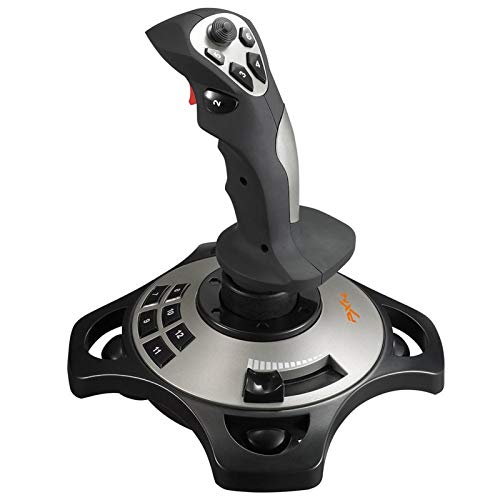
Buying gear for PCVR flight sims usually starts with the headset, but the controller you fly with ends up mattering more than most people expect. The “trackpad vs thumbstick” debate in this space really comes down to two different philosophies: using a flat multi-touch surface like an Apple Magic Trackpad to drive menus, throttle mapping, and analog input through gestures, versus a dedicated flight controller built around physical thumbsticks, a stick, and a throttle — think the PXN 2113PRO or a full HOTAS kit like the Thrustmaster T-Flight with rudder pedals.
The real decision a buyer faces isn’t which device is objectively better. It’s whether you want a versatile desk accessory that happens to work for simming, or purpose-built hardware that takes over part of your room. That choice affects your budget, your desk real estate, how long the gear lasts, and even how the setup looks in your home.
Our Top Picks
 Thrustmaster T-Flight Full Kit HOTAS with Rudder Pedalsregular18.7 x 14.21 x 12.68 inches12.37 poundsCheck on Amazon

Top 3 picks at a glance
Quick Verdict
For anyone serious about PCVR flight sims, thumbstick-based controllers win almost every time. Analog sticks and physical throttles give you the fine, progressive control that landing a virtual Cessna or trimming a fighter in a dogfight demands — and VR motion tracking makes stick-and-throttle setups feel remarkably natural. A trackpad is a legitimate pick only if you already own one, fly casual or menu-heavy titles, and value a clean, minimal desk. Expect to spend $50–$230 on flight controllers versus $117–$130 for a premium trackpad, but the flight hardware holds its value better and lasts longer in daily sim use.
Side by Side
| Factor | Trackpad (e.g., Apple Magic Trackpad) | Thumbstick Controllers (e.g., PXN 2113PRO, Thrustmaster T-Flight HOTAS) |
|---|---|---|
| Comfort for long sessions | Good for short use; wrist strain possible after 60+ minutes of gestures | Designed for multi-hour flights; palm rest and adjustable resistance reduce fatigue |
| Flight sim precision | Indirect control; fine when mapped to virtual controls, but no true analog feel | Excellent; true analog axes with progressive resistance and detents |
| Durability | Sealed glass surface, but battery-powered; expect 3–5 years of heavy use | Mechanical parts wear; quality sticks last 5–10 years, budget models 2–4 |
| Price range | $117–$130 | $50 for a basic stick up to $230 for a full HOTAS with pedals |
| Maintenance | Almost none — wipe the surface, charge it | Occasional calibration, screw tightening, dust around gimbals |
| Space needed | Roughly 6.3 x 4.5 inches, under 1 pound; virtually no footprint | Base of 4–6 inches wide for a stick; HOTAS kits need 12–18 inches plus floor space for pedals |
| Look in your space | Sleek, minimalist, blends into any desk | Purpose-built aviation look; some love it, some find it bulky |
| Resale value | Moderate; used units sell for 40–50% of retail | Strong; popular HOTAS kits resell at 55–70% of retail |
| Setup complexity | Plug-and-play, but mapping to sim controls takes work | Also plug-and-play via USB; most sims detect HOTAS profiles automatically |
| Best for | Casual flyers, deskminimalists, secondary input device | Anyone flying more than casually, especially in VR |
Where Trackpad Wins
A trackpad’s biggest advantage is versatility. The Apple Magic Trackpad, in white at around $120 or black at $130, measures about 6.3 x 4.5 inches, weighs roughly half a pound, and charges over a single cable — no batteries to swap. On your desk, it’s a beautiful, silent input device for everything you do, not just simming. In VR flight titles with heavy menu navigation, map panning, or waypoint plotting, a multi-touch surface is genuinely pleasant: pinch to zoom a moving map, two-finger scroll through checklists, tap to select.
Trackpads also win on space and aesthetics. If your PC lives in a shared living room or a small apartment and a HOTAS would look like a cockpit spill-over, a flat glass rectangle disappears into the setup. There’s essentially no maintenance — no gimbals to dust, no potentiometers to drift, no drivers fighting with firmware updates. And if your flight sim interest turns out to be a passing phase, you’re left with a premium trackpad you’ll use daily anyway, not a stick gathering dust on a shelf.
Finally, for accessibility, some users with limited grip strength or hand mobility find flat surface gestures easier than wrapping a hand around a stick grip for an hour.
Where Thumbstick Controllers for Pcvr Flight Sims Wins
Flight sims live and die on analog precision, and that’s exactly what thumbsticks and flight sticks deliver. A stick like the PXN 2113PRO, at around $49, gives you progressive resistance — the harder and further you push, the more the control surface responds — which no gesture on glass can replicate. Landing an aircraft in VR means managing dozens of simultaneous inputs: pitch, roll, yaw, throttle, flaps, trim. A thumbstick or HOTAS puts each of those on a dedicated physical axis your hands learn by muscle memory.
Step up to the Thrustmaster T-Flight Full Kit HOTAS with rudder pedals at around $230 and you get the full experience: stick in the right hand, throttle in the left, and rudder pedals under your desk for foot-controlled yaw. In VR, where you can’t see your keyboard anyway, physical controls you can find by feel are not a luxury — they’re the difference between enjoying the sim and fighting it. Titles like DCS, X-Plane 12, and Microsoft Flight Simulator practically assume you have at least a stick and throttle.
Durability and value hold up too. Mechanical flight gear has no battery to age out, and the resale market for quality HOTAS equipment is consistently strong. Budget sticks are the weak point — a $50 controller may develop stick drift or gimbal play in two to three years — but even then, replacing one is cheaper than replacing any headset.
Cost Over 5 Years
Trackpad route: One Apple Magic Trackpad at $117–$130, charged over USB, with no consumables. Its rechargeable cell degrades over years, so budget a possible replacement around year four or five — call it $117–$260 total over five years, or roughly $23–$52 per year. Add nothing else.
Thumbstick route: A PXN 2113PRO at around $49 is an entry point, but expect to replace it once in five years if you fly weekly — about $100 total. The Thrustmaster T-Flight Full Kit at around $230 is built to outlast five years with basic care, so $230 once, or about $46 per year. Rudder pedals add no consumable cost.
In practice, the two paths converge: roughly $100–$260 over five years either way. The difference is that the flight controller spend stays dedicated to simming, while the trackpad spend serves your whole desk. If you end up buying a trackpad and then a stick anyway — a common pattern — you’ve doubled your spend.
Which One for Your Home
Small Apartment
Space is your constraint. A trackpad’s six-by-four-inch footprint is unbeatable, and it does double duty for general computing. But don’t rule out a single flight stick: the PXN 2113PRO has a small base that fits on even a shallow desk and stores in a drawer. Skip the full HOTAS with pedals unless you can dedicate a corner. Verdict: trackpad for the truly space-starved, compact stick for everyone else.
Family with Kids or Pets
Glass trackpads are remarkably kid-proof — sealed, spill-resistant, no moving parts to snap off. But they’re also expensive and small enough to walk off with. Flight controllers have protruding parts kids love to grab, and rudder pedals under a desk will be discovered by pets within a day. If you go the HOTAS route, plan on a shelf or cabinet for storage between sessions and supervision during use. A budget stick at $50 stings far less than a $130 trackpad dropped on tile.
Rental
Nothing here damages property, so the question is portability and commitment. A trackpad is fully portable and useful in any future home. A full HOTAS with pedals takes up closet space and may not suit your next rental’s layout. A middle path works well in rentals: one compact stick now, upgrade when you own a place with room for a dedicated sim corner.
Long-Term Home
If you’re settled and flight sims are a lasting hobby, build properly: the Thrustmaster T-Flight Full Kit at around $230 gives you stick, throttle, and pedals that will outlast two headset upgrades. Dedicate a corner of the room, clamp the stick down, and you’ll wonder why you waited. This is the scenario where purpose-built hardware fully justifies itself, especially heading into 2026 with sim titles leaning harder into VR-native controls.
FAQ
Can I use a trackpad for flight sims at all?
Yes, for casual and menu-heavy titles. You can map gestures to virtual stick inputs or use it for navigation and map work. But for anything requiring sustained, precise analog control — landings, aerobatics, helicopter flying — a trackpad is frustrating. It’s a supplement, not a replacement.
Is a $50 flight stick enough, or do I need a full HOTAS?
A $50 stick like the PXN 2113PRO is a genuinely good starting point and will teach you whether the hobby sticks. Most people who fly more than a few hours a month eventually want a separate throttle and pedals, which is where the around $230 HOTAS kits come in. Start small, upgrade only if you’re still flying.
Do these controllers work with any VR headset?
Both trackpads and USB flight controllers work at the PC level, so they function with any PCVR headset — the headset displays the game, and the controller is just another input device on the computer. No headset-specific compatibility issues to worry about.
Which lasts longer: a trackpad or a flight controller?
Quality flight controllers generally last longer — five to ten years with basic care, since there’s no battery to degrade. A trackpad’s rechargeable cell typically needs replacing within three to five years of heavy use. Budget flight sticks are the exception; their mechanical gimbals may wear out in two to three years, though replacement costs are low.
Related guides
- Best Free MMOs on Steam: Subscription Limits, Pay-to-Win and Time Cost (2026)
- Best Free Horror Games on Steam: How to Pick One That Fits Your PC and Your Nerves (2026)
- Black Frame Insertion vs VRR: Which Smoothness Feature Should You Use?
- Best Webcams for Streaming: 11 Listings Compared by Resolution, Focus and Light (2026)








