
Setting up a high-end virtual reality space in a modern home is no longer just a technical challenge; it is a spatial and aesthetic one. As a home and interior design editor, I look at VR hardware through a practical lens: how does this technology integrate into your living room, home office, or bedroom? When designing a space for immersive gaming, the central debate always comes down to a choice between a wired pcvr connection vs wireless virtual desktop streaming.
This decision dictates more than just frame rates and latency. It determines how you layout your furniture, whether you need to drill holes into your ceilings for cable pulleys, and how much visual clutter you are willing to tolerate in your living spaces. On one side, a physical cable offers unmatched, uncompressed visual fidelity but introduces a literal tether that can ruin the clean lines of a room and act as a tripping hazard. On the other side, wireless streaming offers total physical freedom and a minimalist aesthetic, but it demands a robust, dedicated network setup that can be tricky to integrate into a busy household.
As an Amazon Associate we earn from qualifying purchases at no extra cost to you.


If you are trying to decide how to configure your home VR setup without sacrificing your interior design or safety, this comprehensive comparison will help you find the perfect balance between high-end performance and domestic harmony.
Our Top Picks


Top 3 picks at a glance
Quick Verdict
For dedicated simulator enthusiasts, seated gamers, and those with dedicated, permanent gaming rooms, a wired PCVR connection is the superior choice. It guarantees zero latency, requires no network troubleshooting, and delivers pristine image quality. However, for active room-scale gamers, multi-functional living rooms, and homes with children or pets, wireless virtual desktop streaming is the clear winner. It eliminates physical tripping hazards, keeps your living spaces free of unsightly cords, and allows you to play in whatever room has the most open floor space.
Side by Side
To help you visualize how these two connection methods impact your daily home life, here is a detailed breakdown of their physical, aesthetic, and practical characteristics.
| Feature | Wired PCVR Connection | Wireless Virtual Desktop Streaming |
|---|---|---|
| Comfort & Ergonomics | Noticeable cable drag; can pull on the back of the headset during quick turns. | Total physical freedom; lightweight feel with zero cable resistance. |
| Durability & Wear | Cables are prone to twisting, kinking, and internal copper fatigue over time. | No moving parts to wear out, though headset batteries degrade faster. |
| Price Range | $20 to $190 depending on fiber-optic construction and display-port capabilities. | $50 to $200 for dedicated routers, specialized software, and battery headstraps. |
| Maintenance | Requires regular coiling, detangling, and safe storage to prevent tripping. | Occasional software updates and router channel management to avoid interference. |
| Space Needed | Limited to a 10 to 16-foot radius directly surrounding your gaming PC. | Can be used in any room within a 30-foot line-of-sight of your router. |
| Home Aesthetics | Creates visible clutter; often requires ceiling hooks or floor cable runners. | Completely clean and invisible; hardware can be easily tucked away in a drawer. |
| Resale & Future-Proofing | Highly stable but limited by physical port standards (USB-C, DisplayPort). | Adapts quickly to new Wi-Fi standards (Wi-Fi 6, 6E, and 7). |
| Best For | Seated flight/racing simulators, long play sessions, and visual purists. | Active room-scale games, multi-use living rooms, and minimalist homes. |
Where Wired PCVR Connection Wins
The primary advantage of a wired connection is absolute reliability. When you transmit data through a physical cable, you bypass the unpredictable nature of home Wi-Fi networks. There are no dropped frames because a family member started streaming a 4K movie in the next room, and there is no compression lag. This makes wired connections indispensable for high-fidelity experiences.
For headsets designed for ultra-premium visual clarity, a dedicated physical link is often required to unlock their full potential. For example, the HTC VIVE Wired PC Streaming Kit for VIVE Focus Vision VR Headset – DisplayPort Mode Compatible ($189) provides a lossless DisplayPort connection that delivers uncompressed graphics directly from your GPU. This level of visual fidelity is impossible to achieve over wireless streaming, which must compress the video feed to fit within wireless bandwidth limits.
Furthermore, power delivery is a massive benefit of wired setups. Virtual reality headsets are power-hungry devices. When streaming wirelessly, most headsets will deplete their internal batteries in two to three hours. A high-quality wired setup, such as the Kuject 16FT Link Cable with Charging for Meta Quest 3S / 3/2 / Pro, Pico 4 (around $21), solves this issue by incorporating a dedicated smart-charging port. This allows the cable to simultaneously transmit high-speed data while injecting continuous power, ensuring your headset stays charged for marathon gaming sessions.
Where Wireless Virtual Desktop Streaming Wins
Wireless streaming is a revelation for interior design and home safety. From a home editor’s perspective, the physical cable is the single biggest drawback of home VR. It is an eyesore, a dust-magnet when left on the floor, and a constant hazard. If you have expensive hardwood floors, dragging a thick rubber cable across them can scuff the finish over time. If you use ceiling pulleys, you turn your living room or office into a permanent obstacle course.
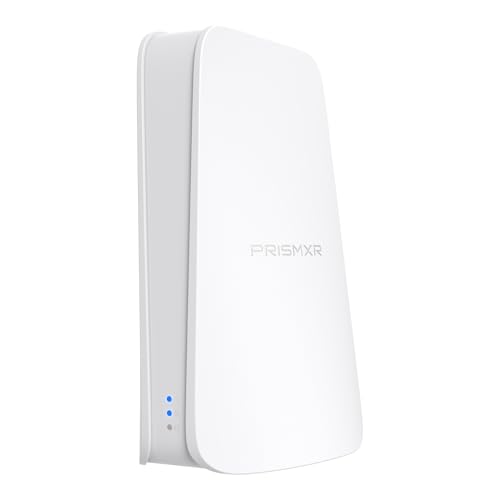
Wireless streaming completely removes these issues. By using a dedicated router, such as the PC-VR Streaming Air Link WiFi6 VR Router Compatible with Meta Quest 3S/3/2 (around $49), you can establish a high-speed, low-latency connection directly between your PC and your headset without running a single wire across your floor. This router acts as a dedicated wireless bridge, ensuring your VR data does not compete with your home’s smart thermostats, phones, and televisions.
This freedom changes how you use your home. You no longer have to play right next to your bulky gaming PC. If your PC is located in a cramped home office, you can easily stream your games to a spacious, open-concept living room down the hall, provided you have a clear line of sight to your wireless access point. When you are finished playing, you simply tuck the headset into a decorative basket or drawer, leaving your living space completely pristine.
Cost Over 5 Years
When planning a home budget, it is helpful to look at the total cost of ownership over a five-year horizon. While both options seem inexpensive upfront, their maintenance and hardware lifecycles differ significantly.
With a wired connection, your primary ongoing cost is cable wear and tear. Physical cables are subjected to immense stress. They are stepped on, twisted 360 degrees during active play, and occasionally run over by office chairs. A standard high-quality cable priced around $20 to $50 will typically need to be replaced every 18 to 24 months under regular use. If you use a premium proprietary system like the HTC VIVE DisplayPort kit ($189), the replacement costs for proprietary cords can be much higher. Over five years, you should budget for at least two cable replacements, bringing the total estimated cost to $60 to $250.
With wireless streaming, the costs are front-loaded but involve different components. You will need a dedicated Wi-Fi 6 or Wi-Fi 6E router ($50 to $150) and a software license for streaming applications like Virtual Desktop ($20). However, because wireless streaming drains headset batteries rapidly, you will also need to invest in comfortable headstraps with integrated, hot-swappable battery packs to facilitate longer play sessions. These battery accessories typically cost between $50 and $100 and may need replacement after three years as the lithium-ion cells naturally degrade. Over five years, the wireless path will cost approximately $120 to $270.
Which One for Your Home
Your physical living arrangement is the most important factor in determining which connection method will work best for you. Here is how both options perform in common household scenarios.
Small Apartment
In a compact apartment where every square foot must serve multiple purposes, wireless streaming is highly recommended. Small apartments rarely have room for a dedicated, permanent VR play space. You will likely need to move a coffee table or clear a temporary path every time you want to play. Managing a 16-foot cable in a tight, multi-functional room is incredibly frustrating and increases the risk of knocking over lamps or decor. A wireless setup allows you to quickly clear a space, play, and pack everything away in seconds without managing tangled cords.
Family with Kids or Pets
If you share your home with young children, dogs, or cats, a wireless setup is almost mandatory for safety. A thick, moving cable trailing across the floor is an irresistible target for playful pets, and a major tripping hazard for children running through the room. A sudden yank on a link cable can pull a costly VR headset off your face, or worse, pull your expensive gaming PC off your desk. Eliminating the wire protects both your family and your tech investment.
Rental Home
For renters who want a high-end wired experience but cannot make permanent modifications to their space, the decision is tricky. True wired room-scale VR usually requires ceiling-mounted retractable pulley systems to keep the cable off the ground. Because renters cannot drill holes into ceiling joists without risking their security deposits, they must resort to temporary adhesive hooks, which can easily rip off drywall paper when removed. Therefore, wireless streaming is the superior choice for renters, as it requires zero structural modifications to achieve a seamless, hazard-free experience.
Long-Term Home
If you own your home and have a dedicated basement, spare bedroom, or den that you can customize, a wired PCVR connection is highly viable. In a permanent home, you can invest in proper cable management, such as running wires through the walls or installing a clean, recessed ceiling track system. Looking ahead to 2026, we are seeing more custom homes designed with dedicated “flex-tech” rooms that feature integrated wall ports for VR. If you have the space to build a dedicated gaming zone where cables can be permanently suspended and managed, the unmatched visual quality of a direct wire is well worth the installation effort.
FAQ
Does wireless virtual desktop streaming degrade visual quality compared to a wired PCVR connection?
Yes, wireless streaming requires the PC to compress the video data before sending it over the air, which can introduce minor visual compression artifacts (such as slight color banding or blurriness in dark areas) and a few milliseconds of latency. A direct wired connection, especially one utilizing DisplayPort, offers uncompressed visual data and instantaneous tracking response.
Can I use both methods in the same home setup?
Absolutely. Many home users keep a high-quality link cable plugged into their PC for seated experiences like racing simulators or flight simulators, and switch to a dedicated wireless router when they want to play active, room-scale games in the center of the room.
How much physical space do I need to safely use a wired connection without tripping?
To safely use a wired connection without a ceiling pulley system, you should have a clear floor space of at least 6 feet by 6 feet, though 10 feet by 10 feet is ideal. This allows the cable to drape naturally behind you on the floor without bunching up around your feet as you turn.
Will my home’s smart devices interfere with wireless VR streaming?
Yes, if they are on the same wireless channel. To prevent interference from smart TVs, phones, and smart home devices, it is highly recommended to use a dedicated Wi-Fi 6 or 6E router that is connected directly to your PC via an Ethernet cable, operating on a separate, quiet 5GHz or 6GHz frequency band reserved solely for your VR headset.
Related guides
- Best Free MMOs on Steam: Subscription Limits, Pay-to-Win and Time Cost (2026)
- Best Free Horror Games on Steam: How to Pick One That Fits Your PC and Your Nerves (2026)
- Black Frame Insertion vs VRR: Which Smoothness Feature Should You Use?
- Best Webcams for Streaming: 11 Listings Compared by Resolution, Focus and Light (2026)








