Our Short List of 3

- Best for: sim racers and flight sim pilots who want maximum panel clarity from a native PC connection.
- Resolution: 2880 x 2880 per eye, QLED panels
- Display: 8K QLED with local dimming
- Tracking: inside-out tracking, controllers included
- Built for flight simulators, iRacing and PC gaming

- Best for: enthusiasts with room-scale space who value field of view and Lighthouse tracking precision.
- Resolution: 4896 x 2448 combined (2448 x 2448 per eye)
- Refresh rate: up to 120 Hz
- Field of view: up to 120 degrees
- In the box: headset, 2 Base Station 2.0, 2 Controller 2.0

- Best for: players who split time between a gaming PC library and standalone VR.
- Resolution: 2064 x 2208 per eye, 4K+ Infinite Display
- Processor: Snapdragon XR2 Gen 2 with 8GB of RAM
- Storage: 512 GB
- Cameras: dual RGB colour cameras for full-colour passthrough
All 4 Picks at a Glance
| Product | Specs | Action |
|---|---|---|
| Pimax Crystal Light |
| Check price on Amazon |
| HTC VIVE Pro 2 |
| Check price on Amazon |
| Meta Quest 3 512GB |
| Check price on Amazon |
 Meta Quest 3S 128GB |
| Check price on Amazon |
Our Top Picks
Top 3 picks at a glance
Short Answer
For PC VR image quality, the Pimax Crystal Light leads this list with 2880 x 2880 QLED panels per eye and local dimming, fed by a direct DisplayPort connection to your gaming PC. The HTC VIVE Pro 2 counters with a 5K-class 4896 x 2448 combined resolution, a 120-degree field of view and Lighthouse tracking that sim rigs and Index owners can build on. Players who want one headset for both PC and standalone play should look at the Meta Quest 3, which connects to a PC through Quest Link and keeps pancake-lens clarity.
Comparison Table
As an Amazon Associate we earn from qualifying purchases
| Product | Best for | Key spec from title |
|---|---|---|
| Pimax Crystal Light | Sharpest image for sims | 2880 x 2880 per eye QLED |
| HTC VIVE Pro 2 | Wide FOV and Lighthouse rigs | 4896 x 2448 combined resolution |
| Meta Quest 3 512GB | PC Link plus standalone | 2064 x 2208 per eye pancake |
| Meta Quest 3S 128GB | Entry point into PC VR | Snapdragon XR2 Gen 2 |
The Best Options
Pimax Crystal Light
- Best for: sim racers and flight sim pilots who want maximum panel clarity from a native PC connection.
- Resolution: 2880 x 2880 per eye, QLED panels
- Display: 8K QLED with local dimming
- Tracking: inside-out tracking, controllers included
- Built for flight simulators, iRacing and PC gaming
sim racers and flight sim pilots who want maximum panel clarity from a native PC connection.
there is no standalone mode and no eye tracking, and driving this many pixels takes a strong graphics card.
The Pimax Crystal Light is the clarity pick for readers who judge a headset by its panels first. Each eye gets a 2880 x 2880 QLED display with local dimming, so cockpit instruments, road signs and distant terrain stay legible instead of dissolving into a blur, and the glass aspheric lenses hold that sharpness across more of the frame than Fresnel designs manage. It is a tethered, PC-only headset with inside-out tracking and controllers in the box, which keeps setup simple while the DisplayPort feed avoids the compression a USB stream can add.
HTC VIVE Pro 2
- Best for: enthusiasts with room-scale space who value field of view and Lighthouse tracking precision.
- Resolution: 4896 x 2448 combined (2448 x 2448 per eye)
- Refresh rate: up to 120 Hz
- Field of view: up to 120 degrees
- In the box: headset, 2 Base Station 2.0, 2 Controller 2.0
enthusiasts with room-scale space who value field of view and Lighthouse tracking precision.
base stations need mounting and power, and the Fresnel lenses show glare in dark, high-contrast scenes.
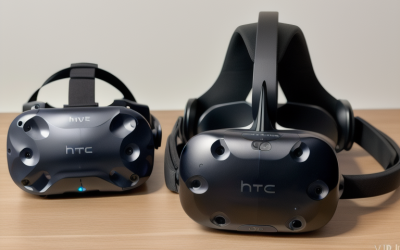
The HTC VIVE Pro 2 Virtual Reality System is the wide-view option, pairing a 4896 x 2448 combined resolution with a field of view that reaches 120 degrees, so peripheral detail survives in racing and flight titles where looking through a narrower window feels restrictive. This full system ships with two Base Station 2.0 units and two controllers, giving sub-millimetre Lighthouse tracking across a room-scale space. That ecosystem is also its upgrade path: the headset fits existing Lighthouse rigs, and owners can later swap controllers or add trackers without replacing the whole setup.
Meta Quest 3 512GB
- Best for: players who split time between a gaming PC library and standalone VR.
- Resolution: 2064 x 2208 per eye, 4K+ Infinite Display
- Processor: Snapdragon XR2 Gen 2 with 8GB of RAM
- Storage: 512 GB
- Cameras: dual RGB colour cameras for full-colour passthrough
players who split time between a gaming PC library and standalone VR.
PC play needs a Link cable or a strong wireless setup, and the battery averages about 2.2 hours per charge.
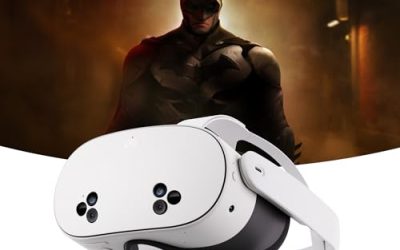
The Meta Quest 3 512GB earns its place on a PC VR list through Quest Link, Meta’s official route for playing a PC library on the headset over USB-C. Its pancake lenses deliver 2064 x 2208 pixels per eye with clarity that holds up well beyond the centre of the image, and the Snapdragon XR2 Gen 2 with 8GB of RAM runs the standalone catalogue when the PC is off. For a gamingpcvr.com reader, it is the flexible option: one headset covering a SteamVR backlog and untethered standalone sessions, with 512GB of storage for the games installed on the device itself.
Meta Quest 3S 128GB
- Best for: newcomers who want PC VR access through Quest Link without paying for pancake optics.
- Processor: Snapdragon XR2 Gen 2
- Storage: 128 GB
- Resolution: 1832 x 1920 per eye
- Features: hand tracking and Touch Plus controllers included
newcomers who want PC VR access through Quest Link without paying for pancake optics.
the Fresnel lenses blur sooner toward the edges, and 128GB fills quickly with standalone games.
The Meta Quest 3S 128GB is the entry point into this list, and it still qualifies as a PC VR headset because it supports the same Quest Link connection to a gaming PC as the Quest 3. It runs the same Snapdragon XR2 Gen 2 platform, so standalone performance matches its bigger sibling, while the savings come from the optics: Fresnel lenses and an 1832 x 1920 per-eye resolution with a smaller sweet spot. For a first headset bought mainly to explore a PC library, that trade is rational, and the Touch Plus controllers and hand tracking carry over unchanged.
How to Choose
Panel type and per-eye resolution decide clarity
Pixels per eye only tell half the story; how those pixels are spread across your view decides whether text and distant detail actually resolve. QLED panels with local dimming, like the Crystal Light’s, add contrast that plain LCD cannot match in dark cockpits and night scenes. Pancake lenses keep focus across more of the frame, while Fresnel lenses concentrate sharpness in the centre. If you read small instruments or play text-heavy titles, prioritise resolution and lens quality over almost everything else on the spec sheet.
Field of view and refresh rate shape immersion
A wider field of view fills your peripheral vision, which matters most in simulators where mirrors, wing tips and apexes sit at the edge of the frame. The VIVE Pro 2 reaches 120 degrees, noticeably wider than the Quest family. Refresh rate is the other half of comfort: 90 Hz is a workable floor for PC VR, while 120 Hz modes reduce the judder that causes fatigue in fast head movement. Match the mode you plan to run to what your graphics card can hold steady, because an unstable high rate feels worse than a locked lower one.
Tracking and audio are separate decisions
Inside-out tracking uses cameras on the headset, needs no extra hardware and suits desk-based sim rigs and small rooms. Lighthouse tracking uses wall-mounted base stations and still sets the standard for controller accuracy and full-body add-ons, at the cost of setup time. Audio splits the same way: some headsets rely on built-in speakers or a 3.5 mm jack for your own earphones, while others leave room for upgraded strap-mounted earphones. Decide which compromises you accept before buying, because these parts of the experience rarely upgrade cheaply later.
Leave GPU headroom and an upgrade path
Every step up in resolution multiplies the pixels your PC must render twice, once per eye, at ninety frames per second or more. A headset bought for today’s card can become tomorrow’s bottleneck, so leave headroom or pick a model with lower refresh modes and fixed foveated rendering to ease the load. Upgrade paths differ too: Lighthouse owners can swap individual components, Quest owners gain new straps and batteries, and Pimax owners can add accessories such as earphones. Buying into the ecosystem you will actually extend saves money over a full replacement.
Frequently Asked Questions
What is a PCVR headset?
A PCVR headset is a virtual reality headset that uses a gaming PC to render its games, rather than a chip inside the headset alone. Tethered models connect by DisplayPort or USB and draw all their power and graphics from the PC, while some standalone headsets, such as the Quest 3, also qualify because they offer an official PC link mode.
How powerful a PC do PCVR headsets need?
It depends on the panel resolution you ask the PC to feed. A Quest 3S or Quest 3 running through Link is manageable on a mid-range gaming PC, while high-resolution tethered headsets such as the Pimax Crystal Light need a high-end graphics card to hold their native resolution at a steady refresh rate without lowering render scale.
Can the Quest 3 and Quest 3S play SteamVR games?
Yes. Both headsets connect to a gaming PC through Quest Link, Meta’s official wired USB-C mode, and can also stream wirelessly with a suitable router setup. Once linked, the PC treats the headset as its display, so a SteamVR library bought for other headsets carries over without buying the games again.
Is DisplayPort better than a USB link for PC VR?
A native DisplayPort connection sends an uncompressed image, which keeps fine detail and dark gradients cleaner, and it adds no encoding load on the PC. USB link modes compress the video stream before sending it, which can soften detail in fast or complex scenes. For sim racing and flight titles, that clarity gap is the main reason enthusiasts still choose tethered DisplayPort headsets.
Which PCVR headset is best for flight and racing simulators?
The Pimax Crystal Light is the strongest fit here, because its 2880 x 2880 per-eye QLED panels keep instruments and distant markers readable, and its tethered DisplayPort feed avoids compression. The VIVE Pro 2 is the alternative when a wider 120-degree field of view matters more than outright pixel density, especially for players already invested in Lighthouse tracking.
Related guides
More from Amazon
Programs that pair well with the guide above. Offers and eligibility are set by Amazon and may change.
Free shipping on eligible items, Prime Video and more. Eligible new members can start with a free trial.
Start a Prime free trialAd-free music streaming. Eligible new subscribers can start with a free trial.
Try Music Unlimited freeA Prime membership for ages 18-24 with a trial period. Eligibility is set by Amazon.
See Prime for Young AdultsAudiobooks and podcasts to listen to on the go. Eligible new members can start with a free trial.
Try Audible freeAs an Amazon Associate we earn from qualifying purchases.