Most gamers shopping for an Xbox Series X|S headset make a classic mistake: they buy based on brand hype or flashy aesthetic designs, only to realize two weeks later that the headset pinches their ears, runs out of battery mid-session, or drops connection constantly. Because a gaming headset is a piece of furniture you wear on your head, ergonomics, physical construction, and wireless protocols matter far more than exaggerated marketing specs.
The Xbox Series X and Series S consoles utilize a proprietary, high-bandwidth wireless protocol. Buying a standard Bluetooth headset and expecting it to connect directly to your console is a recipe for disappointment. To find a headset that delivers immersive spatial audio without causing physical fatigue or connection headaches, you must look closely at the mechanical build quality, exact clamping force, and driver engineering.
As an Amazon Associate we earn from qualifying purchases at no extra cost to you.


Our Top Picks
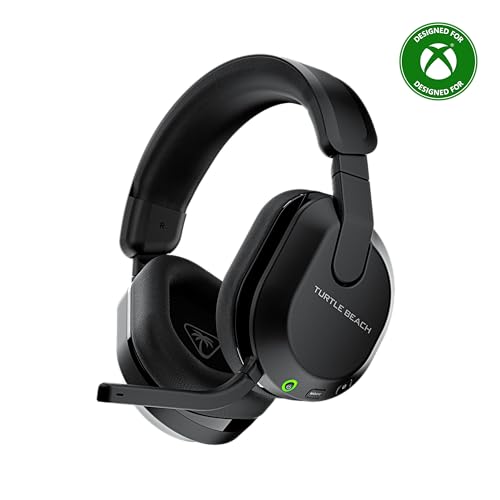 Turtle Beach Stealth 600 Wireless Gaming Headset forStandard8.58 x 7.81 x 3.74 Inches0.7 poundsCheck on Amazon
 Turtle Beach Stealth 500 Wireless Multiplatform Gaming HeadsetStandard8.46 x 7.09 x 3.54 inches1 PoundsCheck on Amazon


Top 3 picks at a glance
Decide These 3 Things First
Before diving into individual specifications, narrow your search by making three fundamental decisions about how you play and how you manage your gaming setup.
- Direct Xbox Wireless vs. USB Transmitter: Do you want a dongle-free setup? Headsets with native “Xbox Wireless” connect directly to the console just like a standard controller. Alternatively, headsets that use a 2.4GHz USB-A or USB-C wireless dongle offer a more stable connection in high-interference environments (such as apartments filled with dozens of active Wi-Fi networks) and make it easier to swap the headset over to a PC.
- Single-Platform vs. Multiplatform Utility: If your headset will only ever be used with your Xbox Series console, you can choose a highly specialized model. However, if you want to take calls on your phone while gaming, or if you also play on a Nintendo Switch or PC, look for a headset that supports simultaneous dual-wireless connections (both 2.4GHz wireless and Bluetooth active at the same time).
- Your Charging Habits and Power Setup: Consider how disciplined you are with cable management. If you frequently forget to plug in your gear, prioritize ultra-long battery life (40+ hours) or models with a quick-charge feature that yields several hours of playtime from a 15-minute charge. If you prefer a clean desk, look for models compatible with magnetic charging stands.
Size and Weight (Physical Footprint)
A wireless headset contains internal drivers, a battery, wireless receivers, and amplifiers. All of this hardware adds weight. A heavy headset causes neck strain and spinal compression, while a headset that is too light often suffers from thin, fragile plastic components that crack under daily use.
- The Ideal Weight Bracket: Target a weight between 250 grams and 320 grams. Headsets weighing over 350 grams will cause noticeable crown fatigue after two hours of continuous play. Premium models manage to pack large batteries while keeping the weight around 280 grams by utilizing lightweight composites instead of heavy steel alloys.
- Ear Cup Inner Dimensions: Ensure the inner ear cup opening measures at least 60mm vertically and 40mm horizontally. Anything smaller shifts the design from “over-ear” (circumaural) to “on-ear” (supraural), which pinches the outer ear cartilage and cuts off circulation.
- Cushion Depth: Look for an ear cup depth of 20mm to 25mm. If the cup is too shallow, your ears will press directly against the hard plastic speaker grille, causing pain within thirty minutes.
Material Composition
The materials touching your head dictate how hot your ears get, how well the headset seals out external room noise, and how long the physical structure will last before degrading.
For the ear cushions, you will encounter three primary materials:
- Synthetic Leather (PU Leather): This material provides excellent acoustic isolation, sealing in the bass response and blocking out room noise (like computer fans or air conditioners). However, it traps body heat. In warm rooms, PU leather can cause sweating within an hour.
- Athletic Mesh Fabric: This material is highly breathable, keeping your ears cool during long sessions. The trade-off is acoustic leakage; mesh fabric allows external noise to enter and reduces the perceived punchiness of low-end bass frequencies by up to 6 decibels.
- Hybrid Cushions: The premium choice. These feature athletic fabric on the surface that touches your skin (for cooling) and synthetic leather on the outer ring (to maintain the acoustic seal).
For the internal foam, high-density memory foam (40kg/m³ to 50kg/m³) is essential. Cheap, low-density foam collapses completely under light pressure, rendering the cushion useless and leaving your skull resting against the hard frame.
Construction and Clamping Force
The structural integrity of a headset determines whether it lasts for several years or snaps the first time it is dropped on a hardwood floor.
Clamping force—the lateral pressure the headband exerts to hold the ear cups against your head—must be perfectly balanced. The sweet spot for a gaming headset is between 1.2 and 1.6 Newtons of force. If the force is below 1.0 Newton, the headset will slide off your head when you tilt forward; if it exceeds 1.8 Newtons, it will compress your jaw joint (temporomandibular joint) and cause headaches, especially if you wear glasses.
Avoid headbands constructed entirely of thin ABS plastic. Look for a spring-steel or reinforced aluminum band running through the plastic housing. The yokes (the forks holding the ear cups) should be secured with metal screws rather than plastic pins. Additionally, look for ear cups that pivot at least 90 degrees flat; this allows the headset to rest comfortably around your neck when you take a break and ensures the cushions self-adjust to the unique angle of your jawline.
Comfort and Acoustic Performance
The acoustic performance of a wireless headset relies on driver design and spatial audio integration rather than inflated marketing numbers.
Most gaming headsets utilize 40mm or 50mm dynamic drivers. While 50mm drivers generally move more air—delivering deeper bass extension—the tuning of the driver enclosure is far more important than the size of the speaker itself. Look for a flat, balanced frequency response (20Hz to 20kHz). Avoid headsets that boast “extreme bass boost” as a primary feature; overemphasized bass muddy the mid-range frequencies, making it difficult to hear subtle audio cues like enemy footsteps or distant reloads.
Because the Xbox Series X|S natively supports spatial audio formats like Dolby Atmos, DTS Headphone:X, and Windows Sonic, your headset does not need proprietary virtual surround-sound software. Any high-quality stereo headset can deliver excellent 3D spatial audio when paired with these console-side processing engines.
As we look ahead to the gaming landscapes of 2026, the integration of high-bandwidth, low-latency wireless chips has made audio lag a thing of the past, provided you select a model with dedicated Xbox hardware compatibility.
Price Tiers and Real-Value Benchmarks
Understanding what your money actually buys prevents you from overpaying for useless marketing gimmicks or underpaying for fragile hardware.
- Entry-Level ($50 – $80): In this bracket, you will find functional, no-frills wireless performance. Materials are almost exclusively ABS plastic, and battery life ranges from 15 to 20 hours. An example is the entry-level generic wireless headset priced around $59, or the Turtle Beach Stealth 500 at around $74, which provides reliable 2.4GHz wireless connectivity and basic memory foam cushions without premium metal reinforcement.
- Mid-Range ($85 – $150): This is the sweet spot for the vast majority of gamers. In this tier, you get steel-reinforced headbands, superior high-density memory foam, longer battery runtimes (30 to 45 hours), and direct Xbox Wireless integration. The official Xbox Wireless Gaming Headset at around $110 sits comfortably in this bracket, offering intuitive rotating ear cup dials for volume and game/chat mix, along with native Dolby Atmos support.
- Premium ($160 – $350+): This category features audiophile-grade dynamic or planar magnetic drivers, active noise cancellation (ANC), milled aluminum or carbon fiber frames, hot-swappable dual-battery systems, and simultaneous dual-wireless connections (allowing you to stream music from your phone via Bluetooth while hearing game audio from your console).
Warranty and Support
A headset is a moving mechanical device subjected to sweat, friction, and constant flexing. Therefore, a robust warranty is highly valuable.
Ensure the manufacturer offers at least a 1-year limited warranty. Read the terms to verify that physical hinge failure is covered under manufacturing defects, as many budget brands categorize cracked plastic headbands as “user damage.”
Additionally, check if the brand sells replacement ear pads and replacement batteries. Synthetic leather cushions will inevitably flake and wear out after 18 to 24 months of daily use; being able to buy a replacement set of pads for $15 is far better than being forced to buy an entirely new headset because the original pads were permanently glued to the ear cups.
Spec Checklist
Use this quick-reference table to compare key physical and technical specifications across different price tiers before making your final purchase.
| Specification | Budget Tier ($50 – $80) | Mid-Range Tier ($85 – $150) | Premium Tier ($160 – $350+) |
|---|---|---|---|
| Weight Range | 310g – 350g (Heavier plastics) | 270g – 300g (Balanced) | 250g – 290g (Or up to 340g for Planar) |
| Battery Life | 15 – 20 Hours | 30 – 45 Hours | 50+ Hours (or Hot-Swappable) |
| Connection Type | USB-A 2.4GHz Dongle | Direct Xbox Wireless or USB-C | Direct Xbox Wireless + Bluetooth |
| Headband Frame | Standard ABS Plastic | Steel-Reinforced Plastic | Milled Aluminum / Steel Suspension |
| Ear Cushion Fill | Standard Polyurethane Foam | High-Density Memory Foam | Cooling Gel-Infused Memory Foam |
| Game/Chat Mix Dial | Rare (Software-controlled) | Physical Dial / Ear Cup Wheel | Physical Dial + App Customization |
Red Flags to Avoid
When browsing product listings online, watch out for these common warning signs of a subpar product:
- “Universal Bluetooth” with no USB Dongle: If a listing claims compatibility with the Xbox Series X|S but only mentions Bluetooth connectivity, do not buy it. The Xbox Series X|S does not support Bluetooth audio. These headsets will only work if you run an auxiliary cable from the headset to your controller, defeating the purpose of buying a wireless headset.
- Lack of an Independent Chat/Game Mix Dial: If a headset does not feature a physical wheel or button layout to balance party chat volume against game sound effects, you will have to constantly open the Xbox guide menu mid-game to make adjustments. This is a massive inconvenience during competitive play.
- Fixed, Non-Retractable Microphones: Microphones that do not swing upward to mute or slide back into the ear cup are highly prone to snapping when the headset is placed on a desk, packed in a bag, or dropped.
- Glued-On Ear Cushions: If the ear cushions cannot be twisted off or unclipped, you will not be able to clean them thoroughly or replace them when the fabric begins to wear down.
FAQ
Can I use any USB wireless headset with my Xbox Series X|S?
No. Xbox consoles require specific security chips in the USB transmitter to handshake with the console. A standard wireless headset designed for PlayStation or PC will not work on an Xbox unless the product box specifically features the green “Designed for Xbox” logo or contains a dedicated switch on the dongle labeled “Xbox.”
What is the benefit of direct Xbox Wireless connection over a 2.4GHz USB dongle?
A direct Xbox Wireless connection allows the headset to pair directly with the console without occupying one of your limited USB ports. It also allows the headset to turn on the console automatically when you power the headset on. However, USB dongles often provide a slightly more stable connection if your gaming room is crowded with other wireless devices.
How do I set up spatial audio like Dolby Atmos on my wireless headset?
Once your headset is connected, navigate to your Xbox settings menu under “General” > “Volume & audio output.” Under the “Headset audio” dropdown, select “Windows Sonic for Headphones” (which is free) or select “Dolby Atmos for Headphones” if you have purchased the Dolby Access license. The console will handle all the spatial processing before sending the audio signal to your headset.
How long do rechargeable wireless headset batteries last before degrading?
Most lithium-ion batteries used in gaming headsets maintain their peak capacity for approximately 300 to 500 charge cycles. If you play daily and charge your headset every other day, you can expect the battery to hold a strong charge for about two to three years before you notice a significant drop in overall runtime.