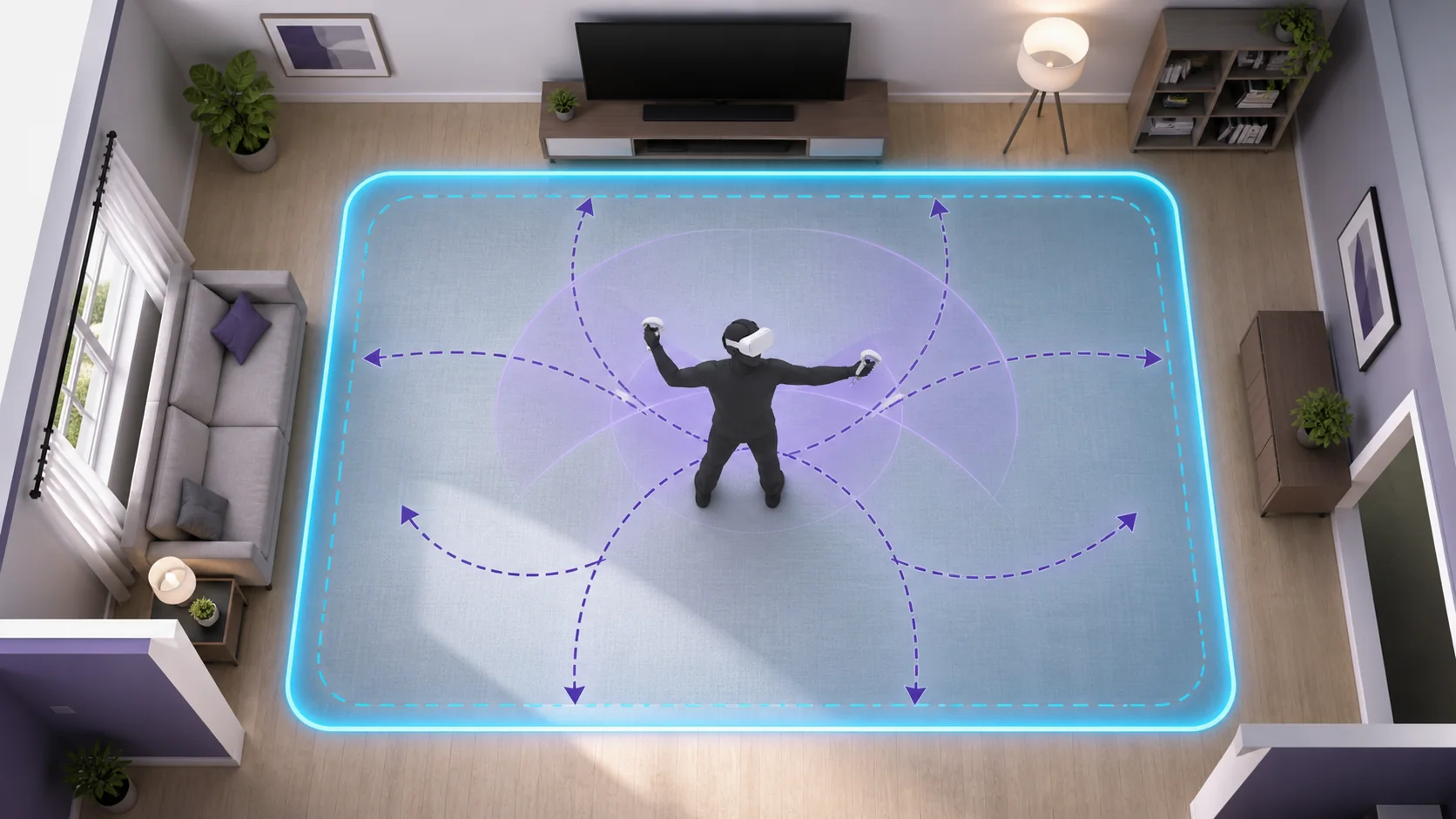
The space you need for VR depends entirely on what kind of games you plan to play: seated cockpit sims need as little as 5×5 feet, while full room-scale titles that expect real walking want closer to 10×10 feet of genuinely clear floor. Most players default to assuming they need a dedicated room, when in practice a cleared corner of a living room handles the majority of the VR library just fine.
I’m Tomas Berger, VR & Handheld Editor, and I’ve measured and mapped play spaces on a tracked play space with frame-timing capture across a range of room sizes to see where tracking and comfort actually break down versus where it’s just a perception issue. This guide breaks requirements down by category so you can match your actual room to a realistic expectation before buying a headset.
As an Amazon Associate we earn from qualifying purchases at no extra cost to you.






Our Top Picks


Top 3 picks at a glance
Minimum Space for Seated and Standing VR
Seated VR is the least space-demanding category by a wide margin. A chair with roughly 5×5 feet of clearance around it — enough that your arms can extend fully in any direction without hitting a wall, desk, or shelf — covers the vast majority of racing sims, flight sims, and narrative-driven titles built around a cockpit or fixed viewpoint.
Standing-in-place titles, common in rhythm games like Beat Saber’s “box” mode or many horror titles, need slightly more overhead and arm-swing room but still don’t require you to take steps. A roughly 6×6 foot clear area, with nothing within arm’s reach in any direction, is a safe standard here.
The key risk in this smaller footprint isn’t tracking loss, it’s physical collision — reaching out during an immersive moment and clipping a monitor, lamp, or wall corner that’s just outside your peripheral awareness while wearing the headset. Sweeping the immediate area with your hand before starting a new game is a five-second habit worth building.
Overhead clearance matters even in seated setups. Standing up unexpectedly — common when a game surprises you — needs at least 7-7.5 feet of ceiling height to avoid contact, which covers the vast majority of standard residential ceilings but is worth checking in converted attics or basements with sloped or low ceilings.
Seated setups are also the easiest to make permanent, since a dedicated gaming chair or desk area rarely needs to be cleared and reset the way a room-scale space does, making this the lowest-friction entry point for anyone with a busy or shared living space.
Room-Scale Requirements by Headset Type
Room-scale VR, where you physically walk to move your in-game character, has the highest space demands, and the recommended minimum differs slightly by headset ecosystem. Meta’s Quest headsets recommend at least 6.5 x 6.5 feet for their room-scale Guardian boundary, described as the practical floor for a reasonable range of movement.
SteamVR’s Chaperone system, used by the Valve Index and other PCVR headsets, recommends a similar 6.5 x 6.5 foot minimum but performs noticeably better with a larger 10×10 foot space for titles that expect genuine sprinting or dodging movement, such as some rhythm-boxing hybrids and larger-scale exploration titles.
| Play style | Minimum clear floor | Comfortable floor | Ceiling height |
|---|---|---|---|
| Seated only | 5×5 ft | 6×6 ft | 7 ft |
| Standing in place | 6×6 ft | 7×7 ft | 7.5 ft |
| Room-scale (small) | 6.5×6.5 ft | 8×8 ft | 8 ft |
| Room-scale (full) | 8×8 ft | 10×10 ft+ | 8 ft+ |
PSVR2’s room-scale tracking, tied to a fixed PS5 setup, follows similar guidance to the Quest — 6.5×6.5 feet minimum, with the console’s camera-free inside-out tracking (built into the headset itself) needing a moderately well-lit room to maintain accurate positioning throughout a session.
The practical difference between the “minimum” and “comfortable” columns above usually isn’t tracking accuracy, since most modern inside-out systems track accurately down to their stated minimum. It’s player experience — a boundary that’s technically large enough still feels cramped if you’re constantly seeing the boundary grid because you’re near an edge, which discourages the natural, unrestrained movement room-scale is meant to enable.
Measuring and Marking Your Play Space
Before drawing a digital boundary in your headset, physically measure your intended space with a tape measure rather than estimating by eye — most people overestimate how much genuinely clear floor they have once furniture, rugs, and door swing paths are accounted for.
Mark the corners of your intended play area temporarily with painter’s tape on the floor. This gives you a physical reference to walk toward while setting up your headset’s boundary tool, which is far easier than trying to judge distances accurately while already wearing the headset with limited peripheral vision.
Check for obstacles at multiple heights, not just floor level — a ceiling fan, hanging light fixture, or wall-mounted shelf can sit outside your immediate reach while standing still but well within range once a game prompts you to reach upward or take a step while looking down at a virtual object.
Test the space with your arms fully extended, turning in a slow circle at your intended center point, before finalizing the boundary. This single check catches most near-miss furniture placements that aren’t obvious just from looking at the room.
Re-measure any time you rearrange furniture, add a rug, or move a plant into the space. A boundary drawn against last month’s furniture layout is one of the more common causes of an unexpected mid-session collision, and it’s worth building a habit of re-checking rather than assuming the old boundary still applies.
Guardian and Chaperone Systems Explained
Guardian (Meta’s system) and Chaperone (SteamVR’s system) both work the same way conceptually: you trace the outer boundary of your safe play area using a controller or the headset’s own tracing tool, and the system remembers that shape, overlaying a warning grid as you physically approach the edge during gameplay.
Most systems offer a “stationary” boundary option, a small fixed circle around your position, as well as a full room-scale boundary you draw yourself. Stationary boundaries suit seated play and skip the tracing step, but they don’t protect against a player who forgets they’re in a small space and stands up unexpectedly.
Boundary color and grid density are usually adjustable in system settings, and increasing grid opacity or triggering the warning earlier (further from the actual edge) gives more reaction time, which is worth doing in a smaller or more cluttered space rather than relying on the default sensitivity.
Some headsets support saving multiple named boundaries — a “living room” boundary and a “bedroom” boundary, for example — which is useful if you regularly play in more than one location and don’t want to redraw the shape every time you move the headset between rooms.
Passthrough cameras, available on Quest 3 and PSVR2, let you briefly see your real room without removing the headset, useful for double-checking a boundary or locating a dropped controller without fully breaking immersion by pulling the headset off.
Furniture and Obstacle Management
The single most effective space hack for room-scale VR in a shared living room is furniture that’s genuinely easy to move — a coffee table on furniture sliders, for instance, rather than one you have to lift, turns a 15-minute room-clearing chore into a 30-second one, which matters for whether you actually use the space regularly.
Rugs and floor mats can be a hazard if they bunch or shift underfoot while you can’t see them, but a securely taped-down or heavy rug that stays flat is generally fine to leave in a play space and can even help mark boundaries by feel underfoot.
Wall-mounted shelving above the headset’s tracking cameras’ typical field of view is a common blind spot — items stored above roughly 6.5 feet are easy to forget about since you rarely reach that high in daily life, but a game prompting an overhead reach can bring you into contact with them.
For a play space that doubles as normal living space, consider marking a “safe center point” on the floor with a small, unobtrusive marker (a corner of a rug pattern, a specific floor tile) that you can return to and re-center your boundary from, rather than eyeballing the same spot each time.
Soft-cornered furniture — rounded coffee tables, upholstered ottomans — is meaningfully safer than sharp-cornered furniture if you’re working with a play space that’s slightly tighter than ideal, since an unexpected light contact with a rounded edge is far less likely to cause injury than the same contact with a hard 90-degree corner.
Ceiling Height and Overhead Clearance
Standard residential ceiling height in most homes, 8 feet, comfortably clears nearly all VR use cases, including surprised or reflexive jumping that can happen during horror or action titles. Below that, in converted basements or older homes with 7-7.5 foot ceilings, seated and standing-in-place titles remain fully safe, but full room-scale titles that involve jumping or reaching upward need extra caution.
Ceiling fans are a specific, recurring hazard worth calling out separately from general furniture — even a fan that seems well clear of a standing player’s reach can come into range during an in-game prompt to jump or reach upward, and the injury risk from moving blades is higher than from most stationary furniture contact.
Sloped ceilings, common in attic conversions, need the clearance check done at multiple points within the play area rather than just the center, since the safe boundary shape may need to be smaller or offset from what the floor space alone would suggest.
Hanging light fixtures and pendant lamps should be temporarily removed or swapped for a flush-mount fixture in a dedicated VR space if the room’s natural layout puts one anywhere near head height within the play boundary — this is a one-time fix that removes a recurring risk rather than something to manage every session.
If your ceiling genuinely limits you to seated or standing-in-place play, that’s not a serious limitation for most of the current game library — the majority of narrative, sim, and rhythm titles don’t require jumping or significant vertical reach as a core mechanic.
Multi-User and Shared Space Considerations
Most modern headsets support saving multiple guardian boundaries tied to different user profiles or room presets, which handles the common case of two or more people in the same household playing at different times without needing to redraw the boundary each session.
True simultaneous two-person VR in one physical space — both people wearing headsets and moving at once — needs roughly double the floor area of a single-person room-scale setup, plus a clear verbal or physical cue system between players, since neither can see the other’s real position while immersed.
Passthrough mode, available on Quest 3 and PSVR2, is genuinely useful here: a quick glance through the cameras lets a player confirm the other person’s location before a fast movement, without either player removing the headset, cutting down on accidental collisions during shared sessions.
Spectators in the same room — people watching without a headset — should stay outside the marked boundary at all times, since a wearer with an active boundary still can’t see a bystander who’s inside their tracked space but outside their own attention.
If your household regularly has multiple VR users, labeling saved boundaries clearly by name (rather than a default “Guardian 1,” “Guardian 2”) avoids a recurring point of confusion where someone loads the wrong saved space for the room they’re actually standing in.
Small-Space Workarounds and Accessories
A swivel chair paired with teleport-based locomotion is the most effective single workaround for a genuinely tight space, since it lets you physically rotate your body to match in-game turning (removing one axis of the motion mismatch entirely) while relying on teleport rather than walking for forward movement.
288-degree or 360-degree cable management mounts, which suspend your PCVR cable from the ceiling and let it swivel freely as you turn, solve a specific small-space problem: a tethered cable getting caught underfoot or wrapped around your legs during a turn, which is a bigger hazard in a tight space where you’re likely closer to walls and furniture to begin with.
For genuinely minimal spaces, seated titles with a swivel chair and a small desk-mounted fan for airflow (which also helps with the motion sickness comfort covered in our VR motion sickness prevention guide) cover a surprisingly large share of the enjoyable VR library without needing any floor-clearing at all.
Portable, wireless standalone headsets like the Quest 3 remove the cable-management problem entirely and are the more forgiving choice for a small or frequently-repurposed space, since there’s no tether to catch on furniture during a turn.
For gear that specifically helps manage a compact setup — cable clips, compact controller storage, low-profile facial interfaces that reduce bulk — our best VR accessories guide covers picks aimed at exactly this kind of space-constrained setup.
Outdoor and Alternative Space Options
Standalone headsets like the Quest 3 can technically be used outdoors since they don’t need external base stations, but direct sunlight interferes with the inside-out tracking cameras and can cause tracking drift or loss, so covered outdoor spaces (a porch or garage with open sides) work far better than open sunlight.
Garages and basements, once cleared of typical storage clutter, often provide the largest genuinely free floor space in a home and are a common choice for players setting up a dedicated room-scale area, provided lighting is adequate — inside-out tracking needs reasonably even, non-flickering light to stay accurate.
Fluorescent lighting with a visible flicker, common in some older garages and basements, can occasionally interfere with camera-based tracking systems. Swapping to LED fixtures, which don’t flicker at a rate cameras pick up, is a low-cost fix if you notice inconsistent tracking in one of these spaces.
Community or shared spaces — an apartment complex common room, for instance — can work for occasional larger room-scale sessions if your own unit is space-limited, though you’ll need to bring and redraw a boundary each time rather than relying on a saved preset.
If none of these options provide meaningful extra space, it’s worth revisiting headset choice itself — some titles and genres are simply better suited to a small footprint, and our how to choose a VR headset guide covers how to weigh that constraint against resolution and refresh rate when you’re shopping.
Frequently asked questions
Can I play VR in a small bedroom?
Yes, most bedrooms fit at least seated and standing VR comfortably, and many fit a reduced room-scale boundary of 6×6 feet once a bed is pushed against a wall. Full 10×10 room-scale titles are harder in a typical bedroom, but they’re a minority of the overall VR library.
What’s the minimum space for seated VR games?
About 5×5 feet of clearance around your chair is enough for seated titles, mainly to avoid hitting furniture when you reach out or lean during gameplay. Cockpit sims, rhythm games and most narrative titles are designed around seated or standing-in-place play and don’t need more than this.
Do I need to bolt VR base stations to the wall?
No, though it’s the most stable option. Valve Index and older Vive base stations can sit on shelves, tripods or furniture as long as they have a clear, elevated line of sight to your play area and stay still during use — movement after calibration will cause tracking drift.
How do I set up a VR guardian boundary correctly?
Walk the full perimeter of your safe space at arm’s length from any obstacle, following your headset’s boundary-drawing tool, then walk the interior to confirm the headset recognizes it as clear floor. Redo this any time you move furniture, since a stale boundary is a common cause of mid-session collisions.
Can two people use VR in the same room?
Yes, most standalone headsets support multiple separately-mapped guardians in the same physical room, letting two people play at different times without redrawing boundaries. Simultaneous two-person room-scale in one shared space is possible but needs roughly double the floor area to avoid collisions.