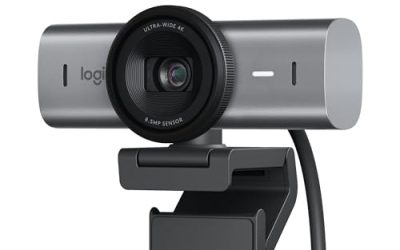
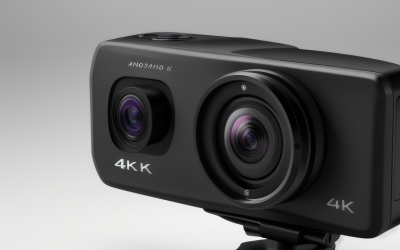
A wireless webcam solves a different problem from the USB camera already clipped to your monitor. The real decision is whether you need a camera that can leave the desk entirely: mounted across the room for a workout class, carried to a sideline for a match stream, or repositioned mid-broadcast without unplugging anything. Both cameras below stream over Wi-Fi, run on built-in batteries and are driven from a phone app rather than conferencing software, so neither behaves like a plug-in webcam and neither should be bought as one.
The two picks split cleanly by production ambition. Solo creators and small venues that stream events straight to a platform are served by the 1080p Logitech Mevo Start, which can also link with sibling units for multi-camera coverage. Streamers who present on camera and move while they talk get more from the OBSBOT Tail Air, a 4K pan-tilt-zoom camera whose AI tracking follows the subject and whose gesture control starts and stops framing hands-free.
Quick Picks
As an Amazon Associate we earn from qualifying purchases.
| Product | Best for | Key spec |
|---|---|---|
| Logitech Mevo Start | Cable-free event and venue streaming | 1080p HD over Wi-Fi with built-in battery |
| OBSBOT Tail Air | Presenters who move while streaming | 4K PTZ with AI tracking and gesture control |
How to Choose
Streaming resolution and sensor headroom
Resolution decides how much freedom you have after the stream starts. A 1080p camera fills a full-screen broadcast comfortably and keeps file sizes and upload demands modest, which suits events streamed live and never re-edited. A 4K sensor earns its place when you crop: digital zoom into a region of the frame, reframing for vertical clips, or pulling a tighter shot from a wide stage view all stay sharp because the extra pixels absorb the crop. Match the sensor to the edit you actually plan, not the biggest number on the box. Low light deserves equal weight: in a dim hall, a small sensor smears detail long before resolution becomes the limit.
How the camera connects and gets controlled
Neither pick here plugs into a computer as a standard webcam, so the connection model matters more than usual. These cameras join your Wi-Fi network and are aimed, started and monitored from a companion app, which means your phone becomes the control surface and your network becomes the cable. Check that the venue or room has stable Wi-Fi where the camera will sit, and consider whether the camera offers fallback wired outputs for a capture setup. A camera that can only reach the internet through a phone hotspot adds a failure point on event day.
Battery runtime and placement freedom
The built-in battery is what makes the placement possible, but it also sets the session length. Think about your longest realistic stream, then leave margin for setup, sound checks and delays, because a battery quoted for continuous streaming drains faster when the camera also powers Wi-Fi transmission at range. Placement freedom cuts both ways: a camera across the room cannot be nudged by hand mid-stream, so remote pan, tilt and zoom or a multi-camera layout has to cover the angles you would otherwise fix by walking over and moving a tripod. For long event days, note in advance which mounting spots sit within reach of a power outlet as a fallback.
Microphones and audio inputs
Audio is where untethered cameras are most often caught out. Built-in microphone arrays are convenient for ambient sound and a presenter close to the camera, but a speaker across a hall will sound distant no matter how good the video looks. Count the microphones, then check whether the camera accepts an external input: a 3.5mm jack lets you plug in a lavalier or a feed from a mixer, which transforms intelligibility for sermons, lectures and performances. If your subject is more than a few metres away, plan the external microphone before you blame the camera.
The 2 Best Options
Logitech Mevo Start
The Mevo Start is the straightforward route into cable-free streaming for churches, schools, sports clubs and small venues. It captures 1080p HD video, connects over Wi-Fi, and can also stream through a phone’s LTE connection when venue internet is unreliable. Because it is built for live production rather than video calls, several Start units can be combined into one multi-camera show, so a single wide shot today can grow into a two-angle broadcast later. Its three-microphone internal array handles ambient sound and nearby speech without extra gear.
Specs
- Wireless live streaming camera, 1080p HD video
- Streams over Wi-Fi or LTE (via phone); app control
- Internal microphone array (3 MEMS microphones)
- Built-in battery for cable-free placement
- Multi-camera compatible (multiple Starts in one production)
- Model 961-000498
Best for: Venues and creators streaming events live over Wi-Fi without a computer in the chain.
Watch out for: It is sold as a single camera alongside multi-packs and case bundles, so confirm the listing in front of you is the single unit before ordering.
ASIN: B0866PZN76
OBSBOT Tail Air

The Tail Air is the step up for presenters who are themselves the subject. Its 4K camera sits on a motorised pan-tilt-zoom mount, and AI tracking keeps a moving speaker framed while gesture control lets them direct the shot without touching a phone. Wi-Fi streaming is the headline connection, but Micro HDMI, USB-C and Ethernet outputs are also on board for more conventional capture chains. Two built-in MEMS microphones cover close-range voice, and a 3.5mm input accepts an external microphone or line feed when the room gets bigger than the camera.
Specs
- 4K PTZ streaming camera with AI tracking and gesture control
- Wireless connection over Wi-Fi, plus Micro HDMI, USB-C and Ethernet options
- Built-in battery — streams untethered
- Two built-in MEMS microphones; 3.5mm mic/line input
- App control; NDI available (activated variants are separate listings)
Best for: Teachers, fitness instructors and solo streamers who move around while presenting.
Watch out for: NDI-activated and remote-combo versions are sold as separate listings, so check that the listing you order is the base camera with the feature set you expect.
ASIN: B0CJLJHS3T
Which One Fits Your Situation
You stream services, matches or school events
Choose the Logitech Mevo Start. Event streaming rewards simplicity and reach more than resolution: the Start goes on a tripod wherever the view is best, runs on its battery, and pushes the feed out over venue Wi-Fi or a phone’s LTE connection. When one angle stops being enough, adding a second Start builds a genuine multi-camera production inside the same app, which no single USB webcam on a desk can imitate.
You teach or present while moving around
Choose the OBSBOT Tail Air. A fixed camera forces a choice between a wide, distant shot and wandering out of frame; the Tail Air removes it. Its AI tracking pans and tilts to follow you across a studio, classroom or workshop, gesture control handles framing commands mid-lesson, and the 4K sensor leaves room to crop a tighter vertical clip from the same recording for short-form platforms afterwards.
Your room has weak or unreliable Wi-Fi
Start with the Logitech Mevo Start, because its app-based streaming can route through a phone’s LTE connection when the local network drops or congests. Whichever camera you shortlist, test the exact mounting position with a full rehearsal stream first: signal strength at the camera’s tripod spot, not at your desk, decides whether a wireless camera is dependable in that room. Battery power also forgives a room whose only good vantage point has no spare outlet nearby.
You record one talking-head stream from a desk
Honestly consider whether you need wireless at all. Both picks here earn their keep away from a computer, and a presenter who never leaves the chair gains little from batteries and app control. If there is any chance the setup grows — a second angle, a standing demo, a different room — the OBSBOT Tail Air is the safer long-term buy, since its wired outputs let it join a desk-based capture chain too.
Common Mistakes
- Expecting a wireless streaming camera to appear in Zoom or Teams like a USB webcam; these cameras stream through their own apps to platforms and networks instead.
- Judging Wi-Fi reliability from the router’s location rather than testing a rehearsal stream from the exact spot where the camera will be mounted.
- Ordering a multi-pack or a case bundle by mistake when only one camera is needed, because bundle listings sit alongside the single camera with similar names.
- Assuming a feature named in a product family, such as NDI, is active on every version, when activated variants are sold as separate listings.
- Relying on built-in microphones for a speaker across a hall instead of planning an external microphone or mixer feed for distant subjects.
Frequently Asked Questions
Can a wireless webcam replace my USB webcam for video calls?
Not directly. The cameras in this roundup are live-streaming cameras that send video over Wi-Fi through a companion app, rather than appearing to a computer as a standard webcam device. For desk-based calls a conventional USB webcam remains the simpler tool; wireless models are for streaming events and presentations away from the computer. Workarounds can route a stream into call software, but they add latency.
How far from the router can a Wi-Fi streaming camera work?
There is no single distance, because walls, interference and network load matter more than metres. The practical approach is a rehearsal: mount the camera in its real position, run a test stream at your intended resolution, and watch for drops before the audience does. If the signal is marginal, move the router, add an access point, or pick the camera that can stream through a phone connection.
Does 4K matter if my platform streams in 1080p?
It can, even when the live output is 1080p. A 4K sensor lets the camera crop into the frame for a closer shot without the softness of digital zoom on a 1080p sensor, and it gives you sharper material for edited clips afterwards. If you never crop and never re-edit, a good 1080p camera covers live streaming completely and asks less of your network.
Can I run one of these cameras for a whole day of streaming?
Plan around the battery rather than assuming it. Built-in batteries are sized for typical streaming sessions, not dawn-to-dusk coverage, and continuous Wi-Fi transmission is the heaviest load. For long events, position the camera where a power cable can reach it as backup, or schedule battery swaps and breaks between sessions so the camera is never the reason a stream ends early.
Related guides
More from Amazon
Programs that pair well with the guide above. Offers and eligibility are set by Amazon and may change.
Free shipping on eligible items, Prime Video and more. Eligible new members can start with a free trial.
Start a Prime free trialAd-free music streaming. Eligible new subscribers can start with a free trial.
Try Music Unlimited freeA Prime membership for ages 18-24 with a trial period. Eligibility is set by Amazon.
See Prime for Young AdultsAudiobooks and podcasts to listen to on the go. Eligible new members can start with a free trial.
Try Audible freeAs an Amazon Associate we earn from qualifying purchases.