A meeting webcam is judged on things a spec sheet buries: whether your voice stays clear over a keyboard and a barking dog, whether your face survives a window behind you, and whether the camera works the second you plug it in. Built-in laptop cameras fail on at least one of those, usually the microphone. The real decision is not resolution — Zoom, Teams and Meet all live comfortably at 1080p — it is microphone quality, automatic light and framing help, and plug-and-play behaviour on the platform you use.


The three cameras below were picked from their Amazon listings for meeting work specifically. A certified all-rounder with dual noise-reduction microphones and auto-framing covers the daily presenter; a simpler fixed-focus model suits IT buyers equipping whole teams; and a 60fps option serves teachers, coaches and sign-language callers whose hands and expressions carry the conversation. Each listing states its platform compatibility, microphone setup and light handling — the details this shortlist is built on.
Quick Picks
As an Amazon Associate we earn from qualifying purchases.
| Product | Best for | Key spec |
|---|---|---|
| Logitech Brio 505 | Certified daily meeting use | Dual noise-reduction mics, auto-framing |
| Logitech Brio 105 (Graphite) | Simple plug-and-play for teams | 1080p with auto-light balance |
| NexiGo N660P (Gen 2) | Animated presenters, sign-language calls | 1080p at 60 fps, dual microphone |
How to Choose
Microphone Quality Decides How You Sound
Colleagues forgive a soft picture long before they forgive hard-to-hear audio, so start with the microphone. Dual noise-reduction microphones, like the pair on the Brio 505 and the N660P Gen 2, separate your voice from keyboard clatter, air conditioning and room echo far better than the single built-in mic on the Brio 105. If you present from a shared or noisy space, dual mics are the upgrade that matters most. Quiet room, occasional calls? A single mic is workable, but keep expectations honest and sit close to the camera. Treat the microphone as part of the camera purchase, not an afterthought you fix later with a headset you may not always wear.
Certification and Plug-and-Play Behaviour
Every camera here connects over USB with no driver install, but certification adds a layer of assurance: the Brio 505 is certified for Microsoft Teams, Google Meet and Zoom, which means its controls and behaviour were tested against those platforms rather than merely being compatible with them. Check the connector before you buy, too. The Brio 505 uses USB-C, the Brio 105 uses USB-A, and a USB-C-only laptop will need an adapter or hub for the older plug. A camera that needs a dongle hunt before every call is not plug-and-play in practice. A certified business model is also the one an IT team can support centrally without exceptions.
Auto Light Correction and Framing
Most home offices have one bad light source: a window behind the chair, a warm ceiling bulb, or a monitor glowing in a dark room. RightLight auto light correction on the Brio 505 adjusts exposure and tone automatically, and its auto-framing keeps you centred when you lean or shift. The Brio 105 offers simpler auto-light balance, which helps but does less. If your background cannot change — a rented room, a shared desk — automatic correction is worth more than any resolution jump, because it fixes the problem in every single call without you touching a setting. Test the camera in your worst light, not your best; an evening call in winter is the honest benchmark.
Frame Rate, Focus and the Privacy Shutter
Standard meetings run at 30 frames per second, and for a seated talking head that is plenty. Movement changes the maths: the N660P Gen 2 records 1080p at 60fps, which keeps gestures, demonstrations and sign language fluid instead of smeared. Focus matters alongside it — autofocus models track you as you move, while the Brio 105’s fixed focus is set for a typical desk distance and softens if you stand up. Finally, check for a physical privacy shutter or cover; all three picks include one, and a lens you can close beats trusting an indicator light. Confirm the shutter is physical rather than software-only, since a software indicator depends on the app behaving correctly.
The 3 Best Options
Logitech Brio 505
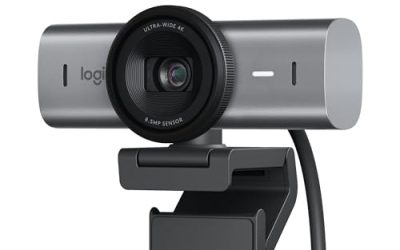
The Brio 505 is the safe default for people who present for a living. It is certified for Teams, Google Meet and Zoom, so it behaves predictably inside the apps themselves, and the dual noise-reduction microphones keep your voice forward in a busy room. RightLight correction handles a window behind you, auto-framing recentres the shot when you shift in your chair, and Show Mode lets you tilt the camera down to share a sketch or document on the desk. A built-in privacy shutter and USB-C plug-and-play finish a package aimed squarely at daily professional calls.
Specs
- Resolution: Full HD 1080p
- Light correction: RightLight auto light correction
- Framing: Auto-framing, Show Mode
- Microphones: Dual noise-reduction mics
- Privacy: Integrated privacy shutter
- Connection: USB-C, plug-and-play
- Certification: Microsoft Teams, Google Meet, Zoom
- Model: Brio 505
Best for: Daily presenters who want a certified camera that handles voice, light and framing automatically.
Watch out for: Confirm you are buying the Brio 505 business listing — the near-identical consumer Brio 500 is a separate product with its own listing, and the two are easy to mix up at checkout.
ASIN: B0CV4GPX9W
Logitech Brio 105 (Graphite)
The Brio 105 is the straightforward option for buyers who need webcams in quantity: for a team’s home setups, hot-desks or a spare-room office. It covers the meeting essentials — Full HD 1080p video, auto-light balance for dim rooms, a built-in microphone, a privacy shutter and compatibility with Teams, Google Meet and Zoom — with no software to configure and nothing to update. Be clear about the trade-offs, though: the single microphone picks up more room noise than pick one’s dual setup, and the fixed focus assumes you stay at desk distance rather than presenting standing up.
Specs
- Resolution: Full HD 1080p
- Light: Auto-light balance
- Microphone: Built-in mic
- Privacy: Privacy shutter
- Connection: USB-A
- Compatibility: Microsoft Teams, Google Meet, Zoom
- Model: 960-001579
Best for: IT buyers and home workers who want a simple, set-and-forget meeting camera.
Watch out for: The connector is USB-A, so a USB-C-only laptop needs an adapter or hub ready; also check the listing shows model 960-001579 so you know you are on the right Brio 105 variant.
ASIN: B0CGZJR7WK
NexiGo N660P (Gen 2)
Most meeting cameras top out at 30fps, which is exactly why the N660P Gen 2 earns its place: its 1080p at 60fps keeps hand movements, demonstrations and sign language smooth where lesser cameras smear them. Autofocus tracks you as you move, the dual microphone covers voice pickup properly, and the listing names Zoom, Skype, FaceTime and Teams among its supported apps. Software control lets you adjust the picture beyond the defaults, and a physical privacy cover closes the lens between calls. It is the presenter’s pick rather than the boardroom default.
Specs
- Resolution: 1080p at 60 fps
- Focus: Autofocus
- Microphone: Dual microphone
- Privacy: Privacy cover
- Controls: Software control
- Connection: USB
- Listed for: Zoom, Skype, FaceTime, Teams
Best for: Teachers, coaches and sign-language callers who need smooth 60fps motion on camera.
Watch out for: Confirm a live featured offer for this exact ASIN before ordering, and check the listing is the Gen 2 model — the older N660P and the Pink version are different listings that look nearly identical.
ASIN: B0DJKYXP4G
Which One Fits Your Situation
You Present to Clients Every Day
Choose the Logitech Brio 505. Certification for Zoom, Teams and Meet removes the guesswork, dual noise-reduction microphones protect your voice in a real home environment, and RightLight plus auto-framing keep you well lit and centred without any setup ritual before a call. It is the camera you can forget about, which is precisely what a daily presenter needs from meeting hardware.
You Are Equipping a Whole Team
Go with the Logitech Brio 105. Nobody in a fleet rollout wants per-user software, settings calls or firmware questions, and this camera asks for none of them: plug in the USB-A cable and it joins the meeting. Auto-light balance and a privacy shutter cover the essentials for standard desk calls, and the fixed focus is fine for staff who sit in one place.
Your Calls Involve Movement or Signing
Pick the NexiGo N660P Gen 2. At 1080p and 60fps it renders gestures, demonstrations and sign language without the blur that 30fps cameras produce, and autofocus keeps you sharp as you lean in or step back. Before ordering, verify the listing is the Gen 2 model and that a live featured offer is attached to it, as set out in the watch-out above.
Your Room Has Awkward Light
Start with the Logitech Brio 505 if a window sits behind you or the room is dim: RightLight correction works continuously, so you stop adjusting blinds and lamps before every call. On a tighter brief, the Brio 105’s auto-light balance still improves on a laptop camera, but it has less correction range, so seat yourself facing the light source where you can.
Common Mistakes
- Buying on resolution alone and ignoring the microphone, when colleagues judge call quality by the audio first.
- Confusing the Brio 505 with the consumer Brio 500 — near-identical names on different listings, so check the model before checkout.
- Ordering the original N660P or its Pink version when the model you actually wanted was the Gen 2 listed here.
- Plugging a USB-A webcam into a USB-C-only laptop with no adapter ready, five minutes before an important meeting starts.
- Leaving the lens uncovered between calls instead of using the built-in shutter or privacy cover the camera already provides.
Frequently Asked Questions
Do I need a 4K webcam for Zoom meetings?
No. Zoom, Teams and Google Meet calls run at 1080p or below in normal use, so a 4K sensor buys you little on a meeting while costing more and demanding more light. A good 1080p camera with proper light correction and a decent microphone — the combination all three picks here aim at — looks and sounds better in practice.
What does certified for Zoom actually mean?
It means the manufacturer had the camera tested against the platform’s requirements, so joining, muting behaviour and in-app controls work as the app expects, with no driver or workaround needed. The Brio 505 carries certification for Teams, Google Meet and Zoom. Compatible-but-uncertified cameras usually still work, but certification removes a category of surprises for IT teams and frequent presenters.
Is 60fps worth it for video calls?
For a seated talking head, rarely — 30fps looks fine and uses less bandwidth. Movement is where 60fps earns its keep: demonstrations, coaching, physical therapy sessions and sign language all stay legible instead of blurring between frames. That is why the N660P Gen 2 is in this shortlist, while the two Logitech models stay at the standard rate for ordinary meetings.
Brio 505 or Brio 105 — what is the real difference?
Three things: microphones, focus and connector. The Brio 505 has dual noise-reduction mics, autofocus with auto-framing and RightLight correction, Show Mode, and a USB-C connection. The Brio 105 has a single built-in mic, fixed focus, simpler auto-light balance and USB-A. Choose the 505 for presenting and difficult rooms; choose the 105 for simple, standard desk setups.
Related guides
More from Amazon
Programs that pair well with the guide above. Offers and eligibility are set by Amazon and may change.
Free shipping on eligible items, Prime Video and more. Eligible new members can start with a free trial.
Start a Prime free trialAd-free music streaming. Eligible new subscribers can start with a free trial.
Try Music Unlimited freeA Prime membership for ages 18-24 with a trial period. Eligibility is set by Amazon.
See Prime for Young AdultsAudiobooks and podcasts to listen to on the go. Eligible new members can start with a free trial.
Try Audible freeAs an Amazon Associate we earn from qualifying purchases.