Our Short List of 3

- Best for: Remote workers and streamers who want 4K video with a ring light that adapts to changing room light.
- Video: 4K at 30fps, 1080p at 60fps
- Sensor: Sony 1/2.5-inch 4K sensor
- Ring light: tri-tone, three color temperatures
- Focus: PDAF autofocus

- Best for: Creators and callers who want a dial-controlled ring light and a large sensor for dim rooms.
- Video: 4K at 30fps, 1080p at 60fps
- Sensor: 1/2-inch Samsung sensor
- Ring light: four modes, Cool White, Warm White, Natural White, Ambient
- Focus: 0.2-second PDAF autofocus

- Best for: Small-group calls and classes where the frame and the light both have to cover more than one person.
- Video: 2K QHD (2560 x 1440) at 30fps
- Sensor: 5MP Sony Starvis CMOS sensor
- Ring light: adjustable, three brightness levels
- Field of view: 110 degrees
All 5 Picks at a Glance
| Product | Specs | Action |
|---|---|---|
| NexiGo N680E Pro |
| Check price on Amazon |
| EMEET S600L |
| Check price on Amazon |
| NexiGo N940P |
| Check price on Amazon |
 Razer Kiyo |
| Check price on Amazon |
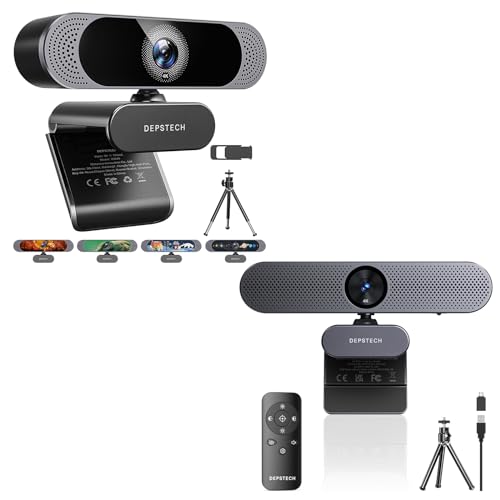 DEPSTECH DW49 |
| Check price on Amazon |
The real decision behind this guide is whether the light should be part of the camera itself. A plain webcam in a dim room leaves your face in shadow, and a separate ring light means a second stand, a second cable, and a glow that sits too far from the lens. A webcam with a ring light built around the lens fixes the lighting at the source, so the fill lands straight on your face.
This guide is for remote workers on daily video calls, teachers and students in rooms lit by a single lamp, and streamers who want even light without extra gear. It is different from the other webcam guides on this site: the cheapest guide ranks by cost, the microphone guide by built-in audio, the video conferencing guide by meeting features, and the general computer guide by everyday use. Here, only the built-in ring light decides, and every specification comes from its Amazon listing.
Our Top Picks
Top 3 picks at a glance
Quick Picks
As an Amazon Associate we earn from qualifying purchases.
| Product | Best for | Key spec from title |
|---|---|---|
| NexiGo N680E Pro | 4K calls with adjustable tri-tone light | Tri-tone ring light with three color temperatures |
| EMEET S600L | Dial-controlled light with a large sensor | Four light modes with dial brightness control |
| NexiGo N940P | Group calls with a wide frame | 110-degree field of view with adjustable ring light |
| Razer Kiyo | Streaming with daylight-balanced light | 5600K daylight-balanced ring light, 12 LEDs |
| DEPSTECH DW49 | Remote-controlled light and zoom | Remote-controlled ring light with 4K video |
How to Choose
Check How Much Control the Ring Light Gives You
A ring light that only switches on and off gives you two choices: a washed-out face or no fill at all. Look for brightness steps and color temperature settings, because the light you need at noon by a window is not the light you need at night under a warm lamp. The NexiGo N680E Pro offers three color temperatures, the EMEET S600L offers four light modes on a dial, the NexiGo N940P offers three brightness levels, and the Razer Kiyo offers a 12-step dial at a fixed daylight color temperature. Several levels let you soften the glow late at night so your face does not turn into a bright circle against a dark background.
Match the Resolution to What the Call Actually Shows
Resolution decides how much detail survives when the call app compresses the picture. A 1080p camera at 30 frames per second looks clean in a one-to-one meeting, and the Razer Kiyo records at that level. Moving to 2K, as the NexiGo N940P does, keeps faces readable when the app crops the frame or shows you small in a corner. The 4K cameras here, the NexiGo N680E Pro, the EMEET S600L, and the DEPSTECH DW49, record 4K at 30 frames per second and drop to 1080p at 60 frames per second for smoother movement. Pick 1080p for everyday calls, 2K when you want extra detail without heavy bandwidth, and 4K when you record locally or show fine detail on camera.
Look at the Autofocus Type, Not Just the Word Autofocus
Autofocus decides whether you stay sharp when you lean toward the screen or sit back to think. The EMEET S600L lists PDAF autofocus that locks in 0.2 seconds, the NexiGo N680E Pro lists PDAF autofocus, and the DEPSTECH DW49 and Razer Kiyo list autofocus, so all four adjust as you move instead of leaving you soft at the wrong moment. The NexiGo N940P is the exception here: it lists fixed focus and suits a caller who sits at a steady distance. Fast focus types such as PDAF lock onto your face by measuring distance rather than hunting back and forth, which matters if you present or gesture during a call.
Confirm the Mount and the Cable
A ring-light webcam still has to sit where the camera sits, so the mount decides how the light lands on your face. A monitor mount puts the camera at the top of the screen, which is the usual distance for calls, while a tripod thread lets you bring the camera closer on a small stand. The EMEET S600L and the DEPSTECH DW49 both list a standard tripod thread, and the DEPSTECH DW49 includes a flexible tripod in the box. Check the cable as well: the EMEET S600L ships with a 6.6 ft USB-C cable and a USB-C to USB-A adapter, while the Razer Kiyo uses a 1.5 m USB 2.0 cable.
The 5 Best Options
NexiGo N680E Pro
- Best for: Remote workers and streamers who want 4K video with a ring light that adapts to changing room light.
- Video: 4K at 30fps, 1080p at 60fps
- Sensor: Sony 1/2.5-inch 4K sensor
- Ring light: tri-tone, three color temperatures
- Focus: PDAF autofocus
Remote workers and streamers who want 4K video with a ring light that adapts to changing room light.
The output resolution depends on the software you use, so check your call app settings if 4K does not appear automatically.
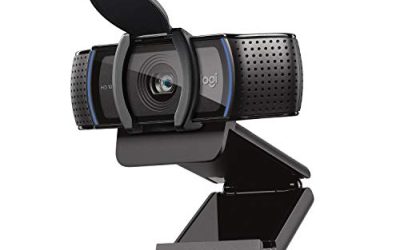
The NexiGo N680E Pro is the pick when the ring light has to do serious work in a room that changes through the day. Its tri-tone ring light sits around the lens and offers three color temperatures, so the fill can match a cool window in the morning and a warm lamp in the evening. Behind the light, a Sony 1/2.5-inch 4K sensor records 4K at 30 frames per second or 1080p at 60 frames per second, with PDAF autofocus that keeps you sharp as you move. Dual noise-canceling microphones carry your voice, and a built-in privacy shutter closes the lens between calls.
Watch out for: The output resolution depends on the software you use, so check your call app settings if 4K does not appear automatically.
EMEET S600L
- Best for: Creators and callers who want a dial-controlled ring light and a large sensor for dim rooms.
- Video: 4K at 30fps, 1080p at 60fps
- Sensor: 1/2-inch Samsung sensor
- Ring light: four modes, Cool White, Warm White, Natural White, Ambient
- Focus: 0.2-second PDAF autofocus
Creators and callers who want a dial-controlled ring light and a large sensor for dim rooms.
The ring light is face fill, not room lighting, so keep a lamp in the room and let the ring light lift your face rather than light the desk.
The EMEET S600L is the pick for buyers who want the light controlled by hand, not by an app. A physical dial switches the ring light between Cool White, Warm White, Natural White, and Ambient modes, and rotating the same dial changes the brightness, so you can tune the fill mid-call without touching the keyboard. Underneath, a large 1/2-inch Samsung sensor captures more light than the smaller sensors in most webcams, which helps in dim rooms. It records 4K at 30 frames per second or 1080p at 60 frames per second, with PDAF autofocus that locks in 0.2 seconds and a 73-degree field of view.
Watch out for: The ring light is face fill, not room lighting, so keep a lamp in the room and let the ring light lift your face rather than light the desk.
NexiGo N940P
- Best for: Small-group calls and classes where the frame and the light both have to cover more than one person.
- Video: 2K QHD (2560 x 1440) at 30fps
- Sensor: 5MP Sony Starvis CMOS sensor
- Ring light: adjustable, three brightness levels
- Field of view: 110 degrees
Small-group calls and classes where the frame and the light both have to cover more than one person.
The focus is fixed, so sit at a steady distance from the camera instead of leaning in and out during the call.
The NexiGo N940P is the pick when more than one person shares the frame. Its 110-degree field of view is the widest in this guide, so a second person fits in the shot without a second camera, and the adjustable ring light has three brightness levels to fill both faces evenly. The camera records in 2K QHD at 2560 by 1440 pixels and 30 frames per second from a 5-megapixel Sony Starvis sensor, and a remote control handles up to 3x digital zoom from across the room. A privacy cover is included, and the camera connects over USB-A or USB-C.
Watch out for: The focus is fixed, so sit at a steady distance from the camera instead of leaning in and out during the call.
Razer Kiyo
- Best for: Streamers and callers who want a compact camera with a daylight ring light and no software setup.
- Video: 1080p at 30fps, 720p at 60fps
- Sensor: 4MP
- Ring light: 5600K daylight-balanced, 12 white LEDs, 12-step ring dial
- Field of view: 81.6 degrees
Streamers and callers who want a compact camera with a daylight ring light and no software setup.
The ring light has one fixed color temperature, so it cannot shift warm for evening calls, and some sellers list the camera as unavailable, so confirm stock on the listing before ordering.
The Razer Kiyo is the original ring-light webcam, and it is still the simplest version of the idea. A 5600K daylight-balanced ring light with 12 white LEDs sits around the lens, and a 12-step ring dial adjusts the brightness by rotating the light itself, with no software to open. The camera records 1080p at 30 frames per second or 720p at 60 frames per second, with autofocus and a built-in omnidirectional microphone, so it covers streaming and video calls from a single compact unit that clips to a monitor or sits on a tripod.
Watch out for: The ring light has one fixed color temperature, so it cannot shift warm for evening calls, and some sellers list the camera as unavailable, so confirm stock on the listing before ordering.
DEPSTECH DW49
- Best for: Presenters and teachers who want remote control of the ring light and zoom during a call.
- Video: 4K, 8MP
- Sensor: 1/3-inch CMOS
- Ring light: remote-controlled ring light
- Focus: autofocus
Presenters and teachers who want remote control of the ring light and zoom during a call.
The camera has a larger footprint than the others here, so check the desk space beside your monitor before ordering.
The DEPSTECH DW49 is the pick for presenters who want to adjust the light without reaching for the camera. Its remote control changes the ring light and the zoom from your chair, which suits anyone who switches between a wide desk shot and a tight talking-head crop during a presentation. The camera records 4K video from an 8-megapixel sensor with autofocus, and dual microphones with digital noise filtering carry your voice. A flexible tripod comes in the box, so the camera works on a desk as well as on a monitor.
Watch out for: The camera has a larger footprint than the others here, so check the desk space beside your monitor before ordering.
Which One Fits Your Situation
You Call All Day From a Dim Home Office
Pick the NexiGo N680E Pro. Its tri-tone ring light adapts to the room as the light changes through the day, and the 4K sensor with PDAF autofocus keeps you sharp in the same frame. The dual noise-canceling microphones and the built-in privacy shutter suit a desk that is used for calls from morning to evening.
You Want the Light on a Dial, Not in an App
Pick the EMEET S600L. The physical dial switches between four light modes and sets the brightness with a turn, so the fill is tuned in seconds without opening any settings. The large Samsung sensor and 0.2-second PDAF autofocus back up the light with a picture that holds up in dim rooms.
Two People Share One Desk and One Camera
Pick the NexiGo N940P. Its 110-degree field of view is the only one here built for two faces, and the adjustable ring light with three brightness levels fills both evenly. The remote with 3x digital zoom lets you tighten the frame from across the room, and 2K resolution keeps both people readable on screen.
You Stream and Want the Simplest Ring-Light Setup
Pick the Razer Kiyo for a fixed streaming seat or the DEPSTECH DW49 if you present and move between shots. The Kiyo gives daylight-balanced light on a 12-step dial with no software, while the DW49 adds 4K video and a remote for the light and zoom. Choose the Kiyo for a compact, set-and-forget camera and the DW49 when the light has to change mid-presentation.
Common Mistakes
- Buying a webcam with a small LED strip and expecting the same even fill as a true ring light that surrounds the lens.
- Running the ring light at full brightness at night, which washes out your face against a dark background instead of lifting it.
- Sitting with a bright window behind you and assuming the ring light alone can fix the silhouette without moving the camera or the desk.
- Picking a 4K webcam and running it on a slow connection, so the call app drops the picture to a soft feed anyway.
- Ordering a bundle listing by mistake, such as a tripod bundle, when the standalone webcam was the intended purchase.
Frequently Asked Questions
Is a built-in ring light bright enough on its own?
It works as face fill, not as room lighting. The ring light lifts your face out of shadow and evens out the light from the lens side, but it will not light a dark room. Keep a lamp in the room and let the ring light balance the shadows, and turn the brightness down at night so your face does not glow against the background.
What is the difference between a ring light and an LED fill light?
A true ring light surrounds the lens, so the fill comes from the same direction as the camera and lands evenly on your face with few shadows. LED fill lights are usually mounted to the side or above the lens, which makes the light more directional and can leave one side of your face darker. Check the listing photos for a circle of light around the lens.
Can I turn the ring light off and use the webcam normally?
Yes. Every webcam in this guide lets you switch the light off and use the camera on its own, so the ring light is there only when the room needs it. The Razer Kiyo turns the light off by rotating the dial to its lowest step, the EMEET S600L uses its dial, and the NexiGo and DEPSTECH models switch the light from the camera body or the remote.
Do I still need a separate microphone with these webcams?
Not for everyday calls. The NexiGo N680E Pro, the EMEET S600L, the Razer Kiyo, and the DEPSTECH DW49 all list built-in microphones, so they handle meetings, classes, and casual streaming without extra audio gear. A separate microphone still sounds fuller for podcasts and long recordings, where the mic sits close to your mouth.
Related guides
More from Amazon
Programs that pair well with the guide above. Offers and eligibility are set by Amazon and may change.
Free shipping on eligible items, Prime Video and more. Eligible new members can start with a free trial.
Start a Prime free trialAd-free music streaming. Eligible new subscribers can start with a free trial.
Try Music Unlimited freeA Prime membership for ages 18-24 with a trial period. Eligibility is set by Amazon.
See Prime for Young AdultsAudiobooks and podcasts to listen to on the go. Eligible new members can start with a free trial.
Try Audible freeAs an Amazon Associate we earn from qualifying purchases.