A gaming desk mat replaces a small mouse pad with one wide surface that runs under both your keyboard and mouse, so your aim, your typing and your desk all sit on the same consistent layer. The best all-round pick for most players is the SteelSeries QcK XXL, a 900 x 400 mm micro-woven cloth mat with a grippy rubber base and a thicker 4 mm profile that smooths out desk imperfections. Players who want a slimmer, lower-friction surface should look at the Logitech G840 XL, while anyone building a lit setup can step up to the SteelSeries QcK Prism XL with two-zone RGB or save money with the Blade Hawks BX04, an LED pad at a budget tier.
Every mat below is an extended desk-size model, sized to cover the main working area of a gaming desk rather than just the mouse zone. They differ in surface texture, thickness, footprint and lighting, and those four factors matter more than brand badges when you are choosing between them.
As an Amazon Associate, we earn from qualifying purchases.
Our Top Picks
 Logitech G840 XL Cloth Gaming Mouse Pad15.7L x 35.4W inches35.4 x 15.7 x 3 inches0.2 poundsCheck on Amazon
Top 3 picks at a glance
Table of Contents
- Our Top Picks at a Glance
-
- SteelSeries QcK XXL
-
- Logitech G840 XL
-
- Razer Gigantus V2 XXL
-
- SteelSeries QcK Prism XL
-
- Blade Hawks BX04 RGB
- How to Choose the Right Gaming Desk Mat
- Frequently Asked Questions
- Conclusion
- Product and ASIN Reference
Our Top Picks at a Glance
| Pick | Size | Lighting | Tier |
|---|---|---|---|
| SteelSeries QcK XXL | 900 x 400 mm | None | Mid-range |
| Logitech G840 XL | 900 x 400 mm | None | Mid-range |
| Razer Gigantus V2 XXL | 940 x 410 mm | None | Mid-range |
| SteelSeries QcK Prism XL | 900 x 300 mm | 2-zone RGB | Premium |
| Blade Hawks BX04 RGB | 800 x 300 mm | 14 LED modes | Budget |

1. SteelSeries QcK XXL
The QcK line is the default cloth surface in competitive gaming, and the XXL stretches that same micro-woven fabric to a full desk footprint of 900 x 400 mm. At 4 mm thick it is one of the more cushioned plain cloth mats in this roundup, which helps it sit flat over slightly uneven desks and softens the feel under your wrists during long sessions. The surface is tuned for a balance of glide and stopping power, so it suits the low-sensitivity arm aiming common in tactical shooters as well as everyday tracking in strategy and RPG titles.
Because there is no lighting hardware, cable or controller box, the QcK XXL is also the simplest mat here to live with: unroll it, let it flatten, and play. The non-slip rubber base keeps the full sheet planted even when a wide mouse sweep ends near the edge. If you want a proven cloth desk mat with no software and no extras to manage, this is the safest recommendation in the group.
Specs
- Dimensions: 900 x 400 mm (35.4 x 15.7 in)
- Thickness: 4 mm
- Surface: Micro-woven cloth, balanced glide
- Base: Non-slip rubber
- Lighting: None
- Model number: 67500
- Tier: Mid-range
2. Logitech G840 XL
The G840 XL matches the QcK on footprint at 900 x 400 mm but runs thinner at 3 mm, and that lower profile changes the feel in a useful way. Logitech describes the surface as performance-tuned with moderate friction, and the thinner rubber base puts your mouse closer to the desk, which many players prefer for a firmer, more direct tracking feel. It is a good fit for low-DPI play, because the full width gives you room for broad swipes while the consistent texture keeps the sensor reading evenly from edge to edge.
The G840 is sold under several regional part numbers, so check that a listing matches the black XL cloth version, model 943-000776, before ordering. Like the QcK, it has no lighting and no electronics, which keeps it light, easy to roll for transport to a LAN or a second setup, and simple to clean. Choose it over the QcK if you prefer a thinner pad, or over the Razer below if 940 mm of width is more than your desk can spare.
Specs
- Dimensions: 900 x 400 mm (35.4 x 15.7 in)
- Thickness: 3 mm (0.12 in)
- Surface: Performance-tuned cloth, moderate friction
- Base: Stable rubber, low profile
- Lighting: None
- Model number: 943-000776
- Tier: Mid-range
3. Razer Gigantus V2 XXL
The Gigantus V2 XXL is the biggest surface in this roundup at 940 x 410 mm, giving low-sensitivity players the widest possible sweep area and leaving extra room beside a full-size keyboard. Its textured micro-weave cloth is designed for a mix of speed and control, and the pad is built on thick, high-density rubber foam: Razer lists the XXL size at 4 mm thick, so it shares the cushioned feel of the QcK XXL while adding a little more coverage in both directions.
The anti-slip base keeps the larger sheet from creeping during play, and the foam core helps the mat stay uniformly flat across its full span. The trade-off is desk space: measure before you buy, because a 940 mm mat plus monitor stands and speakers can crowd a compact desk. Licensed artwork editions of this pad exist under separate listings, so confirm you are looking at the Classic Black XXL, model RZ02-03330400-R3U1, if you want the standard version covered here.
Specs
- Dimensions: 940 x 410 mm (37 x 16.1 in)
- Thickness: 4 mm
- Surface: Textured micro-weave cloth
- Base: High-density rubber foam, anti-slip
- Lighting: None
- Model number: RZ02-03330400-R3U1
- Tier: Mid-range
4. SteelSeries QcK Prism XL
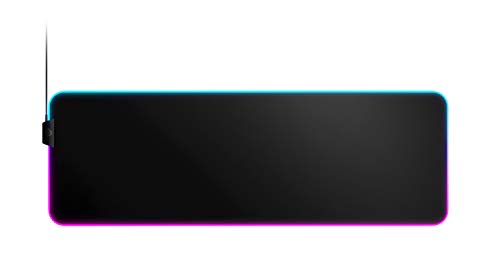
The QcK Prism XL takes the same style of micro-woven cloth surface and wraps it in two-zone RGB illumination that runs around the edge of the mat. The lighting is powered over USB and controlled through SteelSeries Engine software, and it can react to in-game events and Discord notifications through GameSense, so the edge glow becomes a status display as well as decoration. At 900 x 300 mm it is narrower front to back than the other full-size picks, which makes it a better fit for shallower desks where a 400 mm deep mat would run into the monitor stand.
Under the lighting, the pad itself is a 4 mm cloth mat with a non-slip rubber base, so tracking performance stays in line with the wider QcK family. This is the premium option in the group: you are paying for the lighting system and software integration, not for a different class of surface. If your setup already runs other SteelSeries gear, the shared software makes the Prism XL the natural finishing piece.
Specs
- Dimensions: 900 x 300 mm (35.4 x 11.8 in)
- Thickness: 4 mm
- Surface: Micro-woven cloth
- Base: Non-slip rubber
- Lighting: 2-zone RGB Prism illumination, USB powered
- Software: SteelSeries Engine with GameSense alerts
- Model number: 63826
- Tier: Premium
5. Blade Hawks BX04 RGB
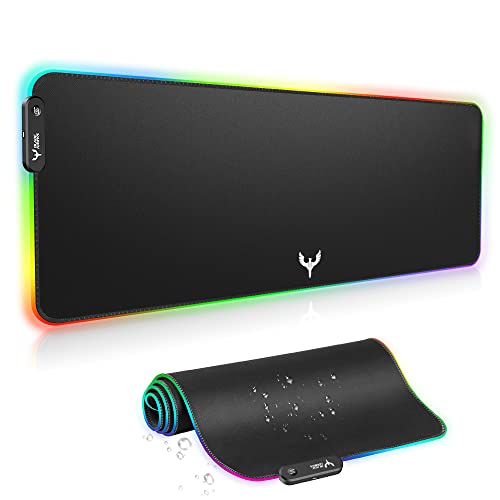
The Blade Hawks BX04 is the budget route to a lit desk mat. It covers 800 x 300 mm (31.5 x 12 in), smaller than the other picks but still wide enough for a keyboard and mouse on a compact desk, and its edge lighting offers 14 switchable modes powered over USB with a cable of about 1.8 m included in the listing details. The soft cloth surface sits on an anti-slip rubber base, and Blade Hawks lists the surface as waterproof, which helps with the occasional spilled drink.
Expect simpler materials and lighting than the premium Prism XL: the modes are cycled from a small controller rather than tuned in software, and the mat is thinner and lighter. For a first desk mat, a secondary setup, or a younger player’s bedroom desk, those compromises are reasonable, and the BX04 remains one of the few LED desk pads at a true budget tier. Note that this model has been sold under more than one Amazon listing over the years, so match the model number BX04 and the 31.5 x 12 inch size when you order.
Specs
- Dimensions: 800 x 300 mm (31.5 x 12 in)
- Surface: Soft cloth, listed as waterproof
- Base: Anti-slip rubber
- Lighting: 14 LED modes, USB powered
- Cable: About 1.8 m USB cable
- Model number: BX04
- Tier: Budget
Desk Mat Size Guide
Measure your desk before you choose a mat. The mat should cover the space your keyboard and mouse use without hanging over an edge where it can lift or catch on a drawer.
| Size label | Typical footprint | Best for |
|---|---|---|
| XL or Extended | About 900 by 300 to 400 mm | Keyboard plus mouse on a standard desk |
| XXL | About 900 to 940 by 400 mm | Larger desks and low-sensitivity arm aiming |
| 3XL | About 1200 by 600 mm | Full desk coverage, including monitors with wide stands |
Speed vs Control Surfaces
Cloth mats vary in how they feel. A smoother weave lets the mouse glide with less friction, which helps fast flicks and wide tracking. A rougher weave adds stopping power, which helps precision aiming and low-sensitivity tactical shooters. If you are unsure, a balanced micro-woven mat is the safe choice because it works well with most sensors and grips.
Edges, Base, and Desk Compatibility
- Stitched or edgeless borders. Stitched edges resist fraying, which is the most common reason cloth mats look worn after a year or two. Edgeless designs avoid a raised border for a cleaner mouse path.
- Rubber base. A textured natural rubber base stops the mat sliding, even on glass or glossy desks. Check the product description for glass-desk compatibility if your desk is not wood.
- Thickness. Thin mats feel precise and flat. Thicker mats add wrist cushioning and smooth over desk seams.
- Lighting and USB. RGB models need a USB cable and sometimes a driver or software, and a built-in hub adds convenient ports but ties the mat to your PC.
More Extended Mats Worth Comparing
Glorious GMP 2 XXL
A spill-resistant micro-weave surface with a grippy rubber base and a wide footprint. It suits players who want a plain, durable mat with good glide for both fast and controlled movement.

Corsair MM350 PRO Extended XL
A cloth mat measuring about 93 by 40 centimeters with anti-fray stitching and a spill-proof surface. It is a practical pick when you want a large surface that is easy to wipe clean.

Corsair MM700 RGB Extended
An extended cloth mat with 360-degree RGB lighting, a thick rubber base, and a two-port USB hub built in. It fits a lit setup where you want extra ports within reach of your hands.
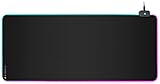
How to Choose the Right Gaming Desk Mat
Start with size. Extended mats run from about 800 x 300 mm up to 940 x 410 mm and beyond. Measure the clear area of your desk first, leaving room for your monitor stand or monitor arm base. A 900 x 400 mm mat is the standard full-coverage choice; drop to a 300 mm deep model if your desk is shallow, and only step up to a 940 mm wide mat if your desk genuinely has the width.
Pick a thickness for your desk and your wrists. Mats of 3 mm sit flatter and feel firmer, which suits players who like a direct connection to the desk. Mats of 4 mm add cushioning, forgive slightly uneven surfaces, and feel softer under the wrist and forearm during long sessions. There is no wrong answer, but the difference is noticeable, so decide which feel you prefer before you buy.
Match the surface to your games. Balanced micro-woven cloth, like the QcK XXL and Gigantus V2, is the versatile choice for mixed gaming. A performance-tuned, moderate-friction surface like the G840 favors controlled, low-sensitivity aiming. All five mats here are cloth, which keeps tracking consistent across optical and laser sensors; hard plastic or glass pads are a separate category with a very different glide.
Decide whether lighting earns its place. RGB mats need a USB connection and, for the full feature set, software running on your PC. They look great in a finished setup and the Prism XL can surface game and chat alerts, but a plain cloth mat gives you the same tracking with zero setup. If you play on console at a desk, remember the lighting still needs USB power, which a console or a powered hub can supply.
Check the exact model before ordering. Desk mats are sold in many sizes under one product name, and large brands also use different regional part numbers for the same mat. Confirm the dimensions and model number in the listing match the version you want, especially with the Gigantus V2 and G840, where several sizes and editions share a product page family.
Frequently Asked Questions
What size gaming desk mat should I buy?
For most desks, 900 x 400 mm is the sweet spot: it fits a full-size keyboard with room to spare and leaves a wide mouse area for low-sensitivity aiming. Choose a 300 mm deep mat for shallow desks, and only choose a 940 mm wide model like the Gigantus V2 XXL if your desk surface is wide enough to hold it alongside your monitor stand.
Do desk mats work with console gaming setups?
Yes, as long as your console setup includes a desk or table where you play with a keyboard and mouse, or you simply want a protective, even surface under a controller and accessories. Plain cloth mats need nothing else. RGB mats need USB power for their lighting, which a console USB port or a powered hub can provide, although software-based effects such as GameSense alerts require a PC.
How do I clean a cloth gaming desk mat?
Shake loose debris off first, then wash the mat gently by hand with lukewarm water and a small amount of mild soap, rinse it well, and let it air-dry flat away from direct heat. Avoid machine washing and harsh detergents, which can break down the rubber base and change the surface texture. RGB models should never be soaked; wipe them down instead and keep water away from the controller and USB connector.
Are stitched edges worth it on a desk mat?
Stitched or anti-fray edges slow down the peeling and fraying that plain cut edges can develop at the wrist contact points, so they are worth having on a mat you plan to keep for years. They are not essential for tracking performance, though, and several proven mats, including long-running cloth lines, use unstitched edges without problems. Treat edges as a durability bonus rather than a deciding factor.
Conclusion
A desk mat is one of the simplest upgrades in a gaming setup: one surface that unifies your keyboard and mouse area, protects the desk, and keeps tracking consistent wherever your hand travels. The SteelSeries QcK XXL is the balanced default for most players, the Logitech G840 XL suits anyone who prefers a thinner, firmer pad, and the Razer Gigantus V2 XXL maximizes space. If lighting matters, the SteelSeries QcK Prism XL is the premium pick, while the Blade Hawks BX04 brings LED color to a budget tier. Measure your desk, pick your thickness, and match the model number when you order.
Related guides
More from Amazon
Programs that pair well with the guide above. Offers and eligibility are set by Amazon and may change.
Free shipping on eligible items, Prime Video and more. Eligible new members can start with a free trial.
Start a Prime free trialAd-free music streaming. Eligible new subscribers can start with a free trial.
Try Music Unlimited freeA Prime membership for ages 18-24 with a trial period. Eligibility is set by Amazon.
See Prime for Young AdultsAudiobooks and podcasts to listen to on the go. Eligible new members can start with a free trial.
Try Audible freeAs an Amazon Associate we earn from qualifying purchases.