Our Short List of 3

- Best for: casual players and students who want the smoothest motion this tier offers.
- Screen size: 21.5 inches
- Resolution: 1920 x 1080 (Full HD)
- Panel type: VA
- Refresh rate: up to 100Hz
- Best for: home workers who sit at one desk all day and want height adjustment plus speakers.
- Screen size: 23.8 inches
- Resolution: 1920 x 1080 (Full HD)
- Panel type: IPS
- Refresh rate: 75Hz

- Best for: everyday family and office use where eye comfort and a clean setup matter most.
- Screen size: 24 inches
- Resolution: 1920 x 1080 (Full HD)
- Panel type: VA
- Refresh rate: 75Hz
All 4 Picks at a Glance
| Product | Specs | Action |
|---|---|---|
| Acer KB220Q H2bi |
| Check price on Amazon |
| HP 24mh |
| Check price on Amazon |
| Dell SE2422HX |
| Check price on Amazon |
 Acer SB220Q bi |
| Check price on Amazon |
The real decision at the bottom of the monitor market is not which screen looks sharpest in a product photo. It is which corners were cut to reach this tier, and whether those cuts land on things you will notice every day: a stand that barely adjusts, a panel that washes out when you lean back, or a port selection that does not match the laptop you already own. Two monitors can share the same size and resolution on paper yet feel completely different after a week of daily use.
This roundup is for students furnishing a first desk, home workers adding a second screen beside a laptop, and casual players who want smoother motion without leaving the lowest tier. Every pick below was chosen from the names and specifications on its Amazon listing, and each one stays in the same narrow band: a compact Full HD panel, a basic but complete set of ports, and a stand suited to the way its buyer actually sits.
Top 3 picks at a glance
Quick Picks
As an Amazon Associate we earn from qualifying purchases.
| Product | Best for | Key spec from title |
|---|---|---|
| Acer KB220Q H2bi | Smoothest motion in this tier | Up to 100Hz refresh |
| HP 24mh | Long workdays at one desk | Built-in speakers and VESA mounting |
| Dell SE2422HX | Eye comfort for everyday use | 75Hz refresh with AMD FreeSync |
| Acer SB220Q bi | Small desks and second screens | IPS panel with HDMI and VGA ports |
How to Choose
Panel Type Decides How the Screen Behaves Off-Center
IPS and VA panels dominate this tier, and the difference shows up in daily habits rather than in a spec headline. An IPS panel holds its colors and contrast when you view it from an angle, which matters if you share the screen with someone beside you or lean back during video. A VA panel usually delivers deeper blacks for movies in a dim room, but its image shifts more when you move off-center. At these sizes, neither choice is wrong; the right one depends on whether you mostly sit square in front of the screen alone or share it.
Refresh Rate Is Worth More Than Marketing Extras
Most entry-tier monitors run at 60Hz or 75Hz, and a step to 75Hz already makes scrolling documents and moving windows feel calmer. A 100Hz panel, like the Acer KB220Q H2bi below, goes further and is the one upgrade in this tier that gamers and heavy scrollers will actually feel. Response time figures need care: a 1ms number measured with a special blur-reduction mode is not the same as everyday response, so treat it as a rough guide. If your computer can only output 60Hz over its port, a faster panel still works, but it cannot show more frames than it receives.
Ports Decide Whether the Monitor Fits Your Setup
HDMI is the baseline input at this level, and every monitor here includes it, so any modern laptop, console, or mini PC connects without an adapter. VGA still appears on most of these models, which keeps older desktops and office machines in play. DisplayPort is the rare extra, found on the HP 24mh in this group, and it matters if your docking station or graphics card reserves its HDMI output for something else. Built-in speakers are just as unevenly spread: only the HP includes them, so plan on headphones or separate speakers with the other three.
Stands and Mounting Are Where This Tier Cuts Deepest
A tilt-only stand is the standard cost cut here, and it is fine when your desk and chair already put the screen near eye level. It becomes a daily annoyance when the monitor sits too low and you end up stacking it on books. Height adjustment is genuinely rare at this level, which is why the HP 24mh stands out in this roundup. VESA mounting holes are the other escape route, since they let you add an arm later. Check the listing for VESA support before ordering if a mount is part of your plan.
The 4 Best Options
Acer KB220Q H2bi
- Best for: casual players and students who want the smoothest motion this tier offers.
- Screen size: 21.5 inches
- Resolution: 1920 x 1080 (Full HD)
- Panel type: VA
- Refresh rate: up to 100Hz
casual players and students who want the smoothest motion this tier offers.
the VA panel narrows viewing angles compared with IPS, and there are no built-in speakers, so audio needs headphones or separate speakers.
Most monitors in the lowest tier stop at 60Hz or 75Hz, so this Acer earns its place by reaching up to 100Hz with Adaptive-Sync support, which smooths both casual gaming and everyday scrolling. The 21.5-inch VA panel keeps text tight at Full HD, the ZeroFrame design suits a pair of screens side by side, and the matte finish calms reflections from windows and lamps. It is the natural first pick for a student or casual player who wants motion to feel modern without leaving the entry tier behind.
Watch out for: the VA panel narrows viewing angles compared with IPS, and there are no built-in speakers, so audio needs headphones or separate speakers.
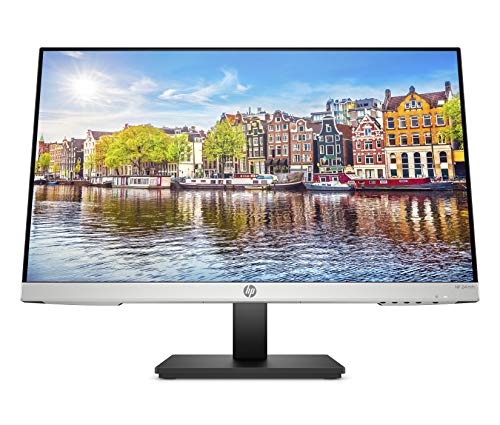
HP 24mh
- Best for: home workers who sit at one desk all day and want height adjustment plus speakers.
- Screen size: 23.8 inches
- Resolution: 1920 x 1080 (Full HD)
- Panel type: IPS
- Refresh rate: 75Hz
home workers who sit at one desk all day and want height adjustment plus speakers.
the 75Hz ceiling and 5ms response suit work and video well, but players chasing fast motion should look at the 100Hz Acer above instead.
The HP 24mh is the comfort pick of this group, built around the two things entry-tier monitors usually skip: a stand that adjusts for height as well as tilt, and built-in speakers that clear small items off the desk. Its 23.8-inch IPS panel holds colors steady from off-center seats, and the port set is the widest here, covering HDMI, DisplayPort, and VGA for older machines. Someone setting up a home office for long daily sessions gets the most from it, because posture and cable flexibility matter more there than raw speed.
Watch out for: the 75Hz ceiling and 5ms response suit work and video well, but players chasing fast motion should look at the 100Hz Acer above instead.
Dell SE2422HX
- Best for: everyday family and office use where eye comfort and a clean setup matter most.
- Screen size: 24 inches
- Resolution: 1920 x 1080 (Full HD)
- Panel type: VA
- Refresh rate: 75Hz
everyday family and office use where eye comfort and a clean setup matter most.
the stand tilts only and there is no DisplayPort, so check that HDMI covers every device you plan to connect.
Dell aims this 24-inch model at buyers who want a familiar brand, a tidy desk, and a screen that is easy on the eyes during long stretches of reading. The VA panel runs at 75Hz with AMD FreeSync, which keeps casual gaming and video free of tearing, while ComfortView reduces blue light and carries TÜV certification. The anti-glare surface with 3H hardness shrugs off bright rooms and the occasional bump. It is a sensible default for a family computer or a spare office desk where the monitor simply needs to work every day.
Watch out for: the stand tilts only and there is no DisplayPort, so check that HDMI covers every device you plan to connect.
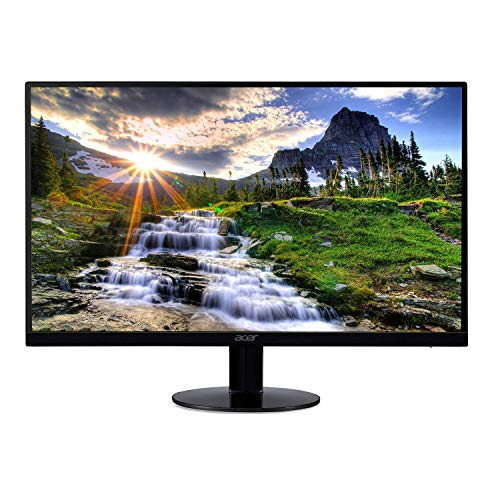
Acer SB220Q bi
- Best for: dorm rooms, small desks, and laptop users adding an affordable second screen.
- Screen size: 21.5 inches
- Resolution: 1920 x 1080 (Full HD)
- Panel type: IPS
- Refresh rate: 75Hz
dorm rooms, small desks, and laptop users adding an affordable second screen.
the tilt-only stand and compact size leave little room for split-screen work, so heavy multitaskers should consider the larger HP or Dell.
This long-running Acer is the compact option for anyone whose desk space is the real constraint. The 21.5-inch IPS panel keeps colors consistent from wide angles, which helps when the screen doubles for video in a dorm room or a shared bedroom, and the ultra-thin Zero Frame body takes up little depth. At 75Hz it feels a step smoother than older 60Hz screens, and having both HDMI and VGA means it can move between a new laptop and an aging desktop without adapters. It is the straightforward second screen of this group.
Watch out for: the tilt-only stand and compact size leave little room for split-screen work, so heavy multitaskers should consider the larger HP or Dell.
Which One Fits Your Situation
You Are Adding a Second Screen to a Laptop
Pick the Acer SB220Q bi if space is tight, since its slim body and 21.5-inch panel slide beside a laptop without swallowing the desk. Choose the HP 24mh instead when the second screen becomes your main working surface, because its height adjustment lets you line the top of the display up with your eyes, and its DisplayPort input keeps your laptop’s HDMI port free for something else.
You Play Games Casually After Work or Classes
The Acer KB220Q H2bi is the clear pick here, because its 100Hz refresh and Adaptive-Sync support are the only combination in this group aimed at motion. The Dell SE2422HX is the fallback if you prefer a slightly larger screen and mostly play slower games, since its 75Hz FreeSync panel still keeps movement tidy without the higher refresh ceiling.
You Work Long Days at a Single Desk
Take the HP 24mh. Height adjustment is the feature your neck will thank you for, the built-in speakers handle calls and videos without extra boxes on the desk, and the IPS panel stays readable when you shift in your chair. Pair it with the Dell SE2422HX as a second unit later if you expand, since the Dell’s ComfortView screen is gentle for reading-heavy side work.
Your Desk Is Small and Shared
The Acer SB220Q bi fits best, because its IPS panel stays clear for a second viewer and the thin frame leaves room for books, a lamp, and a laptop. If the screen will live in a bright room with glare from windows, the Dell SE2422HX and its anti-glare surface handle that setting better, at the cost of a slightly larger footprint.
Common Mistakes
- Choosing by screen size alone and ignoring panel type, then discovering the image washes out from your usual seat.
- Assuming every monitor in this tier has speakers, when most ship without any audio at all.
- Forgetting to match ports with your computer, especially if your dock or graphics card needs DisplayPort.
- Expecting height adjustment as standard, when a tilt-only stand is the norm at this level.
- Buying a second unit with a different panel type and wondering why the two screens never match in color.
Frequently Asked Questions
Is a 21.5-inch monitor big enough for everyday work?
For documents, browsing, email, and video, yes. Text stays sharp at Full HD on a 21.5-inch panel because the pixels are packed tightly, and the smaller footprint suits compact desks. It only feels cramped when you regularly place two windows side by side, where a 24-inch screen like the HP or Dell gives each window more breathing room.
Does a 100Hz refresh rate matter if I rarely play games?
It helps more than you might expect. Scrolling through long documents, dragging windows, and moving the pointer all look steadier at 100Hz than at 60Hz, which reduces the jittery feel of a basic office screen. The benefit shows as long as your computer can output the higher rate over its HDMI port, which most recent laptops and desktops can do.
Should I choose IPS or VA at this level?
Choose IPS if you view the screen from different seats, share it with others, or care about consistent color for photos and video. Choose VA if you mostly sit directly in front of the monitor and watch movies in a darker room, where its deeper blacks help. Both panel types appear in this roundup, so let your seating and lighting decide.
Can I wall-mount one of these monitors?
The HP 24mh lists VESA mounting, so it can go on a standard arm or wall bracket once you confirm the pattern size in the listing. The other models in this group rely on their included stands, which tilt but do not detach for mounting in the same way. Always check the listing’s mounting details before ordering an arm.
Related guides
More from Amazon
Programs that pair well with the guide above. Offers and eligibility are set by Amazon and may change.
Free shipping on eligible items, Prime Video and more. Eligible new members can start with a free trial.
Start a Prime free trialAd-free music streaming. Eligible new subscribers can start with a free trial.
Try Music Unlimited freeA Prime membership for ages 18-24 with a trial period. Eligibility is set by Amazon.
See Prime for Young AdultsAudiobooks and podcasts to listen to on the go. Eligible new members can start with a free trial.
Try Audible freeAs an Amazon Associate we earn from qualifying purchases.