
Our Short List of 3
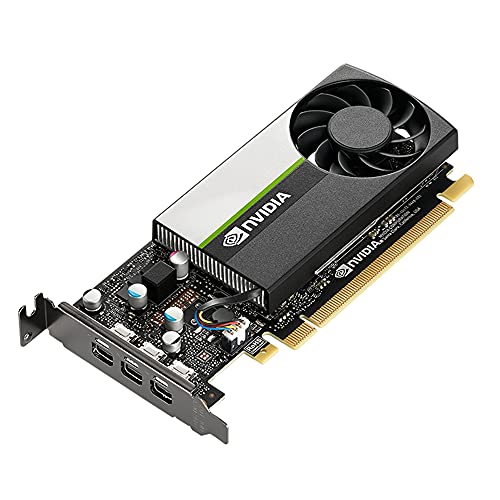
- Best for: driving up to three 4K monitors from a compact workstation or office PC.
- GPU: NVIDIA T400, Turing architecture, 384 CUDA cores
- Memory: 4GB GDDR6, 64-bit interface
- Outputs: 3x Mini DisplayPort 1.4
- Maximum resolution: 7680 x 4320 (8K support listed)

- Best for: small-form-factor workstations running CAD, BIM and 4K editing with ECC reliability.
- GPU: NVIDIA RTX A2000, Ampere architecture, 3,328 CUDA cores
- Memory: 12GB GDDR6 with ECC, 192-bit interface
- Memory bandwidth: 288 GB/s
- Outputs: 4x Mini DisplayPort 1.4, adapters to DisplayPort included

- Best for: VR development, 4K rendering and multi-monitor work inside small workstations.
- GPU: NVIDIA RTX 2000 Ada Generation, Ada Lovelace architecture, 2,816 CUDA cores
- Memory: 16GB GDDR6 with ECC
- Outputs: 4x Mini DisplayPort 1.4a
- Interface: PCI Express 4.0 x8
All 4 Picks at a Glance
| Product | Specs | Action |
|---|---|---|
| PNY NVIDIA T400 4GB |
| Check price on Amazon |
| PNY NVIDIA RTX A2000 12GB |
| Check price on Amazon |
| NVIDIA RTX 2000 Ada Generation 16GB |
| Check price on Amazon |
 PNY NVIDIA RTX 4000 Ada Generation 20GB |
| Check price on Amazon |
Buying a Quadro-line card for 4K work is really a decision about displays and drivers, not raw speed. How many 4K monitors must the card drive at once, and does your software demand certified workstation drivers rather than a gaming driver? A card that lights up four 4K panels can still be the wrong purchase if it will not fit a small-form-factor case, or if its memory is too small for the scenes and timelines you open every day.
This roundup is for CAD users, video editors, 3D artists and IT buyers who need reliable 4K output from a professional NVIDIA card. Every pick below comes from the Quadro family or its RTX A-series and Ada Generation successors, chosen from the names, outputs and specifications printed on the Amazon product listings, and each one drives at least one 4K display over DisplayPort.
Our Top Picks
Top 3 picks at a glance
Quick Picks
As an Amazon Associate we earn from qualifying purchases
| Product | Best for | Key spec from title |
|---|---|---|
| PNY NVIDIA T400 4GB | Three 4K monitors in a compact PC | 4GB GDDR6, 3x Mini DisplayPort |
| PNY NVIDIA RTX A1000 8GB | Entry CAD and 4K photo work | 8GB GDDR6, 4x Mini DisplayPort |
| PNY NVIDIA RTX A2000 12GB | Small workstations needing ECC memory | 12GB GDDR6 ECC, 4x Mini DisplayPort |
| NVIDIA RTX 2000 Ada Generation 16GB | VR development and 4K rendering in tight cases | 16GB GDDR6 ECC, 4x Mini DisplayPort |
| PNY NVIDIA RTX 4000 Ada Generation 20GB | Heavy 4K timelines and large 3D scenes | 20GB GDDR6 ECC, 4x DisplayPort |
How to Choose
Count the 4K displays before anything else
The number of DisplayPort outputs on the bracket decides how many 4K monitors one card can run, and it varies across this family. The T400 carries three Mini DisplayPort connectors, while the other four cards here carry four. A three-screen desk is fully covered by the smallest card, but a four-monitor trading or control-room setup rules it out on day one. Also check the connector size: most of these cards use Mini DisplayPort, so budget for the adapters or cables your monitors actually need.
Match VRAM to the size of your 4K work
Driving a 4K desktop takes very little memory, but working at 4K is a different load. Multi-layer 4K video timelines, high-resolution textures and dense CAD assemblies all live in VRAM while you edit, and running out shows up as stutters and failed renders. The 4GB and 8GB cards suit display duty and lighter design work, while the 12GB, 16GB and 20GB models give large projects room to breathe. Cards marked with ECC memory also correct memory errors silently, which matters on overnight renders.
Check slot size, bracket height and power draw
Workstation cards come in shapes that gaming cards rarely use. Several picks here are low-profile boards for slim office PCs and small workstations, and some occupy one slot while others need two. Power draw runs from 30 watts on the T400 up to 130 watts on the RTX 4000 Ada Generation, and the smaller cards need no auxiliary power cable at all. Measure the case, confirm the bracket height in the box, and check your power supply before ordering, not after the card arrives.
Understand the Quadro name change
NVIDIA retired the Quadro brand name, so the current cards are sold as the RTX A-series and the Ada Generation line instead. They are the same professional family, with the same certified drivers for applications such as SolidWorks, AutoCAD and Premiere Pro. When you compare listings, treat a Quadro RTX card, an RTX A2000 and an RTX 2000 Ada as three generations of one product line, and check that your software version appears on the certified driver list for the generation you pick.
The 5 Best Options
PNY NVIDIA T400 4GB
- Best for: driving up to three 4K monitors from a compact workstation or office PC.
- GPU: NVIDIA T400, Turing architecture, 384 CUDA cores
- Memory: 4GB GDDR6, 64-bit interface
- Outputs: 3x Mini DisplayPort 1.4
- Maximum resolution: 7680 x 4320 (8K support listed)
driving up to three 4K monitors from a compact workstation or office PC.
only three display outputs, so a four-monitor desk needs a different card, and the mini connectors usually need adapters for standard DisplayPort cables.
The T400 is the card to reach for when the job is simply putting sharp 4K pictures on several screens from a small PC. It drives three displays through Mini DisplayPort, sips power, and fits the slim low-profile cases that full-size cards cannot enter. Designers running two or three 4K monitors for CAD viewing, documentation and office applications get certified NVIDIA drivers without paying for compute power they will never use. It is a display card first, and a very good one at that role.
PNY NVIDIA RTX A1000 8GB
Step up to the RTX A1000 when the 4K screens are a workplace rather than just a display wall. Its Ampere GPU adds real ray-tracing and AI acceleration cores to the four Mini DisplayPort outputs, so entry-level CAD modeling, 4K photo editing and light 3D work all run comfortably on one low-profile card. The 8GB of memory doubles the T400’s capacity, and the card still draws all its power from the slot, which keeps small power supplies out of trouble.
Specs
- GPU: NVIDIA RTX A1000, Ampere architecture, 2,304 CUDA cores
- Tensor cores: 72, RT cores: 18
- Memory: 8GB GDDR6, 128-bit interface
- Outputs: 4x Mini DisplayPort 1.4a
- Interface: PCI Express 4.0 x16
- Form factor: low profile, full-height bracket fitted on this listing
- Maximum power consumption: 50 watts
Best for: entry-level CAD, 4K photo editing and four-monitor productivity setups.
Watch out for: this listing is the full-height bracket version (model VCNRTXA1000ATX-PB), so confirm the bracket in the box matches your case before ordering.
PNY NVIDIA RTX A2000 12GB
- Best for: small-form-factor workstations running CAD, BIM and 4K editing with ECC reliability.
- GPU: NVIDIA RTX A2000, Ampere architecture, 3,328 CUDA cores
- Memory: 12GB GDDR6 with ECC, 192-bit interface
- Memory bandwidth: 288 GB/s
- Outputs: 4x Mini DisplayPort 1.4, adapters to DisplayPort included
small-form-factor workstations running CAD, BIM and 4K editing with ECC reliability.
it occupies two slots despite its low-profile height, which can crowd the neighboring slot in very compact builds.
The RTX A2000 has become the default small-workstation card for a reason: it packs 12GB of error-correcting memory and four Mini DisplayPort outputs into a dual-slot, low-profile board that runs on slot power alone. Engineers modeling assemblies in SolidWorks, architects moving through Revit models and editors cutting 4K footage all get certified drivers plus enough VRAM for serious scenes. The box also includes four Mini DisplayPort to DisplayPort adapters, which removes the cable hunt that the smaller cards leave behind.
NVIDIA RTX 2000 Ada Generation 16GB
- Best for: VR development, 4K rendering and multi-monitor work inside small workstations.
- GPU: NVIDIA RTX 2000 Ada Generation, Ada Lovelace architecture, 2,816 CUDA cores
- Memory: 16GB GDDR6 with ECC
- Outputs: 4x Mini DisplayPort 1.4a
- Interface: PCI Express 4.0 x8
VR development, 4K rendering and multi-monitor work inside small workstations.
availability on this listing has been limited, so confirm the card is orderable before planning a build around it.
This is the newer generation of the compact workstation card, and it suits buyers building for VR and rendering as much as for 4K displays. The Ada Lovelace GPU brings 16GB of ECC memory, AV1 encoding and enough ray-tracing performance to develop and preview VR scenes, while the half-height, dual-slot blower design still fits the small cases the A2000 serves. Four Mini DisplayPort outputs run a full 4K multi-monitor desk, and the 70-watt draw keeps thermals calm in tight enclosures.
PNY NVIDIA RTX 4000 Ada Generation 20GB
- Best for: demanding 4K video production, large-scene 3D work and simulation in a tower workstation.
- GPU: NVIDIA RTX 4000 Ada Generation, Ada Lovelace architecture, 6,144 CUDA cores
- Memory: 20GB GDDR6 with ECC, 160-bit interface
- Memory bandwidth: 360 GB/s
- Outputs: 4x DisplayPort 1.4a
demanding 4K video production, large-scene 3D work and simulation in a tower workstation.
it needs a full-height slot and a 130-watt power budget, so it does not suit the low-profile cases the smaller cards here are built for.
At the top of this list sits the card for people whose 4K work is genuinely heavy. The RTX 4000 Ada Generation pairs 20GB of ECC memory with 6,144 CUDA cores in a single-slot, full-height board, a combination that handles large 3D scenes, complex simulations and multi-stream 4K timelines without the memory ceiling of the smaller cards. Four full-size DisplayPort connectors simplify cabling to professional 4K monitors, and the Ada generation’s dual encoders help video workflows that record or stream while they render.
Which One Fits Your Situation
You run three 4K monitors in a small office PC
Choose the T400. Three Mini DisplayPort outputs match your desk exactly, the 30-watt draw works with almost any power supply, and the single-slot low-profile shape fits slim office machines. Spending more buys compute power that display duty never touches, so put the savings toward the monitors themselves. It also leaves budget for the Mini DisplayPort adapters most office monitors need, since the bracket connectors are the mini size.
You edit photos and model parts across four 4K screens
Choose the RTX A1000 for lighter design work or the RTX A2000 if your models keep growing. Both give you four outputs and certified drivers; the A2000’s extra memory and ECC protection justify the step up once assemblies, textures or 4K timelines start filling the framebuffer during long sessions. Either way, the adapters included with the A2000 simplify cabling to standard DisplayPort inputs.
You are building a compact VR and rendering workstation
Choose the RTX 2000 Ada Generation. Its 16GB of ECC memory, AV1 encode support and newer ray-tracing cores handle scene development and preview work that the Ampere cards manage more slowly, and the half-height blower design exhausts heat out of small cases instead of recirculating it inside. That combination makes it the natural step up from the A2000 when preview frame rates start to matter.
You cut multi-stream 4K video in a full-size tower
Choose the RTX 4000 Ada Generation. Twenty gigabytes of memory keeps long, layered timelines responsive, the single-slot design leaves neighboring slots free for capture or storage cards, and the full-size DisplayPort connectors plug straight into professional 4K monitors without adapters. The Ada dual encoders also help when you record or stream a session while an export runs in the background, which is exactly the multitasking pattern of a busy editing desk.
Common Mistakes
- Buying a GeForce gaming card because the specifications look similar, then discovering your CAD or engineering software only certifies the professional Quadro and RTX workstation drivers.
- Assuming every card has HDMI ports. Most of this family is DisplayPort only, and the compact models use Mini DisplayPort, so plan cables and adapters before the card arrives.
- Ordering a low-profile card for a slim case without checking which bracket is fitted or included in the box.
- Counting screens wrong: a four-monitor 4K desk needs a four-output card, and the three-output T400 cannot stretch to cover it.
- Judging by CUDA cores alone when the real job is display output, where output count, memory and driver certification matter more.
Frequently Asked Questions
Are Quadro cards still being made?
The Quadro name has been retired, but the product line continues as the NVIDIA RTX A-series and the Ada Generation workstation cards. They use the same professional driver branch and the same ISV certification program, so an RTX A2000 or RTX 4000 Ada is the direct successor to the older Quadro models, not a different kind of product.
Can these cards run four 4K monitors at once?
Four of the five cards here have four DisplayPort outputs and can drive four 4K displays from a single card, which suits multi-monitor CAD, editing and monitoring desks. The T400 is the exception with three outputs. Check the refresh rate and cable type in the listing, since 4K at higher refresh rates needs DisplayPort rather than adapted HDMI cables.
Is a Quadro-line card worth it for 4K video editing?
It can be, mainly for driver stability and memory. Editing applications run well on the certified workstation drivers, and the ECC memory on the A2000 and Ada cards protects long renders and exports from silent memory errors. If your timelines are short and simple, the smaller cards here still cover 4K editing without the top model’s cost in power and space.
Will one of these cards work for VR?
Yes, within limits. The RTX 2000 Ada Generation is positioned by NVIDIA for VR development and preview work, and the RTX 4000 Ada Generation has the memory and ray-tracing performance for heavier scenes. For simply driving a headset alongside 4K monitors, check that your chosen card leaves a free output of the type your headset requires.
Related guides
More from Amazon
Programs that pair well with the guide above. Offers and eligibility are set by Amazon and may change.
Free shipping on eligible items, Prime Video and more. Eligible new members can start with a free trial.
Start a Prime free trialAd-free music streaming. Eligible new subscribers can start with a free trial.
Try Music Unlimited freeA Prime membership for ages 18-24 with a trial period. Eligibility is set by Amazon.
See Prime for Young AdultsAudiobooks and podcasts to listen to on the go. Eligible new members can start with a free trial.
Try Audible freeAs an Amazon Associate we earn from qualifying purchases.









