Our Short List of 3
All 3 Picks at a Glance
| Product | Specs | Action |
|---|---|---|
 1. HP 24mh — Best Overall 24-Inch Monitor | Check price on Amazon | |
 3. BenQ GW2480 — Best Eye-Care Monitor for the Home Office | Check price on Amazon | |
 4. Acer Nitro VG240Y M3biip — Best 24-Inch Gaming Monitor | Check price on Amazon |
The best 24 monitors hit a sweet spot that larger screens often miss. A 24-inch display is big enough for comfortable multitasking, small enough to fit on a crowded desk, and sharp enough at Full HD resolution that text stays crisp without scaling. Whether you need a second screen for a home office, a reliable display for schoolwork, or a fast panel for competitive gaming, the 24-inch class has a model that fits.
This guide compares four 24-inch monitors that cover the most common needs: an ergonomic all-rounder for the office, a budget eye-care display, a comfort-focused home-office screen, and a high-refresh gaming panel. Every pick below is a 23.8-inch IPS display with a 1920 x 1080 resolution, so you are comparing like with like and can choose based on the features that matter to you rather than on screen size alone.
Top 3 picks at a glance
How to Choose a 24-Inch Monitor
A 24-inch monitor sounds simple, but the details decide whether you will enjoy using it every day. Work through the points below before you buy, and you will end up with a screen that suits your desk, your eyes, and your workload.
Panel Type
Most 24-inch monitors use IPS panels, and for good reason. IPS technology delivers consistent colors and wide viewing angles, so the image looks the same whether you sit directly in front of the screen or glance at it from the side. That matters when you share your screen with a colleague, watch a video with someone beside you, or mount two monitors at a slight angle. VA panels offer deeper blacks but can shift color off-angle, while older TN panels trade color quality for speed and are now rare in this size. For mixed work and entertainment, IPS is the safest choice.
Resolution and Pixel Density
Almost every 24-inch monitor runs at 1920 x 1080, known as Full HD. At this screen size, Full HD gives a pixel density of around 92 pixels per inch, which keeps text sharp at normal viewing distances without needing operating-system scaling. A 1440p panel on a 24-inch screen would look slightly crisper, but those models are uncommon and cost considerably more, while a 720p panel would look visibly soft. Full HD is the right match for the size, and it also keeps the demands on your computer modest, so even an older laptop or a basic office PC can drive it smoothly.
Refresh Rate
Refresh rate is measured in hertz and tells you how many times per second the screen redraws the image. A 60 Hz or 75 Hz panel is fine for documents, spreadsheets, web browsing, and video. The jump from 60 Hz to 75 Hz is subtle but noticeable in how smooth the mouse cursor feels. Gamers should look higher: a 144 Hz or 180 Hz panel redraws the image far more often, which makes motion in fast games look clearer and reduces the blur you see when turning quickly. If you play competitive shooters, refresh rate matters more than almost any other specification. If you do not play games, do not pay extra for it.
Adaptive Sync
Adaptive sync technologies such as AMD FreeSync and VESA Adaptive-Sync match the monitor refresh rate to the frame rate your graphics card produces. That removes screen tearing, the horizontal split you sometimes see when the two fall out of step, and it smooths out stutter when frame rates dip. Most 24-inch monitors include some form of adaptive sync, and it costs nothing to have it. Check that the monitor supports it over both HDMI and DisplayPort if you plan to connect a console or a second device, since support can vary by input.
Ports and Connectivity
Count your devices before you buy. A monitor with HDMI, DisplayPort, and VGA covers a modern laptop, a desktop PC, and an older machine without adapters. Two HDMI ports are handy if you switch between a work laptop and a games console. DisplayPort is the best choice for high refresh rates on a PC. Built-in speakers are a bonus for video calls and casual video watching, although they will never match a dedicated speaker set or headphones. If you plan to wall-mount the display or use a monitor arm, confirm VESA mounting support and the mounting pattern.
Ergonomics and Eye Comfort
You will spend hours in front of this screen, so physical adjustability matters. Height adjustment lets you set the top of the display at eye level, which reduces neck strain. Tilt adjustment helps you angle the screen away from overhead lights. Look for low blue light modes and flicker-free backlighting if you work long days, and consider a monitor with an ambient light sensor that adjusts brightness automatically. An anti-glare coating is worth having if your desk faces a window.
Size and Desk Fit
A 24-inch monitor is about 21 inches wide with its bezel, so measure your desk before ordering. Leave room for the stand, which can extend several inches behind the screen, and think about whether you might add a second monitor later. Slim bezels make dual-monitor setups look cleaner and reduce the gap between screens. If desk space is tight, a VESA-compatible monitor on an arm frees up the area underneath the display.
Top Picks
1. HP 24mh — Best Overall 24-Inch Monitor
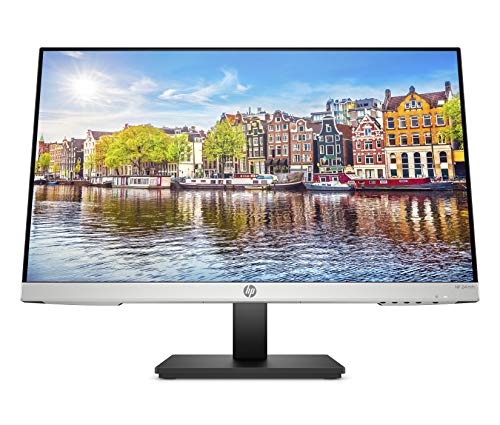
The HP 24mh is the most complete all-rounder in this guide, and it earns the top spot because it does everything well rather than excelling in one narrow area. The 23.8-inch IPS panel delivers a 1920 x 1080 image with wide 178-degree viewing angles, so colors stay accurate whether you sit centered or off to the side. A 75 Hz refresh rate keeps everyday motion smooth, and AMD FreeSync support irons out tearing in casual games and video playback.
Where the HP 24mh pulls ahead of its rivals is ergonomics. The stand adjusts in height as well as tilt, which is rare at this size and makes a real difference to comfort over a full working day. You can raise the screen to eye level instead of stacking it on books, and the slim profile keeps your desk looking tidy. Connectivity is generous: HDMI, DisplayPort, and VGA inputs cover modern laptops, desktops, and older hardware alike, and VESA mounting support means you can move it onto an arm later if you want more desk space.
Built-in speakers handle video calls and background video without extra clutter, and the anti-glare coating keeps reflections under control in bright rooms. The silver and black design looks at home in an office or a study, and the ultra-slim bezel makes it a strong candidate for a dual-monitor setup. If you want one 24-inch monitor that covers work, study, and light entertainment without fuss, this is the one to buy.
2. ASUS VA24EHE — Best Budget Eye-Care Monitor
The ASUS VA24EHE is the pick for anyone who wants a dependable 24-inch display at the lowest sensible cost, without giving up eye comfort. Its 23.8-inch IPS panel runs at 1920 x 1080 and 75 Hz, with a frameless design that looks more expensive than it is and works well in multi-monitor arrangements. Adaptive-Sync support smooths out motion, and the wide viewing angles keep colors consistent across the desk.
ASUS built this monitor around eye care. It carries low blue light and flicker-free technology designed to reduce strain during long sessions, which matters if you spend most of your day reading documents or working in spreadsheets. The panel is bright enough for a well-lit room, and the matte finish resists glare. GamePlus features such as an on-screen crosshair and timer are a small bonus for casual gaming sessions, although this is first and foremost a productivity display.
Connectivity covers HDMI, DVI-D, and VGA, so it connects to almost any computer you already own, and VESA wall mounting is supported. The tilt-only stand is the main compromise: you cannot adjust the height, so you may need a monitor riser to reach an ideal eye level. If your budget is tight and your priority is a comfortable, reliable screen for work and study, the VA24EHE delivers the essentials without extras you will not use.
View the ASUS VA24EHE on Amazon
3. BenQ GW2480 — Best Eye-Care Monitor for the Home Office
The BenQ GW2480 is built for people who spend long hours at a home desk and want the display itself to look after their eyes. Its 23.8-inch IPS panel offers 1920 x 1080 resolution with wide viewing angles and a 250-nit brightness level that suits indoor lighting. The standout feature is Brightness Intelligence, a sensor that measures the light in your room and adjusts the screen brightness automatically, so the display never glares at night or looks washed out during the day.
BenQ pairs that with low blue light and flicker-free technology, plus a dedicated reading mode that warms the image for long documents. The ultra-slim bezel and hidden cable management keep the desk looking clean, which matters when your workspace doubles as a living space. Built-in speakers cover video calls and casual viewing, and connectivity includes HDMI, DisplayPort, and VGA, so it works with new laptops and older desktops alike.
The 60 Hz refresh rate is the lowest here, but it is perfectly adequate for office work, reading, and streaming video. This monitor is not aimed at gamers, and it does not pretend to be. If your day is mostly email, documents, video calls, and browsing, and you want a screen that stays comfortable from the first meeting to the last, the GW2480 is the most thoughtful choice in this guide.
View the BenQ GW2480 on Amazon
4. Acer Nitro VG240Y M3biip — Best 24-Inch Gaming Monitor
The Acer Nitro VG240Y M3biip is the gaming pick, and it brings specifications that were once reserved for much larger and more expensive displays. The 23.8-inch IPS panel runs at 1920 x 1080 with a 180 Hz refresh rate, which makes fast motion in competitive games look noticeably clearer than on a standard 75 Hz screen. AMD FreeSync Premium keeps the frame rate and refresh rate in step, removing tearing and stutter when performance dips during busy scenes.
Response time is rated at 0.5 ms, which helps fast-moving images stay sharp, and HDR10 support adds extra range to bright and dark scenes in supported games and video. Color coverage reaches 99 percent of the sRGB gamut, so the panel also works well for photo editing and content creation when you are not gaming. The zero-frame design keeps bezels thin, and the stand tilts to a comfortable angle.
Connectivity includes one DisplayPort and two HDMI 2.0 ports, so you can keep a PC and a console plugged in at the same time. The 180 Hz refresh rate is best used over DisplayPort on a PC, so check your graphics card outputs before you buy. If gaming is the main job for your monitor and you want high refresh rates without stepping up to a larger screen, this is the strongest 24-inch option here.
View the Acer Nitro VG240Y M3biip on Amazon
Comparison Table
| Monitor | Panel | Resolution | Refresh Rate | Adaptive Sync | Ports | Speakers | Best For |
|---|---|---|---|---|---|---|---|
| HP 24mh | 23.8-inch IPS | 1920 x 1080 | 75 Hz | AMD FreeSync | HDMI, DisplayPort, VGA | Yes | Overall use and ergonomics |
| ASUS VA24EHE | 23.8-inch IPS | 1920 x 1080 | 75 Hz | Adaptive-Sync | HDMI, DVI-D, VGA | No | Budget eye care |
| BenQ GW2480 | 23.8-inch IPS | 1920 x 1080 | 60 Hz | Not specified | HDMI, DisplayPort, VGA | Yes | Home office comfort |
| Acer Nitro VG240Y M3biip | 23.8-inch IPS | 1920 x 1080 | 180 Hz | AMD FreeSync Premium | HDMI x2, DisplayPort | Yes | Gaming |
Frequently Asked Questions
Is a 24-inch monitor big enough for work?
Yes, for most people a 24-inch monitor is the right size for office work. Full HD resolution at this size keeps text sharp, and the screen is wide enough for two documents side by side. If you regularly work with three or more windows at once, consider a dual-monitor setup with two 24-inch screens rather than one larger display, since two screens give you more flexibility for arranging your workspace.
Is 1080p sharp enough on a 24-inch monitor?
Yes. At 24 inches, a 1920 x 1080 panel has a pixel density of about 92 pixels per inch, which looks crisp at a normal viewing distance of roughly an arm’s length. Text stays readable without scaling, and photos and video look clean. Higher resolutions only become noticeably better on larger screens or when you sit very close to the display.
What refresh rate do I need for gaming on a 24-inch monitor?
For casual gaming, 75 Hz is fine and looks smoother than a basic 60 Hz panel. For competitive games such as first-person shooters, a 144 Hz or 180 Hz panel such as the Acer Nitro VG240Y M3biip makes motion clearer and gives you a smoother view of fast action. Pair a high-refresh monitor with a graphics card that can produce high frame rates, or the extra refresh rate will go unused.
Can I use a 24-inch monitor with a laptop?
Yes, and it is one of the most popular upgrades for laptop users. Connect through HDMI or DisplayPort, or use a USB-C adapter if your laptop has no video output. A 24-inch external display gives you far more screen space than a laptop panel, and you can use both screens at once, keeping reference material on one and your main work on the other.
Do I need built-in speakers in a monitor?
Built-in speakers are convenient for video calls and casual video, and they save desk space and cable clutter. Their sound quality is basic, however, so if you listen to music, watch films, or play games with sound, a separate speaker set or a good pair of headphones will sound considerably better. Treat monitor speakers as a backup rather than your main audio.
Conclusion
The best 24 monitors prove that you do not need a giant screen to get a great display. For most buyers, the HP 24mh is the safest choice: it combines a sharp IPS panel, height adjustment, broad connectivity, and built-in speakers in one tidy package. Budget buyers who want eye comfort should look at the ASUS VA24EHE, while home workers who sit at their desk all day will appreciate the automatic brightness and reading modes of the BenQ GW2480. Gamers should skip straight to the Acer Nitro VG240Y M3biip, whose 180 Hz refresh rate and FreeSync Premium support make it the fastest panel in this guide.
Before you order, measure your desk, check your computer’s video outputs, and think about how you will actually use the screen. A monitor that matches your daily routine will serve you far better than one with specifications you never use. Any of the four picks above will give you a sharp, comfortable 24-inch display for years of work, study, and play.
Disclosure: As an Amazon Associate, we earn from qualifying purchases.
Related guides
More from Amazon
Programs that pair well with the guide above. Offers and eligibility are set by Amazon and may change.
Free shipping on eligible items, Prime Video and more. Eligible new members can start with a free trial.
Start a Prime free trialAd-free music streaming. Eligible new subscribers can start with a free trial.
Try Music Unlimited freeA Prime membership for ages 18-24 with a trial period. Eligibility is set by Amazon.
See Prime for Young AdultsAudiobooks and podcasts to listen to on the go. Eligible new members can start with a free trial.
Try Audible freeAs an Amazon Associate we earn from qualifying purchases.