
As a home and furniture editor, I spend my days analyzing how physical objects interact with the human body. Whether it is an ergonomic task chair, a memory foam mattress, or a console gaming headset, the core design principles remain identical: structural integrity, material quality, and long-term physical comfort. Too often, buyers approach a headset as if they are purchasing a computer component—obsessing over digital specifications while ignoring how the object physically sits on their skull for hours at a time.
When researching what to look for in a console gaming headset, the most common mistake is falling for flashy aesthetic gimmicks like RGB lighting or aggressive angular designs. These features add unnecessary weight, drain wireless batteries, and do nothing for your audio experience. Another frequent blunder is ignoring the physical layout of your living room. A short, non-detachable 4-foot cable might be fine at a desktop, but it is a tripping hazard and a physical limitation when you are sitting on a sofa eight feet away from your television. To make an investment that lasts, you must evaluate a headset as wearable furniture.
As an Amazon Associate we earn from qualifying purchases at no extra cost to you.


Our Top Picks
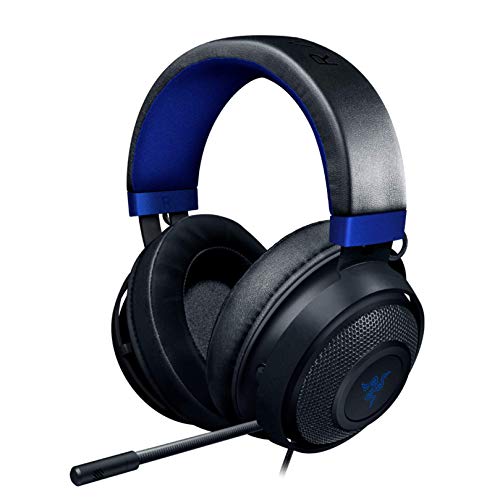 Razer Kraken Gaming Headset: Lightweight Aluminum FrameHeadset6.76 x 7.6 x 3.86 inches0.71 PoundsCheck on Amazon


Top 3 picks at a glance
Decide These 3 Things First
Before diving into driver materials and frequency curves, you must narrow your focus by making three foundational decisions based on your living space, gaming habits, and primary console platform.
First, choose between Wired and Wireless. Wired headsets (utilizing a 3.5mm analog jack) plug directly into your console’s controller. They are lightweight, never require charging, and offer zero latency. However, they draw power from your controller, slightly reducing its battery life. Wireless headsets (utilizing a 2.4GHz USB dongle) offer complete freedom of movement. If your console is situated across a large living room, wireless is almost always the superior choice to avoid cords stretching across high-traffic pathways.
Second, verify your Console Ecosystem Compatibility. While most wired 3.5mm headsets work universally across PlayStation, Xbox, and Nintendo Switch, wireless protocols are highly platform-specific. Xbox consoles use a proprietary wireless security protocol. A wireless headset designed specifically for the PlayStation 5 will not connect wirelessly to an Xbox Series X unless it is explicitly engineered with a dual-protocol chip or a switchable USB dongle.
Third, decide between Closed-Back and Open-Back Earcups. Closed-back headsets feature solid outer earcups that seal sound inside, blocking out household noise (like a vacuum or traffic) while preventing your game audio from disturbing others. Open-back headsets have perforated outer earcups. They provide a wider, more natural “soundstage” and keep your ears cool, but they leak sound in both directions. If you share a living room or bedroom, a closed-back model is highly recommended.
Size, Weight, and Clamping Force
The physical footprint of a headset dictates how long you can wear it before developing a headache or ear fatigue. Weight is measured in grams, and even a 50-gram difference can drastically alter your comfort over a two-hour session. Ultra-lightweight headsets weigh under 250 grams (approximately 8.8 ounces). Standard mid-range models hover between 280 and 330 grams (9.8 to 11.6 ounces). Premium wireless headsets, which must house internal batteries and digital-to-analog converters, often exceed 350 grams (12.3 ounces).
Clamping force—the lateral pressure the earcups exert against the sides of your head—is another critical metric. Measured in Newtons (N), the ideal clamping force for a console headset is between 1.3N and 1.8N. Anything below 1.0N will cause the headset to slip off when you tilt your head back. Anything above 2.0N will compress your jawbone and pinch the arms of your eyeglasses, causing localized pain within thirty minutes. Look for headbands that offer at least 1.5 inches of vertical expansion per side to ensure the clamping force is evenly distributed across your skull rather than concentrated on your ears.
Materials and Structural Integrity
A headset undergoes constant mechanical stress. Every time you put it on, you flex the headband outward. If the structural core of the headband is made entirely of cheap ABS plastic, it will develop micro-fractures and eventually snap within twelve to eighteen months. Look for a core frame constructed from spring steel or reinforced bauxite aluminum, such as the lightweight frame found on the Razer Kraken. Metal frames absorb structural flexing without losing their original shape over time.
The ear cushion material is equally vital for both durability and comfort. There are three primary choices:
- PU Leatherette: This synthetic leather provides an excellent acoustic seal, which boosts low-end bass frequencies and maximizes passive noise isolation. However, it traps body heat and can cause sweating during warm seasons.
- Mesh Fabric: Highly breathable and excellent for temperature regulation, though it allows more external room noise to enter and lets bass frequencies bleed out.
- Velour or Hybrid Memory Foam: Often found on premium headsets, these combine the acoustic sealing properties of leatherette on the outer ring with breathable fabric where the cushion touches your skin.
Acoustic Performance and Driver Hardware
The acoustic engine of a headset relies on its dynamic drivers—the physical speakers inside the earcups. Most gaming headsets utilize either 40mm or 50mm neodymium drivers. While a larger driver does not automatically guarantee better sound, 50mm drivers generally move more air, allowing for deeper, more resonant bass response without distorting mid-range frequencies (such as dialogue and footsteps).
Pay close attention to the frequency response range. Human hearing spans from 20 Hz (deep bass) to 20,000 Hz (high-pitched treble). A standard console gaming headset should cover this entire spectrum. Premium headsets often expand this range from 10 Hz to 40,000 Hz. While you cannot consciously hear these extremes, the extra headroom prevents distortion at high volumes and ensures that complex audio landscapes—like an explosion occurring simultaneously with an orchestral score—remain distinct and clear.
Price Tiers and Real-World Value
Understanding what your budget buys prevents you from overpaying for features you do not need or under-investing in components that directly affect longevity.
Under $50 (Budget Tier): Products in this bracket, like the Orzly Hornet RXH-20 (around $29), focus on basic analog connectivity. You will find all-plastic frames, standard 40mm drivers, and non-detachable cables. They are excellent utility options for casual gamers or children, but the plastic joints are prone to wear.
$50 to $130 (Mid-Range Tier): This is the sweet spot for the vast majority of console gamers. Headsets in this range, such as the Razer Kraken (around $99) or the Xbox Wireless Gaming Headset (around $110), offer metal-reinforced frames, 50mm drivers, memory foam ear cushions, and integrated spatial audio licenses (like Dolby Atmos or DTS Headphone:X). Wireless connectivity becomes standard at the upper end of this tier.
$150 to $300+ (Premium Tier): Products like the Logitech G Astro A50 ($239) offer advanced features. Here, you are paying for high-end base stations, active noise cancellation (ANC), dual-wireless audio mixing (allowing you to connect to your console and your smartphone via Bluetooth simultaneously), and premium materials like magnesium alloy frames and hot-swappable magnetic ear cushions.
Warranty, Longevity, and Repairability
From an editor’s perspective, true value is calculated by dividing the purchase price by the lifespan of the product. A $30 headset that breaks in six months is more expensive than a $120 headset that lasts four years. When evaluating longevity, check the manufacturer’s warranty. Reputable brands offer a minimum of a 1-year limited warranty, while premium models frequently extend this to 2 years.
Repairability is the ultimate defense against the landfill. Ear cushions are wear-and-tear items; skin oils and sweat will break down PU leatherette over time. Ensure the headset you choose features user-replaceable ear cushions that twist or snap off easily. Similarly, if you choose a wired headset, look for a model with a detachable 3.5mm cable. If you accidentally step on the cable of a headset with a fixed cord, the entire unit is ruined. With a detachable cable, a simple $10 replacement cord restores full functionality.
Spec Checklist
Use this reference table to quickly evaluate whether a prospective headset meets the structural and technical standards for its price bracket as we look ahead to the hardware standards of 2026.
| Feature/Spec | Budget Tier (Under $50) | Mid-Range Tier ($50 – $130) | Premium Tier ($150+) |
|---|---|---|---|
| Frame Material | ABS Plastic | Aluminum or Steel Reinforced | Magnesium Alloy / Carbon Fiber |
| Driver Size | 40mm Neodymium | 50mm Neodymium | 50mm Graphene or Dual-Chamber |
| Weight Limit | Under 250g (due to thin plastics) | 280g – 320g | 300g – 360g (including batteries) |
| Connection Type | 3.5mm Analog Cable | 2.4GHz Wireless or USB-C | Simultaneous 2.4GHz & Bluetooth |
| Ear Cushions | Standard Foam & Thin Vinyl | Memory Foam & Cooling Gel | Magnetic Washable Fabric/Velour |
| Battery Life | N/A (Wired only) | 15 to 30 Hours | 40+ Hours / Swappable System |
Red Flags to Avoid
When shopping, be on high alert for these design and marketing warning signs:
- Proprietary Charging Ports: Avoid any wireless headset that still uses a micro-USB port or a proprietary charging cradle without a standard USB-C backup port. USB-C is the universal standard for rapid power delivery and convenience.
- Fixed, Non-Swiveling Earcups: Human heads are not flat boxes. If the earcups do not have at least 15 degrees of lateral and vertical swivel, they cannot conform to the angle of your jawline. This creates pressure hotspots behind your ears and breaks the acoustic seal.
- “Virtual 7.1 Surround Sound” on Analog Jacks: If a headset connects via a standard 3.5mm headphone jack and claims to offer “7.1 Surround Sound” without an inline USB soundcard or digital console transmitter, it is a false marketing claim. True spatial audio on consoles is processed by the console’s internal software engine, not by a basic stereo analog cable.
- Thin, Non-Reinforced Cable Joints: Examine the point where the cable enters the earcup. If there is no rubberized strain relief boot (a flexible plastic sleeve that prevents the wire from bending at a sharp 90-degree angle), the internal copper wires will fray and fail within months of regular use.
Frequently Asked Questions
Do PC gaming headsets work on Xbox and PlayStation consoles?
Yes, but with caveats. Any PC headset that connects via a standard 3.5mm headphone jack will work perfectly when plugged into an Xbox or PlayStation controller. However, if the PC headset relies on a USB-A connection or proprietary PC software for its surround sound and RGB lighting features, those features will not function when connected to a console USB port. Always check the packaging for explicit console compatibility markings.
Is wireless audio lag noticeable on modern console headsets?
No, provided you use a headset that connects via a 2.4GHz USB wireless transmitter rather than standard Bluetooth. Bluetooth connections introduce roughly 150 to 250 milliseconds of latency, which is slow enough to cause a visible disconnect between a gunshot on screen and the sound in your ears. Dedicated 2.4GHz wireless connections reduce this latency to under 15 milliseconds, which is completely imperceptible to the human ear.
How do I clean and maintain my gaming headset ear cushions?
For PU leatherette cushions, wipe them down once a week with a microfiber cloth slightly dampened with warm water and a drop of mild dish soap; avoid isopropyl alcohol as it dries out and cracks synthetic leather. For fabric or velour cushions, remove them from the headset and gently hand wash them in warm water with laundry detergent, then allow them to air dry completely for 24 hours before reattaching them.
Do I need to buy a separate spatial audio license for my console headset?
No. Both the PlayStation 5 and Xbox Series X/S feature built-in, console-side spatial audio processing. The PlayStation 5 utilizes its proprietary Tempest 3D Audio engine, which works automatically with any stereo headset connected via USB or the controller jack. Xbox consoles support Windows Sonic for free, while optional premium spatial formats like Dolby Atmos or DTS Headphone:X can be unlocked via console apps, occasionally coming bundled for free with mid-range and premium headsets.
Related guides
- Best Free MMOs on Steam: Subscription Limits, Pay-to-Win and Time Cost (2026)
- Best Free Horror Games on Steam: How to Pick One That Fits Your PC and Your Nerves (2026)
- Black Frame Insertion vs VRR: Which Smoothness Feature Should You Use?
- Best Webcams for Streaming: 11 Listings Compared by Resolution, Focus and Light (2026)








