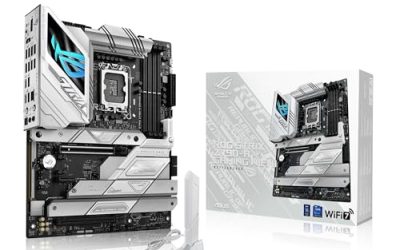
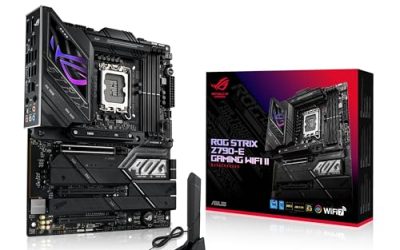
Our Short List of 3

- Best for: Builders who want a long-lasting AM5 foundation with strong power delivery
- Socket AM5 for AMD Ryzen 9000, 8000 and 7000 series processors
- ATX form factor with AMD B650 chipset
- DDR5 memory across four DIMM slots
- Twin 14+2+1 phase digital VRM design

- Best for: Ryzen gaming builds that value power delivery and rear USB count
- Socket AM5 for AMD Ryzen 9000, 8000 and 7000 series processors
- ATX form factor with AMD B650 chipset
- DDR5 memory support up to 6400 MHz and beyond with overclocking
- 14+2+1 Duet Rail power system with 80A Smart Power Stages

- Best for: Builders who want PCIe 5.0 graphics and storage headroom on AM5
- Socket AM5 for AMD Ryzen 9000, 8000 and 7000 series processors
- ATX form factor with AMD B650E chipset
- 12+2 power stages with 8+4 pin ProCool power connectors
- DDR5 memory support
All 5 Picks at a Glance
| Product | Specs | Action |
|---|---|---|
| GIGABYTE B650 AORUS Elite AX |
| Check price on Amazon |
| MSI MAG B650 Tomahawk WiFi |
| Check price on Amazon |
| ASUS ROG Strix B650E-F Gaming WiFi |
| Check price on Amazon |
 MSI MAG B760 Tomahawk WiFi |
| Check price on Amazon |
 ASRock B650M Pro RS WiFi |
| Check price on Amazon |
A motherboard decides which processors, memory and graphics cards your PC can ever run, so picking the wrong one quietly limits every later upgrade. The boards that sell in the biggest numbers are rarely the flashiest models. They are the mainstream ATX and micro-ATX boards with proven power delivery, current networking and enough M.2 slots for years of storage growth. This guide focuses on that proven group rather than halo products, and it explains the checks that separate a safe buy from a listing that only looks similar.
The five picks below suit first-time builders, gamers moving to DDR5 and anyone replacing an aging board without changing cases. Four use AMD’s AM5 socket and one covers Intel’s LGA1700 platform, and every pick comes straight from its current Amazon listing: the GIGABYTE B650 AORUS Elite AX, MSI MAG B650 Tomahawk WiFi, ASUS ROG Strix B650E-F Gaming WiFi, MSI MAG B760 Tomahawk WiFi and ASRock B650M Pro RS WiFi.
Our Top Picks
Top 3 picks at a glance
Quick Picks
As an Amazon Associate we earn from qualifying purchases
| Product | Best for | Key spec from title |
|---|---|---|
| GIGABYTE B650 AORUS Elite AX | Best overall AM5 pick | PCIe 5.0 M.2 support and Wi-Fi 6E |
| MSI MAG B650 Tomahawk WiFi | Ryzen gaming builds | Three M.2 Gen4 slots and Wi-Fi 6E |
| ASUS ROG Strix B650E-F Gaming WiFi | PCIe 5.0 graphics and storage | PCIe 5.0 x16 slot and Gen5 M.2 slot |
| MSI MAG B760 Tomahawk WiFi | Intel DDR5 builds | PCIe 5.0 x16 slot and Wi-Fi 6E |
| ASRock B650M Pro RS WiFi | Compact micro-ATX builds | Gen5 M.2 socket in a micro-ATX board |
How to Choose
Match the Socket and Chipset to Your Processor
Nothing else matters if the board cannot run your CPU. AMD’s current desktop chips use the AM5 socket, while Intel’s 12th, 13th and 14th generation Core processors use LGA1700, and the two are not interchangeable. Check the listing’s supported processor list rather than the product name alone. AM5 buyers should also confirm the BIOS situation: several B650 listings note that a BIOS update may be required before a Ryzen 9000 or 8000 series chip will boot, so a board with BIOS flashback support saves trouble when no older CPU is available.
Check Power Delivery Before Chasing Features
The voltage regulator circuit feeds your processor, and weak designs throttle high-core-count chips under long loads. Compare the power stage counts printed on each listing: the boards here range from an 8+2+1 design on the compact ASRock to twin 14+2+1 phases on the GIGABYTE. More stages with proper heatsinks matter most for Ryzen 9 and Core i7 or i9 parts. For a mid-range Ryzen 5 or Core i5 build, any of these designs is comfortable, so spend attention on storage and ports instead of paying for power headroom you will never use.
Count M.2 Slots, PCIe Lanes and SATA Ports
Storage fills faster than most builders expect, so count the M.2 sockets on the listing and note their speeds. Three slots is the sweet spot in this group, and one Gen5 slot gives a path to the fastest NVMe drives. Check whether the main graphics slot runs at PCIe 5.0 or 4.0, since that decides future graphics card headroom. Also read the fine print about lane sharing: on some boards, filling a second M.2 slot reduces graphics bandwidth, and older SATA drives still need the four SATA ports most of these boards provide.
Compare Networking and Rear Panel Connections
Built-in Wi-Fi saves a slot and a separate adapter, and Wi-Fi 6E is the standard across these picks, with Bluetooth included for controllers and headsets. A 2.5 gigabit Ethernet port is worth having even on a wireless build, because wired connections remain the most stable option for large downloads and local file transfers. Finally, count the rear USB ports and confirm at least one fast Type-C port is present, plus a front-panel Type-C header if your case has one. Display outputs only matter when your processor has integrated graphics, but HDMI and DisplayPort are cheap insurance.
The 5 Best Options
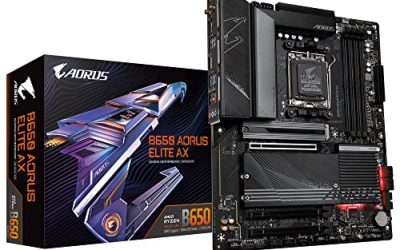
GIGABYTE B650 AORUS Elite AX
- Best for: Builders who want a long-lasting AM5 foundation with strong power delivery
- Socket AM5 for AMD Ryzen 9000, 8000 and 7000 series processors
- ATX form factor with AMD B650 chipset
- DDR5 memory across four DIMM slots
- Twin 14+2+1 phase digital VRM design
Builders who want a long-lasting AM5 foundation with strong power delivery
The B650 chipset limits PCIe 5.0 to storage, so the graphics slot runs at PCIe 4.0 speeds
The AORUS Elite AX is the AM5 board that keeps appearing at the top of buyer shortlists, and the listing explains why: a twin 14+2+1 phase digital VRM, three M.2 slots with PCIe 5.0 support, Wi-Fi 6E and 2.5GbE LAN on a full ATX layout. It suits builders who want one board to carry a Ryzen 5 today and a Ryzen 9 later without a platform change. GIGABYTE’s Q-Flash Plus also helps when a newer chip needs a BIOS update before the system will post for the first time.
MSI MAG B650 Tomahawk WiFi
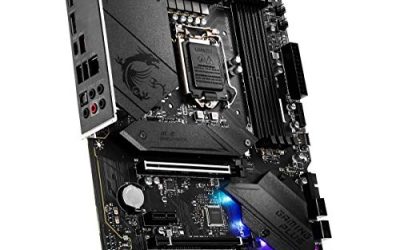
- Best for: Ryzen gaming builds that value power delivery and rear USB count
- Socket AM5 for AMD Ryzen 9000, 8000 and 7000 series processors
- ATX form factor with AMD B650 chipset
- DDR5 memory support up to 6400 MHz and beyond with overclocking
- 14+2+1 Duet Rail power system with 80A Smart Power Stages
Ryzen gaming builds that value power delivery and rear USB count
Storage and graphics both top out at PCIe 4.0, so there is no Gen5 upgrade path
MSI’s Tomahawk line has been a default gaming recommendation for several platform generations, and this AM5 version keeps the formula: a 14+2+1 Duet Rail power system with 80A Smart Power Stages, three M.2 Gen4 slots and a six-layer PCB. The rear panel is generous, with ten USB ports, Wi-Fi 6E, Bluetooth 5.3 and 2.5Gbps LAN, and the ALC4080 audio codec is a step above basic onboard sound. It is the straightforward choice for a Ryzen gaming build that does not need PCIe 5.0 bragging rights to feel complete.
ASUS ROG Strix B650E-F Gaming WiFi
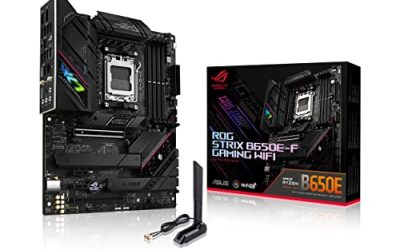
- Best for: Builders who want PCIe 5.0 graphics and storage headroom on AM5
- Socket AM5 for AMD Ryzen 9000, 8000 and 7000 series processors
- ATX form factor with AMD B650E chipset
- 12+2 power stages with 8+4 pin ProCool power connectors
- DDR5 memory support
Builders who want PCIe 5.0 graphics and storage headroom on AM5
The listing notes a BIOS update may be required when using Ryzen 9000 and 8000 series processors
The B650E-F is the pick for buyers who want PCIe 5.0 on both the graphics slot and storage without jumping to a flagship chipset. Its listing highlights 12+2 power stages with ProCool connectors, three M.2 slots with heatsinks (one PCIe 5.0 and two PCIe 4.0), and a PCIe 5.0 x16 SafeSlot for the graphics card. Connectivity is equally complete: USB 3.2 Gen 2×2 Type-C, ten additional rear USB ports, HDMI 2.1, DisplayPort 1.4, WiFi 6E and 2.5G LAN, finished with Aura Sync lighting headers for a coordinated build.
MSI MAG B760 Tomahawk WiFi
- Best for: Intel gaming and work builds using DDR5 memory
- Socket LGA1700 for Intel Core 14th, 13th and 12th generation processors
- ATX form factor with Intel B760 chipset
- Four DDR5 slots supporting up to 256GB at 7000 MHz and beyond with overclocking
- 12+1+1 Duet Rail power system
Intel gaming and work builds using DDR5 memory
The B760 chipset does not support processor overclocking, and a DDR4 namesake exists, so read the full listing title before ordering
Intel builders get their own Tomahawk, and it mirrors the AMD version’s balanced approach on the LGA1700 socket. The listing covers 12th, 13th and 14th generation Core processors, DDR5 memory up to 256GB at speeds beyond 7000 MHz with overclocking profiles, and a PCIe 5.0 x16 slot for current and future graphics cards. Three M.2 Gen4 slots, Intel Wi-Fi 6E, Bluetooth 5.3 and 2.5Gbps LAN round out a board that suits a locked Core i5 or i7 gaming PC that should stay relevant through several upgrades.
ASRock B650M Pro RS WiFi
- Best for: Compact micro-ATX AM5 builds that still want Gen5 storage
- Socket AM5 for AMD Ryzen 9000, 8000 and 7000 series processors
- Micro-ATX form factor, 9.6 by 9.6 inches
- 8+2+1 power phases with 50A Dr.MOS
- Four DDR5 DIMM slots, up to 256GB, 7200 MHz and beyond with overclocking, EXPO and XMP support
Compact micro-ATX AM5 builds that still want Gen5 storage
The smaller board has fewer expansion slots, and a non-WiFi Pro RS namesake exists, so confirm the listing title includes WiFi
Not every popular board is full size. The B650M Pro RS WiFi shrinks the AM5 formula into a micro-ATX footprint that fits smaller cases, yet the listing still includes an 8+2+1 power phase design with 50A Dr.MOS, four DDR5 DIMM slots rated to 7200 MHz and beyond with overclocking, and three M.2 sockets including a Blazing M.2 running at PCIe Gen5 x4. Dragon 2.5G LAN, Wi-Fi 6E and Bluetooth 5.2 cover networking, making this the compact pick that gives up the least to its bigger rivals.
Which One Fits Your Situation
Building a New Ryzen Gaming PC
Start with the GIGABYTE B650 AORUS Elite AX or the MSI MAG B650 Tomahawk WiFi. Both give a Ryzen 5 or Ryzen 7 build strong power delivery, three M.2 slots and Wi-Fi 6E, and both leave room for a faster processor later on the same socket. Choose the GIGABYTE if Gen5 storage matters to you; choose the MSI if you prefer its rear USB layout and audio codec. Either way, budget for DDR5 memory, because neither board accepts DDR4.
Building on Intel With DDR5
The MSI MAG B760 Tomahawk WiFi is the natural home for a 12th, 13th or 14th generation Core processor paired with DDR5. Its PCIe 5.0 graphics slot and three Gen4 M.2 slots match what most Intel gaming builds actually need, and the 12+1+1 power design handles locked Core i7 chips comfortably. Skip it only if you plan to overclock a K-series processor, because the B760 chipset locks that feature out and a Z790 board would be the correct step up.
Choosing a Compact Case
A micro-ATX case rules out the four ATX boards here, which makes the ASRock B650M Pro RS WiFi the pick by default, and a good one. It keeps four memory slots, a Gen5 M.2 socket and 2.5G networking in a 9.6 inch square board, so a small build loses expansion slots rather than everyday performance. Measure your graphics card clearance against the case, not the board, since the card is usually the tightest fit in compact cases.
Replacing a Failed or Aging Board
Match the replacement to the parts you already own. AM5 owners can move their processor and DDR5 memory to any of the four AMD picks, while LGA1700 owners with DDR5 should take the MSI B760 Tomahawk WiFi. If your memory is DDR4, none of these five boards will accept it, so either plan a memory upgrade in the same order or look specifically for a DDR4 variant listing and confirm the memory type in its title before paying.
Common Mistakes
- Buying a DDR5 board for DDR4 memory, or the reverse; all five boards here are DDR5 only, and the two memory types are not interchangeable.
- Ignoring the BIOS note on AM5 listings, then finding a Ryzen 9000 processor will not boot until the board is updated.
- Assuming every M.2 slot runs at full speed, when lane sharing can slow the graphics slot or a secondary slot on some boards.
- Ordering an ATX board for a micro-ATX case, or forgetting to check graphics card clearance in a compact build.
- Confusing near-identical model names, such as WiFi and non-WiFi versions or DDR4 and DDR5 variants, at checkout.
Frequently Asked Questions
Do these motherboards support the latest Ryzen 9000 processors?
The four AM5 picks list Ryzen 9000, 8000 and 7000 series support in their titles, so the socket and chipset are correct. The catch is firmware: some listings state that a BIOS update may be required before a 9000 series chip will boot. Boards with a BIOS flashback feature can be updated without a working processor installed, which is the safest route for a brand new build.
Can I reuse my existing DDR4 memory with these boards?
No. Every board in this guide is a DDR5 model, and DDR4 modules physically cannot fit DDR5 slots. If your current kit is DDR4 and you want to keep it, you need a board whose listing title explicitly says DDR4, because several models here have DDR4 namesakes that look almost identical. Treat the memory line in the listing title as the deciding detail, not the product photos.
Is PCIe 5.0 worth choosing over PCIe 4.0 in a motherboard?
For graphics cards, current models lose very little on a PCIe 4.0 slot, so it is not a reason to overspend today. For storage, a Gen5 M.2 slot is a genuine future upgrade path, since Gen5 NVMe drives are the ones still getting faster. The ASUS B650E-F covers both slots at 5.0, while the GIGABYTE and ASRock picks cover storage only, which is a sensible middle ground.
Does the Intel board here allow processor overclocking?
No. The MSI MAG B760 Tomahawk WiFi uses Intel’s B760 chipset, which supports memory overclocking profiles but locks processor multiplier overclocking. It is designed for locked Core i5 and i7 chips running at their rated speeds, which covers most gaming and work builds. If you own a K-series processor and intend to overclock it, choose a Z790 board instead and confirm that in the listing title before ordering.
Related guides
More from Amazon
Programs that pair well with the guide above. Offers and eligibility are set by Amazon and may change.
Free shipping on eligible items, Prime Video and more. Eligible new members can start with a free trial.
Start a Prime free trialAd-free music streaming. Eligible new subscribers can start with a free trial.
Try Music Unlimited freeA Prime membership for ages 18-24 with a trial period. Eligibility is set by Amazon.
See Prime for Young AdultsAudiobooks and podcasts to listen to on the go. Eligible new members can start with a free trial.
Try Audible freeAs an Amazon Associate we earn from qualifying purchases.