Our Short List of 3

- ASUS VZ24EHF — Best overall for Xbox One. A slim 23.8-inch IPS screen at 1080p and 100Hz. Check on Amazon
- AOC Gaming 24G2S — Best for fast-paced games. A 24-inch frameless VA screen at 1080p and 165Hz. Check on Amazon
- Acer Nitro KG241Y Sbiip — Best FreeSync Premium value. A 23.8-inch VA screen at 1080p and 165Hz. Check on Amazon
- LG 24MP400-B — Best simple IPS picture. A 24-inch IPS screen at 1080p and 75Hz. Check on Amazon
All 5 Picks at a Glance
| Product | Specs | Action |
|---|---|---|
| Our Top Picks |
| Check price on Amazon |
 2. AOC Gaming 24G2S — Best for fast-paced games | Check price on Amazon | |
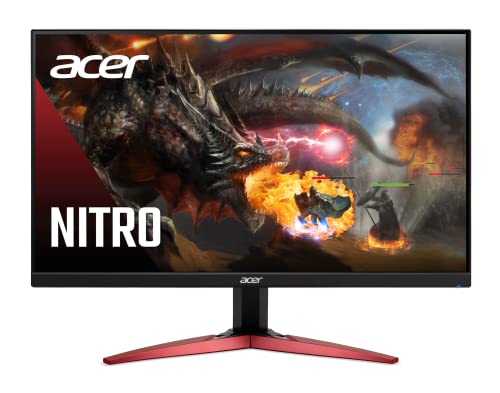 3. Acer Nitro KG241Y Sbiip — Best FreeSync Premium value | Check price on Amazon | |
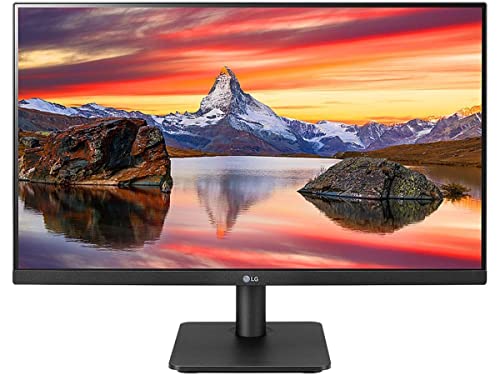 4. LG 24MP400-B — Best simple IPS picture | Check price on Amazon | |
 5. Sceptre E248W-19203R — Best for a bare-bones setup | Check price on Amazon |
As an Amazon Associate I earn from qualifying purchases.
The Xbox One is a 1080p console, and that single fact decides almost everything about the monitor you should pair with it. Games on the standard Xbox One and Xbox One S run at up to 1080p and 60 frames per second, so a screen built around that ceiling shows you everything the console can render. A 24-inch 1080p monitor is the natural match: sharp at arm’s length and small enough for an ordinary desk.
Every pick below is a 24-inch class 1080p screen with HDMI inputs. None of them asks you to pay for 4K resolution or a 120Hz console mode the Xbox One does not have. Where a panel runs faster than 60Hz, that speed is headroom for a connected PC or a future console, not something the Xbox One itself will use. Specs come from each Amazon listing; unstated details are flagged for you to confirm.
Our Top Picks
- Acer Nitro 23.8in FHD 1920x1080 180Hz Gaming Monitor23.8-inch21.27 x 7.44 x 16.3 inches8.4 poundsCheck on Amazon
Top 3 picks at a glance
The Short Answer
If you want one monitor and no second guessing, get the ASUS VZ24EHF. It is a 23.8-inch IPS screen at 1080p and 100Hz with Adaptive-Sync and a 1ms response time. If you play fast-paced shooters, the AOC 24G2S is the pick, with a 165Hz VA panel, a 1ms response time, and a height-adjustable stand. If your desk is tight and you want built-in speakers so the console works with nothing else attached, the Sceptre E248W-19203R is the simplest setup of the five, with two HDMI ports and speakers built in. The Acer Nitro KG241Y Sbiip adds FreeSync Premium, and the LG 24MP400-B adds a calm IPS picture at 75Hz.
Our Top Picks
- ASUS VZ24EHF — Best overall for Xbox One. A slim 23.8-inch IPS screen at 1080p and 100Hz. Check on Amazon
- AOC Gaming 24G2S — Best for fast-paced games. A 24-inch frameless VA screen at 1080p and 165Hz. Check on Amazon
- Acer Nitro KG241Y Sbiip — Best FreeSync Premium value. A 23.8-inch VA screen at 1080p and 165Hz. Check on Amazon
- LG 24MP400-B — Best simple IPS picture. A 24-inch IPS screen at 1080p and 75Hz. Check on Amazon
Quick Comparison
| Product | Best for | Size and panel | Refresh rate | Ports and extras |
|---|---|---|---|---|
| ASUS VZ24EHF | Everyday Xbox One play | 23.8-inch IPS, 1080p | 100Hz, 1ms MPRT | HDMI, Adaptive-Sync, ultra-slim, wall mountable |
| AOC Gaming 24G2S | Fast-paced games | 24-inch VA, 1080p, frameless | 165Hz, 1ms | FreeSync Premium, height-adjustable stand |
| Acer Nitro KG241Y Sbiip | FreeSync Premium gaming | 23.8-inch VA, 1080p, ZeroFrame | 165Hz, 1ms VRB | 2x HDMI 2.0, DisplayPort 1.2, FreeSync Premium |
| LG 24MP400-B | Simple, steady picture | 24-inch IPS, 1080p, borderless | 75Hz, 5ms | HDMI, D-Sub, FreeSync, Reader Mode, OnScreen Control |
| Sceptre E248W-19203R | Small desk, no extra gear | 24-inch LED, 1080p | Up to 100Hz | 2x HDMI, VGA, built-in speakers, VESA 100×100 |
How to Choose
Match the console’s ceiling first
The Xbox One outputs games at up to 1080p and 60 frames per second. A 1080p monitor therefore shows the console at its native resolution with no scaling softness. Panels in this guide run at 75Hz, 100Hz, or 165Hz, and that extra speed does no harm: the console still sends 60 frames per second, and the monitor simply has headroom left over. Treat refresh rate above 60Hz as a bonus for a PC you might connect later, not as a feature the Xbox One needs. The same applies to resolution: a 4K screen scales the 1080p signal up without adding detail.
Size: 24 inches is the sweet spot
At 1080p, a 24-inch screen packs the pixels tightly enough that text and HUD elements stay crisp at arm’s length. Step up to 27 inches at the same resolution and the same image stretches across more glass, which makes edges and small text visibly softer. All five picks here sit in the 24-inch class for exactly that reason, and a 24-inch screen also fits a shallow desk or dorm setup.
Panel type: IPS for viewing angles, VA for contrast
IPS panels, used by the ASUS and LG picks, hold their color and brightness when you watch from an angle, which matters in a shared room. VA panels, used by the AOC and Acer picks, typically show deeper blacks and stronger contrast in a dark room, which suits moody single-player games, but their viewing angles narrow sooner. The Sceptre listing does not name a panel type, so treat its picture as entry-level and confirm on the listing if panel type matters to you.
Refresh rate and variable refresh
Xbox One supports FreeSync on many titles, and FreeSync or Adaptive-Sync on a monitor lets the screen match its refresh to the console’s frame output, which smooths out the judder you get when a game dips below 60 frames per second. The Acer and the AOC carry FreeSync Premium, the LG carries FreeSync, and the ASUS carries Adaptive-Sync. This is a genuine, useful feature for this console, unlike raw refresh rate above 60Hz.
Speakers and ports
Every Xbox One connects over HDMI, so one HDMI port is the minimum and two is better: a second port leaves room for a streaming stick, a laptop, or a second console without swapping cables. The Sceptre and Acer give you two HDMI ports; confirm the port count on the others. Built-in speakers are the other practical question. Only the Sceptre states built-in speakers in its listing title, so if you want sound without a headset or a soundbar, it is the only pick here that guarantees it. For the other four, confirm on the listing and plan on a headset if speakers are absent.
Stand and mounting
A tilt-only stand is fine if the monitor sits at eye level, but a height-adjustable stand, like the one on the AOC 24G2S, helps when the screen sits on a low dresser or a high shelf. Every pick here is wall mountable, and the Sceptre lists a 100x100mm VESA pattern, so an arm or wall bracket is an easy upgrade.
The Picks in Detail
1. ASUS VZ24EHF — Best overall for Xbox One
The VZ24EHF is the most balanced screen in this group, and it is the one to buy if you do not want to think about trade-offs. The listing shows a 23.8-inch IPS panel at 1920×1080 with a 100Hz refresh rate, a 1ms MPRT response time, and Adaptive-Sync. The frameless panel measures 6.5mm at its thinnest point, so it leaves a small footprint on a crowded desk. ASUS lists flicker-free operation and a low blue light mode, both certified by TÜV Rheinland, which matters for long evening sessions. The listing does not state built-in speakers, so confirm on the listing and keep a headset handy.
Pros:
– 23.8-inch IPS panel at 1080p matches the Xbox One output exactly
– 100Hz refresh rate and Adaptive-Sync with a 1ms MPRT response time
– Ultra-slim frameless design with a small desk footprint
– Flicker-free and low blue light modes for long sessions
Cons:
– Built-in speakers are not stated on the listing, so confirm before buying
– Single HDMI input shown
– 100Hz headroom goes unused by the Xbox One itself
2. AOC Gaming 24G2S — Best for fast-paced games
The 24G2S is the pick for players who spend their time in shooters, racers, and anything where a fast-moving target matters. The Amazon listing shows a 24-inch frameless gaming monitor at Full HD 1920×1080 with a 165Hz refresh rate, a 1ms response time, and FreeSync Premium, plus a height-adjustable stand. The wired side covers a console and a PC at once, with two HDMI 1.4 ports, a DisplayPort 1.2 port and a VGA port. For Xbox One play, the honest note is the same as for every fast panel here: the console sends 60 frames per second, so the 165Hz ceiling is headroom, not a visible gain on this console. What you do get is a fast 1ms panel with FreeSync Premium and a stand that adjusts to your eye level.
Pros:
– 165Hz VA panel with a 1ms response time and FreeSync Premium
– Height-adjustable stand, the most flexible stand in this group
– Frameless design that suits a second screen later
– Full HD resolution matches the Xbox One output with no scaling
Cons:
– Built-in speakers are not stated on the listing, so confirm before buying
– The 165Hz ceiling goes unused by the Xbox One itself
– HDMI caps at 144Hz, so the full 165Hz needs DisplayPort — immaterial for Xbox One at 60 frames per second
3. Acer Nitro KG241Y Sbiip — Best FreeSync Premium value
The Nitro KG241Y Sbiip is the pick for buyers who want the strongest variable-refresh support in this group. The Amazon listing shows a 23.8-inch Full HD VA gaming monitor at 1920×1080 with a 165Hz refresh rate, a 1ms VRB response time, and AMD FreeSync Premium, in a ZeroFrame design with one DisplayPort 1.2 input and two HDMI 2.0 inputs. The VA panel shows deeper blacks and stronger contrast than the IPS picks, which suits dark, atmospheric games played in a dim room. The trade-off is viewing angle: color and brightness shift sooner when viewed from the side, so it suits a single player sitting straight in front of it more than a shared room. FreeSync Premium smooths the frame dips that show up in busy scenes.
Pros:
– AMD FreeSync Premium, the strongest variable-refresh support here
– Two HDMI 2.0 ports plus DisplayPort 1.2 for extra devices
– VA panel with deep blacks and strong contrast in dark rooms
– 165Hz refresh rate and 1ms VRB response time
Cons:
– VA viewing angles are narrower than the IPS picks, so it suits solo play best
– Built-in speakers are not stated on the listing, so confirm before buying
– 1080p on a VA panel can look softer from the side
4. LG 24MP400-B — Best simple IPS picture
The 24MP400-B is the quiet pick in this group, and it suits the player who wants a good picture with no gaming styling and no setup fuss. The listing shows a 24-inch Full HD IPS monitor at 1920×1080 with a 75Hz refresh rate, a 5ms response time, AMD FreeSync, and a 3-side virtually borderless design, plus Reader Mode, Smart Energy Saving, and OnScreen Control software, with HDMI and D-Sub inputs. The 75Hz refresh rate is the closest match in this group to the console’s own 60 frames per second, so nothing about this screen is wasted. The 5ms response time is slower than the 1ms gaming panels here, but at 60 frames per second the difference is small.
Pros:
– 24-inch IPS panel with steady color and wide viewing angles
– 75Hz refresh rate sits close to the console’s 60 frames per second
– 3-side borderless design with a small footprint
– Reader Mode and OnScreen Control for long, comfortable sessions
Cons:
– 5ms response time is slower than the 1ms gaming panels in this group
– Built-in speakers are not stated on the listing, so confirm before buying
– No second HDMI port stated
5. Sceptre E248W-19203R — Best for a bare-bones setup
The E248W-19203R is the simplest way to get an Xbox One running on a desk with nothing else to buy. The Amazon listing shows a 24-inch Prime monitor at 1080p with wide sRGB coverage stated in the listing, two HDMI ports, a VGA port, built-in speakers, refresh rates up to 100Hz, and a 100x100mm VESA pattern. Two HDMI ports plus speakers means the console and sound work out of the box, which no other pick in this group guarantees. The trade-offs are honest ones. The listing does not name a panel type, so expect entry-level contrast and viewing angles rather than the IPS steadiness of the ASUS or LG picks, and confirm the panel type on the listing if it matters to you. There is also no adaptive-sync certification stated on the listing, so frame smoothing depends on the console alone.
Pros:
– Built-in speakers, the only pick here that guarantees sound with no extra gear
– Two HDMI ports plus VGA for a console and a second device
– Refresh rates up to 100Hz with a 100x100mm VESA pattern
– 24-inch 1080p size keeps the picture sharp at arm’s length
Cons:
– Panel type is not stated on the listing, so expect entry-level viewing angles
– No adaptive-sync certification stated on the listing
– The plain design and basic stand suit function over form
Who Should Choose What
- You want one monitor that does everything well: the ASUS VZ24EHF. Slim IPS picture, 100Hz, Adaptive-Sync, and a small footprint.
- You play shooters and fast games most: the AOC 24G2S. The 165Hz VA panel and height-adjustable stand suit long competitive sessions.
- You play dark, story-driven games alone: the Acer Nitro KG241Y Sbiip. The VA panel and FreeSync Premium give you deep blacks and the smoothest frame handling in the group.
- You want a calm picture and a quiet design: the LG 24MP400-B. A steady IPS screen at 75Hz.
- You want the console working with nothing else to buy: the Sceptre E248W-19203R. Two HDMI ports and built-in speakers mean the setup is complete out of the box.
- You sit far from the screen or share it with the room: lean toward an IPS pick, the ASUS or LG.
Common Mistakes
- Buying a 4K monitor for Xbox One games. The console renders games at up to 1080p, so a 4K screen scales the image up without adding detail.
- Paying for 120Hz or 240Hz as a console feature. The Xbox One sends at most 60 frames per second, so refresh rate above 60Hz is headroom for other devices, not a gain on this console.
- Choosing a 27-inch 1080p screen for a close desk. The same resolution stretched over a larger panel looks softer. At 1080p, 24 inches is the size that stays sharp.
- Forgetting about sound. Most monitor listings in this class do not include speakers. Only the Sceptre here guarantees them, so plan on a headset.
- Using one HDMI port for everything. A monitor with two HDMI ports saves constant cable swapping when a second device joins the desk. The Acer and Sceptre give you that.
- Skipping FreeSync. Frame dips are where a console monitor shows its weakness, and a FreeSync or Adaptive-Sync panel smooths those dips.
FAQ
Does the Xbox One work with any monitor that has HDMI?
Yes. The Xbox One connects over HDMI, so any monitor in this guide works with a single HDMI cable. Check that the monitor has at least one HDMI input and that you have a cable long enough to reach your desk.
Is a 144Hz or 165Hz monitor wasted on Xbox One?
Mostly, but not entirely. The console sends at most 60 frames per second, so it cannot use the extra refresh rate. What you still get is a fast response time, Adaptive-Sync or FreeSync smoothing, and a panel that stays useful for a PC later.
Do I need a 4K monitor for Xbox One?
No. Xbox One games run at up to 1080p, so a 1080p monitor shows them at native resolution with no scaling. A 4K monitor will display the console’s signal, but it cannot add detail the console never rendered.
Does FreeSync work with Xbox One?
Yes, the Xbox One supports FreeSync on many titles, and a FreeSync or Adaptive-Sync monitor lets the screen match its refresh to the console’s frame output. That smooths judder when a game dips below 60 frames per second. The Acer, LG, AOC, and ASUS picks all carry FreeSync or Adaptive-Sync support.
Can I use a monitor without built-in speakers?
Yes, but you need another way to hear the game. A headset plugged into the controller is the simplest option, and it works with every monitor in this guide. Only the Sceptre E248W-19203R in this group states built-in speakers, so confirm on the listing for the other four.
What size monitor is best for Xbox One?
A 24-inch screen is the best match for 1080p at a desk, because the pixels stay dense enough to keep text and HUD elements crisp at arm’s length. A 27-inch 1080p screen looks softer at the same distance. All five picks here are 24-inch class screens for that reason.
Conclusion
The best monitor for Xbox One is a 24-inch 1080p screen with HDMI, low lag, and variable refresh support, because that is exactly what the console can use and nothing it cannot. The ASUS VZ24EHF is the pick for most players. The AOC 24G2S suits fast games and tall desks, the Acer Nitro KG241Y Sbiip suits dark rooms and FreeSync Premium, the LG 24MP400-B suits a calm, steady picture, and the Sceptre E248W-19203R suits a setup that needs speakers and a second HDMI port with nothing else to buy. Confirm the speaker and port details on the listing before you buy.
Related guides
More from Amazon
Programs that pair well with the guide above. Offers and eligibility are set by Amazon and may change.
Free shipping on eligible items, Prime Video and more. Eligible new members can start with a free trial.
Start a Prime free trialAd-free music streaming. Eligible new subscribers can start with a free trial.
Try Music Unlimited freeA Prime membership for ages 18-24 with a trial period. Eligibility is set by Amazon.
See Prime for Young AdultsAudiobooks and podcasts to listen to on the go. Eligible new members can start with a free trial.
Try Audible freeAs an Amazon Associate we earn from qualifying purchases.