Our Short List of 3

- Best for: flagship 12th Gen gaming builds with an unlocked Core i7 or Core i9, DDR5 memory, and several NVMe drives.

- Best for: builders who want Z690 overclocking and PCIe 5.0 while reusing DDR4 memory from an earlier build.

- Best for: full-size gaming builds with a locked Core i5 or Core i7 that will run at stock speeds.
All 4 Picks at a Glance
| Product | Specs | Action |
|---|---|---|
| ASUS ROG Strix Z690-E Gaming WiFi 6E — ASIN B09JS5DHSX |
| Check price on Amazon |
| MSI PRO Z690-A DDR4 — ASIN B09GLD6LYW |
| Check price on Amazon |
| MSI PRO B660-A DDR4 — ASIN B09PXGNVD3 |
| Check price on Amazon |
 MSI PRO B660M-A WiFi DDR4 — ASIN B09PX7D8KY |
| Check price on Amazon |
The best motherboards for Intel 12th Gen processors use the LGA 1700 socket with a Z690 or B660 chipset, and the right choice depends on whether you want DDR5 memory and overclocking support or a lower-cost DDR4 build. A Z690 board suits an unlocked Core i7 or Core i9 and a high-end graphics card, while a B660 board covers most Core i5 gaming builds with fewer extras. Match the chipset and memory type to your CPU and RAM before you buy, because DDR4 and DDR5 boards are not interchangeable.
Our Top Picks
Top 3 picks at a glance
Introduction
Every 12th Gen Intel Core processor, from the Core i3-12100F to the Core i9-12900K, fits the LGA 1700 socket, so the motherboard decision comes down to chipset, memory, and expansion rather than socket fit. Intel launched the 12th generation with two main desktop chipsets: Z690, which supports CPU overclocking and the fastest memory and storage options, and B660, which keeps the same socket and PCIe support while trimming overclocking and some connectivity. A third chipset, H610, exists for basic builds, but its limited memory slots, fewer USB ports, and single M.2 slot make it a poor match for most gaming PCs, so this guide focuses on Z690 and B660 boards.
Our top pick: ASUS ROG Strix Z690-E Gaming WiFi 6E. Runner-up: MSI PRO Z690-A DDR4. This guide compares published specifications only: every feature mentioned below comes from the manufacturer’s specification sheet or the Amazon product listing, with no performance claims beyond what those published specifications state.
The four boards in this guide cover the realistic range of 12th Gen builds. At the top sits a DDR5 Z690 board with PCIe 5.0, WiFi 6E, and five M.2 slots for a flagship gaming rig. Below it, two DDR4 boards bring the same LGA 1700 socket to builders who already own DDR4 memory or want to keep the memory budget in check. The fourth board is a compact Micro-ATX B660 option with built-in WiFi for smaller cases. Each one supports the full 12th Gen lineup, including Core i9 chips, although the power delivery and cooling on the smaller boards suit mid-range CPUs more comfortably than a heavily loaded Core i9.
Before choosing, confirm three things about your planned build: whether your memory is DDR4 or DDR5, whether your case fits an ATX or a Micro-ATX board, and whether you need WiFi built in or can use a wired connection. Those three answers narrow the field to one or two boards immediately, and the sections below explain how each specification affects the finished PC.
At a Glance
| Product | Best for | Key specification |
|---|---|---|
| ASUS ROG Strix Z690-E Gaming WiFi 6E | Flagship DDR5 gaming builds | Z690, DDR5, PCIe 5.0, WiFi 6E, 5x M.2 |
| MSI PRO Z690-A DDR4 | DDR4 builds that still want Z690 features | Z690, DDR4 up to 5200 MHz (OC), PCIe 5.0, 4x M.2 |
| MSI PRO B660-A DDR4 | Full-size ATX B660 gaming builds | B660, DDR4, PCIe 4.0, 2.5G LAN, M.2 slots |
| MSI PRO B660M-A WiFi DDR4 | Compact builds with wireless networking | B660, Micro-ATX, DDR4, WiFi 6, 2.5G LAN |
How to Choose
1. Chipset: Z690 or B660
The chipset decides what your board can do. Z690 supports CPU overclocking on unlocked K-series processors, splits PCIe lanes more flexibly, and generally carries more USB ports and M.2 slots. B660 drops CPU overclocking while keeping memory overclocking, PCIe 4.0 graphics support, and the same LGA 1700 socket, which makes it the sensible choice when the CPU will run at stock speeds. If you plan to buy a Core i7-12700K or Core i9-12900K and push it beyond stock speeds, choose Z690. If you plan to buy a locked Core i5 such as the 12400F and run it as shipped, B660 gives you the same gaming performance from the socket for a simpler board.
2. Memory type: DDR4 or DDR5
This is the one decision you cannot change later. A board accepts either DDR4 or DDR5, never both, and the memory sticks are physically keyed differently, so DDR4 modules do not fit a DDR5 board. DDR5 brings higher bandwidth and higher capacities per module, and it pairs naturally with Z690 flagship boards. DDR4 remains the practical choice for builders who already own DDR4 kits or want to reuse memory from an earlier build, and DDR4 boards such as the MSI PRO Z690-A DDR4 support speeds up to 5200 MHz with overclocking profiles. Check the memory you own or plan to buy first, then choose a board that matches it.
3. Power delivery and CPU choice
The voltage regulator modules, known as the VRM, feed power to the processor, and their quality matters more as the CPU draws more power. A Core i9-12900K under load demands far more from the VRM than a Core i5-12400F, so a board with more power stages and larger heatsinks suits the bigger chip. The ASUS ROG Strix Z690-E Gaming WiFi 6E lists 18 plus 1 power stages, which is built for high-end unlocked processors. The MSI PRO boards use simpler power delivery that suits Core i5 and Core i7 processors at stock settings. Match the board’s power delivery to your CPU: a flagship CPU deserves a flagship board, while a mid-range CPU runs happily on a B660 board.
4. Expansion slots and storage
Count the slots you need before you buy. A graphics card uses the primary PCIe x16 slot, and on Z690 boards that slot can run at PCIe 5.0 speeds, while B660 boards top out at PCIe 4.0 for graphics. Storage matters just as much: each M.2 slot holds one NVMe solid-state drive, and the number of slots decides how many fast drives you can install without add-in cards. The Strix Z690-E provides five M.2 slots, the PRO Z690-A DDR4 provides four, and the B660 boards provide fewer. If you plan to install two or three NVMe drives plus a large graphics card and a capture card, choose a board with enough M.2 slots and secondary PCIe slots to hold them all.
5. Form factor and case fit
ATX boards measure 305 by 244 millimeters and fit mid-tower and full-tower cases, while Micro-ATX boards are shorter and fit compact cases as well as most mid-towers. The MSI PRO B660M-A WiFi DDR4 uses the Micro-ATX form factor, so it works in smaller cases where a full ATX board would not fit, and it still carries four memory slots and the essential expansion. Before ordering, measure your case or check its specification sheet for the largest board it accepts. A board that does not fit the case cannot be installed at all, so this check comes before any comparison of features.
6. Networking: WiFi, Ethernet, and Bluetooth
Wired Ethernet remains the most stable connection for online gaming, and every board in this guide includes at least a 2.5 gigabit Ethernet port. Built-in WiFi matters when the router sits in another room and running a cable is impractical. The Strix Z690-E includes WiFi 6E, the PRO B660M-A WiFi DDR4 includes WiFi 6, and the MSI PRO Z690-A DDR4 and PRO B660-A DDR4 have no wireless module, so they need a wired connection or a separate adapter. Bluetooth comes with the WiFi module on boards that have one, which covers wireless headsets, controllers, and peripherals. Decide how the PC will connect to the network, then make sure the board includes that option.
7. Rear connectivity and USB
The rear input and output panel decides what you can plug in without reaching inside the case. Look for the number and type of USB ports, including USB Type-C, and for display outputs such as HDMI and DisplayPort, which matter when you run the PC from integrated graphics for troubleshooting or a secondary display. The Strix Z690-E adds a USB 3.2 Gen 2×2 Type-C port and Thunderbolt 4 support through a header, while the B660 boards cover the standard mix of USB 3.2 and USB 2.0 ports. Count your keyboard, mouse, headset, external drive, and other peripherals, then confirm the board has enough ports of the right type.
Our Picks
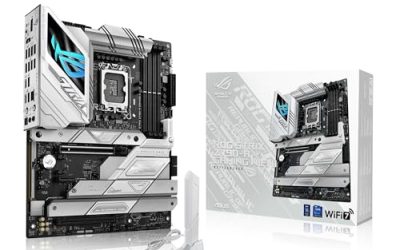
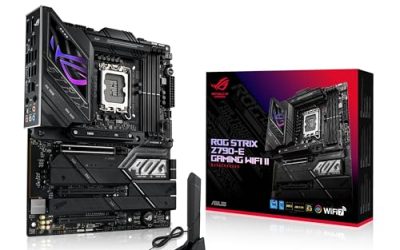
ASUS ROG Strix Z690-E Gaming WiFi 6E — ASIN B09JS5DHSX
- Best for: flagship 12th Gen gaming builds with an unlocked Core i7 or Core i9, DDR5 memory, and several NVMe drives.
flagship 12th Gen gaming builds with an unlocked Core i7 or Core i9, DDR5 memory, and several NVMe drives.
The ASUS ROG Strix Z690-E Gaming WiFi 6E is the most complete 12th Gen board in this guide, built around the Intel Z690 chipset and the LGA 1700 socket with support for DDR5 memory and a PCIe 5.0 graphics slot. Its published specifications list 18 plus 1 power stages, WiFi 6E, Intel 2.5 Gb Ethernet, five M.2 slots with a combination heatsink, Thunderbolt 4 support, and a front-panel USB 3.2 Gen 2×2 Type-C port. The board also includes a ROG Hyper M.2 card for an additional PCIe 5.0 M.2 slot, and its audio section uses the ALC4080 codec with SupremeFX shielding. Four DDR5 DIMM slots support high-speed DDR5 kits, and the ATX form factor fits standard mid-tower and full-tower cases.
Consideration: it requires DDR5 memory, so builders who already own DDR4 kits need a different board, and its full feature set goes beyond what a locked Core i5 build needs.
MSI PRO Z690-A DDR4 — ASIN B09GLD6LYW
- Best for: builders who want Z690 overclocking and PCIe 5.0 while reusing DDR4 memory from an earlier build.
builders who want Z690 overclocking and PCIe 5.0 while reusing DDR4 memory from an earlier build.
The MSI PRO Z690-A DDR4 brings the Z690 chipset to DDR4 builders, pairing the LGA 1700 socket with four DDR4 DIMM slots that support memory speeds up to 5200 MHz with overclocking. Its published specifications list a PCIe 5.0 x16 slot for graphics, three M.2 Gen4 slots plus one M.2 Gen3 slot, Intel I225-V 2.5G LAN, and HDMI and DisplayPort outputs. The board uses the ATX form factor, includes M.2 Shield Frozr heatsinks for the primary storage slots, and supports 12th Gen Intel Core, Pentium, and Celeron processors. Audio comes from a 7.1-channel high-definition codec, and the board provides twelve USB 2.0 ports alongside its faster USB connections.
Consideration: it has no built-in WiFi or Bluetooth, so wireless networking needs a wired connection or a separate adapter.
MSI PRO B660-A DDR4 — ASIN B09PXGNVD3
- Best for: full-size gaming builds with a locked Core i5 or Core i7 that will run at stock speeds.
full-size gaming builds with a locked Core i5 or Core i7 that will run at stock speeds.
The MSI PRO B660-A DDR4 is a full-size ATX board for 12th Gen builds that do not need overclocking, using the Intel B660 chipset with the LGA 1700 socket and DDR4 memory. Its published specifications list PCIe 4.0 support, 2.5G LAN, M.2 slots for NVMe storage, and USB 3.2 connectivity. The board supports 12th Gen Intel Core processors and carries the standard PRO series feature set, including a straightforward layout with room for a full-size graphics card and additional expansion cards. Four DDR4 DIMM slots support dual-channel memory, and the ATX form factor gives builders the full set of slots and headers found on larger boards.
Consideration: the B660 chipset does not support CPU overclocking, so an unlocked K-series processor loses its main advantage on this board, and it has no built-in WiFi.
MSI PRO B660M-A WiFi DDR4 — ASIN B09PX7D8KY
- Best for: compact Micro-ATX builds that need built-in WiFi and a smaller footprint without giving up four memory slots.
compact Micro-ATX builds that need built-in WiFi and a smaller footprint without giving up four memory slots.
The MSI PRO B660M-A WiFi DDR4 is the compact option in this guide, using the Micro-ATX form factor with the Intel B660 chipset and the LGA 1700 socket. Its published specifications list four DIMM slots with dual-channel DDR4 memory support up to 4800 MHz and higher with overclocking, PCIe 4.0 graphics support, and an M.2 Shield Frozr heatsink for the primary storage slot. Networking includes WiFi 6 with Bluetooth and a 2.5G LAN port, and the board provides a front Type-C USB 3.2 Gen 1 header plus Audio Boost for onboard sound. The smaller board still supports 12th Gen Intel Core processors from Core i3 through Core i9, and its EZ Debug LED helps identify boot problems during assembly.
Consideration: the Micro-ATX layout has fewer expansion slots than the ATX boards here, so builders planning multiple add-in cards should choose a full-size board instead.
Which One Is Right for You?
Start with your processor and memory. If you own a Core i9-12900K or Core i7-12700K and want to overclock it with DDR5 memory, the ASUS ROG Strix Z690-E Gaming WiFi 6E is the match, with the strongest power delivery and the most storage slots in this guide. If you own the same unlocked processor but want to keep DDR4 memory, the MSI PRO Z690-A DDR4 keeps Z690 overclocking and PCIe 5.0 while accepting the DDR4 kits you already have.
If your processor is a locked Core i5 such as the 12400F or a locked Core i7, the B660 boards cover everything you need. Choose the MSI PRO B660-A DDR4 when your case fits a full ATX board and you want the maximum number of expansion slots, and choose the MSI PRO B660M-A WiFi DDR4 when your case is compact or your router sits too far away for a cable. The wireless board is also the better pick for a living-room PC or a setup where the desk has no Ethernet drop nearby.
Think about storage next. Builders planning three or more NVMe drives should lean toward the Z690 boards with four or five M.2 slots, while a build with one NVMe drive and one SATA drive fits any board here. Finally, check the rear panel against your peripherals: a setup with many USB devices benefits from the Strix board’s larger port count, while a simple keyboard, mouse, and headset setup works on any of the four.
Frequently Asked Questions
Do 12th Gen Intel processors work on Z690 and B660 boards?
Yes. Both chipsets use the LGA 1700 socket, which is the socket for the entire 12th Gen lineup, from Core i3 through Core i9. Some boards may need a BIOS update for later processor steppings, so check the manufacturer’s CPU support list for your exact processor model before buying.
Can I use DDR4 memory on a DDR5 motherboard?
No. DDR4 and DDR5 modules have different notch positions and do not fit each other’s slots, and no LGA 1700 board accepts both types. Decide which memory type you own or plan to buy first, then choose a board that matches it, because the memory decision locks in the board choice.
Do I need a Z690 board to overclock a 12th Gen CPU?
CPU overclocking requires both an unlocked K-series processor and a Z690 chipset, so a B660 board cannot overclock the CPU even with a K-series chip installed. Memory overclocking works on both chipsets, so a B660 board still supports faster DDR4 or DDR5 kits through their rated overclocking profiles.
Will a 12th Gen motherboard work with a 13th or 14th Gen processor?
Most LGA 1700 boards support 13th and 14th Gen processors with a BIOS update, because those generations share the same socket. The exact support depends on the board model and BIOS version, so confirm compatibility on the manufacturer’s support page and be ready to update the BIOS before installing a newer processor.
How many M.2 slots do I need for a gaming PC?
One M.2 slot covers a single NVMe drive for Windows and games, which suits most builds. Two slots let you separate the operating system from a games library, and three or more suit builders who keep large media collections or work files on fast storage. The boards in this guide range from the B660 options up to five M.2 slots on the Strix Z690-E, so match the slot count to the number of NVMe drives you plan to install.
Bottom Line
The best motherboard for an Intel 12th Gen build starts with the socket every 12th Gen chip shares and then narrows to the chipset and memory type your build needs. Choose the ASUS ROG Strix Z690-E Gaming WiFi 6E for a flagship DDR5 build with an unlocked processor, the MSI PRO Z690-A DDR4 for Z690 features with DDR4 memory, the MSI PRO B660-A DDR4 for a full-size stock-speed build, or the MSI PRO B660M-A WiFi DDR4 for a compact build with wireless networking. Confirm the memory type, form factor, and network connection before ordering, and the board you pick will serve the processor well for years.
Disclosure: As an Amazon Associate, this site earns from qualifying purchases.
Related guides
More from Amazon
Programs that pair well with the guide above. Offers and eligibility are set by Amazon and may change.
Free shipping on eligible items, Prime Video and more. Eligible new members can start with a free trial.
Start a Prime free trialAd-free music streaming. Eligible new subscribers can start with a free trial.
Try Music Unlimited freeA Prime membership for ages 18-24 with a trial period. Eligibility is set by Amazon.
See Prime for Young AdultsAudiobooks and podcasts to listen to on the go. Eligible new members can start with a free trial.
Try Audible freeAs an Amazon Associate we earn from qualifying purchases.