A budget motherboard is the one part of a build you cannot swap later without rebuilding the whole PC, so the real decision is not which board looks best on a spec sheet but which platform you want to live on for years. Pick the wrong socket or memory type and your CPU and RAM budget is wasted, while the right entry board leaves money for the graphics card and storage that actually shape daily performance.


This guide serves three groups: first-time builders starting fresh on a current AMD or Intel platform, upgraders reusing a DDR4 memory kit on AM4 or LGA 1700, and compact-build fans who want micro-ATX without losing fast storage. Every board below was chosen from the names and specifications on its Amazon listing, and each one is a headline motherboard model in the entry tier of its platform.
Quick Picks
As an Amazon Associate we earn from qualifying purchases
| Product | Best for | Key spec from title |
|---|---|---|
| ASRock B650M-HDV/M.2 | Lean AM5 builds with fast storage | Blazing M.2 PCIe Gen5x4 slot |
| MSI PRO B650M-P | Four-slot AM5 memory expansion | DDR5 support up to 7200 MHz |
| MSI B550M PRO-VDH WiFi | AM4 builds needing wireless built in | Wi-Fi and Bluetooth onboard |
| MSI PRO B760M-P DDR4 | Intel builds reusing a DDR4 kit | LGA 1700 with PCIe 4.0 |
How to Choose
Socket and Chipset Fit for Your CPU
The socket decides everything else, so confirm it before comparing any other feature. AM5 boards such as the two B650 models here take Ryzen 7000, 8000 and 9000 series processors and nothing older, while the B550 board uses AM4 for Ryzen 5000 series chips. On the Intel side, the B760 board uses LGA 1700 for 12th, 13th and 14th generation Core, Pentium Gold and Celeron processors. Chipset letters matter too: B-series boards cover gaming and everyday overclocking of memory, while cheaper H-series boards cut slots and USB speed. Match the exact CPU model against the board support list on the listing page before ordering.
Memory Type and Slot Count
Memory type is locked to the platform, and mixing it up is the most expensive mistake at this tier. AM5 boards use DDR5 only, so an existing DDR4 kit cannot follow you there, while the AM4 and LGA 1700 DDR4 boards in this guide exist precisely for builders reusing memory they already own. Slot count shapes your upgrade path just as much. Four-slot boards like the MSI PRO B650M-P and PRO B760M-P DDR4 let you start with two sticks and add two more later, whereas the two-slot ASRock B650M-HDV/M.2 means a capacity upgrade replaces the whole kit. Check the listed maximum capacity and memory speed for each board.
Expansion and Storage Slots
Count the slots your build actually needs today, then leave one spare where you can. Every board here provides a PCIe 4.0 x16 slot for a graphics card, which is enough for a single-GPU gaming build. Storage is where the entry tier splits: the ASRock pairs a Blazing M.2 Gen5x4 slot with a Hyper M.2 Gen4x4 slot for very fast NVMe drives, the MSI B650 board offers two M.2 Gen4 slots, and the DDR4 boards combine one or more M.2 slots with SATA ports for older drives. If you plan a second NVMe drive for game storage, rule out any board with a single M.2 slot before you buy.
Rear I/O and Wi-Fi Trade-Offs at This Tier
Entry boards save money at the back panel, so read the port list instead of assuming it. Display outputs matter if your CPU has integrated graphics: the boards here variously list HDMI, DisplayPort and even D-SUB, and a missing DisplayPort can strand a high-refresh monitor on a weaker connection. Networking splits the range clearly. The MSI B550M PRO-VDH WiFi includes Wi-Fi and Bluetooth onboard, the MSI B650 board lists 2.5Gbps wired LAN without wireless, and the ASRock lists Dragon 2.5G LAN as well. If the PC sits far from the router, a board with wireless built in avoids a separate adapter purchase later.
The 4 Best Options
ASRock B650M-HDV/M.2
This is the leanest route onto AM5, built for a builder who wants current-platform storage speed without paying for slots that stay empty. Its listing highlights an 8+2+1 power phase design with Dr.MOS, support for Ryzen 9000, 8000 and 7000 series processors, and a Blazing M.2 slot running at PCIe Gen5x4 beside a second Hyper M.2 Gen4x4 slot, a pairing rarely seen at this tier. The trade is memory flexibility, with two DDR5 slots instead of four, so it suits a planned two-stick kit bought at the capacity you intend to keep for the life of the build.
Specs
- Socket AM5 for AMD Ryzen 9000, 8000 and 7000 series processors
- AMD B650 chipset, micro-ATX form factor
- 2 DDR5 DIMM slots, dual channel, up to 7200 plus MHz overclocked
- 1 Blazing M.2 PCIe Gen5x4 slot and 1 Hyper M.2 PCIe Gen4x4 slot
- 4 SATA3 ports
- Graphics outputs: HDMI and DisplayPort
- Dragon 2.5G LAN and Realtek ALC897 7.1 HD audio
Best for: AM5 builders who want Gen5 NVMe storage in a compact, no-frills board
Watch out for: Only two memory slots, so check your kit capacity covers future needs before ordering
MSI PRO B650M-P
MSI positions this ProSeries board as the business-elegant AM5 option, and its listing backs that up with four DDR5 slots where many entry rivals fit two. It supports Ryzen 9000, 8000 and 7000 series processors, lists memory speeds up to 7200 MHz, and pairs a PCIe 4.0 x16 slot with two M.2 Gen4 slots and 2.5Gbps LAN for fast wired networking. There is no wireless in the listing title, so it fits a desk that sits near an Ethernet point. For a first AM5 build that may grow from two memory sticks to four, this is the flexible pick of the group.
Specs
- Socket AM5 for AMD Ryzen 9000, 8000 and 7000 series processors
- AMD B650 chipset, micro-ATX form factor
- DDR5 memory, listed speed up to 7200 MHz
- PCIe 4.0 x16 slot and M.2 storage support
- SATA 6Gb/s ports
- USB 3.2 Gen 2 ports
- Display outputs: HDMI and DisplayPort
- 2.5Gbps LAN
Best for: First AM5 builds that want four memory slots and fast wired networking
Watch out for: No onboard Wi-Fi in the listing, so confirm your setup can run on Ethernet
MSI B550M PRO-VDH WiFi
For an AM4 build, this ProSeries board is the one that arrives with the wireless already solved, since its listing names Wi-Fi and Bluetooth alongside the usual wired connections. It supports Ryzen 5000 series processors on the AM4 socket with DDR4 memory, PCIe 4.0 for the graphics slot, an M.2 slot for NVMe storage and three display outputs covering D-SUB, HDMI and DisplayPort, which helps when driving older monitors. Builders finishing an AM4 system around an existing DDR4 kit and a Ryzen 5000 chip get the most complete connectivity package in this guide without adding a separate wireless card.
Specs
- Socket AM4 for AMD Ryzen 5000 series processors
- AMD B550 chipset, micro-ATX form factor
- DDR4 memory support
- PCIe 4.0 graphics slot
- M.2 slot and SATA 6Gb/s ports
- USB 3.2 Gen 1 ports
- Wi-Fi and Bluetooth onboard
- Display outputs: D-SUB, HDMI and DisplayPort
Best for: AM4 builders who need Wi-Fi and Bluetooth without a separate adapter card
Watch out for: AM4 is a mature platform, so confirm your Ryzen chip is a supported 5000 series model
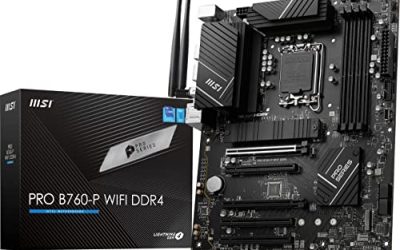
MSI PRO B760M-P DDR4
Intel builders holding a DDR4 kit should start here, because this ProSeries board pairs the LGA 1700 socket with DDR4 memory instead of forcing a move to DDR5. Its listing covers 12th, 13th and 14th generation Intel processors, four DDR4 slots with support up to 4800 MHz overclocked, a PCIe 4.0 slot for the graphics card, M.2 storage and USB 3.2 Gen 2 connectivity. The business styling keeps the board free of gaming extras, which is exactly the point at this tier. It is the natural home for a Core i5 class gaming or family PC built around memory you already own.
Specs
- Socket LGA 1700 for Intel 12th, 13th and 14th generation processors
- Intel B760 chipset, micro-ATX form factor
- 4 DDR4 slots, dual channel, up to 4800 MHz overclocked
- PCIe 4.0 graphics slot
- M.2 storage support
- USB 3.2 Gen 2 ports
- Display outputs: HDMI and DisplayPort
Best for: Intel builds that reuse an existing DDR4 kit on a current LGA 1700 chip
Watch out for: The listing names no Wi-Fi, so plan on Ethernet or a separate wireless solution
Which One Fits Your Situation
Starting Fresh on the Newest AMD Platform
Choose between the two B650 boards by storage ambition and memory plan. The ASRock B650M-HDV/M.2 is the pick when a Gen5 NVMe drive is on your parts list, since its Blazing M.2 slot is the fastest storage connection in this guide. The MSI PRO B650M-P suits you better when four memory slots matter more, letting a two-stick starter kit grow later without replacement.
Reusing a DDR4 Kit You Already Own
Keep your memory and spend the savings elsewhere by staying on a DDR4 platform. AMD owners with a Ryzen 5000 chip should take the MSI B550M PRO-VDH WiFi, which adds wireless that most entry boards skip. Intel owners should take the MSI PRO B760M-P DDR4, whose four slots accept a typical two-stick kit today and a matching pair later.
Building Small Without Losing Speed
All four boards here use the micro-ATX form factor, so a compact case does not force a storage compromise. The ASRock leads for small builds because its Gen5 and Gen4 M.2 pairing removes any need for bulky SATA drives, while the MSI B650 board adds 2.5Gbps wired networking for a compact desk setup parked beside the router.
A Family or Office PC Near the Router
A wired, no-frills board keeps a shared PC simple to manage. The MSI PRO B650M-P fits an AMD-based family machine with its four memory slots and fast LAN, while the MSI PRO B760M-P DDR4 covers the same role on Intel with DDR4 support. Pick by the CPU already in your cart, since both boards skip wireless you would never use at a wired desk.
Common Mistakes
- Buying a board before confirming the socket matches the exact CPU model in the cart
- Ordering DDR5 memory for a DDR4 board, or the reverse, since the two are not interchangeable
- Choosing a two-slot board while planning a four-stick memory upgrade later
- Assuming Wi-Fi is included when the listing only names wired LAN
- Ignoring display outputs, then finding a monitor has no matching port on the board
Frequently Asked Questions
Can a budget board handle a high-end CPU later?
Often yes within the same socket, because AM5 and LGA 1700 boards support wide processor ranges on one chipset. Check the board listing and support page for your exact chip, and remember that entry power designs are happiest with mainstream processors rather than flagship models run at sustained full load.
Is DDR4 still a sensible choice for a new build?
Yes, when you already own a kit or find one bundled with a mature platform like AM4 or LGA 1700. DDR4 boards such as the two MSI models here let that memory keep working, while AM5 requires DDR5 from day one, which raises the total cost of switching platforms.
Do I need Wi-Fi on a gaming motherboard?
Only if the PC cannot reach the router with a cable. Wired Ethernet on these boards runs at gigabit or 2.5Gbps speeds with lower latency than wireless, so a desk beside the router loses nothing. Rooms away from the router are better served by a board with Wi-Fi already fitted.
How many M.2 slots should a budget board have?
One slot covers a single NVMe boot drive, which is enough for many builds. Two slots, as on the ASRock and MSI B650 boards here, let you add a second fast drive for games or media later without reinstalling the system, so storage-heavy builders should treat two as the practical minimum.
Related guides
More from Amazon
Programs that pair well with the guide above. Offers and eligibility are set by Amazon and may change.
Free shipping on eligible items, Prime Video and more. Eligible new members can start with a free trial.
Start a Prime free trialAd-free music streaming. Eligible new subscribers can start with a free trial.
Try Music Unlimited freeA Prime membership for ages 18-24 with a trial period. Eligibility is set by Amazon.
See Prime for Young AdultsAudiobooks and podcasts to listen to on the go. Eligible new members can start with a free trial.
Try Audible freeAs an Amazon Associate we earn from qualifying purchases.