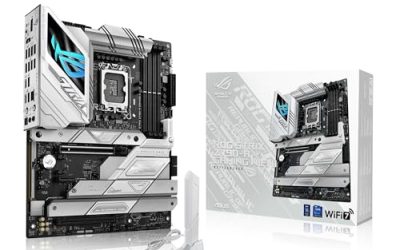
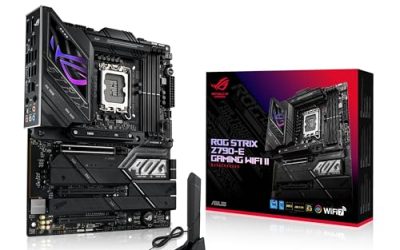
Our Short List of 3

- Best for: A balanced ATX Ryzen 7 gaming build that may gain a Gen5 SSD later
- Socket: AM5, supports Ryzen 9000, 8000, and 7000 Series processors
- Chipset: AMD B650
- Form factor: ATX
- Memory: DDR5, four DIMM slots

- Best for: Storage-heavy builds mixing several NVMe and SATA drives
- Socket: AM5, supports Ryzen 9000, 8000, and 7000 Series processors
- Chipset: AMD B650
- Form factor: ATX
- Memory: DDR5, up to 128 GB

- Best for: A durability-focused Ryzen 7 build that also streams or edits video
- Socket: AM5, supports Ryzen 9000, 8000, and 7000 Series processors
- Chipset: AMD B650
- Form factor: ATX
- Memory: DDR5, up to 128 GB
All 4 Picks at a Glance
| Product | Specs | Action |
|---|---|---|
| GIGABYTE B650 AORUS Elite AX |
| Check price on Amazon |
| MSI MAG B650 Tomahawk WiFi |
| Check price on Amazon |
| ASUS TUF Gaming B650-PLUS WiFi |
| Check price on Amazon |
 ASRock B650M Pro RS WiFi |
| Check price on Amazon |
Choosing a motherboard for a Ryzen 7 processor is less about chasing the highest chipset badge and more about avoiding a board that limits the chip you already picked. A Ryzen 7 can boost hard during long gaming sessions and rendering work, so power delivery, memory support, storage speed, and rear ports matter more than decorative extras. Pick too cheaply and you may lose fast M.2 slots, stable DDR5 speeds, or the USB ports your headset, capture gear, and external drives need every day.
This guide serves three groups: gamers building around a Ryzen 7 for high-refresh play, creators who also edit and stream from the same machine, and upgraders moving to AM5 who want a board that survives a later CPU swap. Every pick below is an AM5 board whose listing names Ryzen 7000, 8000, or 9000 support, chosen from the chipset, power stages, memory speeds, and connectivity printed on its Amazon page.
Our Top Picks
Top 3 picks at a glance
Quick Picks
As an Amazon Associate we earn from qualifying purchases
| Product | Best for | Key spec from title |
|---|---|---|
| GIGABYTE B650 AORUS Elite AX | Balanced ATX gaming builds | PCIe 5.0 M.2 and Wi-Fi 6E |
| MSI MAG B650 Tomahawk WiFi | Storage-heavy ATX builds | Three M.2 slots and Wi-Fi 6E |
| ASUS TUF Gaming B650-PLUS WiFi | Durability-focused builders | 14 power stages and USB4 support |
| ASRock B650M Pro RS WiFi | Compact micro-ATX builds | DDR5 7200+ (OC) and PCIe 5.0 M.2 |
How to Choose
Chipset Tier and PCIe Generation
The chipset decides how many fast lanes you get for graphics and storage. Standard B650 boards such as the Tomahawk WiFi run the main graphics slot at PCIe 4.0, which still fully feeds current graphics cards, while boards like the AORUS Elite AX and TUF B650-PLUS WiFi add a PCIe 5.0 M.2 slot for next-generation SSDs. B650E variants push PCIe 5.0 to the graphics slot as well, and X870 boards add USB4 as standard. For most Ryzen 7 gaming builds, a well-equipped B650 board covers the real needs, and paying for an E-tier chipset only makes sense when a Gen5 graphics card or several Gen5 drives are already in the parts list.
VRM Quality for Sustained Boosts
A Ryzen 7 holds high boost clocks only when the voltage regulator stays cool under load, so the power stage count and heatsinks deserve real attention. The TUF B650-PLUS WiFi lists 14 power stages, the AORUS Elite AX uses a 14+2+1 design, and the Tomahawk WiFi sits in the same capable bracket, while the smaller ASRock B650M Pro RS WiFi runs an 8+2+1 Dr.MOS layout suited to stock and lightly tuned chips. Bigger finned heatsinks around the socket, rather than flat decorative covers, signal a board that can handle long rendering queues or marathon sessions without throttling the processor back.
Memory Support and Speeds
Every AM5 board here uses DDR5 only, so older DDR4 kits cannot move across from an AM4 build. Check three numbers on the listing: the slot count, the maximum capacity, and the rated overclocked speed. The ASRock board advertises DDR5 7200+ in overclocked mode, the Tomahawk WiFi lists support well beyond the common DDR5-6000 sweet spot, and the ASUS and Gigabyte boards cap capacity at 128 GB across four slots. Two matched sticks in the correct slots remain the stable route for gaming, while four-stick kits and very high speeds place more strain on the memory controller and may need manual tuning.
Rear I/O and Wi-Fi
Ports decide daily convenience long after the build is finished. Count the rear USB ports against your keyboard, mouse, headset dongle, webcam, and external drives, then check for a USB Type-C port at Gen 2 speed or faster for enclosures and docks. The TUF board adds USB4 support through a header, which suits fast external storage. Wi-Fi 6E on the Gigabyte, MSI, and ASRock boards opens the 6 GHz band for less crowded wireless, while the ASUS board uses Wi-Fi 6. All four picks include 2.5 gigabit Ethernet, so a wired connection stays available when wireless conditions turn poor during competitive play.
The 4 Best Options
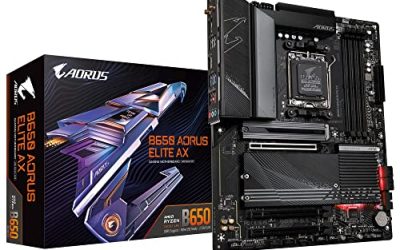
GIGABYTE B650 AORUS Elite AX
- Best for: A balanced ATX Ryzen 7 gaming build that may gain a Gen5 SSD later
- Socket: AM5, supports Ryzen 9000, 8000, and 7000 Series processors
- Chipset: AMD B650
- Form factor: ATX
- Memory: DDR5, four DIMM slots
A balanced ATX Ryzen 7 gaming build that may gain a Gen5 SSD later
Confirm your case fits a full ATX board before ordering
For a Ryzen 7 gaming build that needs no excuses, the AORUS Elite AX is the balanced center of this group. Its 14+2+1 power design gives a Ryzen 7 comfortable headroom for sustained boost behavior, and the PCIe 5.0 M.2 slot means a future Gen5 SSD drops in without a board change. Triple M.2 coverage, Wi-Fi 6E, and 2.5GbE LAN handle storage and networking in one step, while the full ATX layout leaves room for a large graphics card and a capture card together. Builders who want one board to serve this CPU and the next will find the specification hard to outgrow quickly.
MSI MAG B650 Tomahawk WiFi
- Best for: Storage-heavy builds mixing several NVMe and SATA drives
- Socket: AM5, supports Ryzen 9000, 8000, and 7000 Series processors
- Chipset: AMD B650
- Form factor: ATX
- Memory: DDR5, up to 128 GB
Storage-heavy builds mixing several NVMe and SATA drives
There is no PCIe 5.0 slot, so Gen5 SSDs will run at Gen4 speed
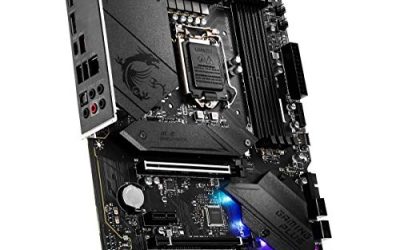
The Tomahawk WiFi suits builders who keep adding drives and peripherals over time. Its listing pairs the AM5 socket with PCIe 4.0 graphics, three M.2 slots, and six SATA ports, so game libraries, footage archives, and backup drives can coexist without adapters. Wi-Fi 6E and Bluetooth 5.3 cover wireless headsets and controllers, while HDMI and DisplayPort outputs support the integrated graphics of Ryzen 7 chips during troubleshooting. Memory support reaches 128 GB, and the ATX frame keeps cabling straightforward in mid-tower cases. Choose it when storage flexibility matters more than having a Gen5 slot on day one.
ASUS TUF Gaming B650-PLUS WiFi
- Best for: A durability-focused Ryzen 7 build that also streams or edits video
- Socket: AM5, supports Ryzen 9000, 8000, and 7000 Series processors
- Chipset: AMD B650
- Form factor: ATX
- Memory: DDR5, up to 128 GB
A durability-focused Ryzen 7 build that also streams or edits video
Wi-Fi is the 6 standard rather than 6E, so there is no 6 GHz band
Builders who value sturdy construction and straightforward setup tend to land on the TUF line, and this B650-PLUS WiFi makes that case for a Ryzen 7 system. Fourteen power stages feed the processor, a PCIe 5.0 M.2 slot covers fast storage, and USB4 support through its header gives high-bandwidth docks and enclosures a path that most B650 rivals skip. Wi-Fi 6 and 2.5 Gb Ethernet handle networking, and Aura Sync ties case lighting together for those who want it. It fits a gaming and streaming desk where the same machine records, edits, and plays across a long day.
ASRock B650M Pro RS WiFi
- Best for: A compact micro-ATX Ryzen 7 build for a small case or desk
- Socket: AM5, supports Ryzen 9000, 8000, and 7000 Series processors
- Chipset: AMD B650
- Form factor: Micro ATX
- Memory: four DDR5 DIMMs, up to 7200+ (OC)
A compact micro-ATX Ryzen 7 build for a small case or desk
The smaller layout means fewer expansion slots for extra cards
Small cases rule out most of the boards above, and the B650M Pro RS WiFi answers with a micro-ATX layout that keeps the important AM5 features. It still offers a PCIe 5.0 M.2 slot among its three M.2 sockets, DDR5 support rated to 7200+ in overclocked mode, Wi-Fi 6E, and 2.5G LAN, which is a rare combination at this size. The 8+2+1 Dr.MOS power design matches a Ryzen 7 run at stock settings for gaming and everyday creation. For a compact desk build or a living-room PC that should stay quiet and current, this board keeps the footprint small without dropping to entry-level storage.
Which One Fits Your Situation
You Are Building a First AM5 Gaming PC
Start with the GIGABYTE B650 AORUS Elite AX. Its power design, PCIe 5.0 storage slot, Wi-Fi 6E, and full-size layout cover the parts a first build usually grows into, from a second SSD to a faster graphics card. Nothing in its specification forces an early replacement, which protects the rest of the budget for the GPU and monitor where frame rates are actually decided.
Your Case Is a Compact Micro-ATX Tower
The ASRock B650M Pro RS WiFi is the only pick here sized for your case, and it gives up little: three M.2 sockets, a Gen5 slot, fast DDR5 support, and Wi-Fi 6E all remain. Check graphics card length against the smaller board layout, seat two memory sticks first, and the build stays tidy, cool, and easy to service later.
You Stream and Edit on the Same Machine
Pick the ASUS TUF Gaming B650-PLUS WiFi. Fourteen power stages suit long encoding sessions, the PCIe 5.0 M.2 slot keeps project drives quick, and USB4 support helps when footage moves through fast external enclosures. Its wired 2.5 Gb Ethernet also gives a stream a steadier path than wireless when the household network gets busy in the evening.
You Keep Several Drives and Plan to Add More
The MSI MAG B650 Tomahawk WiFi fits this habit best. Three M.2 slots plus six SATA connections let game drives, capture storage, and spinning backup disks live inside one case without swapping hardware. Bluetooth 5.3 and Wi-Fi 6E round out controller and headset support, making it the natural home for a mature, peripheral-heavy gaming desk.
Common Mistakes
- Buying an AM4 B550 board for a Ryzen 7 AM5 processor, since the sockets and memory standards are completely different.
- Reusing DDR4 memory in an AM5 build, when every board in this class accepts DDR5 only.
- Ignoring the BIOS version, then finding a newer Ryzen 7 chip needs a firmware update before the system will post.
- Choosing a micro-ATX board for a large case and losing expansion room, or an ATX board that a compact case cannot fit.
- Filling all four memory slots with a fast kit and expecting the highest rated speed without any manual adjustment.
Frequently Asked Questions
Does a Ryzen 7 need an X870 board instead of B650?
No. A Ryzen 7 runs at full stock performance on a well-built B650 board, because the processor itself is not limited by the chipset. Higher chipsets mainly add ports, USB4 as standard, and more PCIe 5.0 lanes. Spend the difference on graphics or storage unless those extra connections are already on your parts list.
Can these boards take a newer Ryzen chip later?
Yes, that is the main appeal of the AM5 socket. All four listings name Ryzen 9000, 8000, and 7000 support, so a later processor from those families fits the same board and memory. A BIOS update may be required before swapping, so update the firmware while the current chip is still installed and working.
How much memory should a Ryzen 7 gaming build use?
A two-stick DDR5 kit is the sensible default for gaming, placed in the slots the manual marks for a single pair. It keeps speeds stable and leaves room to add capacity later. Creators working with large timelines or virtual machines benefit from higher capacity, while four-stick setups at aggressive speeds may need relaxed settings to stay reliable.
Is Wi-Fi 6E worth choosing over Wi-Fi 6 here?
Wi-Fi 6E adds the 6 GHz band, which helps in apartment buildings and dorms where the older bands are crowded, provided your router also supports it. The Gigabyte, MSI, and ASRock boards include 6E, while the ASUS board uses Wi-Fi 6. If the PC will sit on a wired Ethernet connection, the difference matters far less than port layout.
Related guides
More from Amazon
Programs that pair well with the guide above. Offers and eligibility are set by Amazon and may change.
Free shipping on eligible items, Prime Video and more. Eligible new members can start with a free trial.
Start a Prime free trialAd-free music streaming. Eligible new subscribers can start with a free trial.
Try Music Unlimited freeA Prime membership for ages 18-24 with a trial period. Eligibility is set by Amazon.
See Prime for Young AdultsAudiobooks and podcasts to listen to on the go. Eligible new members can start with a free trial.
Try Audible freeAs an Amazon Associate we earn from qualifying purchases.