
Our Short List of 3

- Best for: Desk setups that want native 4K with maximum graphics headroom
- Display: 18-inch UHD+ Mini LED, 120Hz, 3840 x 2400
- Processor: Intel Core Ultra 9 285HX
- Graphics: NVIDIA GeForce RTX 5090, 24GB GDDR7
- Memory: 64GB DDR5-6400
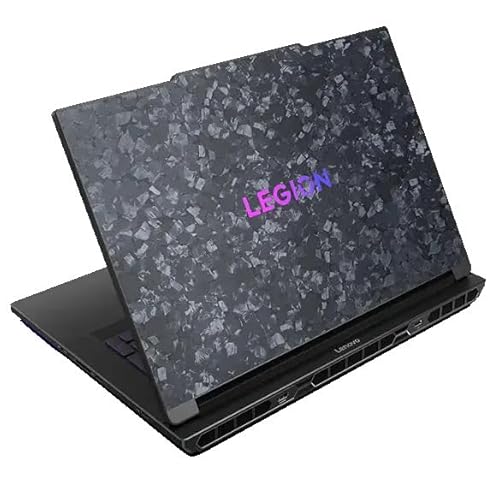
- Best for: Players who want native 4K and a high refresh rate on the same panel
- Display: 18.0-inch 4K, 240Hz, 520 nits
- Processor: Intel Core Ultra 9 275HX, 24 cores
- Graphics: NVIDIA GeForce RTX 5090, 24GB
- Memory: 64GB RAM

- Best for: Native 4K gaming in an 18-inch chassis that still travels between rooms and offices
- Display: 18-inch 4K Mini LED, 120Hz
- Processor: Intel Core Ultra 9 275HX with integrated NPU
- Graphics: NVIDIA GeForce RTX 5080
- Memory: 32GB DDR5
All 4 Picks at a Glance
| Product | Specs | Action |
|---|---|---|
| MSI Titan 18 HX AI |
| Check price on Amazon |
| Lenovo Legion 9i Gen 10 |
| Check price on Amazon |
| MSI Stealth 18 HX AI |
| Check price on Amazon |
 Razer Blade 16 (2025) |
| Check price on Amazon |
The first decision is not which brand to buy. It is where the 4K pixels will actually live. A small group of 18-inch flagships carry a true 3840-pixel panel of their own, so the sharp image travels with the machine. Far more gaming laptops pair a QHD+ internal screen with an RTX 5080 or RTX 5090 that renders games at 4K on a desk monitor. Paying for the wrong arrangement means buying pixels you never look at, or a graphics chip that cannot feed the display you already own.
This roundup suits desk-based players who want one machine to replace a desktop, creators who cut 4K footage between game sessions, and travelers who plug into a 4K monitor at home. Every model below was picked from its Amazon listing name and the specifications printed on that product page, including panel resolution, graphics model, memory and storage, so the claims here trace back to the listing itself.
Our Top Picks
Top 3 picks at a glance
Quick Picks
As an Amazon Associate we earn from qualifying purchases
| Product | Best for | Key spec from title |
|---|---|---|
| MSI Titan 18 HX AI | Native 4K with no compromises held back | 18-inch UHD+ Mini LED 120Hz panel with RTX 5090 |
| Lenovo Legion 9i Gen 10 | Native 4K at a high refresh rate | 18-inch 4K 240Hz display with RTX 5090 |
| MSI Stealth 18 HX AI | Native 4K in a slimmer 18-inch body | 18-inch 4K Mini LED 120Hz panel with RTX 5080 |
| Razer Blade 16 (2025) | Portable power that feeds a 4K desk monitor | RTX 5090 behind a QHD+ 240Hz OLED screen |
| ASUS ROG Zephyrus G16 | Creators who game on an external 4K screen | RTX 5090 with 16-inch 240Hz OLED panel |
How to Choose
Decide Where the 4K Image Lives
A native 4K panel renders the game on the laptop screen itself, which matters if you play on trains, in hotels or anywhere away from your desk. A 4K capable machine with a QHD+ screen takes the other route: the internal display stays at 2560 pixels wide for everyday play, and the graphics card pushes full 4K only when you connect an external monitor. Neither answer is wrong, but they suit different routines, and the listings use similar wording for both, so read the resolution line before anything else.
Match the Graphics Card to 4K Workloads
Rendering 3840 pixels across means roughly four times the pixels of 1080p, and midrange laptop graphics struggle to hold playable frame rates there without heavy upscaling. The listings in this roundup start at the RTX 5080 and RTX 5090, the two laptop chips with the memory bandwidth and VRAM headroom this resolution demands. Check the VRAM figure printed in the listing too: 16GB and 24GB configurations appear under similar model names, and the larger buffer matters for texture-heavy games at 4K.
Look Past Resolution to Refresh and Panel Type
Two laptops can both advertise a 4K screen and feel completely different in motion. Refresh rate is the first gap: panels here run at 120Hz or 240Hz, while older 4K gaming laptops often stopped at 60Hz. Panel technology is the second gap. Mini LED delivers the high brightness and local dimming that HDR games are mastered for, while OLED answers with per-pixel contrast and faster pixel response. The listing title usually names both the refresh rate and the panel type, so compare those two lines side by side.
Plan Around Size, Heat and Ports
Almost every native 4K gaming laptop is an 18-inch machine weighing close to eight pounds, because the cooling hardware that keeps an RTX 5090 fed needs physical room. If the laptop will feed an external 4K monitor, confirm the port situation in the listing: you want an HDMI 2.1 socket or a USB-C port carrying a display signal for 4K at high refresh rates. Also check whether memory and storage sit in upgradeable slots, since several thin models solder their RAM down permanently.
The 5 Best Options
MSI Titan 18 HX AI
- Best for: Desk setups that want native 4K with maximum graphics headroom
- Display: 18-inch UHD+ Mini LED, 120Hz, 3840 x 2400
- Processor: Intel Core Ultra 9 285HX
- Graphics: NVIDIA GeForce RTX 5090, 24GB GDDR7
- Memory: 64GB DDR5-6400
Desk setups that want native 4K with maximum graphics headroom
At nearly eight pounds before the power brick, this is transportable rather than portable
The Titan is the machine for buyers who refuse to split the difference: the 4K panel is built in, and the hardware behind it is the strongest in this roundup. Its RTX 5090 and 64GB of memory handle native 4K play without leaning on aggressive upscaling, while the split storage layout pairs a Gen5 system drive with a second Gen4 drive for a growing game library. The mechanical keyboard and the sheer chassis size mark it as a desktop replacement that occasionally moves rooms rather than a travel companion.
Lenovo Legion 9i Gen 10
- Best for: Players who want native 4K and a high refresh rate on the same panel
- Display: 18.0-inch 4K, 240Hz, 520 nits
- Processor: Intel Core Ultra 9 275HX, 24 cores
- Graphics: NVIDIA GeForce RTX 5090, 24GB
- Memory: 64GB RAM
Players who want native 4K and a high refresh rate on the same panel
The 1TB drive is small next to the rest of the specification, so check the second slot situation
Most native 4K gaming panels refresh at 120Hz, so the Legion 9i stands out by pairing its 4K screen with a 240Hz refresh rate, a combination aimed at players who move between cinematic single-player games and faster competitive titles on the same display. The listing pairs that panel with an RTX 5090 and 64GB of memory, so the graphics side is not the bottleneck. Storage is the one modest figure here: the 1TB Gen5 drive will fill quickly with modern game installs, so budget attention for a second drive later.
MSI Stealth 18 HX AI
- Best for: Native 4K gaming in an 18-inch chassis that still travels between rooms and offices
- Display: 18-inch 4K Mini LED, 120Hz
- Processor: Intel Core Ultra 9 275HX with integrated NPU
- Graphics: NVIDIA GeForce RTX 5080
- Memory: 32GB DDR5
Native 4K gaming in an 18-inch chassis that still travels between rooms and offices
The RTX 5080 has less 4K headroom than the 5090 models, so expect to use upscaling in the heaviest games
The Stealth line exists for people who want the big 4K screen without the full desktop-replacement bulk, and this configuration keeps the native 4K Mini LED panel while stepping down to an RTX 5080 and 32GB of memory. That combination still renders 4K games well, especially with DLSS doing part of the work, and the vapor chamber cooling is the hardware that lets a thinner 18-inch chassis sustain it. It is the natural pick when the laptop has to share a bag with work gear during the week.
Razer Blade 16 (2025)
- Best for: Players who game at 4K on a desk monitor and want a genuinely portable laptop the rest of the time
- Display: 16-inch QHD+ OLED, 240Hz, 2560 x 1600
- Processor: AMD Ryzen AI 9 HX 370
- Graphics: NVIDIA GeForce RTX 5090
- Memory: 32GB LPDDR5x
Players who game at 4K on a desk monitor and want a genuinely portable laptop the rest of the time
The internal screen is 2560 x 1600, not 4K, so away from a monitor you are playing at QHD+
The Blade 16 takes the opposite route to 4K from the 18-inch machines above. Its own screen is a QHD+ OLED running at 240Hz, which is the resolution this chassis plays best at on the move, while the RTX 5090 inside is the part that earns the 4K label: connect a 4K monitor at your desk and the graphics card has the power to drive it properly. In exchange for giving up the native panel you get a far thinner, lighter machine with an OLED screen that flatters everything else you do.
ASUS ROG Zephyrus G16
The Zephyrus G16 is the creator-leaning version of the same idea as the Blade: a 16-inch OLED laptop whose RTX 5090 is there to drive 4K workloads, whether that is a game on an external 4K monitor or a 4K timeline in an editor. This listing is a reseller configuration with an unusually large 4TB of storage, which suits footage libraries and big installs alike. The soldered-style LPDDR5X memory layout typical of this line means the 32GB figure in the listing is the figure you live with, so read it carefully.
Specs
- Display: 16-inch OLED, 240Hz, 2560 x 1600
- Processor: Intel Core Ultra 9 285H
- Graphics: NVIDIA GeForce RTX 5090, 24GB GDDR7
- Memory: 32GB LPDDR5X
- Storage: 4TB PCIe SSD
- Operating system: Windows 11 Pro
- Seller configuration: HIDevolution build of the GU605CX
Best for: Creators and players who want RTX 5090 power for a 4K monitor in a 16-inch machine
Watch out for: This is a reseller-built configuration, so confirm the exact memory and storage on the listing before ordering
Which One Fits Your Situation
You Play Away From Your Desk and Still Want 4K
If the screen you actually look at is the laptop’s own, the choice narrows to the three native 4K machines. The Titan 18 HX AI brings the most storage and the joint-strongest graphics, while the Legion 9i Gen 10 is the pick when refresh rate matters as much as resolution. The Stealth 18 HX AI fits when those two feel like more machine than your bag can justify.
Your Laptop Docks Into a 4K Monitor at Home
A docked routine plays to the strengths of the Razer Blade 16 and the Zephyrus G16. Both carry an RTX 5090 that feeds a 4K external display at the desk, then fall back to sharp, fast QHD+ OLED panels when you unplug. Pick the Blade for the slimmest chassis, or the Zephyrus configuration here when its larger storage matches a library of games and footage.
You Edit 4K Video and Game on the Same Machine
Timeline work rewards memory, fast storage and a colour-rich panel. The Legion 9i Gen 10 pairs its 4K screen with 64GB of memory for editing in the same resolution you deliver, while the Zephyrus G16 configuration answers with 4TB of storage for project files. The Titan sits above both if renders and games compete for the same evening hours.
You Want 4K Without the Flagship Bulk
Start with the Stealth 18 HX AI: it keeps the native 4K Mini LED panel and an RTX 5080 in a chassis designed to move around the house and office. If even that is too much machine to carry, drop to the 16-inch pair and accept that 4K happens on an external monitor instead of the built-in screen.
Common Mistakes
- Assuming every listing that says 4K has a 4K screen fitted, when some mean the graphics card can output 4K to a monitor
- Pairing a native 4K panel with a midrange graphics card, then blaming the laptop when frame rates collapse
- Overlooking refresh rate and ending up with an older 60Hz 4K panel that feels sluggish in fast games
- Forgetting that 4K gaming on battery is unrealistic, so the machine still lives plugged in at a desk
- Skipping the port check and discovering the laptop cannot send 4K at high refresh rates to your monitor
Frequently Asked Questions
Can a laptop with a QHD+ screen really count as 4K capable?
Yes, when the graphics card is strong enough to render games at 3840 pixels wide on an external display. The RTX 5080 and RTX 5090 laptops in this roundup do exactly that through their display outputs. What you give up is 4K on the internal panel itself, which stays at its native QHD+ resolution whenever you are away from a monitor.
Is the RTX 5080 enough for 4K gaming, or should I insist on the RTX 5090?
The RTX 5080 handles 4K gaming well in most current titles, particularly with DLSS upscaling and frame generation switched on. The RTX 5090 earns its place when you want native 4K rendering, heavier ray tracing, or the extra VRAM headroom of the 24GB configuration for texture-heavy games and large creative projects. Both appear in the listings here, so the choice is about settings, not viability.
Why do so few gaming laptops have a native 4K screen?
Most gaming panels settled on QHD+ because it balances sharpness against frame rates that esports and fast-paced games demand. Driving 4K at high refresh rates takes the strongest mobile graphics and serious cooling, which pushes size and cost up sharply. That is why native 4K survives mainly on 18-inch flagships like the Titan, Legion 9i and Stealth in this roundup.
What should I check before buying a 4K capable laptop for a monitor setup?
Confirm the laptop has an output that carries 4K at the refresh rate your monitor supports, usually HDMI 2.1 or a USB-C port with a display signal. Then check the graphics card model and VRAM in the listing, since those decide your 4K frame rates. Finally, make sure the desk setup keeps the vents clear, because sustained 4K loads produce sustained heat.
Related guides
More from Amazon
Programs that pair well with the guide above. Offers and eligibility are set by Amazon and may change.
Free shipping on eligible items, Prime Video and more. Eligible new members can start with a free trial.
Start a Prime free trialAd-free music streaming. Eligible new subscribers can start with a free trial.
Try Music Unlimited freeA Prime membership for ages 18-24 with a trial period. Eligibility is set by Amazon.
See Prime for Young AdultsAudiobooks and podcasts to listen to on the go. Eligible new members can start with a free trial.
Try Audible freeAs an Amazon Associate we earn from qualifying purchases.









