
Our Short List of 3

- Best for: Editors who need a large, affordable archive for finished projects.
- 5TB storage capacity
- USB 3.2 Gen 1 connection
- USB-C port
- Password protection with 256-bit AES hardware encryption
- Best for: Creators who want simple, roomy storage for daily editing work.
- 5TB storage capacity
- USB 3.2 Gen 1 connection
- USB-C port
- Password protection

- Best for: Editors who cut 4K directly from an external drive.
- 2TB storage capacity
- Up to 1050MB/s read speed
- USB-C connection
- IP65 water and dust resistance
All 3 Picks at a Glance
| Product | Specs | Action |
|---|---|---|
| WD My Passport 5TB |
| Check price on Amazon |
| Seagate One Touch 5TB |
| Check price on Amazon |
| SanDisk Extreme Portable SSD 2TB |
| Check price on Amazon |
Video editing eats storage faster than almost any other task, because a single afternoon of 4K footage can fill a laptop drive and leave your timeline stuttering. The right external drive holds whole projects, moves large files quickly, and survives the knocks of a bag or a busy desk. A slow drive turns scrubbing through clips into a chore, while a fast one keeps playback smooth and exports moving. Editors who work with long takes or multicam angles feel the difference, since every stream asks more from the drive behind the timeline.
This guide is for editors cutting 4K footage, creators who archive finished projects, and anyone whose internal drive keeps filling up mid-edit. Every product below was chosen from the name and specifications shown on its Amazon page, with attention to capacity, transfer speed, durability, and how the drive connects to your computer. Use the sections below to match capacity and speed to the way you work, so the drive you buy fits the footage you shoot.
Our Top Picks
Top 3 picks at a glance
Quick Picks
As an Amazon Associate we earn from qualifying purchases
| Product | Best for | Key spec from title |
|---|---|---|
| WD My Passport 5TB | Biggest archive | 5TB capacity |
| Seagate One Touch 5TB | Everyday editing | 5TB capacity |
| SanDisk Extreme 2TB | Fast portable SSD | Up to 1050MB/s |
| Samsung T7 Shield 2TB | Rugged outdoor shoots | Up to 1050MB/s |
How to Choose
Pick Capacity for Your Footage
Capacity decides how many projects fit on one drive, and 4K footage fills space far faster than most beginners expect. A 2TB drive covers a few active projects and a season of clips, while 5TB holds a library of finished work alongside the edits in progress. Editors who shoot every week should lean toward the larger drives, because moving finished projects off a full drive mid-edit wastes an afternoon. Buy the largest capacity your budget allows, since storage needs only grow as cameras improve. Keep the current project, its media cache, and its proxies on one drive, so you avoid shuffling files while you are still cutting.
Speed Shapes the Timeline
Speed decides whether your timeline scrubs smoothly or stutters every time you drag the playhead, and solid-state drives beat spinning hard drives by a wide margin. An SSD reading near 1050 megabytes per second handles 4K playback and multicam edits without dropping frames, while a spinning drive suits archiving and backup better than active cutting. If you edit directly from the drive, choose an SSD; if you store finished projects and copy them to a fast drive for editing, a large hard drive saves money. A drive that keeps up with two camera angles at once saves hours, because you spend time cutting instead of waiting for frames to load.
Durability Matters on Location
Durability decides whether a drive survives a drop from a desk or a dusty shoot, and rugged models carry ratings for water, dust, and drops that plain drives lack. A rubberized shell and a sealed design protect the drive when it rides in a camera bag or sits on a location table. Editors who work outdoors or travel should treat durability as a core feature, not a bonus, because a failed drive on location can lose a day of footage that cannot be reshot. A drive that survives a fall onto a hard floor keeps a shoot on schedule, while a fragile drive can turn one accident into a lost day of work.
Check the Connection and Software
Connection type decides the real speed you get, and a USB-C port with USB 3.2 support is the baseline for modern editing drives. A drive rated for high speeds still crawls when plugged into an older USB port, so match the drive to your computer’s fastest port. Password protection and hardware encryption protect client footage when a drive goes missing, and backup software helps automate the copies that keep a project safe. Check compatibility with your operating system before buying, since some drives need reformatting to work across platforms. Test the transfer speed after setup, and move the drive to a faster port when the numbers fall short of its rating.
The 4 Best Options
WD My Passport 5TB
- Best for: Editors who need a large, affordable archive for finished projects.
- 5TB storage capacity
- USB 3.2 Gen 1 connection
- USB-C port
- Password protection with 256-bit AES hardware encryption
Editors who need a large, affordable archive for finished projects.
A spinning hard drive edits slower than an SSD, so copy active projects to a fast drive first.
The My Passport suits editors who need a big, affordable archive for finished projects and raw footage. Five terabytes hold months of 4K clips, and the compact body slips into a bag without adding much weight. Password protection and hardware encryption keep client work safe when the drive travels, and the USB-C connection moves large folders steadily. It works best as a library drive that holds projects between edits rather than as the drive you cut from directly. The slim case stays out of the way on a crowded desk, and steady transfers move large folders without drama.
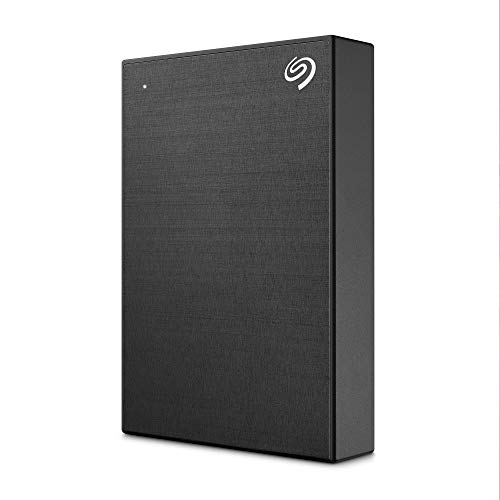
Seagate One Touch 5TB
- Best for: Creators who want simple, roomy storage for daily editing work.
- 5TB storage capacity
- USB 3.2 Gen 1 connection
- USB-C port
- Password protection
Creators who want simple, roomy storage for daily editing work.
Spinning-drive speeds suit storage and backup better than cutting 4K directly from the drive.
The One Touch covers everyday editing storage with five terabytes in a slim body that fits a jacket pocket. It connects over USB-C, carries password protection for sensitive footage, and works with both Windows and Mac computers without fuss. The large capacity holds active projects and their backups side by side, so you stop juggling drives mid-edit. Its simple design suits creators who want storage that works the moment it plugs in. The pocket-sized body travels well between home and studio, and the quiet operation keeps it unobtrusive during long editing sessions at a shared desk.
SanDisk Extreme Portable SSD 2TB
- Best for: Editors who cut 4K directly from an external drive.
- 2TB storage capacity
- Up to 1050MB/s read speed
- USB-C connection
- IP65 water and dust resistance
Editors who cut 4K directly from an external drive.
Two terabytes fill quickly with raw 4K footage, so archive finished projects elsewhere.
The Extreme Portable SSD is the pick for editors who cut directly from an external drive, because its solid-state speed keeps 4K timelines smooth. Two terabytes hold several active projects, and the rugged shell resists water and dust on location shoots. The compact body clips to a bag or a belt loop, so it travels to every shoot without adding bulk. It is the drive to reach for when playback stutter is costing you time. The carabiner loop clips the drive to a bag, and the solid-state design has no moving parts to worry about on bumpy travel days.
Samsung T7 Shield 2TB
The T7 Shield suits editors who shoot outdoors, because its rugged body shrugs off drops, dust, and rain that would end a plain drive. Solid-state speed near 1050 megabytes per second keeps timelines fluid, and two terabytes hold the projects you are cutting right now. The rubberized shell grips well in cold or wet hands, and the drive connects over USB-C to modern laptops and desktops. It is built for the field, not just the desk. The grippy texture helps you hold the drive with wet hands, and the compact shape fits a jacket pocket alongside memory cards and a spare cable.
Specs
- 2TB storage capacity
- Up to 1050MB/s read speed
- USB 3.2 Gen 2 connection
- IP65 water and dust resistance
- Drop resistant up to 3 meters
- USB-C port
Best for: Outdoor shoots where the drive takes knocks, dust, and weather.
Watch out for: The rugged shell adds a little bulk compared with slimmer portable SSDs.
ASIN: B09VLHR4JC
Which One Fits Your Situation
You Archive Finished Projects
Pick the My Passport or the One Touch when your main job is storing finished edits and raw footage for months or years. Five terabytes hold a large library at a friendly cost, and both drives include password protection for client work. Keep one as the archive and a second as the backup, because a single copy of irreplaceable footage is a risk no editor should take. Both drives travel well between home and studio.
You Edit Directly from the Drive
Pick the SanDisk Extreme or the T7 Shield when your timeline lives on the external drive and smooth playback matters. Both SSDs read fast enough for 4K multicam work, and their compact bodies travel well between desk and shoot. The SanDisk suits general editing, while the T7 Shield wins when the drive works outdoors in rough conditions. Fast reads help when you review footage with a client, since playback keeps the session focused.
You Shoot on Location
Pick the T7 Shield when your drive rides in a camera bag, sits on dusty ground, or works through rain. Its drop resistance and sealed body protect footage that cannot be reshot, and its speed keeps on-site review smooth. Pair it with a large hard drive back at the desk, so the field drive stays light and the archive stays safe. Back up the drive each evening, so a lost drive never takes the shoot.
You Work Across Windows and Mac
Pick the One Touch or the My Passport when your projects move between operating systems, because both work across platforms without complicated setup. Format the drive for the system you use most, or keep a second drive for the other platform, and your footage stays readable wherever you edit. Check the file system before the first transfer to avoid surprises mid-project. A shared drive simplifies handoffs, since everyone opens the same project files.
Common Mistakes
- Buying a small drive and then paying more later to move projects around mid-edit, while the timeline waits and the deadline keeps moving.
- Cutting 4K directly from a spinning hard drive and blaming the editing software for stutters, when the drive itself cannot keep up with the footage.
- Keeping a single copy of irreplaceable footage on one drive with no backup, and discovering the loss only after the original cards are wiped.
- Ignoring the USB port version and wondering why a fast drive transfers slowly, when an older port caps every transfer below the drive rating.
- Choosing a plain drive for outdoor shoots where dust and drops kill unprotected storage, and learning the lesson from a dead drive instead of a checklist.
Frequently Asked Questions
Should I edit from an SSD or a hard drive?
An SSD suits active editing, because its fast reads keep 4K timelines smooth and scrubbing responsive. A spinning hard drive suits archiving and backup, where capacity matters more than speed and the cost per terabyte stays low. Many editors use both: an SSD for the project in progress and a large hard drive for finished work and backups.
How much storage do I need for 4K video editing?
Two terabytes cover a few active projects and a season of clips for most creators, while five terabytes suit editors who shoot weekly or keep long archives. Raw 4K footage grows quickly, and multicam projects multiply the need, so buy the largest capacity your budget allows.
Does a rugged drive matter for editing?
A rugged drive matters when your work leaves the desk, because drops, dust, and rain can end a plain drive and the footage with it. Water and dust ratings plus drop protection give real insurance on location shoots. Desk-bound editors can skip rugged features and spend the money on capacity instead, since a drive that never leaves the room faces little risk.
Can I use one drive for Windows and Mac?
Most external drives work across Windows and Mac, though you may need to reformat the drive to a file system both systems read. Some drives ship formatted for one system and need a quick format before they work on the other. Check the product page for compatibility notes, and back up any files before reformatting, since the process erases the drive.
Related guides
More from Amazon
Programs that pair well with the guide above. Offers and eligibility are set by Amazon and may change.
Free shipping on eligible items, Prime Video and more. Eligible new members can start with a free trial.
Start a Prime free trialAd-free music streaming. Eligible new subscribers can start with a free trial.
Try Music Unlimited freeA Prime membership for ages 18-24 with a trial period. Eligibility is set by Amazon.
See Prime for Young AdultsAudiobooks and podcasts to listen to on the go. Eligible new members can start with a free trial.
Try Audible freeAs an Amazon Associate we earn from qualifying purchases.









