
Our Short List of 3

- Best for: Large session libraries and sample collections with room to grow.
- 4TB storage capacity
- USB 3.0 interface
- Model STEA4000400
- Plug-and-play design

- Best for: Simple plug-and-play storage for finished sessions and backups.
- 4TB storage capacity
- USB 3.2 Gen 1 interface
- Model WDBU6Y0040BBK-WESN
- Plug-and-play design

- Best for: Automatic backups with password protection for unfinished work.
- 4TB storage capacity
- USB-C interface
- Model WDBRMD0040BGY-WESN
- Backup software included
All 4 Picks at a Glance
| Product | Specs | Action |
|---|---|---|
| Seagate Expansion Portable 4TB |
| Check price on Amazon |
| WD Elements 4TB |
| Check price on Amazon |
| WD My Passport 4TB |
| Check price on Amazon |
 LaCie Rugged Mini 2TB |
| Check price on Amazon |
Music production builds large session files, sample libraries and backups, so a portable drive needs enough capacity, steady transfer speed and a connection that keeps up with a digital audio workstation. The wrong drive shows up as slow sample loads, stuttering playback and lost takes when a session grows. A drive that fills past 90 percent slows down, so the capacity you buy today should cover the sessions you will record next year. Sample libraries grow with every pack you add, so a drive that fits today may not fit in a year.
This guide is for producers, engineers and musicians who store sessions, samples and backups on a portable drive. Every drive below was chosen from the name and specifications shown on its Amazon page, with the capacity, interface and included software checked against the listing. The guide below walks through capacity, speed, durability and backup software first, then compares four drives that cover large libraries, simple storage, automatic backups and travel.
Our Top Picks
Top 3 picks at a glance
Quick Picks
As an Amazon Associate we earn from qualifying purchases
| Product | Best for | Key spec from title |
|---|---|---|
| Seagate Expansion Portable 4TB | Large session libraries | 4TB, USB 3.0 |
| WD Elements 4TB | Simple plug-and-play storage | 4TB, USB 3.2 Gen 1 |
| WD My Passport 4TB | Backups with software | 4TB, USB-C |
| LaCie Rugged Mini 2TB | Tough travel storage | 2TB, rugged design |
How to Choose
Capacity and session size
A single production session with many tracks, takes and sample libraries can grow to tens of gigabytes, so a 4TB drive holds years of sessions while a 2TB drive suits a smaller library or a travel backup. Count the libraries you use, because orchestral and drum sample packs take far more room than a few synth presets. A drive that fills past 90 percent slows down, so leave headroom for new sessions and bounces. Buy the capacity you will need in a year, not just the capacity you need today. A producer with many libraries should buy the larger drive first.
Speed and interface
Transfer speed decides how fast a sample library loads and how quickly a session opens, so check the interface before the capacity. USB 3.0 and USB 3.2 Gen 1 move data fast enough for most sessions, while USB-C adds a modern connector that works with current laptops. A spinning hard drive suits storage and backups, while a solid-state drive loads samples faster when a session streams many files at once. Match the cable to the ports on your computer, because an adapter adds a weak point.
Durability and travel
A drive that travels to studios, rehearsals and gigs needs protection against drops, bumps and dust, because a single fall can end a session. Rugged drives use a rubber bumper and a metal shell to absorb shocks, while a plain plastic drive suits a desk that never moves. Check whether the drive includes a data recovery service, since a dropped drive with a recovery plan costs less to fix than one without. Keep a second copy of every session, because no single drive is safe enough on its own.
Backup software and formatting
Backup software turns a drive from storage into a safety net, because it copies new sessions automatically instead of waiting for a manual drag and drop. Password protection keeps unfinished work private when a drive is lost or shared, and hardware encryption adds a layer that software alone cannot match. Check the file system before first use, because a drive formatted for Windows needs reformatting for a Mac workflow. Test the backup once, so you know the restore works before you need it.
The 4 Best Options
Seagate Expansion Portable 4TB
- Best for: Large session libraries and sample collections with room to grow.
- 4TB storage capacity
- USB 3.0 interface
- Model STEA4000400
- Plug-and-play design
Large session libraries and sample collections with room to grow.
It has no backup software included, so set up your own backup routine.
The Expansion Portable gives 4TB of room for sessions, sample libraries and backups in a slim drive that fits a laptop bag. Its USB 3.0 connection moves files fast enough for most production work, and the plug-and-play design needs no software to start, so it works on any computer you connect it to. The drive is light enough to carry to every session, and the 4TB capacity holds years of projects without constant cleanup. It is the pick for producers who want the most room for the least fuss. The slim case slides into a laptop bag beside the computer, so it travels to every session.
Watch out for: It has no backup software included, so set up your own backup routine.
WD Elements 4TB
- Best for: Simple plug-and-play storage for finished sessions and backups.
- 4TB storage capacity
- USB 3.2 Gen 1 interface
- Model WDBU6Y0040BBK-WESN
- Plug-and-play design
Simple plug-and-play storage for finished sessions and backups.
It has no backup software or password protection built in.
The Elements drive gives 4TB of simple storage with a USB 3.2 Gen 1 connection, which suits producers who want a drive that just works. There is no software to learn and no setup to manage, so it connects and appears as a drive ready for sessions and backups. The slim case fits beside a laptop in a bag, and the 4TB capacity holds a large library of samples and projects. It is the pick for a second drive that stores finished sessions and backups without extra features. The drive works on any computer without installing software, which suits a shared studio.
Watch out for: It has no backup software or password protection built in.
WD My Passport 4TB
- Best for: Automatic backups with password protection for unfinished work.
- 4TB storage capacity
- USB-C interface
- Model WDBRMD0040BGY-WESN
- Backup software included
Automatic backups with password protection for unfinished work.
The backup software needs a first setup before it runs on its own.
The My Passport adds backup software and password protection to 4TB of portable storage, which makes it the safest drive in this group for unfinished work. Its USB-C connection fits modern laptops, and the included software copies new sessions automatically so a backup never depends on remembering. The drive is small enough to carry in a pocket, and the password lock keeps projects private when the drive is lost or shared. It is the pick for producers who want backups handled without thinking about them. The pocket-size case fits in a jacket, so the drive goes wherever the session goes.
Watch out for: The backup software needs a first setup before it runs on its own.
LaCie Rugged Mini 2TB
- Best for: Tough travel storage for sessions on the move.
- 2TB storage capacity
- USB 3.0 and USB 2.0 compatibility
- Model LAC9000298
- Drop, shock, dust and rain resistant
Tough travel storage for sessions on the move.
2TB holds less than the 4TB drives here, so it suits current work rather than a full archive.
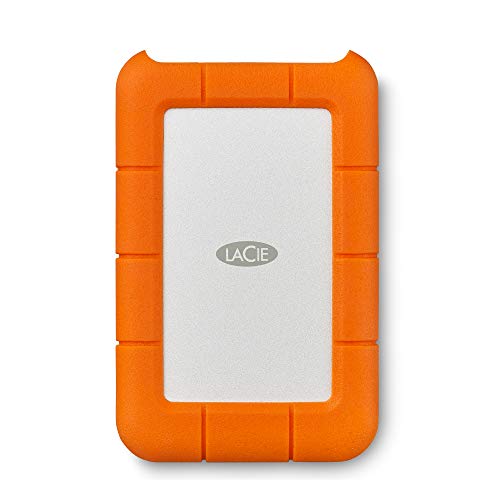
The Rugged Mini is the toughest drive in this group, with a rubber bumper and metal shell that resist drops, shocks, dust and rain during travel to studios and gigs. Its 2TB capacity suits a working library of current sessions and samples, while the USB 3.0 connection moves files fast enough for production work. A Data Rescue Service is included, which helps recover files when a drive is damaged. It is the pick for producers who carry their sessions everywhere and need a drive that survives the trip. The orange bumper makes the drive easy to spot in a dark studio or a crowded bag.
Watch out for: 2TB holds less than the 4TB drives here, so it suits current work rather than a full archive.
Which One Fits Your Situation
For a large sample library
The Seagate Expansion leads with 4TB of room and a simple design, while the WD Elements follows with the same capacity and a faster USB interface. Both drives hold years of samples, so the choice comes down to the connector on your computer. Check the cable first, because the wrong port slows every transfer. A 4TB drive also leaves room for bounces and alternate takes.
For automatic backups
The My Passport is the pick, because its software copies new sessions on its own and password protection keeps them private. Pair it with a second drive for finished work, so every session exists in two places. Test the restore once after setup, so you know the backup works before you need it. A backup you never test is only a hope, not a plan.
For travel and gigs
The Rugged Mini leads, because its bumper and shell survive drops that would end a plain drive. Keep current sessions on it and archive finished work on a 4TB drive at home, so a lost bag never costs a whole library. A recovery service adds a safety net when a drive is damaged on the road. Pack the drive in a padded pocket, since even a rugged shell benefits from care.
For a first production drive
The Seagate Expansion is the simplest first step, with 4TB of room and no software to learn. The My Passport is the pick when backups matter from day one, with software and password protection built in. Both drives work on any computer, so either one fits a first setup. Start with the drive that matches your habits, then add a second one for backups.
Common Mistakes
- Buying a drive that barely fits the current library and filling it within months of the first sessions.
- Keeping every session on one drive with no second copy anywhere, then losing the drive.
- Choosing a slow interface, then waiting on sample loads during a session that needs to move fast.
- Carrying a plain plastic drive to gigs without a case or a rugged shell to protect it.
- Never testing a backup, then finding the restore fails when a session is lost for good.
Frequently Asked Questions
How much storage does music production need?
A 4TB drive suits most producers, because sessions, sample libraries and backups grow quickly over a year. A 2TB drive covers a smaller library or a travel copy of current work. Count your sample libraries first, because orchestral and drum packs take far more room than synth presets. A drive that fills past 90 percent slows down, so leave headroom.
Is a hard drive fast enough for music production?
Yes, for most sessions, because a USB 3.0 or USB 3.2 hard drive moves data fast enough to load samples and play back many tracks. A solid-state drive loads large libraries faster, so it helps when a session streams many samples at once. Keep the working session on the fastest drive you own. A faster drive saves time every day.
Should I back up sessions to a second drive?
Yes, every session should exist in two places, because a single drive can fail, get lost or get damaged. Use one drive for working sessions and a second drive for backups, and copy finished work to both. Test the backup once, so you know the restore works before you need it. Store the backup drive away from the working drive.
Does a rugged drive matter for a studio that never moves?
No, a plain drive suits a desk that never moves, because the rugged shell only helps when the drive travels. A rugged drive is worth it for producers who carry sessions to studios, rehearsals and gigs, where a drop can end a session. Match the drive to how it travels, not to how it looks.
Related guides
More from Amazon
Programs that pair well with the guide above. Offers and eligibility are set by Amazon and may change.
Free shipping on eligible items, Prime Video and more. Eligible new members can start with a free trial.
Start a Prime free trialAd-free music streaming. Eligible new subscribers can start with a free trial.
Try Music Unlimited freeA Prime membership for ages 18-24 with a trial period. Eligibility is set by Amazon.
See Prime for Young AdultsAudiobooks and podcasts to listen to on the go. Eligible new members can start with a free trial.
Try Audible freeAs an Amazon Associate we earn from qualifying purchases.









