Our Short List of 3

- Best for: Players who want a metal-bodied mechanical board with a simple, predictable feel.
- Layout: 60 percent form factor, 61 keys
- Switches: HyperX Red linear mechanical, rated for 80 million keypresses
- Body: full aircraft-grade aluminum
- Keycaps: double shot PBT with side-printed secondary functions

- Best for: Competitive players who want per-key actuation tuning and a cable-free desk.
- Layout: 60 percent design
- Switches: OmniPoint 2.0 adjustable HyperMagnetic
- Connection: Quantum 2.0 Dual Wireless (2.4 GHz and Bluetooth 5.0) plus USB-C wired
- Keycaps: double shot PBT

- Best for: Tournament and LAN players who need a wireless board that travels well.
- Layout: 60 percent ultra-compact form factor
- Switches: GX Optical tactile
- Connection: Lightspeed wireless, Bluetooth, and USB wired
- Keycaps: dual-shot PBT
All 5 Picks at a Glance
| Product | Specs | Action |
|---|---|---|
| HyperX Alloy Origins 60 |
| Check price on Amazon |
| SteelSeries Apex Pro Mini Wireless |
| Check price on Amazon |
| Logitech G PRO X 60 Lightspeed |
| Check price on Amazon |
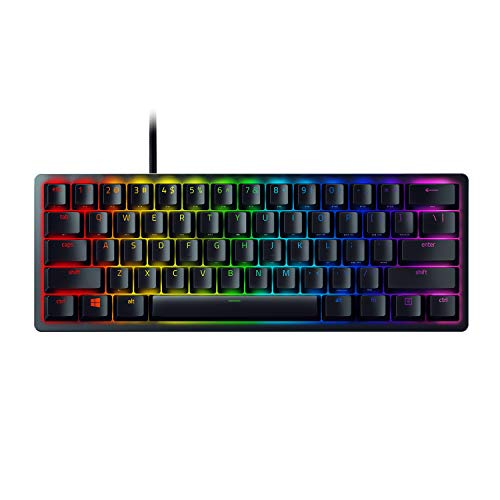 Razer Huntsman Mini |
| Check price on Amazon |
 RK Royal Kludge RK61 |
| Check price on Amazon |
Every 60 percent keyboard makes the same trade: you give up the function row, the arrow cluster, and the number pad in exchange for a frame that leaves most of your desk to the mouse. Because the layout itself is fixed, the real decision is what fills the small frame — mechanical, optical, or adjustable magnetic switches, a cable or a wireless link, and an Fn layer you can live with every day. Picking on price alone usually ends with a board whose layer layout fights the games or the work you actually do.
This guide serves competitive players who need sweeping mouse room, small-desk users who still type all day, and first-time buyers who want a compact board without wasting money on the wrong variant. The five picks below were chosen from the names and specification details printed on their Amazon listings, and they cover wired and wireless models at very different budgets.
Our Top Picks
Top 3 picks at a glance
Quick Picks
As an Amazon Associate we earn from qualifying purchases
| Product | Best for | Key spec from title |
|---|---|---|
| HyperX Alloy Origins 60 | A solid mechanical feel in a metal frame | HyperX Red linear switches, aluminum body |
| SteelSeries Apex Pro Mini Wireless | Adjustable actuation without a cable | OmniPoint 2.0 switches, Quantum 2.0 wireless |
| Logitech G PRO X 60 Lightspeed | Esports players who carry their board to events | GX Optical tactile switches, Lightspeed wireless |
| Razer Huntsman Mini | Fast optical actuation on a wired desk | Linear optical switches, 1.0 mm actuation |
| RK Royal Kludge RK61 | A first compact board on a tight budget | Triple-mode connection, hot-swappable switches |
How to Choose
Switch type decides how each press feels
Mechanical switches like the HyperX Red and RK Brown are contact-based, with a fixed actuation point and a familiar travel feel. Optical switches in the Razer and Logitech boards register a press with a beam of light, which shortens the actuation distance. The SteelSeries OmniPoint 2.0 goes further and lets you set the actuation point per key. Decide which behaviour you want before comparing anything else, because the switch is the one part of a 60 percent board you interact with on every single press.
Wired or wireless changes the whole setup
A wired board such as the Huntsman Mini or Alloy Origins 60 never needs charging and keeps the desk simple, but the cable fixes where the keyboard can sit. Wireless models add freedom: the Apex Pro Mini Wireless and the PRO X 60 both pair a low-latency 2.4 GHz link with Bluetooth, and the RK61 adds a wired mode on top of both. If the board will move between a gaming PC, a laptop, and a tablet, triple-mode connection is worth more than a small saving on a wired-only model.
The Fn layer replaces the keys you gave up
Nothing is truly deleted on a 60 percent board; the function row, arrows, and navigation keys move onto an Fn layer printed on the keycap fronts or sides. Boards differ in how readable that layer is. HyperX prints the secondary functions on the side of each keycap, which shortens the learning curve, while other boards expect you to memorise positions. Before buying, look at listing photos of the keycaps and check where the arrow keys land, because you will press those combinations hundreds of times a week.
Keycaps and software shape daily use
Doubleshot PBT keycaps appear on the HyperX, SteelSeries, Logitech, and Razer picks, and the legends will not wear smooth the way printed ABS caps do. Software matters just as much: remapping, macros, and lighting live in NGENUITY, GG, G HUB, or Synapse depending on the brand, and some of these tools run on Windows only. If you plan to remap the Fn layer or store profiles on the board itself, confirm the software supports your operating system before the box arrives.
The 5 Best Options
HyperX Alloy Origins 60
- Best for: Players who want a metal-bodied mechanical board with a simple, predictable feel.
- Layout: 60 percent form factor, 61 keys
- Switches: HyperX Red linear mechanical, rated for 80 million keypresses
- Body: full aircraft-grade aluminum
- Keycaps: double shot PBT with side-printed secondary functions
Players who want a metal-bodied mechanical board with a simple, predictable feel.
The switches are soldered rather than hot-swappable, and NGENUITY runs on Windows only, so check both points before ordering.
The Alloy Origins 60 is the straightforward mechanical choice in this group: 61 keys, HyperX Red linear switches, and a full aircraft-grade aluminum body that gives the small frame a dense, planted feel during fast play. Side-printed secondary functions make the Fn layer easier to learn than on most mini boards, and the doubleshot PBT keycaps keep their texture over time. It suits players who want a sturdy 60 percent board that behaves the same way every session, with no actuation tuning or rapid-trigger extras to manage.
SteelSeries Apex Pro Mini Wireless
- Best for: Competitive players who want per-key actuation tuning and a cable-free desk.
- Layout: 60 percent design
- Switches: OmniPoint 2.0 adjustable HyperMagnetic
- Connection: Quantum 2.0 Dual Wireless (2.4 GHz and Bluetooth 5.0) plus USB-C wired
- Keycaps: double shot PBT
Competitive players who want per-key actuation tuning and a cable-free desk.
A wired Apex Pro Mini is sold under a nearly identical name, so confirm the listing says Wireless before you check out.
The Apex Pro Mini Wireless is built around OmniPoint 2.0 adjustable HyperMagnetic switches, which let you set a different actuation point for movement keys and ability keys on the same board. Quantum 2.0 Dual Wireless pairs a 2.4 GHz gaming link with Bluetooth 5.0, and a wired USB-C mode covers charging and desk use. Doubleshot PBT keycaps and per-key RGB lighting finish a specification aimed at players who tune their board per game rather than accepting one fixed switch behaviour for everything they play.
Logitech G PRO X 60 Lightspeed
- Best for: Tournament and LAN players who need a wireless board that travels well.
- Layout: 60 percent ultra-compact form factor
- Switches: GX Optical tactile
- Connection: Lightspeed wireless, Bluetooth, and USB wired
- Keycaps: dual-shot PBT
Tournament and LAN players who need a wireless board that travels well.
This listing is the tactile switch version; a linear optical version is sold separately, so check the switch type named in the title.
Logitech designed the PRO X 60 with input from esports athletes, and the priorities show: a 60 percent frame, GX Optical tactile switches, and the Lightspeed wireless connection the brand uses across its pro line. Bluetooth and a wired USB mode sit alongside Lightspeed, so the same board can stay paired to a gaming PC and still serve a laptop. Dual-shot PBT keycaps and LIGHTSYNC RGB lighting round out a board aimed at players who travel to events and want their home setup to work unchanged in a backpack.
Razer Huntsman Mini
- Best for: FPS players who want the fastest wired actuation in a compact frame.
- Layout: 60 percent form factor
- Switches: Razer Linear Optical, 1.0 mm actuation
- Frame: matte aluminum top frame
- Keycaps: oil-resistant doubleshot PBT
FPS players who want the fastest wired actuation in a compact frame.
Snap Tap is off by default and needs Synapse to enable, and clicky and linear versions share the Huntsman Mini name, so verify the switch in the listing title.
The Huntsman Mini pairs Razer Linear Optical switches with a 1.0 mm actuation distance, so presses register early in the travel and the board feels quick in movement-heavy games. A matte aluminum top frame keeps the small chassis rigid, and the oil-resistant doubleshot PBT keycaps are textured for grip. Onboard memory stores your profiles on the keyboard itself, while Snap Tap and Hypershift remapping are handled through Razer Synapse. It is the wired pick for players who value actuation speed over wireless freedom and want their settings to travel with the board.
RK Royal Kludge RK61
- Best for: First-time buyers who want wireless flexibility and swappable switches for little money.
- Layout: 60 percent, 61 keys
- Switches: hot-swappable RK Brown
- Connection: Bluetooth, 2.4 GHz wireless, and wired USB-C
- Backlighting: RGB
First-time buyers who want wireless flexibility and swappable switches for little money.
The RK61 is sold in several switch and colour variants under similar titles, so confirm the switch named in the title is the one you want.
The RK61 is the budget route into the format, and it gives up less than its price suggests. It connects three ways — Bluetooth, 2.4 GHz wireless, and wired USB-C — so one board can cover a gaming PC, a laptop, and a tablet. The Brown switches are hot-swappable, which lets a first-time owner change the feel later without buying a second keyboard, and the box includes a coiled cable, a keycap puller, spare switches, and the wireless receiver. It suits anyone who wants to learn whether the 60 percent layout fits their habits before spending more.
Which One Fits Your Situation
You play competitive shooters on a small desk
Mouse room is the whole point of the format here. The Huntsman Mini gives you wired optical actuation at 1.0 mm, while the Apex Pro Mini Wireless lets you shorten the actuation on movement keys and drop the cable entirely. Either board frees the wide, low-sensitivity sweeps that a full-size frame crowds out.
You split time between gaming and office work
You need the Fn layer to feel natural by the second week. The Alloy Origins 60 prints its secondary functions on the keycap sides, which speeds that up, and its linear switches stay quiet enough for shared rooms. The RK61 is the cheaper alternative if the board also has to pair with a work laptop over Bluetooth.
You are buying your first 60 percent board
Start with the RK61. Its triple-mode connection forgives almost any setup, the hot-swappable switches let you correct a wrong switch choice cheaply, and the included receiver and coiled cable mean nothing else to buy. If the layout clicks and you want a permanent upgrade, the HyperX and SteelSeries boards are the natural next step.
You play in more than one room or travel to events
Take the PRO X 60 Lightspeed. Lightspeed covers the gaming PC, Bluetooth covers a laptop or tablet elsewhere in the house, and the compact frame leaves room in a bag for the rest of your kit. The Apex Pro Mini Wireless is the alternative when per-key actuation matters more than the Logitech software ecosystem.
Common Mistakes
- Expecting dedicated arrow keys, then struggling through spreadsheet or document work that leans on them all day.
- Ignoring the Fn layer layout in listing photos, even though it decides how awkward everyday shortcuts feel.
- Ordering the wrong switch variant because clicky, linear, and tactile versions often share one product name.
- Choosing a wireless board without checking that its connection modes match the devices you actually own.
- Assuming every compact board is hot-swappable, when several of the best-known models use soldered switches.
Frequently Asked Questions
What keys does a 60 percent keyboard leave out?
A 60 percent board keeps the letters, numbers, and main punctuation, and drops the function row, the arrow cluster, the navigation keys, and the number pad. Those functions still exist on an Fn layer, reached by holding Fn and pressing a second key, which is why the printed layer layout matters so much.
Are 60 percent keyboards good for typing and work?
They can be, once the Fn layer becomes automatic, which usually takes a week or two of daily use. Writers and programmers often adapt quickly because their hands stay centred. Work that depends on a number pad or constant arrow-key navigation is the hardest fit, and a separate numpad is the common fix.
What is the difference between optical and mechanical switches?
A mechanical switch registers a press when two metal contacts meet, and its actuation point is fixed by the switch design. An optical switch registers the press when the stem breaks a beam of light, which allows a shorter actuation distance. Magnetic switches go further and let software set the actuation point per key.
Can a 60 percent keyboard connect to more than one device?
Some can. The RK61, Apex Pro Mini Wireless, and PRO X 60 in this guide each combine a 2.4 GHz wireless link with Bluetooth and a wired mode, so you can leave the receiver in a gaming PC and pair Bluetooth to a laptop. Wired-only boards connect to one device at a time by definition.
Related guides
More from Amazon
Programs that pair well with the guide above. Offers and eligibility are set by Amazon and may change.
Free shipping on eligible items, Prime Video and more. Eligible new members can start with a free trial.
Start a Prime free trialAd-free music streaming. Eligible new subscribers can start with a free trial.
Try Music Unlimited freeA Prime membership for ages 18-24 with a trial period. Eligibility is set by Amazon.
See Prime for Young AdultsAudiobooks and podcasts to listen to on the go. Eligible new members can start with a free trial.
Try Audible freeAs an Amazon Associate we earn from qualifying purchases.