Our Short List of 3

- Best for: People who switch between a laptop, a desktop and a tablet at one desk.
- Connectivity: Bluetooth Smart or 2.4 GHz wireless via Logitech Unifying USB receiver
- Device pairing: up to 3 devices, multi-OS (Windows, macOS, ChromeOS)
- Keyboard: full-size layout with number pad and cushioned palm rest
- Mouse: contoured right-handed shape, hyper-fast scroll wheel, 8 buttons

- Best for: Quiet typing on a small desk in a shared room.
- Connectivity: 2.4 GHz wireless via nano USB receiver
- Wireless range: 33 ft (10 m)
- Keyboard: slim full-size layout with number pad, low-profile scissor keys, 104 keys
- Mouse: ambidextrous, 3 buttons, optical tracking, 1000 DPI, mechanical scroll wheel

- Best for: A fixed workstation with a large monitor and a day full of calls.
- Connectivity: 2.4 GHz wireless, single USB receiver for both devices
- Keyboard: full-size layout, plunger keys, dedicated volume control and mute hot key
- Mouse: optical LED tracking at 4000 DPI, ambidextrous shape
- Batteries included: 2 AAA and 1 AA
All 4 Picks at a Glance
| Product | Specs | Action |
|---|---|---|
| Logitech MK850 Performance Wireless Keyboard and Mouse Combo |
| Check price on Amazon |
| Logitech MK470 Slim Wireless Keyboard and Mouse Combo, Graphite |
| Check price on Amazon |
| Dell Pro Wireless Keyboard and Mouse KM5221W, White |
| Check price on Amazon |
 Logitech MK270 Wireless Keyboard and Mouse Combo |
| Check price on Amazon |
A combo purchase looks simple until the details bite: a keyboard that eats two USB ports’ worth of dongles, a mouse sized for a laptop bag rather than a full workday, or a set that can only talk to one machine when your desk runs two. The real decision is matching the pair to how you actually work — how many devices you switch between, how much desk depth you can spare, and whether quiet keys matter more than a cushioned palm rest.
This roundup serves three kinds of buyers: people running a laptop plus a desktop who need one set to jump between machines, workers in shared or quiet rooms who need low-noise typing, and anyone replacing a worn wired pair with something that just plugs in and works. Every set below was picked from the names and specifications on its Amazon product page, and each one keeps the keyboard and mouse on a matched wireless link.
Our Top Picks
- Logitech MK850 Performance Wireless Keyboard and Mouse ComboOne Size21 x 9 x 3 inches0.1 poundsCheck on Amazon
Top 3 picks at a glance
Quick Picks
As an Amazon Associate we earn from qualifying purchases.
| Product | Best for | Key spec from title |
|---|---|---|
| Logitech MK850 Performance Combo | Switching between three devices | Bluetooth and USB receiver pairing |
| Logitech MK470 Slim Combo | Quiet work on a small desk | 2.4 GHz nano receiver, 1000 DPI mouse |
| Dell Pro KM5221W Combo | Big monitors and daily calls | 4000 DPI optical mouse |
| Logitech MK270 Combo | Simple shared or spare desks | 2.4 GHz nano receiver, 33 ft range |
How to Choose
Decide how the pair connects
Start with the link between the set and your computers, because it decides how flexible the combo can be. A single 2.4 GHz USB receiver is the simplest route: plug it in and both devices work, which suits a fixed desk and older machines without Bluetooth. Bluetooth sets skip the dongle and keep a port free, and multi-device models can pair with two or three computers or tablets at once. If you regularly move between a work laptop and a home desktop, that switching ability matters more than any other feature on the box.
Match the keyboard layout to your desk
Combo keyboards range from slim boards that stop at the edge of the number pad to full-size frames with wide cushioned palm rests, and the difference shows up in your desk measurements before it shows up in your typing. Measure the depth and width you can give up, then check the listing dimensions against that space. Spreadsheet work argues for a full number pad, while a shallow desk or a tray argues for a compact board. Tilt legs, wave-shaped frames and palm rests all trade footprint for wrist support.
Check the mouse shape and sensor
The mouse is the half of the combo people forget to scrutinise, yet it is the half your hand sits on all day. Listings state the shape — contoured for right-handers or ambidextrous — plus the sensor resolution in DPI and the button count. A contoured body with extra buttons suits long document work and scrolling through long pages, while a small ambidextrous mouse suits shared desks and left-handed users. Higher DPI figures matter on large or high-resolution monitors, where a low-sensitivity mouse means repeated long drags across the pad.
Plan around batteries and spare ports
Almost every combo here runs on replaceable AA or AAA cells rather than a rechargeable pack, so battery life in the listing is really a maintenance schedule. Figures vary widely between keyboard and mouse, and the mouse always runs out first, so note both numbers before buying. On/off switches stretch those figures when the desk sits idle. Also count your free USB ports: a receiver-based set takes one port for both devices, which is a genuine saving on a laptop or mini PC with only two or three sockets.
The 4 Best Options
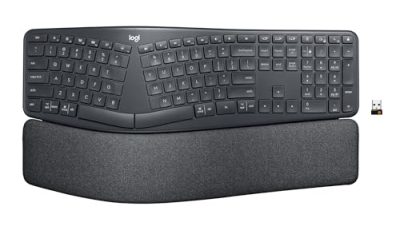
Logitech MK850 Performance Wireless Keyboard and Mouse Combo
- Best for: People who switch between a laptop, a desktop and a tablet at one desk.
- Connectivity: Bluetooth Smart or 2.4 GHz wireless via Logitech Unifying USB receiver
- Device pairing: up to 3 devices, multi-OS (Windows, macOS, ChromeOS)
- Keyboard: full-size layout with number pad and cushioned palm rest
- Mouse: contoured right-handed shape, hyper-fast scroll wheel, 8 buttons
People who switch between a laptop, a desktop and a tablet at one desk.
The mouse is shaped for right-handed use only, and the palm rest makes this the deepest keyboard in the group, so measure a shallow desk or tray first.
The MK850 Performance is the set here for people who split the day between two or three machines. Both halves pair over Bluetooth or the included Unifying receiver and can switch between three devices, so one keyboard and mouse can drive a work laptop, a home desktop and a tablet without re-pairing. The full-size keyboard adds a cushioned palm rest and a gently curved frame for long typing sessions, while the contoured mouse brings a hyper-fast scroll wheel and eight buttons for moving through long documents and spreadsheets.
Watch out for: The mouse is shaped for right-handed use only, and the palm rest makes this the deepest keyboard in the group, so measure a shallow desk or tray first.
Logitech MK470 Slim Wireless Keyboard and Mouse Combo, Graphite
- Best for: Quiet typing on a small desk in a shared room.
- Connectivity: 2.4 GHz wireless via nano USB receiver
- Wireless range: 33 ft (10 m)
- Keyboard: slim full-size layout with number pad, low-profile scissor keys, 104 keys
- Mouse: ambidextrous, 3 buttons, optical tracking, 1000 DPI, mechanical scroll wheel
Quiet typing on a small desk in a shared room.
There is no Bluetooth and no multi-device switching, so the set stays with whichever computer holds the receiver, and the layout is optimised for Windows.
Choose the MK470 when desk space and noise are the problems to solve. The keyboard is slim and compact for a full-size layout, keeping the number pad while trimming the frame, and its low-profile scissor keys are built for quiet typing in shared rooms or on calls. The matching mouse is a small ambidextrous pebble shape with quiet clicking, so the set works in a home office that doubles as a living space. Everything runs from one nano receiver, with batteries already fitted in both devices.
Watch out for: There is no Bluetooth and no multi-device switching, so the set stays with whichever computer holds the receiver, and the layout is optimised for Windows.
Dell Pro Wireless Keyboard and Mouse KM5221W, White
- Best for: A fixed workstation with a large monitor and a day full of calls.
- Connectivity: 2.4 GHz wireless, single USB receiver for both devices
- Keyboard: full-size layout, plunger keys, dedicated volume control and mute hot key
- Mouse: optical LED tracking at 4000 DPI, ambidextrous shape
- Batteries included: 2 AAA and 1 AA
A fixed workstation with a large monitor and a day full of calls.
The listing shows no Bluetooth, so the receiver is the only connection path, and the white finish is the KM5221W variant on this listing, so confirm the colour and US layout before ordering.
The Dell set suits a workstation that stays put and a user who wants the mouse to keep up with a large, sharp monitor. Its optical mouse tracks at 4000 DPI, the highest figure in this group, which means short, controlled movements across big displays. The full-size keyboard uses plunger keys for a quieter action and puts volume control plus a mute hot key on the board itself, handy during calls. Both devices share one USB receiver, and Dell backs the set with a three-year manufacturer warranty.
Watch out for: The listing shows no Bluetooth, so the receiver is the only connection path, and the white finish is the KM5221W variant on this listing, so confirm the colour and US layout before ordering.
Logitech MK270 Wireless Keyboard and Mouse Combo
- Best for: A shared family computer or a spare set that anyone can use.
- Connectivity: 2.4 GHz wireless via USB nano receiver
- Wireless range: up to 33 ft
- Keyboard: full-size layout with number pad and full-size F-keys, spill-resistant design, adjustable tilt legs
- Hot keys: 8 multimedia and shortcut keys
A shared family computer or a spare set that anyone can use.
The compact mouse can feel small in a large hand, and there is no Bluetooth or device switching, so it belongs to one computer at a time.
The MK270 is the straightforward option: one nano receiver, a full-size keyboard, a compact mouse, and no pairing menus to learn. It fits a family computer, a spare desk or a first home-office setup where several people share the same machine. The keyboard keeps a number pad and eight multimedia hot keys for volume and playback, and its spill-resistant design shrugs off the coffee accidents that happen on busy desks. The small ambidextrous mouse works for either hand, which helps when the desk changes users often.
Watch out for: The compact mouse can feel small in a large hand, and there is no Bluetooth or device switching, so it belongs to one computer at a time.
Which One Fits Your Situation
You switch between a work laptop and a home desktop
Pick the MK850 Performance. It is the only set here that pairs with three devices over Bluetooth or its receiver and switches between them from the keyboard and mouse, so the same pair follows you from the office laptop to the home machine and even a tablet. The palm rest and full-size mouse also suit the longest typing days in this group.
Your desk is small and the room is shared
Go with the MK470 Slim Combo. Its trimmed-down frame leaves room for a notebook or a second screen stand, and both the scissor keys and the mouse clicks are designed to stay quiet, which matters when someone else is sleeping, studying or on a call nearby. The ambidextrous mouse also works for whichever hand reaches for it.
You run a big monitor and take calls all day
The Dell KM5221W fits this desk. The 4000 DPI mouse covers a large high-resolution screen without long sweeping drags, and the keyboard’s volume and mute hot keys sit on the board where you can reach them mid-call. One receiver keeps a port free for a headset dongle or a drive, and the three-year warranty suits a set that will be used hard.
You just need a spare set that works
Take the MK270. It asks nothing of you beyond plugging in the receiver: no Bluetooth pairing, no software, no device switching to configure. That simplicity suits a family PC, a guest desk or a backup set kept in a drawer for the day a wired keyboard gives up. The spill-resistant board is a sensible match for shared, snack-adjacent computers.
Common Mistakes
- Buying a receiver-only combo for a computer with no free USB-A port, then discovering the set cannot pair over Bluetooth instead.
- Assuming both halves of a combo share one battery life figure; the mouse almost always needs new cells long before the keyboard.
- Picking a full-size board with a palm rest for a keyboard tray or shallow desk without checking the listing dimensions first.
- Choosing a contoured right-handed mouse for a shared desk where a left-handed colleague or partner also needs to use it.
- Ordering a regional variant of a set without confirming the key layout printed on the board matches the language you type in.
Frequently Asked Questions
Can one combo work with two computers at the same time?
Only some can. In this group the MK850 Performance pairs with up to three devices over Bluetooth or its Unifying receiver and switches between them, while the MK470, KM5221W and MK270 each stay tied to the single computer holding their receiver. If two machines are your daily routine, multi-device pairing is the feature to insist on.
Do these combos need software to work?
No. Every set here types and points as soon as the receiver is plugged in or the Bluetooth pairing is done. Optional software from the maker can remap buttons or link the keyboard and mouse for extra tricks on some models, and it can show battery status, but nothing in daily typing or clicking depends on installing it.
How long do the batteries in a combo last?
It depends on the half. Keyboards in this group are listed at up to 36 months on a set of AAA cells, while the matching mice are listed between 18 and 24 months on a single AA. Sleep modes and on/off switches protect those figures, but heavy daily use and a mouse left switched on will shorten them.
Is a combo better than buying a keyboard and mouse separately?
A combo guarantees the two devices share one receiver and one pairing process, which keeps setup simple and frees a USB port. Buying separately lets you mix a favourite keyboard with a favourite mouse, but you may end up with two receivers and two battery schedules. For most desks, the matched set is the calmer choice; specialists are the exception.
Related guides
More from Amazon
Programs that pair well with the guide above. Offers and eligibility are set by Amazon and may change.
Free shipping on eligible items, Prime Video and more. Eligible new members can start with a free trial.
Start a Prime free trialAd-free music streaming. Eligible new subscribers can start with a free trial.
Try Music Unlimited freeA Prime membership for ages 18-24 with a trial period. Eligibility is set by Amazon.
See Prime for Young AdultsAudiobooks and podcasts to listen to on the go. Eligible new members can start with a free trial.
Try Audible freeAs an Amazon Associate we earn from qualifying purchases.