Our Short List of 3

All 5 Picks at a Glance
| Product | Specs | Action |
|---|---|---|
| 1. MacBook Pro 16-inch with M4 Max — the maximum-performance pick | Check price on Amazon | |
 2. MacBook Pro 14-inch with M4 Pro — the balanced gaming pick | Check price on Amazon | |
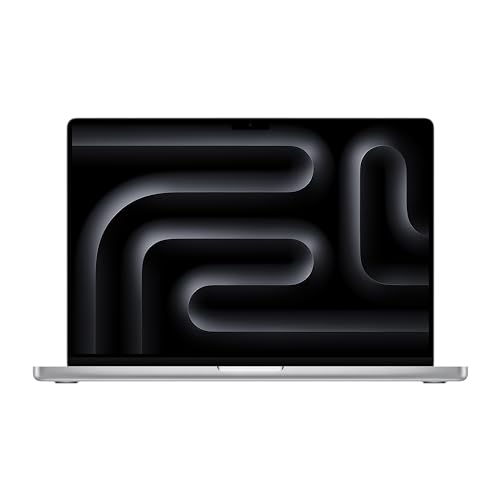 3. MacBook Pro 16-inch with M3 Pro — the big-screen value pick | Check price on Amazon | |
 4. MacBook Air 15-inch with M3 — the large-screen portable pick | Check price on Amazon | |
 5. MacBook Air 13-inch with M3 — the entry pick for light gaming | Check price on Amazon |
As an Amazon Associate we earn from qualifying purchases.
Choosing the best Apple laptops for gaming starts with an honest admission: a MacBook is not a Windows gaming laptop, and it never tries to be. There is no discrete NVIDIA or AMD graphics card, no swappable RAM, and a large part of the PC games catalogue simply never arrives on macOS. What Apple offers instead is a single family of M-series chips with unusually strong integrated graphics, superb displays, quiet and efficient cooling, and battery life that Windows gaming machines cannot match. If your library leans towards the growing list of native Mac releases, Apple Arcade, emulators that run well on Apple silicon, and cloud streaming, a MacBook can be a genuinely enjoyable gaming machine — provided you pick the right chip tier.
This guide compares five MacBook configurations sold on Amazon US, from the flagship MacBook Pro 16-inch with M4 Max down to the entry-level MacBook Air 13-inch with M3. Each pick is judged on what decides gaming on a Mac: GPU core count, unified memory, sustained performance under load, display quality and refresh rate, and storage headroom. The right choice depends less on the badge — Air or Pro — and more on how demanding your games are and whether you play natively, through a translation layer, or streamed from the cloud.
Our Top Picks
Top 3 picks at a glance
How to Choose an Apple Laptop for Gaming
Understand gaming on macOS before you spend anything
The macOS games library is smaller than the Windows library, and no buying guide should pretend otherwise. Major storefronts do carry Mac builds — Steam, the Mac App Store, GOG and the Epic Games Store all filter by platform — and the native catalogue now includes demanding titles that have been ported to Apple silicon, alongside thousands of indie games that run perfectly. Apple Arcade adds a large casual library that plays identically across the range in this guide.
Three workarounds widen the catalogue further. First, cloud services such as GeForce NOW and Xbox Cloud Gaming stream Windows games to a Mac through a browser or app, shifting the burden to your internet connection — on a fast connection, even the MacBook Air here can play titles that will never be ported. Second, translation layers such as CrossOver let some Windows games run on Apple silicon with varying, game-specific success, so check compatibility databases for your exact titles before relying on this route. Third, note what does not work: Boot Camp does not exist on Apple silicon, so you cannot install Windows natively. Buy a MacBook for the games it can definitely play, and treat translation-layer successes as a bonus.
Chip tier matters more than anything else
Every machine in this guide uses an Apple M-series system on a chip, where CPU, GPU and memory sit on one die. For gaming, the GPU core count and the memory bandwidth of the tier are what count. The base M3 in the MacBook Air models offers an 8-core CPU and a 10-core GPU — enough for native and indie titles at moderate settings, and it introduced hardware-accelerated ray tracing to the family. The M3 Pro and M4 Pro step up to substantially more GPU cores and far higher memory bandwidth, which is what heavier native ports need at the high internal resolutions of these displays. The M4 Max sits at the top, with the widest GPU and the most bandwidth, and it is the closest a MacBook gets to a no-compromises gaming specification. As a rule, buy the strongest GPU tier your budget allows, because none of it can be upgraded later.
Unified memory and storage cannot be changed later
RAM and SSD in every MacBook are fixed at purchase. Unified memory is shared between the CPU and GPU, so games draw from the same pool as the operating system and everything else you have open. Sixteen gigabytes is a sensible floor for gaming, 24GB or more is comfortable for heavier ports and for keeping a browser, chat and capture tools open alongside, and the 36GB configurations in this guide remove memory pressure from the equation almost entirely. For storage, game installs are large and external drives are a clumsy fix for a laptop, so 512GB should be treated as the practical minimum and 1TB as the relaxed option if your library is big.
Cooling decides sustained performance
The MacBook Air is fanless. That makes it silent, which is lovely, but in long gaming sessions the chip reduces its clocks to manage heat, so frame rates drift downwards over time. The MacBook Pro models have active cooling with fans, and they hold their performance far more consistently across a long session — one of the strongest practical arguments for the Pro line if you play for hours rather than in short bursts. The 16-inch Pro has the largest chassis and the most thermal headroom of the range.
Displays: ProMotion is a real gaming advantage
The MacBook Pro models use Liquid Retina XDR panels with ProMotion adaptive refresh up to 120Hz, very high brightness and mini-LED contrast. The 120Hz refresh makes a visible difference in fast-moving games that can push high frame rates, and the contrast flatters dark scenes. The MacBook Air models use standard Liquid Retina panels at 60Hz — bright, accurate and perfectly pleasant, but capped at 60 frames per second on the internal screen. Both lines can drive external monitors, so a desk setup with a high-refresh display is an option either way, but for gaming on the laptop screen itself, the Pro panels are clearly ahead.
Ports, controllers and the rest of the setup
Current MacBook Pro models include an HDMI port alongside Thunderbolt, which makes connecting to a TV for couch gaming straightforward; the Air relies on Thunderbolt, so a simple USB-C hub or cable covers most needs. macOS supports the major wireless controllers — PlayStation, Xbox and Nintendo pads all pair over Bluetooth — and Game Mode in recent macOS versions prioritises the game in the foreground and reduces latency for wireless accessories while you play.
The Best Apple Laptops for Gaming
1. MacBook Pro 16-inch with M4 Max — the maximum-performance pick
This configuration pairs the M4 Max chip — in this listing, a 14-core CPU with a 32-core GPU — with 36GB of unified memory and a 1TB SSD, in the Space Black 16-inch chassis. On paper and in specification terms, it is simply the most gaming-capable laptop Apple sells. The 32-core GPU and the M4 Max memory bandwidth give native Mac ports the most headroom in this guide for high settings at the panel’s high native resolution, and hardware-accelerated ray tracing and mesh shading are supported for the small but growing set of Mac titles that use them.
The 16.2-inch Liquid Retina XDR display is the other half of the appeal: ProMotion up to 120Hz, mini-LED contrast and very high peak brightness make it the best screen here for games, full stop. The large chassis gives the cooling system the most room to work, so sustained performance in long sessions is as strong as the MacBook line offers, and the six-speaker system is genuinely good enough that a headset is optional for single-player games. The trade-offs are size, weight and cost: this is a desk-first machine that you can carry, rather than a laptop you forget in a bag. For a buyer who wants one Apple laptop that plays every native Mac game as well as a MacBook possibly can, and who also streams or experiments with translation layers, this is the ceiling — buy it if the budget stretches and portability is secondary.
2. MacBook Pro 14-inch with M4 Pro — the balanced gaming pick
The 14-inch MacBook Pro with M4 Pro — here with a 12-core CPU, 16-core GPU, 24GB of unified memory and a 512GB SSD in Space Black — is the configuration most gaming-minded Mac buyers should look at first. The M4 Pro tier is a large step up from the base chips in GPU cores and memory bandwidth, and in practical terms it handles the current native Mac catalogue at high settings far more comfortably than an Air, while the active cooling keeps that performance steady through long sessions instead of fading as a fanless chassis warms up.
You still get the full Pro display package — the 14.2-inch Liquid Retina XDR panel with ProMotion up to 120Hz — plus the HDMI port that makes TV gaming easy, in a chassis that remains properly portable for everyday use away from games. The 24GB of memory is a sweet spot for gaming alongside the usual background apps, and 512GB is workable if you rotate a modest installed library, though heavy collectors should note the fixed storage before ordering. Compared with the M4 Max model above, you give up GPU headroom at the very top end; compared with everything below, you gain the screen, the cooling and the chip tier that matter most. For most people searching for the best Apple laptop for gaming, this is the sensible flagship.
3. MacBook Pro 16-inch with M3 Pro — the big-screen value pick
The previous-generation 16-inch MacBook Pro remains a compelling gaming buy in this configuration: an M3 Pro chip with a 12-core CPU and 18-core GPU, a generous 36GB of unified memory and a 512GB SSD, in Silver. The M3 Pro’s GPU is a generation behind the M4 Pro, but it still comfortably out-guns the base M3 in the Air models, supports hardware-accelerated ray tracing, and — importantly for gaming — sits in the large, actively cooled 16-inch chassis, so it sustains its performance well.
What you keep from the flagship experience is the screen: the same class of 16.2-inch Liquid Retina XDR display with ProMotion up to 120Hz, which matters every minute you play. The 36GB memory allocation is the largest in this guide relative to its chip tier, which suits players who keep plenty open alongside a game or who dabble in the heavier translation-layer titles that appreciate memory headroom. As a 2023 model, its Amazon listing should be checked carefully for the exact configuration — the ASIN above is the 36GB, 512GB Silver variant — and stock of older configurations can thin out over time. If the listing is available, it is the route to the big Pro screen and Pro cooling without paying for the newest chip generation.
4. MacBook Air 15-inch with M3 — the large-screen portable pick
The 15-inch MacBook Air with M3 — this listing with 16GB of unified memory and a 512GB SSD in Midnight — is the pick for players who want a bigger screen and a machine that disappears into a bag. The M3 chip’s 10-core GPU handles the native Mac catalogue’s lighter and mid-weight titles, indie games and Apple Arcade very well, and the 16GB memory in this configuration is the version to buy for gaming, since memory cannot be added later. The 15.3-inch Liquid Retina display gives games more room to breathe than the 13-inch model, and the six-speaker system is a step up from the smaller Air as well.
The compromises are the familiar Air ones. The chassis is fanless, so in long sessions with demanding games the chip throttles and frame rates settle lower than the first minutes suggest; shorter sessions and less demanding titles will never show this. The screen is 60Hz, so high frame rates are capped on the internal display. And there is no HDMI port, so TV play means a USB-C adapter. None of that stops it being the most likeable all-rounder here for casual-to-moderate Mac gaming — especially for players whose library is mostly native, indie or streamed through a cloud service, where the chip barely matters and the portability matters every day.
5. MacBook Air 13-inch with M3 — the entry pick for light gaming
The 13-inch MacBook Air with M3, in this base Midnight configuration with 8GB of unified memory and a 256GB SSD, is the entry point to gaming on an Apple laptop. The M3 chip itself is capable — the same 8-core CPU and 10-core GPU as the 15-inch model — and for Apple Arcade, indie games, older native ports and cloud streaming it performs perfectly respectably. It is also the lightest, cheapest route into the ecosystem in this guide, and its silence and battery life are exactly what make the Air line popular.
Buy it with clear eyes about its limits, though. Eight gigabytes of shared memory is tight for modern games alongside a browser and chat apps, and 256GB fills quickly once a few large titles are installed, so this configuration suits a small, rotating library rather than a big installed collection. The fanless design and 60Hz screen carry the same caveats as the 15-inch Air. Within those bounds — light native gaming, Arcade, emulation of older systems and streamed games — it is a charming little machine. Players who know they will push heavier native titles should step up to the 16GB 15-inch Air or the M4 Pro above instead.
Which Apple Laptop Should You Buy for Gaming?
Match the machine to your library first. If your games are mostly native Mac releases and you play for hours at a time, the actively cooled Pro models are the right family: the M4 Pro 14-inch for most buyers, the M4 Max 16-inch if you want the ceiling, and the M3 Pro 16-inch if you want the big screen for less. If your gaming is lighter — indies, Arcade, older ports and cloud streaming — the Air models make more sense, with the 16GB 15-inch configuration the safer long-term buy and the base 13-inch reserved for the lightest libraries and tightest budgets. Whichever you choose, prioritise memory and storage at checkout, because neither can be changed afterwards, and confirm the exact chip, memory and storage on the live listing, since each configuration is a separate product.
Frequently Asked Questions
Can a MacBook really be used for gaming?
Yes, within the limits of the macOS catalogue. Native Mac ports, Apple Arcade and thousands of indie titles run well on M-series chips, and cloud services stream many Windows-only games. What a MacBook cannot do is match a Windows gaming laptop’s library or run every major release, so check that the specific games you want are available for Mac, playable through a translation layer, or streamable before buying.
Which is better for gaming, MacBook Air or MacBook Pro?
The Pro, for two structural reasons: its chips have more GPU cores and memory bandwidth, and its fans sustain performance in long sessions where the fanless Air throttles. The Pro also has the 120Hz ProMotion XDR display. The Air is the better choice only when portability, silence and budget matter more than maximum frame rates.
How much memory does a MacBook need for gaming?
Sixteen gigabytes of unified memory is a sensible minimum for gaming today, and 24GB or more is the comfortable choice for heavier ports and multitasking. Because memory is shared between CPU and GPU and can never be upgraded, erring on the higher side at purchase is wise.
Can I play Windows games on an Apple silicon MacBook?
Not natively — Boot Camp does not exist on Apple silicon. Some Windows games run through translation layers such as CrossOver with game-by-game results, and many more can be streamed through cloud gaming services. Neither route is guaranteed for a specific title, so verify your must-play games individually.
Does the MacBook support controllers?
Yes. PlayStation, Xbox and Nintendo controllers pair with macOS over Bluetooth, and recent macOS versions include a Game Mode that prioritises the active game and reduces wireless accessory latency while you play.
Is a higher refresh rate worth it on a MacBook?
For games that can sustain high frame rates, the ProMotion displays on the MacBook Pro models — up to 120Hz — look and feel noticeably smoother than the Air’s 60Hz panels. For slower-paced or streamed games the difference is smaller, and cloud gaming is often capped by the stream rather than the screen.
Conclusion
The best Apple laptops for gaming are the ones bought with the macOS reality in mind. The MacBook Pro 14-inch with M4 Pro is the balanced recommendation for most players; the M4 Max 16-inch is the no-compromise ceiling; the M3 Pro 16-inch delivers the big-screen Pro experience from the previous generation; and the two M3 Air models cover portable, lighter gaming — the 15-inch in its 16GB configuration especially. Pick the chip and memory for the library you actually own, confirm the configuration on the listing, and a MacBook can be a far better gaming companion than its reputation suggests.
Disclosure
Disclosure: This article contains affiliate links. If you buy through those links, a commission may be earned at no additional cost to you. Product information was taken from the listings and manufacturer details available at the time of writing, and specifications should be confirmed on the live listing before purchase.
Related guides
More from Amazon
Programs that pair well with the guide above. Offers and eligibility are set by Amazon and may change.
Free shipping on eligible items, Prime Video and more. Eligible new members can start with a free trial.
Start a Prime free trialAd-free music streaming. Eligible new subscribers can start with a free trial.
Try Music Unlimited freeA Prime membership for ages 18-24 with a trial period. Eligibility is set by Amazon.
See Prime for Young AdultsAudiobooks and podcasts to listen to on the go. Eligible new members can start with a free trial.
Try Audible freeAs an Amazon Associate we earn from qualifying purchases.