Our Short List of 3

- Best for: streamers and professionals who want the best fixed-position 4K image.
- Ultra HD 4K webcam; 4K at 30 fps and 1080p at 60 fps
- Show Mode for sharing desk content
- Dual beamforming noise-reducing microphones
- AI-enhanced image quality

- Best for: presenters and streamers who move around and want a gimbal that follows.
- 4K webcam with 1/1.5-inch sensor
- PTZ with AI tracking (multi-mode) and autofocus
- Voice control and gesture control
- 60 FPS in 1080p mode

- Best for: Mac and PC users who want the newest large-sensor tracking camera.
- 4K PTZ webcam for PC and Mac
- 1/1.3-inch sensor
- AI tracking
- Directional noise-canceling microphone
All 3 Picks at a Glance
| Product | Specs | Action |
|---|---|---|
| Logitech MX Brio |
| Check price on Amazon |
| OBSBOT Tiny 2 |
| Check price on Amazon |
| Insta360 Link 2 Pro |
| Check price on Amazon |
A box that says 4K can hide two very different cameras: a genuine 4K sensor, or a 1080p sensor stretched by upscaling. That distinction decides how much detail survives cropping or digital zoom, so settle it first. The second decision is mechanical. A fixed camera stays aimed where you point it, while a PTZ model on a gimbal can follow you around the room. Pick the wrong style and even a sharp sensor feels limiting.
This shortlist serves three kinds of buyer: streamers who sit in one place, presenters who stand and move, and households running both a Mac and a PC. Every model below was chosen because its Amazon listing states a true 4K sensor: the Logitech MX Brio, the OBSBOT Tiny 2, the Insta360 Link 2 Pro and the OBSBOT Tiny 2 Lite. One limit applies to the fixed cameras here: 4K capture runs at 30 frames per second, and the 60 fps figures belong to 1080p modes.
Our Top Picks
Top 3 picks at a glance
Quick Picks
As an Amazon Associate we earn from qualifying purchases.
| Product | Best for | Key spec |
|---|---|---|
| Logitech MX Brio | Fixed-position streaming and professional calls | Ultra HD 4K at 30 fps |
| OBSBOT Tiny 2 | Presenters who move around while presenting | 1/1.5-inch sensor with AI-tracking PTZ |
| Insta360 Link 2 Pro | Mac and PC users who want the newest tracking camera | 1/1.3-inch sensor, 4K PTZ |
| OBSBOT Tiny 2 Lite | PTZ tracking at a step down from the Tiny 2 | 4K at 30 fps with 2-axis gimbal |
How to Choose
Fixed Camera or AI-Tracking Gimbal
Start with how you actually work. If you sit at a desk and rarely leave the frame, a fixed camera like the MX Brio gives you the simplest setup: mount it, frame it once, and forget it. If you stand, gesture, walk to a whiteboard or demonstrate products, a PTZ camera earns its place by panning and tilting to keep you centred. The OBSBOT Tiny 2, Link 2 Pro and Tiny 2 Lite all track automatically, which removes the need for a camera operator. Tracking is a convenience feature, though, not an image-quality upgrade, so do not pay for a gimbal you will lock in one position.
Sensor Size Behind the 4K Label
Resolution alone says little about image quality; the sensor collecting the light matters just as much. Larger sensors generally hold up better in ordinary room lighting, where small webcam sensors tend to smear detail. In this shortlist the Link 2 Pro carries a 1/1.3-inch sensor, the Tiny 2 a 1/1.5-inch sensor and the Tiny 2 Lite a 1/2-inch CMOS sensor, and each listing states genuine 4K capture rather than an upscaled 1080p feed. When you compare any other model, look for the sensor size and the native capture resolution in the listing, and treat vague “4K quality” wording without those figures as a warning sign.
Frame Rates: What 4K30 and 1080p60 Really Mean
Every fixed camera in this roundup captures 4K at 30 frames per second, and the faster 60 fps modes switch the resolution down to 1080p. That trade-off is normal for the category, not a defect in these models. For talking-head calls, interviews and most streams, 4K30 is plenty, and the extra resolution lets you crop tighter in software without going soft. If your content depends on fast motion, such as energetic game streams, a smooth 1080p60 feed can look better than 4K30. Decide which you value before buying, because no camera here gives you both at once.
Microphones and Platform Certification
A webcam’s microphone is what your audience actually hears, so weigh it alongside the picture. The MX Brio uses dual beamforming noise-reducing microphones, the Link 2 Pro lists a directional noise-canceling microphone, and the Tiny 2 Lite relies on dual omni microphones, which pick up more of the room. Certification is the other practical check: the MX Brio is certified for Microsoft Teams, Zoom and Google Meet on macOS and Windows, which reduces setup friction in managed work environments. If your meetings run on a locked-down work laptop, certified plug-and-play hardware saves real troubleshooting time.
The 4 Best Options
Logitech MX Brio
- Best for: streamers and professionals who want the best fixed-position 4K image.
- Ultra HD 4K webcam; 4K at 30 fps and 1080p at 60 fps
- Show Mode for sharing desk content
- Dual beamforming noise-reducing microphones
- AI-enhanced image quality
streamers and professionals who want the best fixed-position 4K image.
this is a fixed camera with no tracking, so if you move around it cannot follow you. Confirm your computer has a free USB-C port, and remember that its 4K mode tops out at 30 fps before you plan fast-motion content around it.
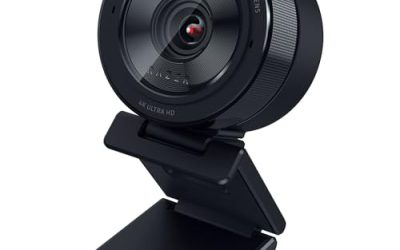
The MX Brio is the fixed-position anchor of this list, built for people whose camera never needs to move. Its listing states Ultra HD 4K capture, AI-enhanced image quality and a choice between fine manual controls for ISO, shutter speed, tint and vibrance or a fully automatic mode, so you can either tune the picture once or leave it alone. Show Mode lets you tilt the camera down to share documents or sketches on your desk, and the built-in privacy protector closes the lens when you are off camera. For streamers and professionals who want the strongest fixed 4K image, it is the straightforward pick.
Watch out for: this is a fixed camera with no tracking, so if you move around it cannot follow you. Confirm your computer has a free USB-C port, and remember that its 4K mode tops out at 30 fps before you plan fast-motion content around it.
OBSBOT Tiny 2
- Best for: presenters and streamers who move around and want a gimbal that follows.
- 4K webcam with 1/1.5-inch sensor
- PTZ with AI tracking (multi-mode) and autofocus
- Voice control and gesture control
- 60 FPS in 1080p mode
presenters and streamers who move around and want a gimbal that follows.
the headline 60 FPS figure applies to the 1080p mode, not 4K, so check the listing’s mode table before assuming fast 4K capture. A tracking gimbal also needs clear desk space to pan, so measure your setup if your monitor sits close to a wall.
The Tiny 2 exists for presenters and streamers who refuse to sit still. Its 1/1.5-inch sensor feeds a PTZ camera with multi-mode AI tracking and autofocus, so the gimbal pans and tilts to keep you framed while you walk, gesture or demonstrate something in your hands. Voice control and gesture control let you start tracking or zoom without returning to the keyboard, which suits teachers, fitness instructors and product demonstrators. HDR and light correction help when your room lighting is uneven. If movement is central to how you present, this is the camera designed around that habit rather than tolerating it.
Watch out for: the headline 60 FPS figure applies to the 1080p mode, not 4K, so check the listing’s mode table before assuming fast 4K capture. A tracking gimbal also needs clear desk space to pan, so measure your setup if your monitor sits close to a wall.
Insta360 Link 2 Pro
- Best for: Mac and PC users who want the newest large-sensor tracking camera.
- 4K PTZ webcam for PC and Mac
- 1/1.3-inch sensor
- AI tracking
- Directional noise-canceling microphone
Mac and PC users who want the newest large-sensor tracking camera.
Insta360 sells three similar names — the original Link, the standard Link 2 and this Link 2 Pro — as separate listings. Check that the page you order from is the Link 2 Pro with model CINSABPA, because specs and sensors differ across the three.
The Link 2 Pro is the newest large-sensor tracking camera in this group, pairing a 1/1.3-inch sensor with a PTZ gimbal and AI tracking. That sensor is the largest listed here, which is the spec that matters most once your room light is less than ideal. Its directional noise-canceling microphone aims at your voice rather than the whole room, and at roughly 0.37 lb the unit stays light enough for laptop lids and travel bags. Because the listing covers both PC and Mac, it suits households and hybrid workers who switch between systems and want one camera that follows them on either.
Watch out for: Insta360 sells three similar names — the original Link, the standard Link 2 and this Link 2 Pro — as separate listings. Check that the page you order from is the Link 2 Pro with model CINSABPA, because specs and sensors differ across the three.
OBSBOT Tiny 2 Lite
The Tiny 2 Lite keeps the Tiny 2 formula — a 4K PTZ camera with AI tracking on a gimbal — at a step down in sensor and hardware. Its listing states a 1/2-inch CMOS sensor, 4K at 30 fps with 1080p at 60 fps, PDAF autofocus and a 2-axis gimbal with a sleep mode, plus dual omni microphones for voice pickup. For buyers who present standing up but do not need the larger sensor of the full Tiny 2, it covers the same working style. It is the value route into tracking, provided you verify the exact listing carefully before ordering, as explained below.
Specs
- 4K PTZ AI webcam
- 1/2-inch CMOS sensor
- 4K at 30 fps and 1080p at 60 fps
- PDAF autofocus
- 2-axis gimbal with sleep mode
- Dual omni microphones
Best for: buyers who want PTZ tracking at a step down from the Tiny 2.
Watch out for: this model’s ASIN attribution rests on a single current roundup source rather than a directly captured product page, and several variant codes circulate for this camera family. Before ordering, open the listing and confirm a live featured offer exists for the exact ASIN B0D45T2LTE and that the page is the Tiny 2 Lite 4K listing — if it resolves to a different variant, do not substitute it blindly.
Which One Fits Your Situation
You Stream From a Fixed Desk Setup
Choose the Logitech MX Brio. Your camera never needs to travel, so the money goes into the fixed 4K image, the manual exposure and colour controls, and Show Mode for sharing paper or products on your desk. Its Teams, Zoom and Meet certification also makes it the safest option if the same desk handles client calls between streams.
You Present Standing Up or Teach Online
Choose the OBSBOT Tiny 2. Its gimbal follows you as you move to a whiteboard, demonstrate a product or lead a workout, and gesture control means you can start or stop tracking mid-session without walking back to the keyboard. The larger 1/1.5-inch sensor also holds detail better when you step away from your desk lamp’s reach.
You Split Time Between a Mac and a PC
Choose the Insta360 Link 2 Pro. Its listing covers both platforms, the directional microphone keeps your voice forward on calls from either machine, and the tracking gimbal adapts whether you are seated for meetings or standing for a presentation. At about 0.37 lb it also moves easily between a home desk and a laptop bag.
You Want Tracking Without the Flagship Tier
Choose the OBSBOT Tiny 2 Lite. You get the same working pattern — AI tracking, a 2-axis gimbal, PDAF autofocus — with a smaller 1/2-inch sensor as the main compromise. Just follow its Watch-out closely: verify the exact ASIN on the product page and confirm the featured offer is live before you pay, because variant listings for this family are easy to confuse.
Common Mistakes
- Buying a 1080p camera whose listing leans on “4K” upscaling language instead of stating a native 4K sensor and capture resolution.
- Assuming a webcam shoots 4K at 60 fps, when the 60 fps mode on these cameras applies to 1080p and 4K runs at 30 fps.
- Mixing up the Insta360 Link, Link 2 and Link 2 Pro listings, which are three different products with different sensors.
- Paying for a tracking gimbal and then never moving, when a fixed camera would have delivered a simpler setup for the same desk.
- Ordering the Tiny 2 Lite from a variant listing without checking that the page matches the exact ASIN and model name first.
Frequently Asked Questions
Is a 4K webcam worth it if my meetings run on Zoom or Teams?
Usually yes, though not because the call itself streams in 4K. Meeting apps compress video, but a 4K sensor gives the app a cleaner source, holds up when you crop or digitally zoom, and looks better in recordings and streams. If you only take casual calls in good light, the benefit shrinks; for client-facing or recorded work, it shows.
Can any of these webcams record 4K at 60 frames per second?
No. On the fixed cameras here, 4K capture runs at 30 fps, and the 60 fps figures in the listings belong to 1080p modes. That split is standard across the current 4K webcam category. If smooth motion matters more than resolution for your content, run the camera in its 1080p60 mode rather than expecting a 4K60 option that these listings do not offer.
What is the difference between the OBSBOT Tiny 2 and the Tiny 2 Lite?
The Tiny 2 uses a larger 1/1.5-inch sensor and adds voice control alongside gesture control, while the Tiny 2 Lite steps down to a 1/2-inch CMOS sensor and a 2-axis gimbal with sleep mode and dual omni microphones. Both track you automatically and shoot 4K at 30 fps. The Lite suits presenters who want the tracking behaviour first and the biggest sensor second.
Do these 4K webcams work with a Mac?
Yes. The MX Brio is certified for macOS as well as Windows, and the Insta360 Link 2 Pro is listed for PC and Mac, so both are safe cross-platform choices. Whichever model you pick, confirm the listing names your operating system before ordering, and keep a USB-C port free, since current MacBooks offer little else without an adapter or hub in between.
Related guides
More from Amazon
Programs that pair well with the guide above. Offers and eligibility are set by Amazon and may change.
Free shipping on eligible items, Prime Video and more. Eligible new members can start with a free trial.
Start a Prime free trialAd-free music streaming. Eligible new subscribers can start with a free trial.
Try Music Unlimited freeA Prime membership for ages 18-24 with a trial period. Eligibility is set by Amazon.
See Prime for Young AdultsAudiobooks and podcasts to listen to on the go. Eligible new members can start with a free trial.
Try Audible freeAs an Amazon Associate we earn from qualifying purchases.