Our Short List of 3
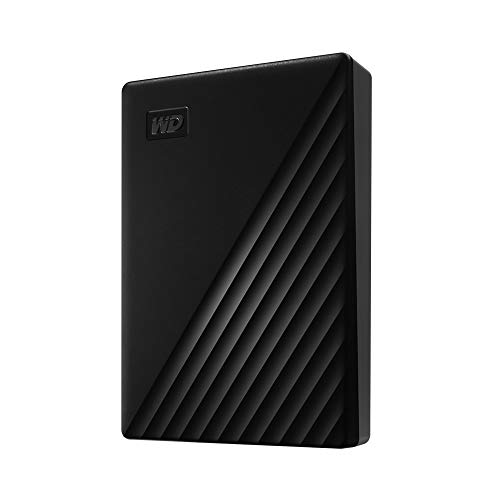
- Best for: A large home photo archive that keeps growing year after year.
- 4TB portable external hard drive
- USB 3.1 and USB 3.0 compatible
- Backup software with defence against ransomware
- Password protection with 256-bit AES hardware encryption
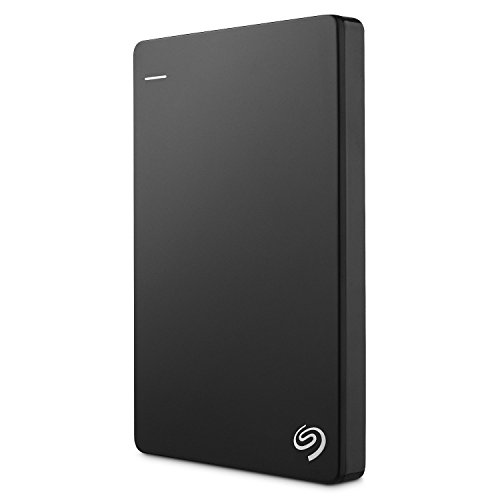
- Best for: Travellers who want a slim backup drive in a camera bag.
- 2TB portable external hard drive
- USB 3.0 connection
- Slim and lightweight design
- Two-month Adobe Creative Cloud Photography plan included

- Best for: Buyers who want simple high-capacity storage with no learning curve.
- 4TB portable external hard drive
- USB 3.2 Gen 1 and USB 3.0 compatible
- Plug-and-play ready, no software setup
- Formatted for Windows, Mac compatible
All 4 Picks at a Glance
| Product | Specs | Action |
|---|---|---|
| WD My Passport 4TB |
| Check price on Amazon |
| Seagate Backup Plus Slim 2TB |
| Check price on Amazon |
| WD Elements 4TB Portable |
| Check price on Amazon |
 Toshiba Canvio Advance 2TB |
| Check price on Amazon |
A photo library grows quietly until the day it fills the laptop, and that is the moment most photographers start thinking about a dedicated drive. The choice is not just about capacity: a drive that holds years of pictures also needs to move large files quickly, survive life in a camera bag, and make backups easy enough that they actually happen. Pick the wrong one and the library ends up scattered across half-full drives and forgotten folders.
This guide is for photographers, hobbyists, and families with growing photo collections who want one reliable place for their pictures, whether the drive lives on a desk at home or travels in a bag. The five drives below were chosen from the names and specs on their Amazon pages, with attention to capacity, connection speed, toughness, and the backup software that keeps a library safe.
Our Top Picks
Top 3 picks at a glance
Quick Picks
As an Amazon Associate we earn from qualifying purchases
| Product | Best for | Key spec from title |
|---|---|---|
| WD My Passport 4TB | A large home photo archive that keeps growing | 4TB portable external hard drive |
| Seagate Backup Plus Slim 2TB | A slim backup drive in a camera bag | 2TB portable external hard drive |
| WD Elements 4TB Portable | Simple high-capacity storage with no learning curve | 4TB portable external hard drive |
| Toshiba Canvio Advance 2TB | A pocket drive for current shoots that travels daily | 2TB portable external hard drive |
| SanDisk Extreme Portable SSD 500GB | A tough pocket drive for outdoor shoots | Read speeds up to 550MB/s |
How to Choose
Pick capacity for the library you will have
Photographers underestimate their storage needs more than any other group, because raw files, edited copies, and video clips pile up far faster than the original shoots suggest. Count the size of your current library, then double it, because a drive that is nearly full slows down and leaves no room for the next year of shooting. Four terabytes suits a family archive or a working photographer with years of files, while two terabytes covers a current collection and a laptop backup. If you shoot video as well as stills, lean toward the larger size from the start, since a second drive bought in a hurry rarely matches the first.
Decide between a hard drive and a solid-state drive
A traditional hard drive gives more terabytes for the money, which makes it the sensible choice for a large archive that sits on a desk or in a drawer. A solid-state drive costs more per terabyte yet moves files faster, shrugs off knocks, and stays silent, which suits travel and editing on the move. Think about where the files live: an archive that is copied to once a week belongs on a hard drive, while a working set of photos that opens and edits daily belongs on a solid-state drive. Many photographers end up with both, using the solid-state drive for current work and the hard drive for the finished archive.
Check the connection your computer actually has
A fast drive is wasted on a slow port, so match the drive connection to the ports on your computer before ordering. USB 3.2 Gen 1 and USB 3.1 move large photo folders quickly on most modern machines, while an older USB 2.0 port turns the same transfer into a long wait. Check whether the drive ships with the cable your machine needs, since some include both USB-C and USB-A cables while others include only one. A drive that plugs straight into your laptop without an adapter is one less thing to forget on a shoot. If your computer has only USB-C ports, confirm the included cable fits before the drive arrives.
Look for backup software and protection
A drive is only as useful as the backup habit it supports, so the software in the box matters as much as the hardware. Scheduled backup tools copy new photos automatically, which beats remembering to drag folders across by hand, and some include protection against ransomware that watches for suspicious changes to your files. Password protection and hardware encryption keep private pictures locked if the drive is lost or stolen, which matters for family photos and client work alike. Read what the listing states about the included software before buying, since a drive with no bundled backup tool needs your own software or a manual routine to stay safe.
The 5 Best Options
WD My Passport 4TB
- Best for: A large home photo archive that keeps growing year after year.
- 4TB portable external hard drive
- USB 3.1 and USB 3.0 compatible
- Backup software with defence against ransomware
- Password protection with 256-bit AES hardware encryption
A large home photo archive that keeps growing year after year.
The backup software needs setup on first use, so run it before the first big copy.
The My Passport 4TB is the drive for a photo archive that keeps growing, because four terabytes holds years of pictures, videos, and finished edits in one place. It connects over USB 3.1 and USB 3.0, works with Windows, Mac, Chromebook, and consoles, and includes both USB-C and USB-A cables so it plugs into almost any machine. Backup software with defence against ransomware watches your files, and password protection with 256-bit AES hardware encryption keeps private material locked. It is the most complete drive here for a home archive that must stay safe for years.
Watch out for: The backup software needs setup on first use, so run it before the first big copy.
Seagate Backup Plus Slim 2TB
- Best for: Travellers who want a slim backup drive in a camera bag.
- 2TB portable external hard drive
- USB 3.0 connection
- Slim and lightweight design
- Two-month Adobe Creative Cloud Photography plan included
Travellers who want a slim backup drive in a camera bag.
Two terabytes fills fast with video, so check your largest folders before choosing it.
The Backup Plus Slim 2TB is the traveller of this group, a thin and light drive that disappears into a camera bag or a laptop sleeve. Two terabytes is enough for a laptop backup and a working photo collection, and the USB 3.0 connection moves files quickly enough for daily use. Seagate Toolkit backup software handles scheduled copies, and the box includes a two-month Adobe Creative Cloud Photography plan for editing the photos you store. It works with PC, laptop, and Mac, so it suits anyone who moves between machines during the week.
Watch out for: Two terabytes fills fast with video, so check your largest folders before choosing it.
WD Elements 4TB Portable
- Best for: Buyers who want simple high-capacity storage with no learning curve.
- 4TB portable external hard drive
- USB 3.2 Gen 1 and USB 3.0 compatible
- Plug-and-play ready, no software setup
- Formatted for Windows, Mac compatible
Buyers who want simple high-capacity storage with no learning curve.
There is no bundled backup software, so use your own backup tool or copy files by hand.
The Elements 4TB Portable is the simplest drive here, and that is its strength: plug it in and it works, with no software to learn and no account to create. Four terabytes gives a laptop backup and a media library plenty of room, and the USB 3.2 Gen 1 connection keeps large transfers moving. It arrives formatted for Windows and works with Mac as well, and the slim, lightweight build means it still travels in a bag when needed. If you want storage without a learning curve, this is the drive to buy.
Watch out for: There is no bundled backup software, so use your own backup tool or copy files by hand.
Toshiba Canvio Advance 2TB
- Best for: A pocket drive for current shoots that travels every day.
- 2TB portable external hard drive
- USB 3.0 connection
- Backup software included
- Password protection software
A pocket drive for current shoots that travels every day.
The casing is textured rather than ruggedised, so keep it in a sleeve inside a crowded bag.
The Canvio Advance 2TB is the everyday pocket drive, small enough to carry daily and tough enough to survive a bag full of cables and chargers. Two terabytes covers current shoots, coursework, and a laptop backup, and the USB 3.0 connection is quick for everyday file moves. Backup software is included for scheduled copies, password protection software keeps files private, and the textured black casing resists scratches. A three-year limited warranty backs the drive, which is the longest cover in this group.
Watch out for: The casing is textured rather than ruggedised, so keep it in a sleeve inside a crowded bag.
SanDisk Extreme Portable SSD 500GB
The SanDisk Extreme Portable SSD is the pick for anyone whose drive leaves the house in a pocket or a camera bag on outdoor shoots. Its rugged shell and stated IP55 water and dust rating make it the most forgiving drive here when it gets rained on or dropped, and read speeds of up to 550MB/s move photo folders far faster than a traditional hard drive. Five hundred gigabytes is smaller than the hard drives here, so it suits a working set of current photos, not a full archive. The carabiner loop lets you clip the drive to a bag strap instead of losing it in a pocket.
Specs
- Capacity listed as 500GB
- Read speeds up to 550MB/s
- IP55 water and dust resistance rating
- Certified to withstand drops up to 2 metres
- USB 3.1 Type-C connector
- Includes USB Type-C to Type-C cable and Type-C to Type-A adapter
Best for: Outdoor shoots where the drive faces rain, dust, and knocks.
Watch out for: 500GB is a working set, not an archive, so pair it with a larger drive at home.
Which One Fits Your Situation
You are building a home photo archive
Choose the WD My Passport 4TB, because four terabytes holds years of pictures and the backup software with ransomware defence watches the library for you. The encryption keeps private photos locked, and the included cables fit almost any machine in the house. Set the software up on the first day, then let scheduled backups do the work.
You travel with a camera
Choose the Seagate Backup Plus Slim 2TB for a slim bag or the SanDisk Extreme Portable SSD for rough outdoor conditions, depending on how much space you need. The Seagate holds more and slips into a laptop sleeve, while the SanDisk survives rain and drops that would worry a hard drive. Either way, copy each shoot to the drive before you format the memory card.
You just want space with no setup
Choose the WD Elements 4TB Portable, because it works the moment you plug it in, with no software to learn and no account to create. Four terabytes covers a laptop backup and a media library, and the slim build still travels when needed. Remember that no bundled software means the backup routine is yours to run.
You carry a drive every day
Choose the Toshiba Canvio Advance 2TB, because its pocket size, included backup software, and three-year warranty suit daily carry. Two terabytes covers current shoots and coursework, and the textured casing resists scratches in a crowded bag. Keep it in a sleeve for extra protection on rough days.
Common Mistakes
- Buying the smallest drive to save money, then filling it within months and buying a second one.
- Choosing a hard drive for editing on the move, when a solid-state drive would open and save large photo files far faster.
- Ignoring the cable in the box and discovering on a shoot that the drive does not fit the laptop port.
- Copying photos to the drive and deleting the originals, leaving a single copy that a lost drive would wipe out.
- Skipping the backup software setup and relying on memory, until a failed drive shows the library was never copied.
Frequently Asked Questions
How much space do I need for photo storage?
Count your current library and double it, because raw files, edited copies, and video grow faster than most people expect. Two terabytes covers a current collection and a laptop backup, while four terabytes suits a family archive or years of shoots. Video pushes the need higher still, so lean toward the larger drive when you shoot both stills and video.
Should I choose a hard drive or a solid-state drive for photos?
Choose a hard drive for a large archive that sits at home, since it gives more terabytes for the money. Choose a solid-state drive for a working set that travels and edits daily, since it moves files faster and survives knocks. Many photographers use both: the solid-state drive for current work, the hard drive for the archive.
Can I use an external hard drive with both Windows and Mac?
Yes, though the format matters, since a drive formatted for Windows needs reformatting or extra software before a Mac can write to it fully. Check the listing for cross-platform compatibility, and reformat to a shared format before the first backup if you switch machines. Keep a copy elsewhere while reformatting, since the process wipes the drive.
Is one external drive enough to protect my photos?
No, because a single drive is a single point of failure, and a lost, dropped, or failed drive takes the only copy with it. Keep photos in at least two places, such as the laptop plus the external drive, or a second backup at home. A drive protects against a full laptop, not against losing the drive itself.
Related guides
More from Amazon
Programs that pair well with the guide above. Offers and eligibility are set by Amazon and may change.
Free shipping on eligible items, Prime Video and more. Eligible new members can start with a free trial.
Start a Prime free trialAd-free music streaming. Eligible new subscribers can start with a free trial.
Try Music Unlimited freeA Prime membership for ages 18-24 with a trial period. Eligibility is set by Amazon.
See Prime for Young AdultsAudiobooks and podcasts to listen to on the go. Eligible new members can start with a free trial.
Try Audible freeAs an Amazon Associate we earn from qualifying purchases.