New PS5 DualSense controller photos reveal our best look yet at the controller that has defined PlayStation 5 gaming since launch, and the images are worth a close look before you buy. The new PS5 DualSense controller photos reveal our best look yet because they show the shape, the finish, the button layout, the textured grips, the light strip around the touch pad, and the small details that are easy to miss in a store listing or a short product thumbnail. Those photos help first-time buyers, second-controller buyers, and anyone replacing a worn-out pad judge how the controller looks in hand and how the colours read in normal light.
The quick answer is straightforward. For most PS5 owners, the standard DualSense Wireless Controller is the right choice. It has haptic feedback and adaptive triggers, a built-in microphone, a headset jack, and a rechargeable battery, and it works with PS5, PC, Mac, and mobile devices. The DualSense Edge is the premium option for players who want remappable back buttons, adjustable trigger stops, swappable stick modules, and deeper customisation. Colour is personal, and the core experience is the same across the standard models, so choose the colour you like and confirm that you are buying an official Sony controller from a listing that clearly names the model and colour.
Note on product codes in this article: no Amazon product codes are listed below. Amazon product pages returned access errors during verification for this article, and the available search results confirmed that the DualSense is listed as available on Amazon US without showing a product code that could be verified against a search result. Rather than publish an unverified code, this guide names the official DualSense models only. Confirm the exact model, colour, and contents on the listing before you buy.
Our Top Picks


Top 3 picks at a glance


Quick Picks
| Product | Best For | Key Spec |
|---|---|---|
| PlayStation DualSense Wireless Controller — White | Most PS5 owners buying a first or second controller | Haptic feedback, adaptive triggers, built-in microphone, USB-C charging, Bluetooth and USB connection |
| PlayStation DualSense Wireless Controller — Midnight Black | Players who want a darker finish that matches a black console setup | Same core DualSense features as the White model, two-tone black finish, textured grips |
| PlayStation DualSense Wireless Controller — Cosmic Red | Players who want a bold colour without changing the controls | Same core DualSense features, red and black two-tone finish, standard button layout |
| PlayStation DualSense Wireless Controller — Galactic Purple | Players who want a distinctive colour for a second controller | Same core DualSense features, purple and black two-tone finish, standard button layout |
| PlayStation DualSense Edge Wireless Controller — White | Competitive and heavy-use players who want custom controls | Remappable back buttons, adjustable trigger stops, swappable stick modules, custom profiles |
How to Choose
Start With the Photos, Then Check the Details They Reveal
New photos show the controller from angles that a single front view cannot. Look at the grip texture, the seam lines around the shell, the shape of the triggers and bumpers, and the finish around the touch pad. Compare the colour of the shell, the buttons, and the sticks across several photos, because a single image can make a colour look lighter or darker than it is in a living room. If the photos show a USB cable, a charging dock, or a carry case, read the listing text to confirm whether those items are included. The photos reveal the look; the listing text confirms what is in the box.
Match the Controller to Your Platform
The standard DualSense is made for PS5, and it also works with PC, Mac, and mobile devices over Bluetooth or a USB connection. Haptic feedback and adaptive triggers are designed around PS5 games that support them, and some PC games support those features while others treat the DualSense as a standard controller. If PS5 is your main platform, any official DualSense will give you the full experience in supported games. If PC is your main platform, check whether the games you play most support DualSense features on PC before you choose between a standard model and the Edge.
Understand Haptic Feedback and Adaptive Triggers
Haptic feedback and adaptive triggers set the DualSense apart from earlier PlayStation controllers. Haptic feedback uses dual actuators to create a wider range of sensations than a traditional rumble motor, so rain, footsteps, recoil, and surface changes can feel different in games that support the feature. Adaptive triggers can change resistance as you press them, so drawing a bow, braking a car, or firing a weapon can feel tighter or looser depending on the in-game action. These features depend on game support, so they will be obvious in some games and subtle or absent in others.
Choose a Colour and Finish You Will Still Like in a Year
Colour is the main difference between standard DualSense models. White is the launch colour and matches the standard PS5 console. Midnight Black is a darker two-tone finish that suits a black console or a darker desk setup. Cosmic Red, Galactic Purple, and other colours add contrast and make it easier to tell two controllers apart during couch play. A lighter shell can show dirt and wear more clearly over time, while a darker shell can show dust and fingerprints. If you buy a second controller, a different colour is practical as well as personal.
Decide Whether the DualSense Edge Is Worth It for You
The DualSense Edge adds two remappable back buttons, adjustable trigger stops that shorten trigger travel, swappable stick modules, and custom control profiles. Those features suit players who want faster access to actions without moving a thumb off a stick, or who play competitive games where trigger travel and stick response matter. If you play casually, mostly play single-player games, or want a simple spare controller, the standard DualSense gives you the same core haptics and triggers without the added complexity.
Check Battery, Charging, and Connection Options
The DualSense has a built-in rechargeable battery and charges over USB-C. Battery life depends on how much you use haptic feedback, adaptive triggers, the microphone, and the light strip, and on whether you play over Bluetooth or a wired connection. A wired connection can reduce input delay on PC and keeps the controller charged while you play. Some listings include a USB cable and some do not, so check the contents before you buy. A charging dock is a separate accessory and is not included with a standard controller.
Confirm You Are Buying an Official Controller
New photos can help you spot an official controller, but they are not a substitute for reading the listing. An official DualSense carries PlayStation branding, the familiar button symbols, and the standard layout with a touch pad in the centre, a PlayStation button below it, and a microphone mute button. Third-party controllers can look similar in a thumbnail, so confirm the brand name, the model name, and the platform compatibility in the listing text. If a listing is vague about the brand, the model, or what is included, choose a listing that states those details clearly.
The Best New PS5 DualSense Controller Photos Reveal Our Best Look Yet Reviewed
PlayStation DualSense Wireless Controller — White
The White DualSense is the standard controller that most PS5 owners should start with, and it is the model shown in most of the new photos. It has haptic feedback, adaptive triggers, a built-in microphone array, a headset jack, a touch pad, and a light strip around the touch pad. The white and black two-tone finish matches the standard PS5 console, and the textured grips give the controller a secure feel during long sessions. It connects to PS5 over Bluetooth or USB, and it also works with PC, Mac, and mobile devices.
This controller suits a first-time PS5 owner, a player replacing a worn controller, and anyone who wants a second pad for couch play. It also suits PC players who want a comfortable controller with strong support in games that recognise the DualSense. It is less suited to players who already know they want back buttons or adjustable trigger stops, because those features are only available on the Edge. It is also less suited to players who want a darker or more distinctive finish, in which case Midnight Black or another colour is a better match.
PlayStation DualSense Wireless Controller — Midnight Black
The Midnight Black DualSense is the same standard controller in a darker two-tone finish, and it is the colour most often shown in recent listings and photos. It has the same haptic feedback, adaptive triggers, built-in microphone, headset jack, touch pad, and USB-C charging as the White model. The black shell and dark grey accents give it a quieter look that suits a black PS5 console, a dark entertainment unit, or a desk setup where a white controller would stand out. The textured grips and button layout are the same as the White model, so the feel in hand is the same and only the appearance changes.
This controller suits players who prefer a darker setup, players who want a second controller that is easy to tell apart from a white first controller, and anyone who finds that a darker shell shows everyday wear less obviously. It should be skipped by players who want the extra customisation of the Edge, and by players who want a bright colour that is easy to spot on a shelf.
PlayStation DualSense Wireless Controller — Cosmic Red
The Cosmic Red DualSense is a standard DualSense in a red and black two-tone finish, and it is a good choice if you want colour without changing the controls. It has the same haptic feedback, adaptive triggers, built-in microphone, headset jack, touch pad, and USB-C charging as the other standard models. The red shell is the most visible part of the controller, while the black grips and buttons keep the look grounded. In photos, Cosmic Red reads as a deep red rather than a bright red, and that deeper tone suits both a living room and a gaming desk.
This controller suits players who want a bold second controller, players who like to match a controller to a room or a setup, and players who want to tell controllers apart at a glance during multiplayer sessions. It should be skipped by players who prefer a neutral colour, and by players who want the Edge and its remappable controls.
PlayStation DualSense Wireless Controller — Galactic Purple
The Galactic Purple DualSense is a standard DualSense in a purple and black two-tone finish, and it is one of the more distinctive colours in the range. It has the same haptic feedback, adaptive triggers, built-in microphone, headset jack, touch pad, and USB-C charging as the other standard models. The purple shell is darker than it can look in a bright product photo, and the black accents around the sticks and buttons keep the design balanced. New photos that show the controller in normal room light give a better sense of that purple than a single studio shot.
This controller suits players who want a second controller with a clear identity, players who like a purple accent in their setup, and anyone who wants the standard DualSense without a white or black finish. It should be skipped by players who want a neutral colour that blends into a setup, and by players who need the Edge for competitive customisation.
PlayStation DualSense Edge Wireless Controller — White
The DualSense Edge is the premium DualSense, built for players who want to tune the controller to their own play style. It has the same haptic feedback and adaptive triggers as the standard DualSense, plus two remappable back buttons, adjustable trigger stops, swappable stick modules, and custom profiles that can be switched with a function button. The Edge also has a different underside layout to fit the back buttons, and it comes with a carry case and extra stick caps in the standard package, so check the listing to confirm what is included.
This controller suits competitive players, heavy-use players, and players who already use back buttons and want them on a PlayStation controller. It suits players who play shooters, fighting games, or other genres where quick access to an extra action matters, and players who want to adjust stick dead zones and trigger travel. It should be skipped by casual players who will not use the extra controls, by players who want a simple spare controller, and by anyone who finds the added complexity unnecessary.
What to Check Before You Buy
Before you buy, confirm the model name, the colour name, and the platform compatibility in the listing. A standard DualSense and a DualSense Edge look similar in a small photo, but they are different controllers with different controls and different contents. Check whether a USB cable is included, whether a charging dock or carry case is part of the package, and whether the listing describes the controller as new and official. If you are buying for PC, check whether the games you play support DualSense features on PC, and whether you will play wired or over Bluetooth. If you are buying a second controller for PS5, check that you have a way to charge it between sessions, and think about whether a different colour would make it easier to tell the two controllers apart.
Check the grip texture and the trigger shape in the photos if you play for long sessions. The DualSense is larger than some earlier PlayStation pads, and it will feel different at first if you have used a DualShock 4 for years. A single controller is enough if you play alone and charge it between sessions, while a second controller is useful for couch multiplayer and for households where more than one person plays.
Top Picks for DualSense Controller Buyers
A new controller look is fun, but most buyers want a pad that works and a way to keep it charged. These controllers and chargers cover both needs for a PS5 setup.
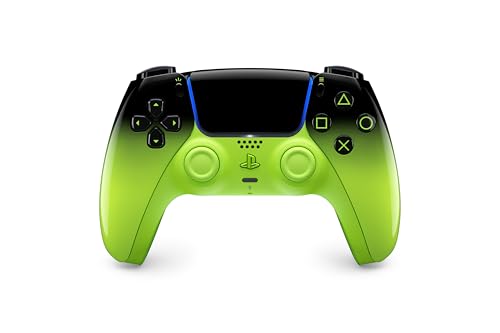
PlayStation DualSense Wireless Controller, Remix Green
A standard controller in a bright color, working with PS5, PC, Mac and mobile. It is a simple way to add a second pad in a different shade.
PlayStation DualSense Edge Wireless Controller
A customizable controller with swappable parts and extra controls. It is built for players who want to tune their setup to specific games.
PlayStation 5 DualSense Charging Station
An official dock that charges two controllers at once without a cable. It keeps pads topped up and tidy when they are not in use.
PowerA Twin Charging Station for DualSense Wireless Controllers
A twin charger that is a more budget-friendly option than the official dock. Check that your controller sits properly in the contacts.

Before You Choose
Check what each accessory is compatible with. DualSense chargers differ in whether they fit the standard pad or also the Edge, and some stand designs dislike thick grips or skins. A dock that sits near the console makes it easy to keep a spare pad ready. Look for a clear charge indicator.
FAQ
Do the new photos show a new DualSense model?
The photos show the DualSense in detail, including its finish, grips, and button layout, and they are best read as a closer look at the current controller rather than proof of a different model. Always confirm the model name in writing before you buy, and do not assume a colour or a finish means a different controller inside.
Is the standard DualSense enough for most PS5 players?
Yes, for most PS5 players the standard DualSense is enough. It has the full haptic feedback and adaptive trigger system, a built-in microphone, a headset jack, and a rechargeable battery. The Edge adds customisation for players who want it, but it does not change the core haptics or triggers. If you do not need back buttons, the standard model is the right starting point.
Can I use a DualSense on PC?
Yes, the DualSense works with PC over Bluetooth or a USB connection, and many PC games recognise it as a controller. Feature support varies by game, so haptic feedback and adaptive triggers may work in some PC games and not in others. A wired connection is often the simplest option on PC, and it keeps the controller charged while you play.
What is the difference between the DualSense and the DualSense Edge?
The standard DualSense is the regular PS5 controller with haptic feedback, adaptive triggers, a touch pad, and a built-in microphone. The DualSense Edge adds remappable back buttons, adjustable trigger stops, swappable stick modules, and custom profiles that can be switched during play. The Edge is built for players who want to tune those controls, while the standard DualSense is built for players who want the full PS5 experience without extra setup.
How do I choose a DualSense colour?
Choose the colour you like, because colour does not change features or compatibility. White matches the standard PS5 console, Midnight Black suits a darker setup, and Cosmic Red and Galactic Purple make a second controller easy to identify. Look at photos taken in normal light, not only studio shots, to judge how a colour will look in your room.
Bottom Line
New PS5 DualSense controller photos reveal our best look yet at a controller that is easy to buy well once you know what to look for. The photos show the finish, the grips, the triggers, and the layout clearly, and they help you choose a colour and a model with confidence. For most buyers, the standard DualSense in White or Midnight Black is the right choice, with Cosmic Red or Galactic Purple as a distinctive option for a second controller. The DualSense Edge is the right choice only if you will use its back buttons, trigger stops, and custom profiles. Confirm the model, colour, and contents on the listing, match the controller to PS5 or PC use, and choose the finish you will still like after many sessions.
Disclosure: As an Amazon Associate, we may earn from qualifying purchases.
Related guides
More from Amazon
Programs that pair well with the guide above. Offers and eligibility are set by Amazon and may change.
Free shipping on eligible items, Prime Video and more. Eligible new members can start with a free trial.
Start a Prime free trialAd-free music streaming. Eligible new subscribers can start with a free trial.
Try Music Unlimited freeA Prime membership for ages 18-24 with a trial period. Eligibility is set by Amazon.
See Prime for Young AdultsAudiobooks and podcasts to listen to on the go. Eligible new members can start with a free trial.
Try Audible freeAs an Amazon Associate we earn from qualifying purchases.