Left-handed players shop in a market that barely acknowledges them, so this guide starts with the honest picture. No major brand currently sells a true left-handed gaming mouse with an esports sensor: the genuinely left-handed wireless models are office mice built for comfort, while serious left-handed gamers almost always end up on symmetrical gaming mice whose shells fit either hand. Pretending otherwise would send you towards products that do not exist.
That split shapes the three picks below. The first is a symmetrical flagship that competitive left-handers actually use, thumb-button caveat included. The other two are true left-hand shapes from Logitech: a vertical model that takes wrist strain seriously and a full-size everyday mouse with silent clicks. Read the sections in order, because which route suits you depends on how you play far more than on any single specification. There is no filler pick here; each route exists because the other two genuinely cannot do its job.
Quick Picks
As an Amazon Associate we earn from qualifying purchases
| Product | Best for | Key spec from title |
|---|---|---|
| Razer Viper V3 Pro | Left-handed competitive play | Symmetrical shape, 54 g |
| Logitech Lift for Business Left | A genuine left-hand shape | True left-handed vertical design (57-degree angle) |
| Logitech Signature M650 L Left | True-left shape with silent clicks | SilentTouch silent clicks |
How to Choose
Decide between a symmetrical gaming mouse and a true left-hand shape
This is the fork every left-handed buyer faces. Symmetrical gaming mice give you the sensors, switches and polling rates competitive play demands, and the shell sits naturally in a left hand. True left-handed models mirror the shape itself, so buttons and curves land where a left hand expects them, but they are built for office work, with modest sensors and few buttons. Neither answer is wrong. Ranked players pick performance; players with wrist pain or all-day desk jobs often pick the honest left-hand fit.
Be clear-eyed about thumb buttons on symmetrical shells
A symmetrical shell is not the same as a mirrored layout. On most ambidextrous gaming mice, including the Viper V3 Pro in this guide, the side buttons sit on the left flank only, positioned for a right-handed thumb. In a left hand those buttons end up under your ring or pinky side rather than your thumb. Many left-handed players simply play without them or remap the pair to low-pressure actions. If thumb buttons are central to your bindings, weigh that heavily before choosing the symmetrical route.
Match the sensor and polling rate to your games
Office-grade sensors are fine for strategy titles, card games and slow-paced play, but fast shooters expose their limits in tracking speed and responsiveness. A flagship gaming sensor with a high polling rate keeps the cursor glued to quick direction changes, which is exactly where left-handed players using a mirrored grip feel any weakness first. Check the maximum DPI, but pay more attention to whether the mouse was designed for gaming at all. The gap between the two categories is the whole story of this keyword.
Consider your wrist and your working day
A mouse used for eight hours of work and two hours of gaming has a different job from a dedicated match mouse. Vertical left-hand designs hold the wrist in a handshake position that many people find easier over long days, and silent clicks matter in shared rooms. If your left hand aches after long sessions, comfort features may serve you better than a faster sensor. Some players keep two mice: a true-left model for the desk and a symmetrical gaming mouse for matches.
The 3 Best Options
Razer Viper V3 Pro
This is the mouse competitive left-handers actually buy. The symmetrical shell fits a left hand without any sculpted right-hand bias, the Focus Pro 35K Gen-2 sensor and 8K polling deliver the fastest tracking in this guide, and at 54 g it stays easy to flick through long sessions. Eight programmable buttons cover the essentials, and the listed battery runs up to 95 hours. It is a right-handed market’s flagship that happens to work in a left hand, with one real compromise covered below. Gen-3 optical switches keep clicks crisp and free of the double-click wear that plagues long-serving mice.
Specs
- Razer Focus Pro 35K Optical Sensor Gen-2, 35,000 DPI max
- 8K polling
- 54 g
- 8 programmable buttons
- Up to 95 hr battery
- Gen-3 optical switches
- Symmetrical shape
- HyperSpeed wireless
- Model: RZ01-05120100-R3U1
Best for: Left-handed competitive play.
Watch out for: The side buttons sit on the left flank for a right-handed thumb, so in a left hand they fall under your outer fingers; most left-handed players remap them or play without them.
ASIN: B0CW25XR5R
Logitech Lift for Business Left
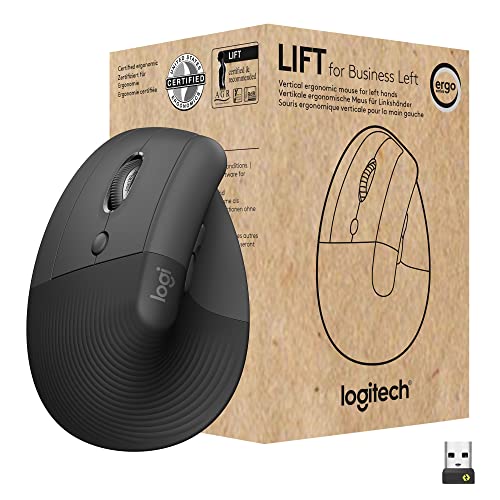
The Lift Left is the rare mouse actually built for your hand. Its vertical shell holds a left wrist at a 57-degree angle, the buttons are laid out for a left thumb, and clicks are quiet enough for shared spaces. The trade-offs are plain: a 4,000 DPI sensor and four buttons mark it as a work mouse, not a match mouse. Battery life stretches to 24 months from a single AA, and it connects over Bluetooth or the Logi Bolt receiver, so it pairs happily with a work laptop and a home PC alike.
Specs
- True left-handed vertical design (57-degree angle)
- Quiet clicks
- 4 buttons
- 4,000 DPI
- Bluetooth or Logi Bolt USB receiver
- 1x AA battery, 24-month battery life
- 125 g
- Model: 910-006492
Best for: A genuine left-hand shape.
Watch out for: The sensor and button count suit strategy and casual games, not fast shooters; treat it as a comfort-first desk mouse that can game lightly.
ASIN: B09WD7XYBC
Logitech Signature M650 L Left
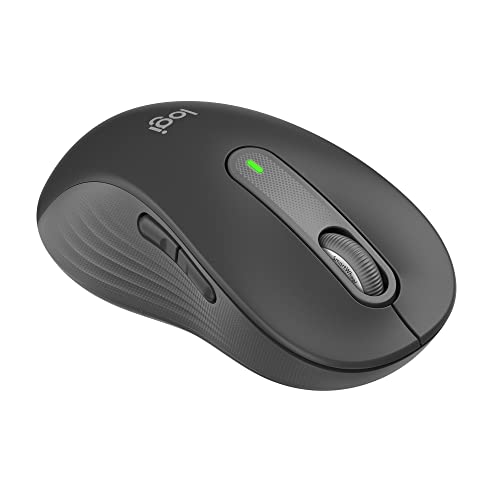
Logitech’s second true-left option keeps a conventional horizontal shape in a full size suited to larger hands. The left-handed layout puts the customizable side buttons under a left thumb, where they belong, and SilentTouch clicks keep late-night sessions quiet around other people. Battery life is listed at 24 months, and Bluetooth pairing keeps the setup simple across laptops and desktops. Like the Lift, it is an everyday mouse first, so its gaming ceiling is set by an office-grade sensor rather than by its shape. For turn-based games, city builders and relaxed adventures, that ceiling rarely gets in the way.
Specs
- Left-handed version of the M650 L
- SilentTouch silent clicks
- Bluetooth
- Customizable buttons
- 24-month battery
- Full size for large hands
- Model: 910-006234
Best for: True-left shape with silent clicks.
Watch out for: It connects over Bluetooth only and uses an office sensor, so competitive shooter players should take the Viper route instead.
ASIN: B09KXFTCLP
Which One Fits Your Situation
You play ranked shooters left-handed
The Viper V3 Pro is your only real option in this guide, and it is a strong one. The symmetrical shell, flagship sensor and 8K polling give up nothing to right-handed rivals. Accept the side-button compromise, bind your essentials to the keyboard or wheel, and the mouse disappears into your aim.
Your left wrist hurts after long days
Choose the Lift for Business Left. The vertical 57-degree shape is the one true left-handed design here that addresses posture directly, and its quiet clicks and two-year battery make it painless to live with. Keep expectations for fast-paced gaming modest and it will serve you well through years of desk work and slower-paced evening games.
You want one mouse for work and casual gaming
The M650 L Left balances both halves of the day. Its full-size left-hand shell and properly placed thumb buttons feel natural immediately, silent clicks suit shared rooms, and slower-paced games run fine on it. Players who later get serious about shooters can add a symmetrical gaming mouse alongside, keeping this one for everything else the day involves.
You are buying for a left-handed teenager
Start with how they play. Competitive titles point to the Viper V3 Pro despite its button caveat, because teenagers adapt quickly and performance shapes confidence. For homework, creative apps and relaxed games, the M650 L Left is the kinder daily fit and its silent clicks will be appreciated by the whole household.
Common Mistakes
- Assuming symmetrical means fully mirrored, then discovering the side buttons sit on the wrong flank for a left thumb.
- Buying a right-handed ergonomic mouse and forcing your left hand into its sculpted shape for months.
- Expecting office-grade left-handed mice to track like gaming sensors in fast shooters.
- Ignoring vertical options when wrist discomfort, not aim, is the real problem to solve.
- Giving up on gaming mice entirely instead of testing a symmetrical shell, which most left-handed competitors use happily.
Frequently Asked Questions
Is there a true left-handed gaming mouse with an esports sensor?
Not among current major-brand wireless models. Genuinely left-handed mice, like the two Logitech picks in this guide, are office designs with modest sensors. Left-handed competitive players use symmetrical gaming mice such as the Viper V3 Pro, accepting that the side buttons sit on the flank designed for a right-handed thumb, because no mirrored gaming flagship exists to buy instead.
Can I use the Viper V3 Pro’s side buttons with my left hand?
They sit on the mouse’s left side, so in a left hand they rest under your ring and pinky fingers rather than your thumb. Some players learn to press them there or remap them to rarely used actions, but most left-handed Viper owners simply play without relying on them, moving those binds to the keyboard instead.
Are vertical mice good for gaming?
They are good for comfort, which is a different strength. A vertical left-hand mouse like the Lift suits strategy games, simulations and casual play, and it can be the right choice if wrist strain limits your sessions. Its sensor and button count are not built for competitive shooters, so match it to slower games and longer, more comfortable sessions instead.
Which of these is best for a left-handed child or small hands?
None of the three is a small mouse: the M650 L Left is explicitly full size, and the Lift is a substantial vertical design. The Viper V3 Pro is the lightest and most manageable of the trio for smaller hands, though left-handed children who game casually may find the M650 shape easier to learn.
Related guides
More from Amazon
Programs that pair well with the guide above. Offers and eligibility are set by Amazon and may change.
Free shipping on eligible items, Prime Video and more. Eligible new members can start with a free trial.
Start a Prime free trialAd-free music streaming. Eligible new subscribers can start with a free trial.
Try Music Unlimited freeA Prime membership for ages 18-24 with a trial period. Eligibility is set by Amazon.
See Prime for Young AdultsAudiobooks and podcasts to listen to on the go. Eligible new members can start with a free trial.
Try Audible freeAs an Amazon Associate we earn from qualifying purchases.