Our Short List of 3

- Best for: Wired esports players who want a true 8000Hz rate in the original long, low Viper shape with no dongle or battery to manage.
- True 8000Hz HyperPolling technology
- Razer Focus+ 20K optical sensor
- 2nd-generation Razer optical mouse switches rated for 70 million clicks
- 71 g lightweight ambidextrous design
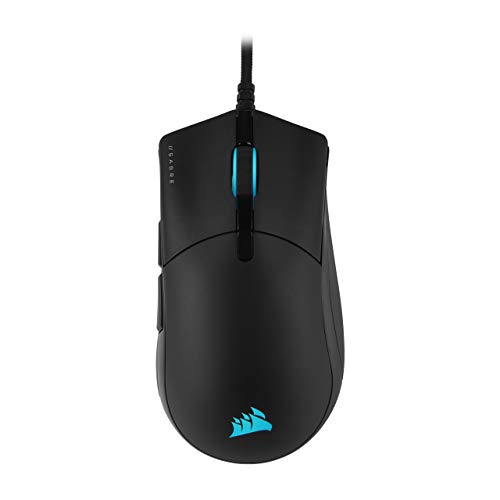
- Best for: Claw and palm players who want an ergonomic wired 8000Hz mouse with a flexible paracord cable and immediate-feeling clicks.
- 8,000Hz hyper-polling with CORSAIR AXON technology
- 18,000 DPI optical sensor
- Ultra-lightweight 74 g design
- CORSAIR QUICKSTRIKE buttons with spring-loaded design

- Best for: Right-handed palm players who want the familiar DeathAdder shape with a true 8000Hz polling rate and a light, flexible cable.
- True 8000Hz HyperPolling technology
- Focus Pro 30K optical sensor
- 59 g ultra-lightweight design
- Gen-3 optical switches
All 3 Picks at a Glance
| Product | Specs | Action |
|---|---|---|
| Razer Viper 8KHz |
| Check price on Amazon |
| Corsair Sabre RGB Pro Champion Series |
| Check price on Amazon |
| Razer DeathAdder V3 Wired |
| Check price on Amazon |
Polling rate is the number behind how fast a mouse talks to your PC. A standard gaming mouse reports its position 1,000 times per second, while an 8000Hz mouse reports 8,000 times per second, cutting the gap between reports to one eighth of a millisecond. In fast shooters that means smoother tracking, steadier aim during flicks, and clicks that register sooner. The trade is real: an 8000Hz mouse asks more from the processor, so the benefit is clearest on a modern PC with a high refresh display.
This guide is for competitive players who want that extra responsiveness without guessing which mice truly reach 8000Hz. The four mice below were chosen from the names and specifications on their Amazon listings, and every one lists a true 8000Hz polling rate, not a lower rate dressed up with an 8000Hz label. The set covers a wired classic, a feather-light wireless flagship, an ergonomic Corsair wired option, and a right-handed wired shape for palm players.
Top 3 picks at a glance
Quick Picks
As an Amazon Associate, we earn from qualifying purchases.
| Product | Best for | Key spec from title |
|---|---|---|
| Razer Viper 8KHz | Wired esports play with the original Viper shape | True 8000Hz HyperPolling, 20K DPI sensor |
| Razer Viper V3 Pro Black | Wireless competitive play at 8000Hz | True 8000Hz wireless polling, 54 g |
| Corsair Sabre RGB Pro Champion Series | Claw and palm grips with a flexible cable | 8000Hz hyper-polling, 74 g |
| Razer DeathAdder V3 Wired | Right-handed ergonomic play at 8000Hz | 8000Hz HyperPolling, 59 g |
How to Choose
Wired or wireless at 8000Hz
A wired 8000Hz mouse holds its polling rate while plugged in, with no battery to manage and no dongle to lose. A wireless 8000Hz mouse needs a HyperPolling dongle in the box: some wireless mice list 8000Hz on the packaging but only reach it with a dongle bought separately, so check the listing before assuming the full rate works out of the box. Wireless battery life also drops hard at 8000Hz, since the mouse wakes and transmits eight times as often as at 1000Hz. If you play long sessions away from a cable, weigh that shorter runtime against the freedom of no cord. For tournament play on a desktop, wired is the simpler path to a steady 8000Hz.
Shape and grip first, polling second
Polling rate means little if the shell fights your hand. Ambidextrous mice like the Viper line suit claw and fingertip grips and work for either hand, while ergonomic right-handed shells like the DeathAdder V3 and the Sabre support the palm and thumb through long sessions. Length and height matter as much as weight: a low, long shell suits players who anchor the palm, while a shorter shell suits players who lift and reposition often. Hold your current mouse and note where your fingers land, then compare that against the listed dimensions before buying. A mouse that is five grams lighter will not save a shape that cramps your ring finger after an hour.
Sensor, switches, and cable
DPI ceilings get the headlines, but tracking quality matters more than the biggest number on the box. A modern optical sensor that tracks cleanly at high speeds, with no spin-outs during fast flicks, will serve you better than a higher DPI figure you will never use. Optical switches register clicks with light instead of metal contact, which avoids double-click faults and keeps the click feel consistent over years of play. For wired mice, the cable is part of the performance: a stiff rubber cable drags across the pad and pulls against fast movements, while a flexible paracord or Speedflex cable stays out of the way. Check the listing for the cable type before buying a wired model.
Check your PC can keep up
An 8000Hz mouse sends eight times the data of a standard mouse, and a weaker processor can stutter under that load, especially while a game uses every core. If the cursor feels uneven or the game hitches after switching to 8000Hz, drop the polling rate to 4000Hz in the mouse software and see whether the stutter clears. Most modern gaming PCs handle the full rate, but older machines and laptops with power limits are the usual trouble spots. Pair the mouse with a high refresh display to see the benefit, since a 60Hz screen cannot show the smoother motion 8000Hz tracking delivers. Set the polling rate in Razer Synapse or Corsair iCUE and confirm it sticks after a restart.
The 4 Best Options
Razer Viper 8KHz
- Best for: Wired esports players who want a true 8000Hz rate in the original long, low Viper shape with no dongle or battery to manage.
- True 8000Hz HyperPolling technology
- Razer Focus+ 20K optical sensor
- 2nd-generation Razer optical mouse switches rated for 70 million clicks
- 71 g lightweight ambidextrous design
Wired esports players who want a true 8000Hz rate in the original long, low Viper shape with no dongle or battery to manage.
The cable is thicker and stiffer than modern paracord cables, so route it with a bungee or keep slack on the desk to avoid drag.
The Viper 8KHz was the first mouse to bring a true 8000Hz polling rate to a wired esports shell, and it remains the pick for players who want that rate without a dongle or a battery to think about. The ambidextrous shape is long and low, which suits claw and fingertip grips, and the 71-gram shell is light enough for fast flicks while still feeling solid. Its Focus+ 20K sensor tracks cleanly at high speeds, and the second-generation optical switches register clicks with no double-click faults. Eight programmable buttons give room for binds, and Chroma RGB lighting rounds out a mouse that has stayed relevant years after launch.
Watch out for: The cable is thicker and stiffer than modern paracord cables, so route it with a bungee or keep slack on the desk to avoid drag.
Razer Viper V3 Pro Black
The Viper V3 Pro is the wireless flagship here, pairing true 8000Hz wireless polling with a 54-gram symmetrical shell that feels weightless during fast play. The included HyperPolling Wireless Dongle makes the full rate possible without a cable, and the Focus Pro 35K sensor tracks on glass as well as on cloth pads, so surface matters less. Gen-3 optical switches keep clicks crisp, eight programmable controls cover binds and DPI steps, and the battery is rated for up to 95 hours at the standard polling rate. For players who want wireless freedom with the lowest latency available, this is the mouse to beat.
Specs
- True 8000Hz wireless polling with HyperPolling technology
- HyperPolling Wireless Dongle included
- Focus Pro 35K optical sensor Gen-2
- 54 g ultra-lightweight symmetrical design
- Gen-3 optical switches
- 8 programmable controls
- Up to 95 hours of battery life
- Model RZ01-05120100-R3U1
Best for: Competitive wireless players who want 8000Hz polling, the lightest shell in this guide, and a dongle included in the box.
Watch out for: Battery life falls sharply at 8000Hz compared with the rated 95 hours, so keep the charging cable nearby for long sessions at the full rate.
Corsair Sabre RGB Pro Champion Series
- Best for: Claw and palm players who want an ergonomic wired 8000Hz mouse with a flexible paracord cable and immediate-feeling clicks.
- 8,000Hz hyper-polling with CORSAIR AXON technology
- 18,000 DPI optical sensor
- Ultra-lightweight 74 g design
- CORSAIR QUICKSTRIKE buttons with spring-loaded design
Claw and palm players who want an ergonomic wired 8000Hz mouse with a flexible paracord cable and immediate-feeling clicks.
The ergonomic shape is right-handed only, so left-handed players should look at one of the ambidextrous Viper models instead.
The Sabre RGB Pro is the Corsair entry here, built around an ergonomic shape that supports claw and palm grips through long matches. Its CORSAIR AXON hyper-processing pushes inputs to the PC at 8,000Hz, and the 74-gram shell stays light without a honeycomb design. QUICKSTRIKE buttons use a spring-loaded design with no gap between button and switch, so clicks feel immediate, and the OMRON switches are rated for 50 million clicks. The flexible paracord cable is the quiet advantage: it drags far less than a stiff rubber cable, which matters when every flick counts. The 18,000 DPI optical sensor covers the sensitivity range most players use.
Watch out for: The ergonomic shape is right-handed only, so left-handed players should look at one of the ambidextrous Viper models instead.
Razer DeathAdder V3 Wired
- Best for: Right-handed palm players who want the familiar DeathAdder shape with a true 8000Hz polling rate and a light, flexible cable.
- True 8000Hz HyperPolling technology
- Focus Pro 30K optical sensor
- 59 g ultra-lightweight design
- Gen-3 optical switches
Right-handed palm players who want the familiar DeathAdder shape with a true 8000Hz polling rate and a light, flexible cable.
The shape is right-handed only and the shell is fairly large, so players with small hands should check the listed dimensions against their grip first.
The DeathAdder V3 Wired brings 8000Hz polling to the classic right-handed DeathAdder shape, refined into a 59-gram shell that suits palm players who rest their whole hand on the mouse. The Focus Pro 30K sensor handles fast tracking without spin-outs, Gen-3 optical switches keep clicks consistent, and the Speedflex cable is light and flexible enough to stay out of the way during wide sweeps. Six programmable buttons cover the essentials without crowding the shell, and the smooth-touch finish gives grip without feeling sticky. For players who have used a DeathAdder before, this is the familiar shape with the polling rate turned all the way up.
Watch out for: The shape is right-handed only and the shell is fairly large, so players with small hands should check the listed dimensions against their grip first.
Which One Fits Your Situation
You play competitive shooters on a wired setup
Pick the Razer Viper 8KHz. It holds 8000Hz whenever it is plugged in, with no dongle and no battery to watch, and the long ambidextrous shape suits the claw and fingertip grips shooter players use. The 20K sensor and optical switches cover the tracking and click speed you need, and the mouse has been a tournament staple long enough to prove its shape and feel. Just plan for the stiffer cable by giving it slack or using a bungee.
You want wireless freedom without giving up 8000Hz
Pick the Razer Viper V3 Pro in black. It is the only mouse in this guide that reaches 8000Hz over wireless, and the HyperPolling dongle comes in the box, so the full rate works from the first session. At 54 grams it is also the lightest shell here, which helps during fast flicks and long matches. Keep the charging cable close, since running at 8000Hz drains the battery far faster than the rated 95 hours at the standard rate.
You rest your palm and want an ergonomic shape
Pick the Razer DeathAdder V3 Wired. The right-handed ergonomic shell supports the whole hand, the 59-gram weight keeps it nimble for a palm mouse, and the Speedflex cable stays out of the way during wide movements. The 8000Hz polling rate and Focus Pro 30K sensor give the same low-latency tracking as the ambidextrous models, so you give up nothing on speed by choosing comfort. Measure your hand against the listed dimensions first, since the shell runs large.
You hate cable drag on a tight desk
Pick the Corsair Sabre RGB Pro. Its flexible paracord cable is the lightest-dragging cable in this guide, which matters when the desk is small and the cable has nowhere to go. The ergonomic shape suits claw and palm grips, the QUICKSTRIKE buttons feel immediate, and the 8000Hz AXON polling keeps inputs fast. At 74 grams it is the heaviest mouse here, but the weight sits well in an ergonomic shell built for steady control.
Common Mistakes
- Buying an 8000Hz mouse and leaving it at the default 1000Hz polling rate, then wondering why nothing feels different.
- Assuming every wireless mouse with an 8K label includes the polling dongle, when some models need it bought separately.
- Choosing by polling rate alone and ignoring shape, grip, and weight, which decide comfort over a full session.
- Running 8000Hz on an older or heavily loaded PC and blaming the mouse when the cursor stutters.
- Using a stiff cable on a wired 8000Hz mouse and letting cable drag cancel the advantage of the faster rate.
Frequently Asked Questions
Does 8000Hz polling make a real difference in games?
Yes, in fast shooters on a capable PC. The mouse reports its position eight times as often, so tracking looks smoother and clicks register sooner during flicks. The gain is smaller in slower games, and you need a high refresh display to see the smoother motion. On a 60Hz screen or an older PC the difference is harder to notice, so match the mouse to the setup.
Do I need a special dongle for 8000Hz wireless?
For the Viper V3 Pro, no extra hardware is needed, because the HyperPolling Wireless Dongle comes in the box and unlocks the full 8000Hz rate. Other wireless mice sometimes list 8000Hz on the packaging but only reach it with a dongle bought separately, so always check the listing for the included dongle and the box contents before ordering. Wired mice in this guide need no dongle at all.
Does 8000Hz polling drain battery faster?
Yes. A wireless mouse wakes and transmits eight times as often at 8000Hz as at 1000Hz, so the battery runs down faster at the full rate. The Viper V3 Pro is rated for up to 95 hours at the standard polling rate, and that figure drops sharply at 8000Hz. Wired mice have no battery concern, which is one more reason desktop players often pick a cable.
Can any gaming PC run an 8000Hz mouse?
Most modern gaming PCs can, since the extra data is small next to what a game already moves. Older machines, laptops with power limits, and busy systems are the usual trouble spots, and the sign is an uneven cursor or a game that hitches after switching to 8000Hz. Dropping to 4000Hz in the mouse software usually clears it, and the mouse still feels faster than a standard model.
Related guides
More from Amazon
Programs that pair well with the guide above. Offers and eligibility are set by Amazon and may change.
Free shipping on eligible items, Prime Video and more. Eligible new members can start with a free trial.
Start a Prime free trialAd-free music streaming. Eligible new subscribers can start with a free trial.
Try Music Unlimited freeA Prime membership for ages 18-24 with a trial period. Eligibility is set by Amazon.
See Prime for Young AdultsAudiobooks and podcasts to listen to on the go. Eligible new members can start with a free trial.
Try Audible freeAs an Amazon Associate we earn from qualifying purchases.