Many gaming motherboards still ship with a single rear USB-C port, and that port is quickly claimed by a VR headset link cable, a fast external drive or a capture device. A PCIe USB-C expansion card adds proper Type-C ports inside the case you already own, using a spare expansion slot instead of a front-panel header or a desk hub.
The five cards below all add at least one USB-C port, but they split into clear camps: single-port 20Gbps cards for one very fast drive, dual-controller cards that keep several drives busy at once, and high port-count cards that mix USB-C with USB-A. Check the slot width, the shared-bandwidth notes and the video warnings on each listing carefully before choosing between them.
Top 3 picks at a glance


Quick Picks
As an Amazon Associate we earn from qualifying purchases.
| Product | Best for | Key spec from title |
|---|---|---|
| StarTech.com 1-Port USB 3.2 Gen 2×2 PCIe Card (PEXUSB321C) | One fastest possible drive | USB-C 20Gbps SuperSpeed |
| Sonnet Allegro USB-C 4-Port PCIe Card | Several fast USB-C drives | Four USB-C 10Gbps ports |
| Inateck RedComets U22 | Mixed USB-A and USB-C desks | 6 USB Type-A and 2 USB Type-C ports, 16 Gbps bandwidth |
| Inateck RedComets U27 | Windows-only 20Gbps on a simple card | Single USB 3.2 Gen 2×2 Type-C port, 20 Gbps bandwidth |
| YEELIYA 7-Port PCIe USB 3.2 Gen 2 Card | Port count over peak speed | 7 ports (2 USB-C and 5 Type-A), 10Gbps |
How to Choose
Decide Between 10Gbps and 20Gbps USB-C
USB 3.2 Gen 2 ports run at 10Gbps, which already covers most external SSDs, VR link cables, capture devices and fast flash drives sold for gaming PCs. USB 3.2 Gen 2×2 doubles that to 20Gbps, but only a narrow set of external NVMe enclosures can use the extra speed, and both the drive and the cable must support Gen 2×2 as well. If your fastest device is a 10Gbps enclosure, a good Gen 2 card loses nothing in practice. If you move large game installs or video captures to a Gen 2×2 enclosure every day, the single-port 20Gbps cards in this guide are the ones built for that job.
Check the Slot Width and Lane Sharing
Most of these cards use a physical PCIe x4 connector and need an x4, x8 or x16 slot to reach full speed. On many gaming boards the second long slot shares lanes with the graphics card or with an M.2 socket, so fitting the card can slow something else down. Read your motherboard manual for the slot layout before ordering, and check whether a thick graphics card already covers the only free slot. Low-profile brackets matter in small cases: some cards include one in the box, while full-height-only cards rule out slim builds entirely.
Understand Shared Bandwidth Before Counting Ports
A card with four or eight ports rarely gives every port its headline speed at the same time. Controllers share a total bandwidth pool, and several listings state exactly how that pool splits: one group of ports may share 10Gbps while another group shares a second 10Gbps. For a keyboard, headset dongle and controller receiver, sharing is invisible. For two external SSDs copying at once, sharing decides the real transfer time. Match the card to your simultaneous-use pattern rather than the port count alone, and favour dual-controller designs when two fast drives genuinely work side by side.
Do Not Assume Video, Charging or Thunderbolt
A USB-C connector shape says nothing about video output. Most plain USB expansion cards are data-only: their listings state that DisplayPort Alt Mode, USB Power Delivery and Thunderbolt devices are not supported, so a monitor or a Thunderbolt dock will not work through them. Charging is usually limited to a modest wattage per port, enough for bus-powered drives and phones rather than laptops. If you need a display or a Thunderbolt dock from the same port, you need a dedicated Thunderbolt add-in card matched to a motherboard header, which is a different product category from every card in this guide.
The 5 Best Options
StarTech.com 1-Port USB 3.2 Gen 2×2 PCIe Card (PEXUSB321C)
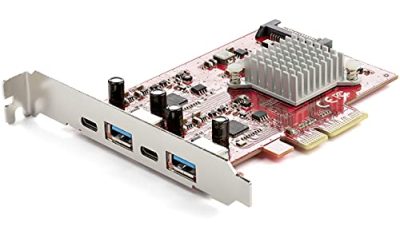
This StarTech card does one job at full speed: it adds a single USB-C port running USB 3.2 Gen 2×2 at up to 20Gbps, driven by an ASMedia ASM3242 controller on a PCIe 3.0 x4 connection. That makes it the cleanest upgrade for one fast Gen 2×2 NVMe enclosure used for game libraries or capture storage. The listing is explicit that the port is data-only, with no DisplayPort Alt Mode, no USB Power Delivery and no Thunderbolt support, and it includes both full and low-profile brackets for standard and slim cases.
Specs
- 1 USB-C port, USB 3.2 Gen 2×2, up to 20Gbps
- ASMedia ASM3242 host controller, PCI Express 3.0 x4
- Up to 15W (5V at 3A) power through the USB-C port
- Data only: no DisplayPort Alt Mode, USB Power Delivery or Thunderbolt
- Windows, macOS and Linux support, drivers auto-install on Windows 8 and up
- UASP support and full-profile plus low-profile brackets included
Best for: A single Gen 2×2 external SSD that needs the full 20Gbps path.
Watch out for: It adds exactly one port, and Gen 2×2 speed also needs a Gen 2×2 drive and a short, rated cable.
ASIN: B08T6FCF9S
Sonnet Allegro USB-C 4-Port PCIe Card
Sonnet’s Allegro card adds four USB-C ports at USB 3.2 Gen 2 speed for builders whose single motherboard port is already taken by a headset or a dock. The Amazon listing describes it as a way to add four USB-C 10Gbps ports to computers and Thunderbolt expansion systems that have PCIe slots, which also makes it one of the few options here aimed at Mac Pro and expansion-chassis users as well as Windows desktops. With four same-shape ports on one bracket, cable swapping between drives, cameras and audio gear largely disappears.
Specs
- 4 USB-C ports, USB 3.2 Gen 2 at 10Gbps
- Part number USB3C-4PM-E
- Adds USB-C ports to computers and Thunderbolt expansion systems with PCIe slots
- PCIe add-in card format
Best for: Desks juggling several 10Gbps USB-C drives and devices at once.
Watch out for: Sonnet’s own spec sheet lists no alternate-mode support, so plan on data only and do not expect a monitor signal from these ports.
ASIN: B07L8KCQPT
Inateck RedComets U22
The RedComets U22 is the port-count option: its listing states six USB Type-A and two USB Type-C ports from one PCIe x4 card, with 16Gbps of total bandwidth. Inateck explains the split plainly on the listing: one USB-C port and three USB-A ports share one chip at up to 10Gbps, and the remaining four ports share another 10Gbps group. The card draws its power from the PCIe slot itself, provides up to 15W through a USB-C port, and suits desks mixing older USB-A peripherals with newer Type-C drives.
Specs
- 6 USB Type-A and 2 USB Type-C ports, USB 3.2 Gen 2
- 16Gbps total bandwidth, split across two port groups
- PCIe x4 card for x4, x8 and x16 slots, PCIe 3.0 with PCIe 2.0 backward compatibility
- USB Type-C port provides up to 15W, USB Type-A port up to 5W
- Compatible with Windows 11/7/8/10 and Mac OS 10.8.2 and above
- Model number KU8211-R-US, powered directly from the PCIe interface
Best for: A mixed desk of USB-A peripherals plus one or two USB-C drives.
Watch out for: Two fast drives plugged into the same port group share 10Gbps, so spread busy drives across the two groups.
ASIN: B0953P5K97
Inateck RedComets U27

The RedComets U27 takes the opposite approach to its U22 sibling: one USB Type-C port with a dedicated 20Gbps of USB 3.2 Gen 2×2 bandwidth, so a single fast enclosure never shares its lane with anything else. The card is bus powered with no external power cable to route, and the box includes both standard and low-profile brackets plus a screwdriver. Its limits are stated just as clearly in the manual: it supports Windows and Linux only, with no Windows 7 and no macOS support, which rules it out for older or Apple-based builds.
Specs
- 1 USB Type-C port, USB 3.2 Gen 2×2, dedicated 20Gbps bandwidth
- Model number KU1222
- Supports Windows 8/10/11 and Linux, not compatible with Windows 7 or macOS
- Fits PCIe x4, x8 and x16 slots for best performance
- PCIe bus powered, no external power source required
- Standard bracket, low-profile bracket, screws and screwdriver included
Best for: A Windows gaming PC with one very fast external drive.
Watch out for: There is only one port and no macOS support, so confirm your operating system before ordering.
ASIN: B09BN184L7
YEELIYA 7-Port PCIe USB 3.2 Gen 2 Card

YEELIYA’s seven-port card mixes two USB-C ports with five USB-A ports at USB 3.2 Gen 2 speed, aimed at builders who run out of sockets long before they run out of bandwidth. The listing names an ASM3142 plus VL820 chipset pairing, a PCIe x4 interface and four independent power modules, with the USB-C ports rated at 5V/3A output and the USB-A ports at 5V/0.9A. It is a practical way to retire a desk hub for headsets, receivers, drives and capture gear while still gaining a pair of modern Type-C sockets.
Specs
- 7 ports: 2 USB Type-C and 5 USB Type-A, USB 3.2/3.1 Gen 2
- Maximum data transfer rate of 10Gbps
- Chipset: ASM3142 plus VL820
- PCI Express x4 interface
- USB-C port output 5V/3A, USB-A port output 5V/0.9A
- Model number UP10072
Best for: Replacing a desk hub with in-case ports for many peripherals.
Watch out for: The 10Gbps is a card maximum rather than a per-port promise, so it is not the pick for two fast drives copying together.
ASIN: B09V6SFDZQ
Which One Fits Your Situation
One Very Fast External Drive
If a single Gen 2×2 NVMe enclosure holds your overflow game library or your capture footage, choose a single-port 20Gbps card and give that drive an unshared path. The dedicated-port design wastes nothing on sockets you will never use, and the low-profile brackets on these cards also suit smaller cases. Just confirm the enclosure and its cable are genuinely Gen 2×2 rated, because the whole chain falls back to 10Gbps if any link in it does.
Several USB-C Devices Competing for One Port
If a VR link cable, two external drives and a camera all fight over the motherboard’s only USB-C socket, a four-port USB-C card ends the daily unplugging routine. Every device stays connected at 10Gbps-class speed, which is all that current headsets and most enclosures ask for. Keep expectations realistic about simultaneous transfers: port count solves the plugging problem first, and only dual-controller layouts soften the bandwidth sharing when two drives work at once.
A Mixed Desk of Old and New Peripherals
Streamers and sim racers often run USB-A wheels, pedals, button boxes and headset dongles next to USB-C drives and cameras. A mixed card with several USB-A ports and a pair of USB-C ports clears the desk hub and its extra power brick off the setup. Check the listing’s bandwidth grouping before plugging in, and put your fastest drive on the group with the least competition so background peripherals never slow a big transfer down.
A Slim or Small Form Factor Case
In a compact build, bracket height decides whether a card fits at all. Look for a low-profile bracket in the box contents, and confirm the card’s length against your case clearance and graphics card position. A single-port card is usually the easiest fit, while wide multi-port cards can crowd a small case’s airflow. Also verify that your board’s free slot is not the one already hidden under a thick graphics card cooler.
Common Mistakes
- Buying a 20Gbps Gen 2×2 card for a 10Gbps enclosure, then blaming the card when transfers match the old port exactly.
- Assuming a USB-C port carries video, then discovering the listing stated data-only with no DisplayPort Alt Mode.
- Counting ports instead of controllers, so two fast drives end up sharing one 10Gbps group and halving each other’s speed.
- Forgetting that the second long PCIe slot may share lanes with the graphics card or an M.2 drive on many gaming boards.
- Skipping the operating system notes, especially on cards that drop macOS or older Windows versions entirely.
Frequently Asked Questions
Will a PCIe USB-C card give my monitor a picture?
Usually not. Plain USB expansion cards are data devices, and several listings in this guide state directly that DisplayPort Alt Mode is not supported. A monitor needs either a graphics card output or a Thunderbolt add-in card matched to a motherboard Thunderbolt header, with a DisplayPort feed cable connected. Check the exact listing wording before assuming any USB-C port can drive a display.
Is USB 3.2 Gen 2×2 worth it for gaming storage?
Only if the drive at the other end is also Gen 2×2. A 20Gbps card paired with a 10Gbps enclosure performs exactly like a 10Gbps card, because the slowest link sets the speed. Most external gaming SSDs and VR link cables are 10Gbps devices today. Gen 2×2 pays off for fast NVMe enclosures used for big game installs, backups and capture files, where the shorter copy times add up quickly.
Can I install one of these cards in a PCIe x16 slot?
Yes, in most cases. The cards in this guide use an x4 connector and their listings describe fitting x4, x8 and x16 slots. The real checks are lane sharing and physical clearance: a long slot wired for fewer lanes, or one covered by a thick graphics card, can limit speed or block installation entirely. Your motherboard manual’s slot layout chart answers both questions before you order.
Do these cards need a power cable from the power supply?
It depends on the model. Some cards draw everything from the PCIe slot and state that no external power is required, while others offer an optional SATA power connector that helps when several bus-powered drives run together. Read the listing’s power notes for the exact card, and if a SATA connector is provided and you plan to run multiple external drives, connecting it is the safer choice.
Related guides
More from Amazon
Programs that pair well with the guide above. Offers and eligibility are set by Amazon and may change.
Free shipping on eligible items, Prime Video and more. Eligible new members can start with a free trial.
Start a Prime free trialAd-free music streaming. Eligible new subscribers can start with a free trial.
Try Music Unlimited freeA Prime membership for ages 18-24 with a trial period. Eligibility is set by Amazon.
See Prime for Young AdultsAudiobooks and podcasts to listen to on the go. Eligible new members can start with a free trial.
Try Audible freeAs an Amazon Associate we earn from qualifying purchases.