A PCIe USB 3.2 expansion card is the cleanest fix when a gaming PC runs out of fast ports: a VR headset, a capture card, external SSDs and wireless dongles all compete for the same few rear sockets, and a desktop hub only splits one port’s bandwidth between everything plugged into it. A card in a spare slot adds its own controller and its own bandwidth instead.
The five cards below all state USB 3.2 Gen 2 ports on their Amazon listings, rated at 10Gbps, with port counts running from two sockets to eight and mixes running from all USB-A to all USB-C. The honest differences sit in how bandwidth is shared between ports and how much power each port delivers, so those two figures anchor every comparison that follows.
Top 3 picks at a glance


Quick Picks
As an Amazon Associate we earn from qualifying purchases.
| Product | Best for | Key spec from title |
|---|---|---|
| StarTech.com 4-Port USB PCIe Card (PEXUSB312A2C2V) | Mixed USB-A and USB-C gear | 2 controllers, 10Gbps per port |
| StarTech.com 4-Port USB PCIe Card (PEXUSB314A2V2) | Four USB-A ports that pair up per controller | 2 controllers, 10Gbps per port |
| StarTech.com 2-Port USB PCIe Card (PEXUSB312A3) | Two fast USB-A ports in a slim case | 10Gbps per port, low-profile bracket included |
| Sonnet Allegro Pro USB-C 8-Port PCIe Card | Many fast drives at once | Full 10Gbps on all 8 USB-C ports |
| StarTech.com 2-Port USB-C PCIe Card (PEXUSB312C3) | Two USB-C ports with stronger bus power | 15W (5V 3A) per USB-C port |
How to Choose
Read Bandwidth as Per-Port or as a Shared Total
The headline figure on these listings hides two very different designs. A card with two controllers can feed each controller its own 10Gbps, so two busy ports run at full speed side by side. A card built around one controller plus a hub chip shares a single 10Gbps or a fixed total across every port, which is fine for dongles and headsets but slows simultaneous SSD transfers. Read the listing wording literally: “10Gbps per port” and a stated total bandwidth are different promises, and when a listing gives only one maximum figure with no split, assume the ports share it.
Match the Slot Before the Spec Sheet
Most cards here connect as PCIe x4, but the largest card in this guide uses an x16 mechanical connector, so a board whose second long slot is already taken by a capture card or a thick graphics card cooler may have nowhere to put it. Lane sharing matters too: on many motherboards the lower slots drop to x1 or share lanes with M.2 sockets, which caps the card below its rated speed. Check the motherboard manual for the slot’s electrical width and its sharing rules before ordering, because a Gen 2 card in an x1 slot cannot reach 10Gbps however good its controller is.
Count Ports by Connector, Not Just by Total
Eight ports sounds generous until the mix is wrong. VR setups still lean on USB-A for headset cables, sensor dongles and controller receivers, while newer capture gear, SSD enclosures and link cables increasingly arrive as USB-C only. A card that is all one connector type forces adapters into the chain, and cheap adapters are a common source of dropouts at 10Gbps. Count the devices you actually plug in, separate them by connector, and pick the card whose rear bracket matches that split. Also leave one port spare: a card filled to the last socket on day one has no room for the next peripheral.
Check Power Delivery Port by Port
Bus-powered drives, VR headsets and capture devices draw real current, and the listings here state per-port output figures that vary widely: some USB-A ports supply only 4.5W, while certain USB-C ports are rated at 15W. Cards with an optional SATA power header can top up what the slot provides, which steadies power-hungry drives under load. Note what these cards do not do: none of them turns a desktop into a fast charger, and the listings that mention video are explicit that DisplayPort alt mode and USB Power Delivery are not supported, so a monitor will not wake up on these ports.
The 5 Best Options
StarTech.com 4-Port USB PCIe Card (PEXUSB312A2C2V)
This is the balanced card for a mixed desk of gaming gear. Two USB-C and two USB-A ports all run at USB 3.2 Gen 2 speed, and because the card carries two ASM3142 controllers rather than one, its listing states up to 20Gbps of total bandwidth across the four ports, so a VR headset link cable and a fast external SSD are not forced through a single controller. It takes a full-profile PCIe 3.0 x4 slot, accepts optional SATA power when the motherboard’s supply is not enough, and keeps things honest about its limits: no DisplayPort alt mode and no USB Power Delivery.
Specs
- Ports: 2x USB-C and 2x USB-A, USB 3.2 Gen 2
- Speed: 10Gbps per port, up to 20Gbps total across 4 ports
- Controllers: 2x ASMedia ASM3142
- Interface: PCI Express 3.0 x4, full profile
- Power: optional SATA power for supplemental port power
- Video and charging: no DisplayPort alt mode, no USB Power Delivery
- Warranty: 2-year
Best for: A gaming PC that mixes USB-A peripherals with USB-C drives and wants both pairs running at full Gen 2 speed.
Watch out for: The 20Gbps figure is the combined total of two controllers, not a per-port rate; each port still tops out at 10Gbps, and the card needs a true x4 slot to deliver it.
StarTech.com 4-Port USB PCIe Card (PEXUSB314A2V2)
This four-port card is the USB-A workhorse of the guide. All four sockets are USB-A at USB 3.2 Gen 2 speed, and the card carries two ASM3142 controllers rather than one, so its listing states up to 20Gbps of total bandwidth across the four ports, with each controller feeding a pair of ports. That layout suits a desk where a headset dongle, a wheel and two external drives share one slot: pair each busy drive with a quiet peripheral and neither drive fights the other for its controller. Optional SATA power tops up port power when the motherboard supply runs short.
Specs
- Ports: 4x USB-A, USB 3.2 Gen 2
- Speed: 10Gbps per port, up to 20Gbps total across 4 ports
- Controllers: 2x ASMedia ASM3142
- Interface: PCI Express x4
- Power: optional SATA power for supplemental port power
- Warranty: lifetime
Best for: USB-A-heavy gaming desks that want two drives running at Gen 2 speed from a single slot.
Watch out for: Each controller’s 10Gbps is shared by its pair of ports, so which sockets your two fastest drives use matters; the card also ships with a full-height bracket only.
StarTech.com 2-Port USB PCIe Card (PEXUSB312A3)
The PEXUSB312A3 keeps things simple: two USB-A ports, one ASM3142 controller, and a stated 10Gbps per port at USB 3.2 Gen 2. It is the upgraded version of StarTech’s earlier PEXUSB312A2, with Multiple INs support to hold bandwidth when mixed-speed devices share the card and UASP support for external storage. An optional SATA power header supplies supplemental power, stated at up to 4.5W per USB-A port, and the box includes both full-profile and low-profile brackets, which makes this the easiest card here to fit into a slim case or a compact streaming PC.
Specs
- Ports: 2x USB-A, USB 3.2 Gen 2
- Speed: 10Gbps per port
- Controller: ASMedia ASM3142
- Interface: PCI Express 3.0 x4, full-profile and low-profile brackets included
- Power: optional SATA power header, up to 4.5W (5V at 0.9A) per port
- Features: Multiple INs and UASP support
- Warranty: lifetime
Best for: A compact or older gaming PC that needs two honest Gen 2 USB-A ports and nothing more.
Watch out for: Two ports is the whole offer, and the 4.5W per port is modest for bus-powered drives; connect the SATA header if a hungry enclosure will live on this card.
Sonnet Allegro Pro USB-C 8-Port PCIe Card

The Allegro Pro is the professional end of this category: eight USB-C ports, each with a full 10Gbps USB 3.2 Gen 2 connection, driven by four independent ASMedia 3142 controllers working through a PCIe 3.0 bridge chip, two ports per controller. That architecture is built for several NVMe enclosures transferring at once without collapsing into one shared pipe, and each port supplies 7.5W for bus-powered drives with no extra power cable required. The cost of that density is slot size: the full-height card uses an x8 electrical, x16 mechanical PCIe 3.0 interface, and Thunderbolt-only peripherals are not supported even though the ports are USB-C.
Specs
- Ports: 8x USB-C, USB 3.2 Gen 2
- Speed: full 10Gbps per port, including simultaneous transfers
- Controllers: 4x ASMedia 3142, two ports per controller, PCIe 3.0 bridge chip
- Interface: PCI Express 3.0 x8 electrical, x16 mechanical, full-height
- Port power: 7.5W per port, no additional power supply required
- Compatibility: Mac, Windows and Linux; Thunderbolt-only peripherals not supported
- Part number: USB3C-8PM-E
Best for: Creators and VR capture rigs moving footage across several fast USB-C SSDs at the same time.
Watch out for: It physically needs an x16 slot and electrically wants x8 lanes, which many gaming boards cannot spare once a graphics card is fitted; confirm the slot layout before choosing it.
StarTech.com 2-Port USB-C PCIe Card (PEXUSB312C3)

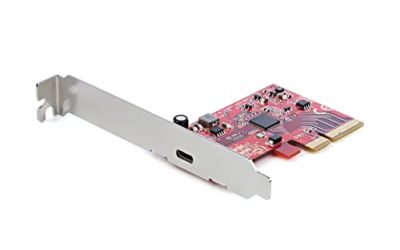
The PEXUSB312C3 is the USB-C counterpart to the two-port USB-A card above: two USB-C ports at USB 3.2 Gen 2 speed on an ASM3142 controller, using a PCIe 3.0 x4 connector that runs electrically at x2. Its listing states up to 15W, 5V at 3A, through the USB-C ports, which is stronger bus power than the USB-A cards here offer and a better match for bus-powered NVMe enclosures and link cables. It is equally plain about the limits: the ports are data only, with no DisplayPort Alt Mode, no USB Power Delivery and no Thunderbolt support.
Specs
- Ports: 2x USB-C, USB 3.2 Gen 2
- Speed: 10Gbps per port
- Controller: ASMedia ASM3142
- Interface: PCI Express 3.0 x4 connector, x2 electrical, full-profile and low-profile brackets included
- Port power: up to 15W (5V at 3A) per USB-C port
- Video and charging: data only, no DisplayPort Alt Mode, no USB Power Delivery, no Thunderbolt
- Warranty: 2-year
Best for: A gaming PC whose newer drives and link cables are USB-C and need stronger per-port power.
Watch out for: The card runs at x2 electrically despite its x4 connector, and two ports share the controller’s bandwidth; a monitor will not wake up on these data-only ports.
Which One Fits Your Situation
Your VR Headset Keeps Fighting for Ports
A headset, its link cable and a set of controller dongles want dedicated sockets, not a shared hub. Pick a card with its own controllers and a mix of USB-A and USB-C, and give the headset the port group that nothing else heavy uses. The dual-controller four-port design in this guide fits that pattern best, since the headset’s traffic stays clear of your drive transfers.
You Record or Stream with Capture Gear
Capture cards dislike sharing a controller with a busy SSD, because both want sustained bandwidth at the same moment. Look for a card that splits its ports across two or more controllers, then put the capture device on one controller and storage on the other. More total ports only help if the controller split keeps those two jobs apart during a live session.
You Shuffle Game Libraries on External SSDs
Library moves are bulk transfers, so per-port speed under load is the figure that matters. A card that sustains 10Gbps on several ports at once finishes a multi-drive copy far sooner than one sharing a single 10Gbps pipe. Cards that split their ports across two controllers keep that pace up when a second drive joins in, which is where single-controller cards start to divide their bandwidth between drives.
Your Board Is Older and Short on Everything
An older motherboard with one free x4 slot and a front panel stuck at USB 2.0 gains the most from a many-port Gen 2 card, even one that shares its bandwidth. Dongles, headsets and controllers barely sip data, so a high port-count card refreshes the whole desk at once. Just confirm the slot is electrically x4 before relying on the headline speeds.
Common Mistakes
- Assuming every port on a card runs at 10Gbps at the same time, when the listing’s total bandwidth figure says the ports share one pool.
- Buying a card with an x16 connector for a board whose only free long slot is blocked by the graphics card cooler or wired for x1.
- Plugging a monitor into a USB-C port on one of these cards and expecting a picture; the listings state data only, with no DisplayPort alt mode.
- Expecting 20Gbps from a Gen 2×2 card with a Gen 2 enclosure, when both ends of the connection must support the faster standard.
- Skipping the optional SATA power connection on a card that offers one, then blaming the card when bus-powered drives drop out under load.
Frequently Asked Questions
Will a USB 3.2 Gen 2 expansion card improve a PC VR setup?
It can, mainly by giving the headset and its dongles their own controller instead of sharing the motherboard’s ports with drives and capture gear. The headset itself still runs at its own USB speed, so the gain is stability and free ports rather than a higher ceiling. Check that your slot wiring keeps the card at full bandwidth.
What is the difference between USB 3.2 Gen 2 and Gen 2×2?
Gen 2 runs at 10Gbps per link, while Gen 2×2 bonds two lanes for 20Gbps on a USB-C connection. The device, the cable and the port all have to support Gen 2×2 to see the higher rate, and most headsets, capture cards and enclosures are Gen 2 devices. A Gen 2×2 card still serves them normally at 10Gbps.
Can I charge a laptop or run a display from these USB-C ports?
No. The listings for these cards describe data ports: DisplayPort alt mode and USB Power Delivery are not supported where the question is addressed, and per-port power figures top out at levels meant for drives and peripherals. Treat every port here as data plus modest bus power, and keep using your existing display and charging connections.
Do PCIe USB cards need drivers or extra power cables?
Modern operating systems load a standard xHCI driver for the controller chips these cards use, so most installs are recognised immediately. Extra power is optional and card-dependent: some models offer a SATA power header to supplement slot power for hungry drives. Read the listing’s power notes for the specific card, and connect the header when bus-powered devices will run together.
Related guides
More from Amazon
Programs that pair well with the guide above. Offers and eligibility are set by Amazon and may change.
Free shipping on eligible items, Prime Video and more. Eligible new members can start with a free trial.
Start a Prime free trialAd-free music streaming. Eligible new subscribers can start with a free trial.
Try Music Unlimited freeA Prime membership for ages 18-24 with a trial period. Eligibility is set by Amazon.
See Prime for Young AdultsAudiobooks and podcasts to listen to on the go. Eligible new members can start with a free trial.
Try Audible freeAs an Amazon Associate we earn from qualifying purchases.