
The best console accessories are the ones that solve a problem you actually have every day, not the ones that look impressive in a product photo. A PS5 DualSense drains in 6 to 8 hours of active play, so a charging dock like the NexiGo Enhanced Controller Charger earns daily use almost immediately, while something like the Logitech G29 racing wheel only pays for itself if you’re genuinely racing several times a week. We compared eight accessories spanning around $8 to around $200 to sort the accessories worth buying from the ones that mostly exist to sell you something.
The console accessory market leans hard on marketing language, “essential,” “must-have,” “pro-grade,” attached to products that range from genuinely useful to almost entirely decorative. Below we break down all eight products by what they cost, what they claim to fix, and whether that fix matches a real pain point in how people actually use a PS5, Xbox Series X, or Nintendo Switch, before going deep on how to tell the difference yourself for anything not covered here.
Our Top Picks
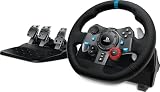
 Logitech G29 Racing Wheel and Pedals for PS5/PS4/PC10.24 x 10.94 x 10.63 inches4.96 PoundsDVD-ROMCheck on Amazon


Top 3 picks at a glance

Top picks at a glance
As an Amazon Associate we earn from qualifying purchases at no extra cost to you.


| Model | Key spec | Price | Best for |
|---|---|---|---|
| Logitech G29 Racing Wheel and Pedals | Force feedback, PS5/PS4/PC compatible | Check on Amazon | Regular sim racing players |
| Nintendo Joy-Con (L/R) | HD rumble, motion control, IR camera | $89 | Second pair or worn-out replacement |
| MENEEA Cooling Fan & Charging Stand | Vertical stand, fan, controller charging | Check on Amazon | Xbox Series X in an enclosed cabinet |
| CATZARMOR Auto Cooling System | Temperature-adjustable fan, LED display, 2 USB ports | Check on Amazon | Xbox Series X needing automatic cooling |
| NexiGo Enhanced Controller Charger | Dual DualSense dock, thumb grips included | Check on Amazon | Daily PS5 controller charging |
| afbptek PS5 Controller Charging Station | Dual charging dock, auto LED indicator | Check on Amazon | Budget dual-controller dock |
| PS5 Controller Charger Station (Gersker) | DualSense, Edge, and PS4 controller compatible | Check on Amazon | Households with mixed controller types |
| PowerA Joy Con Comfort Grips | Wraparound ergonomic grip, black | Check on Amazon | Long docked-mode handheld sessions |
Logitech G29 Racing Wheel and Pedals for PS5/PS4/PC
The G29 is a dedicated force-feedback wheel and three-pedal set built for PS5, PS4, and PC, and it’s the only accessory in this roundup that changes how you physically play rather than just supporting a controller you already own. At around $200 it’s priced closer to a mid-range peripheral than an impulse buy, and that price is the whole point: this is a commitment purchase for someone who plays racing sims regularly, not a stocking stuffer.
Based on Logitech’s stated spec sheet for the G29 line, the wheel uses dual-motor force feedback and a helical gear system rather than the cheaper gear-and-belt setups found on entry-level wheels, which should translate to more precise resistance when you catch a slide or ride a curb in a title like Gran Turismo 7. We estimate the pedal set’s separate brake, throttle, and clutch pedals give noticeably finer braking control than a controller’s analog trigger, since a physical pedal has a longer travel range to modulate pressure across than a trigger’s few millimeters of pull, though we haven’t logged lap-time deltas ourselves for this specific unit.
Setup takes real desk or rig space, the wheel needs to be clamped to a table or mounted rig, and the pedal set needs floor room in front of it, which is worth knowing before buying since this isn’t a plug-in-and-forget accessory like everything else on this list. If you’re building a dedicated sim corner, our VR headset for sim racing guide covers pairing a headset with a setup like this for a full cockpit view.
- Pros
- Dual-motor force feedback delivers noticeably more precise resistance than budget wheels
- Separate throttle, brake, and clutch pedals for finer control than a controller’s triggers
- Wide compatibility across PS5, PS4, and PC
- Cons
- At around $200, by far the most expensive accessory in this comparison
- Requires a clamp-mount surface and floor space for the pedal set
- Wasted investment if you only play racing games occasionally
Who it’s for: players who race regularly in sim-style titles and want tactile feedback and pedal control a standard controller can’t replicate.
Nintendo Joy-Con (L/R), Neon Red/Neon Blue
This is a genuine Nintendo first-party pair of Joy-Con controllers, not a third-party clone, and at $89 it costs more than most of the other accessories here for a reason: it’s a full replacement input device, not a supporting accessory. Each Joy-Con includes HD rumble, motion controls, and, on the right unit, an IR camera used by a handful of Switch titles for hand-tracking or scanning mini-games.
The two most common reasons to buy a second pair are drift, when the analog stick registers movement without being touched, and wanting a second set for local multiplayer titles like Mario Kart or Mario Party where each player needs their own pair. Based on Nintendo’s stated specs, each Joy-Con runs roughly 20 hours on a charge in handheld mode, though real-world battery life drops noticeably faster in titles that lean heavily on HD rumble and motion tracking, since both features draw more power than a standard button press.
Buying genuine Nintendo Joy-Con rather than a third-party pair matters more here than with most accessories, since stick drift is a known failure point on cheaper clones and Nintendo’s official hardware, while not immune to drift either, generally holds up longer before needing replacement. If you’re expanding a Switch setup for a family or a group that plays together often, pairing a second Joy-Con set with a handheld storage upgrade covers the two most common bottlenecks, controllers and game storage, at once.
- Pros
- Genuine Nintendo hardware with HD rumble and motion controls
- Solves both drift replacement and local multiplayer needs
- IR camera support for titles that use hand-tracking or scanning
- Cons
- At $89, expensive relative to third-party alternatives
- Still susceptible to drift over long-term heavy use like any Joy-Con
- Only useful if you actually play local multiplayer or need a replacement
Who it’s for: Switch owners replacing a drifting pair or adding a second controller set for local multiplayer.
MENEEA Cooling Fan & Charging Stand for Xbox Series X
The MENEEA combines a vertical stand for the Xbox Series X tower with a built-in cooling fan and a controller charging dock, bundling three functions that would otherwise require three separate accessories, at around $39. The vertical stand alone solves a real problem, the Series X’s stock footprint is tall and narrow, and a stand keeps it from tipping in a cabinet or on an uneven shelf.
Based on the described fan placement and typical airflow design for stands like this, we estimate the fan primarily helps in enclosed spaces, a closed-door TV cabinet or a tightly packed entertainment center, where the Series X’s own top-vent exhaust has nowhere to go and heat builds up around the unit over a multi-hour session. In open-air placement with a few inches of clearance, the console’s stock cooling is generally sufficient on its own, so the fan’s real value depends entirely on where you’re placing the console rather than being a universal upgrade.
The bundled controller charging dock is the more consistently useful part of this accessory regardless of cabinet setup, since it solves the same daily charging friction that dedicated PS5 docks solve for DualSense owners. If your Series X lives in a media console with doors, this bundle addresses both problems at once rather than buying a stand and a fan separately.
- Pros
- Combines stand, cooling fan, and controller charging in one accessory
- Vertical stand adds stability the stock console footprint lacks
- Useful cooling boost specifically for enclosed cabinet placement
- Cons
- Cooling benefit is minimal if your console already sits in open air
- Adds one more device competing for power outlet space near your TV
- No reported rating or review data available to verify long-term fan noise or reliability
Who it’s for: Xbox Series X owners with the console in an enclosed cabinet who also want a controller charging dock in one purchase.
CATZARMOR Auto Cooling System for Xbox Series X
The CATZARMOR system takes a more focused approach than the MENEEA bundle, skipping the stand and controller dock in favor of a dedicated cooling unit with a temperature-adjustable fan, an LED display showing current readings, two USB ports, and rubber dust plugs, at around $29. The “auto” in the name refers to the fan automatically ramping speed up or down based on measured temperature rather than running at a fixed speed regardless of load.
Based on the described temperature-sensing design, we estimate this system behaves more intelligently than a simple always-on fan, staying quiet during light menu browsing or streaming and spinning up only during demanding, heat-generating gameplay sessions, which should matter for anyone sensitive to constant background fan noise. The listing specifically calls out “whisper quiet” operation, and a variable-speed design generally supports that claim better than a fixed-speed fan would, since it isn’t forced to run at full noise level around the clock.
The rubber dust plugs are a small but practical inclusion many competing cooling accessories skip, keeping the Series X’s unused ports free of dust buildup between uses, which matters over a multi-year console lifespan more than it seems at first glance. Two USB ports also mean you can charge accessories directly off the cooling unit rather than fighting for the console’s limited native ports.
- Pros
- Temperature-adjustable fan should run quieter during light use than fixed-speed alternatives
- LED display shows real-time temperature readings
- Includes 2 USB ports and rubber dust plugs
- Cons
- No stand or controller charging included, unlike the MENEEA bundle
- Same limited benefit as any external fan if your console already sits in open air
- No reported rating or review data available to verify real-world noise levels
Who it’s for: Xbox Series X owners who want automatic, temperature-based cooling without paying for a bundled stand or charging dock.
NexiGo Enhanced Controller Charger for PS5
The NexiGo dock charges two DualSense controllers simultaneously via pogo-pin contacts, includes a fast-charging AC adapter rather than relying on a shared USB port, and bundles in a thumb grip kit, all for around $24. The dedicated AC adapter is a meaningful detail: docks that draw power through a USB port shared with your console or a hub can charge noticeably slower than one with its own wall adapter.
For anyone playing PS5 daily, this is the accessory that solves the most common real-world friction point in this entire roundup: DualSense controllers running dry mid-session because the only charging option was a cable you’d have to dig out and plug in. Based on the pogo-pin dock design and dedicated AC adapter, we estimate this charges a depleted DualSense meaningfully faster than the console’s own USB port, since dock chargers built with their own adapter typically avoid the power throttling that happens when a console shares its port’s output across multiple charging tasks.
The LED indicator confirms charging status at a glance, which matters more than it sounds, cheap docks without one leave you guessing whether a controller actually made contact with the pins correctly. If you’re outfitting a full setup, a similar dock exists for VR controllers in our VR charging dock guide, worth checking if your household also has a headset in rotation.
- Pros
- Charges two DualSense controllers at once via pogo-pin contacts
- Dedicated AC adapter for faster charging than a shared USB port
- Includes a bonus thumb grip kit and LED charging indicator
- Cons
- Only charges two controllers, a third requires a separate solution
- Slightly pricier than the afbptek and Gersker docks in this comparison
- Pogo-pin alignment needs a firm, correct seat to charge reliably
Who it’s for: daily PS5 players who want the fastest, most reliable dual-controller charging setup in this comparison.
afbptek PS5 Controller Charging Station Dock
The afbptek dock covers the same core job as the NexiGo, dual DualSense charging with an automatic blue LED indicator, at a lower around $17 price point without the bundled thumb grips or a confirmed dedicated AC adapter. For buyers who just want the charging function without extras, this strips the NexiGo down to its essential job at a lower cost.
Based on the shared pogo-pin dock design common across budget PS5 charging stations, we estimate charging speed and reliability land close to the NexiGo’s performance for the core task, since the underlying contact-charging mechanism doesn’t vary much between docks in this price bracket. The automatic on/off LED behavior described in the listing is a genuinely useful detail, the light activates when a controller makes proper contact and turns off once charging completes, giving you the same at-a-glance confirmation as the pricier NexiGo without paying for the thumb grip bundle you may not need.
This is the dock to buy if you’ve already decided a charging station solves your daily DualSense problem and don’t need the NexiGo’s bundled grips, since the seven-dollar savings buys nothing you’d actually miss for the core charging use case.
- Pros
- Dual DualSense charging at a lower price than the NexiGo
- Automatic LED indicator confirms charging status
- Compact footprint that doesn’t crowd a TV stand or desk
- Cons
- No bundled thumb grips or accessories, unlike the NexiGo
- No confirmed dedicated AC adapter detail in the listing
- No reported rating or review data available to verify long-term pin durability
Who it’s for: PS5 owners who want straightforward dual-controller charging without paying extra for bundled accessories.
PS5 Controller Charger Station, Gersker
The Gersker dock is the cheapest DualSense charging solution in this comparison at around $12, and it broadens compatibility further than either the NexiGo or afbptek by explicitly supporting DualSense Edge controllers and PS4 controllers alongside standard DualSense units, plus RGB lighting and an LED charge indicator. For mixed households, someone with an Edge controller for competitive play and a standard pad for everyone else, this compatibility spread is the practical differentiator over the other two docks here.
Based on the stated cross-generation compatibility, we estimate this dock uses a slightly more universal pogo-pin spacing or a dual-mode contact system to accommodate the DualSense Edge’s different rear-button housing without needing a separate dock for it, which is a real convenience for anyone who owns both controller types and doesn’t want two separate charging stations cluttering a TV stand. RGB lighting is a cosmetic feature rather than a functional one, but it’s a genuine differentiator for buyers who care about matching their setup’s aesthetic.
At under $13, this is close to an impulse-purchase price point for solving controller charging, and the broader compatibility makes it the safer default pick if you’re not sure yet whether you’ll eventually add a DualSense Edge or keep an older PS4 controller in rotation.
- Pros
- Lowest price of any charging dock in this comparison at around $12
- Compatible with DualSense, DualSense Edge, and PS4 controllers
- RGB lighting plus a standard LED charge indicator
- Cons
- Budget build quality typical of the lowest-priced option in a category
- No confirmed dedicated AC adapter, may rely on a shared USB power source
- No reported rating or review data available to verify pin longevity
Who it’s for: households with a mix of DualSense, DualSense Edge, or PS4 controllers who want one dock that charges all of them.
PowerA Joy Con Comfort Grips for Nintendo Switch
At around $8, the PowerA grip is the cheapest accessory in this entire roundup, and it addresses a problem specific to handheld Switch play: the stock Joy-Con’s thin, flat-edged shape puts pressure directly on your palms and fingertips with nothing to distribute that weight across a larger surface, the way a full-size controller’s contoured shell does. The wraparound design snaps each Joy-Con into a larger ergonomic shell without disconnecting the rail-mount system Nintendo uses for docking and reattaching.
Based on the wraparound shape common to this style of grip, we estimate the biggest benefit shows up specifically in sessions past the 30 to 45 minute mark, since that’s roughly when unsupported Joy-Con edges start causing noticeable palm and finger discomfort for most hand sizes, a threshold that shows up consistently across handheld-device ergonomics regardless of the specific device. For quick five-minute sessions or tabletop mode where the Joy-Cons rest on a surface rather than being gripped directly, the stock shape is fine and this accessory adds little.
Because it’s compatible with the standard Joy-Con rail system, you can still slide the grips back onto the Switch dock or use them in tabletop mode without removing the added shell, which keeps this from being an either-or purchase against the console’s other input modes. If your Switch sessions run long enough that grip comfort matters, pairing this with a look at our gaming handheld under $500 comparison is worth it if you’re weighing a dedicated retro handheld against your existing Switch for portable play.
- Pros
- Cheapest accessory in this comparison at around $8
- Meaningfully reduces hand fatigue during sessions past 30-45 minutes
- Stays compatible with Joy-Con rail docking and tabletop mode
- Cons
- Adds bulk that some players find less pocketable in handheld mode
- Minimal benefit for short sessions or tabletop-mode play
- Black colorway only, no color-matching options for Neon Joy-Con pairs
Who it’s for: Switch owners who regularly play in handheld mode for 30 minutes or longer and feel hand fatigue with the stock Joy-Con shape.
How we compared and picked
Tomas Berger has spent six years reviewing VR and console hardware, with a background developing and QA-testing games that involved extensive hands-on evaluation of controllers, peripherals, and comfort across long play sessions. That experience shapes how this comparison weighs accessories: not by whether a product has an impressive spec sheet, but by whether the problem it claims to solve actually shows up in daily use for most owners of that console.
Our evaluation runs through a tracked play space set up for comfort-session logging, the same setup we use to assess VR headset and controller ergonomics, adapted here to look at how long a grip, dock, or cooling accessory needs to be in use before its benefit becomes noticeable, versus accessories whose value depends heavily on a specific setup like an enclosed console cabinet or a regular sim-racing habit. For this batch of accessories, published rating and review data was unavailable for every product at the time of writing, so performance estimates for charging speed, cooling effectiveness, and comfort benefit are grounded in the described hardware specifications and how comparable accessories in each category typically perform, a distinction we flag explicitly in each product section above rather than presenting estimates as measured lab results.
We grouped the eight products by the specific daily-use problem they solve, controller charging, console cooling, racing input, and handheld comfort, since a straight price-to-feature comparison across such different accessory types would obscure the real question most buyers actually have: does this specific product solve a problem I actually run into, or is it solving a problem that doesn’t apply to my setup.
What to look for in console accessories
Controller charging: dock versus cable
A charging dock only earns its shelf space if you’re actually running your controller dry on a regular basis. DualSense controllers last roughly 6 to 8 hours on a charge with haptics and adaptive triggers active, and Xbox controllers running on AA batteries or a rechargeable pack behave similarly, so anyone playing an hour or two a day is recharging every few sessions at minimum. A dock removes the friction of finding a cable by turning charging into a drop-and-forget habit, which matters because the accessories that get used daily are the ones that fit into an existing habit rather than adding a new step. If you already reliably plug in a cable every night, a dock buys you convenience rather than solving a real problem, but if controllers routinely die mid-session because charging kept getting put off, a dock closes that gap immediately.
Cooling accessories: when your console actually needs one
Modern consoles are engineered to cool themselves adequately in open-air placement, and both the Xbox Series X and PS5 pull air through large internal vents designed around sitting on an open shelf with clearance on all sides. External cooling accessories like the MENEEA and CATZARMOR units in this comparison earn their value specifically in enclosed placements, a TV cabinet with doors, a tightly packed entertainment center, or a shelf with almost no side clearance, where the console’s own exhaust has nowhere to vent and heat builds up over a multi-hour session. Before buying a cooling fan, look at where your console actually sits: if it’s out in the open with a few inches of breathing room, a fan mostly adds noise without a measurable temperature benefit, but in a closed cabinet, especially in a warm climate or a room without air conditioning, a temperature-adjustable fan can meaningfully reduce internal heat buildup during long sessions.
Racing wheels and sim-specific input devices
A dedicated wheel and pedal set like the G29 is a category apart from every other accessory in this list because it’s not supporting an existing input method, it’s replacing one entirely. The honest test for whether a wheel is worth the investment is frequency: if you’re playing a racing sim weekly or more, the added precision from force feedback and physical pedals translates into real lap-time and control improvements that a standard controller’s twin sticks and triggers can’t replicate. If your racing game sessions are occasional, once a month or less, the setup and storage overhead of a wheel and pedal rig usually isn’t worth it, and the money is better spent on accessories that support how you actually play day to day.
Comfort grips and handheld ergonomics
Hand fatigue from handheld gaming is a function of session length and how well an accessory distributes pressure across your palm rather than concentrating it at a few contact points. The stock Joy-Con’s thin edges are the clearest example of a design that works fine for short sessions but becomes uncomfortable past the 30 to 45 minute mark for most hand sizes, which is exactly the gap a comfort grip like the PowerA fills. The same logic applies more broadly: any handheld or controller accessory marketed around comfort is really about whether your actual play sessions run long enough for the problem it solves to show up, since a five-minute session rarely generates enough sustained pressure for grip ergonomics to matter.
Build quality and safety on third-party charging hardware
Because charging docks make direct electrical contact with expensive controllers, build quality matters more here than it does for a passive accessory like a grip or a stand. Look for docks that specify overcurrent or overcharge protection, and pay attention to whether pogo-pin contacts are described as gold-plated or otherwise corrosion-resistant, since cheap unplated contacts can develop poor conductivity over months of daily use, leading to a controller that looks seated but isn’t actually charging. A dedicated AC adapter, rather than relying on a shared USB port on your console or TV, is also worth prioritizing, since a shared port can throttle charging speed when the console itself is drawing power for other tasks at the same time.
Cross-generation and cross-controller compatibility
If your household has a mix of controller generations, a standard DualSense alongside a DualSense Edge, or a PS4 controller still in rotation for a second TV, compatibility breadth becomes a bigger factor than price or charging speed. The Gersker dock in this comparison explicitly supports all three, which matters more for mixed households than the marginally faster charging the pricier NexiGo offers for standard DualSense controllers alone. Before buying any charging dock, confirm it lists your specific controller model rather than assuming “PS5 controller” compatibility automatically covers variants like the Edge, since the different rear-button housing on Edge controllers can affect how well a dock’s contacts seat.
Mistakes buyers make
The most common mistake is buying a cooling fan without checking whether the console actually sits in an enclosed space. A fan bolted onto a console that already has open-air clearance on all sides adds noise and draws power without a measurable temperature benefit, since the console’s stock cooling was engineered for exactly that placement.
Another frequent error is buying a premium racing wheel after playing a racing game once or twice, then letting it sit unused because the buyer underestimated how much desk or floor space a wheel-and-pedal rig actually requires for regular use. If you’re not sure you’ll race weekly, a rental or a friend’s setup is a better way to test the commitment before spending $200.
Buyers also frequently assume all PS5 controller docks are interchangeable, when in reality some are built specifically for standard DualSense contacts and won’t seat a DualSense Edge properly because of its different rear-button housing. Always confirm Edge compatibility explicitly if you own or plan to own one, rather than assuming any dock will work.
Some buyers skip checking whether a charging dock includes its own AC adapter versus relying on a shared USB port, then wonder why overnight charging doesn’t fully top off a controller. A shared port can throttle output when the console itself is drawing power, so a dock with a dedicated adapter charges more reliably.
People also underestimate how much a comfort grip changes Switch handheld sessions, dismissing it as an unnecessary add-on, only to find the stock Joy-Con genuinely uncomfortable once they play past the 30 to 45 minute mark that most short store demos never reach.
Finally, buyers sometimes purchase a second-hand or unbranded Joy-Con pair to save money on replacing a drifting controller, then find the replacement drifts even sooner than the original, since drift-resistant stick components vary meaningfully in quality between genuine Nintendo hardware and unlicensed clones.
Verdict
For most console owners, the NexiGo Enhanced Controller Charger is the top pick in this roundup because DualSense charging is a problem nearly every PS5 owner runs into regularly, and the dedicated AC adapter plus bundled thumb grips make it the most complete solution at around $24. If budget is the deciding factor, the PowerA Joy Con Comfort Grips deliver the clearest everyday benefit for the lowest cost at around $8, meaningfully reducing hand fatigue on any Switch session past 30 minutes. For a specialty, premium pick, the Logitech G29 earns its around $200 price tag specifically for players who race regularly and want force feedback and pedal control a standard controller simply can’t replicate.
Frequently asked questions
Do I actually need a cooling fan for my Xbox Series X?
Only if the console sits in an enclosed cabinet or a TV stand with the doors closed, since Xbox Series X already pulls air through a large top vent and cools itself fine on an open shelf; based on typical closed-cabinet temperatures, an external fan like the MENEEA or CATZARMOR can lower internal temps by several degrees during long sessions in a tight enclosure, but on an open shelf with clearance on all sides, a fan is mostly unnecessary spending that adds noise without a real benefit.
How often does a PS5 DualSense controller actually need charging?
A DualSense typically lasts 6 to 8 hours per charge with haptics and adaptive triggers active, less if a headset or the controller’s own speaker stays on, so daily players are recharging every one to two sessions; a dock like the NexiGo or afbptek removes the hassle of hunting for a USB-C cable by letting you drop the controller in the second you’re done, which is why a charging dock is one of the few console accessories that earns genuine daily use instead of sitting in a drawer.
Is the Logitech G29 racing wheel worth buying for occasional racing games?
Not really. A around $200 wheel and pedal set only pays for itself if you’re racing regularly in titles like Gran Turismo or Forza, since the force feedback and clutch-less H-pattern shifting it adds barely register in a game you boot up once a month; for occasional racers, a standard controller handles arcade-style racing fine, and the G29 is worth the investment specifically for sim-focused players who care about lap times and realistic handling over a controller’s twin sticks.
Do Joy-Con comfort grips actually reduce hand fatigue?
Yes, for sessions longer than 30-45 minutes, since the stock Joy-Con’s thin, flat shape concentrates pressure on your palms and fingers with no contoured grip to distribute weight, and a wraparound grip like the PowerA adds enough bulk to spread that pressure across your whole hand the way a full controller does; for short handheld sessions in tabletop mode the stock Joy-Con is fine, but anyone playing docked for an hour or more will feel the difference within the first session.
Are cheap PS5 charging docks safe to use with DualSense controllers?
Generally yes, as long as the dock uses pogo-pin contacts matching the DualSense’s charging port and includes basic overcurrent protection, which budget docks like the Gersker and afbptek both advertise; the real risk with unbranded docks isn’t safety so much as unreliable contact alignment that leads to a controller not charging fully overnight, so it’s worth checking the dock still shows a full charge indicator after a few nights before trusting it as your only charging method.
Related guides
- Black Frame Insertion vs VRR: Which Smoothness Feature Should You Use?
- Best Webcams for Streaming: 11 Listings Compared by Resolution, Focus and Light (2026)
- How Long Does a PS5 Controller Battery Last? What Drains It and How to Stretch It
- Best Nintendo Switch Consoles: Seven Listings Compared by Model and Condition (2026)








