As an Amazon Associate we earn from qualifying purchases.
Hexagon light panels are one of the fastest ways to give a gaming room a finished look. Instead of a plain wall behind your monitor, you get a honeycomb of glowing tiles that can wash the room in a single color, run animated effects, or pulse along with your game audio. Every kit in this guide is modular, so you can arrange the panels in a tight cluster, a long line, or a wide honeycomb, and add more panels later as your setup grows. The five kits below cover the main ways to build that wall: full smart home ecosystems with voice control, RGBIC panels that show several colors per panel, and simpler USB-powered sets you tap to change. We compared panel counts, app controls, music modes, and mounting methods to help you pick the right kit for your room.
Disclosure: This post may contain affiliate links. If you buy through these links, we may earn a commission at no extra cost to you.
Our Top Picks
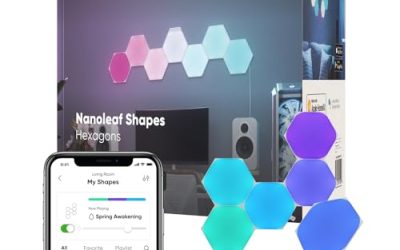
 Nanoleaf Shapes Hexagon LightsWhite Hexagons 7pk10.71 x 10.33 x 5.91 inches5.3 poundsCheck on Amazon

Top 3 picks at a glance

How to Choose
Panel count sets the size of your layout. Kits with six or seven panels suit a compact wall section above a desk, while ten-panel kits can anchor a full battlestation or cover the wall behind a TV. Think about the shape you want first, because a wide honeycomb needs more panels than a vertical strip.
Color technology matters for effects. RGBW panels like the Nanoleaf kit add a dedicated white channel for cleaner whites and softer ambient tones. RGBIC panels can display multiple colors on a single panel at the same time, which makes gradients, waves, and animated scenes look much smoother than plain RGB.
Control options split the field. App-based kits give you scene libraries, schedules, and DIY effects, and most add voice control through Alexa or Google Assistant. Touch and remote kits skip the Wi-Fi setup entirely and are easier to move between rooms.
Music sync is worth having if the wall sits near your speakers. Panels with a built-in microphone or rhythm mode react to game audio in real time, while app-only sync depends on your phone listening instead. Finally, check mounting and power: adhesive plates and tape suit renters, and USB-powered kits can run from a PC or console port, while larger Wi-Fi kits use a wall adapter and support expansion packs.
Nanoleaf Shapes Hexagons Smarter Kit (7 Panels)
Nanoleaf helped define this category, and the Shapes Hexagons Smarter Kit is the most connected option here. The seven RGBW panels link together in any layout and mix with other Nanoleaf Shapes panels, so a first wall can grow over time. Built-in touch controls let you tap a panel to change scenes, and the Rhythm feature listens to room audio and turns it into moving light. The kit connects over Wi-Fi and Thread and works with Alexa, Google Assistant, Apple HomeKit, and SmartThings, which makes it a natural pick if your gaming room already runs on voice routines and automations.
Specs
- Panel count: 7 hexagon panels
- Color: RGBW, 16M+ colors
- Connectivity: Wi-Fi and Thread
- Controls: Nanoleaf app, touch-sensitive panels, voice control via Alexa, Google Assistant, Apple HomeKit, and SmartThings
- Music sync: Built-in Rhythm music visualizer
- Mounting: Adhesive mounting plates included
- Expandability: Combines with other Nanoleaf Shapes panels and expansion packs
Govee Glide Hexa Pro Light Panels (10 Panels)
The Glide Hexa Pro takes the flat panel and gives it a raised, 3D look, with a smaller inner hexagon that adds depth when the lights are off and extra dimension when they are on. Ten RGBIC panels come in the box, and each panel can show several colors at once, which suits gradients and animated effects that single-color panels cannot match. Control runs through the Govee Home app or voice commands with Alexa and Google Assistant, and the music mode syncs effects to game audio playing in the room. PC players also get Razer Chroma integration, so the wall can react along with a compatible keyboard and other gear on the desk.
Specs
- Panel count: 10 hexagon panels
- Color: RGBIC with 3D panel design
- Connectivity: Wi-Fi
- Controls: Govee Home app, voice control via Alexa and Google Assistant
- Music sync: Yes, reacts to room audio
- Extra feature: Razer Chroma integration for PC setups
- Mounting: Adhesive backing on each panel
Govee Glide Hexa Light Panels (10 Panels)
The original Glide Hexa is the flexible all-rounder in the Govee line. Its ten flat RGBIC panels can display multiple colors per panel, and the Govee Home app includes a layout tool that maps the shape on your wall so effects flow across the panels the way you planned them. Music sync, timers, and DIY scenes are all handled in the app, with Alexa and Google Assistant voice control on top. The flat profile sits close to the wall for a clean, tiled look. If you outgrow the ten panels, a single power supply supports up to twelve, so adding a couple of extra panels later is simple.
Specs
- Panel count: 10 hexagon panels
- Color: RGBIC, multiple colors per panel
- Connectivity: Wi-Fi
- Controls: Govee Home app with layout mapping, voice control via Alexa and Google Assistant
- Music sync: Yes, built-in music modes
- Expandability: One power supply supports up to 12 panels
- Mounting: Adhesive tape included
TISOFU Hexagon LED Lights (8 Panels)

The TISOFU kit covers the smart essentials in a mid-size layout that suits a single wall above a desk. Its eight large hexagon panels connect over Wi-Fi and are controlled from the companion app, with Alexa and Google Assistant support for hands-free changes between matches. Music sync is built in, so the panels can follow the beat of a soundtrack or react to in-game sound effects as you play. Scene modes cover steady colors and animated patterns, and the panels link together in whatever arrangement fits your space. For players who want app scenes and voice control without building a huge installation, this is a straightforward way to fill a wall section with animated color.
Specs
- Panel count: 8 hexagon panels
- Color: RGB
- Connectivity: Wi-Fi
- Controls: App control, voice control via Alexa and Google Assistant
- Music sync: Yes
- Design: Large-format panels for wide wall coverage
- Mounting: Wall-mounted with included fixings
ODISTAR Hexagon Wall Light (6 Panels)

ODISTAR takes a different route: no app, no Wi-Fi, and no account to set up. The six hexagon panels are touch-sensitive, so a tap on any panel changes the color, and the included remote handles modes and brightness from your chair. The set runs on USB power, which makes it easy to place near a PC, a console, or a powered monitor hub. Each panel connects to its neighbors in whatever shape you like, and the whole layout can be pulled down and rearranged in minutes. It is the simplest kit here, and a good fit for smaller rooms, dorm setups, or a compact gaming corner where you want color without another app on your phone.
Specs
- Panel count: 6 hexagon panels
- Color: RGB color changing
- Power: USB powered
- Controls: Touch-sensitive panels and remote control
- Connectivity: No Wi-Fi; local control only
- Design: Modular DIY geometric panels
- Mounting: Wall-mounted, adhesive style fitting
Comparison Summary
The Nanoleaf Shapes kit is the pick for smart home households: it has the widest platform support, Thread connectivity, touch controls, and the easiest path to a mixed-shape wall later. Govee’s two kits both give you ten RGBIC panels and the same app, so the choice between them is visual: the Hexa Pro adds a raised 3D face and Razer Chroma support for PC rigs, while the standard Glide Hexa sits flat and can run up to twelve panels on one power supply. The TISOFU eight-pack lands in the middle, with Wi-Fi, app scenes, and voice control in a slightly smaller layout. The ODISTAR set drops smart features entirely in favor of touch and remote control over USB power, which keeps setup quick and works anywhere.
Conclusion
Start with how you want to control the wall. If voice routines and automations matter, Nanoleaf and the two Govee kits are the strongest fits, with the Hexa Pro standing out for PC setups. If you want app control in a mid-size layout, the TISOFU kit covers the essentials well. And if you would rather tap the wall than open an app, the ODISTAR panels keep things simple. Whichever kit you choose, sketch your layout before mounting, leave room to expand, and your gaming room wall becomes part of the setup instead of a backdrop.
Related guides
More from Amazon
Programs that pair well with the guide above. Offers and eligibility are set by Amazon and may change.
Free shipping on eligible items, Prime Video and more. Eligible new members can start with a free trial.
Start a Prime free trialAd-free music streaming. Eligible new subscribers can start with a free trial.
Try Music Unlimited freeA Prime membership for ages 18-24 with a trial period. Eligibility is set by Amazon.
See Prime for Young AdultsAudiobooks and podcasts to listen to on the go. Eligible new members can start with a free trial.
Try Audible freeAs an Amazon Associate we earn from qualifying purchases.