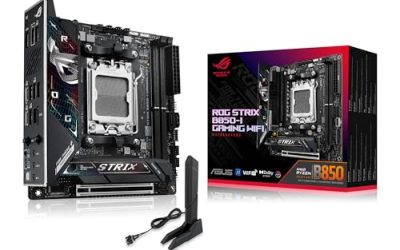
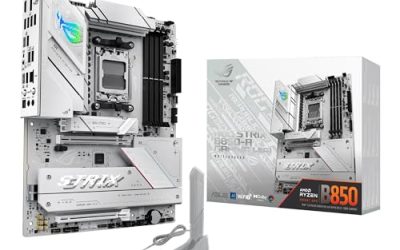
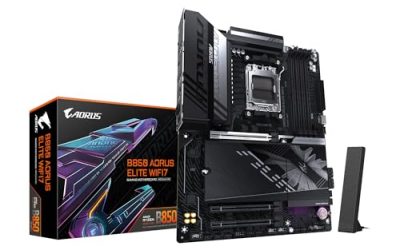
B650 is the quiet workhorse of the AM5 platform. It gives up the flashiest extras of the X-series chipsets but keeps what a gaming build needs: DDR5 memory, a PCIe slot for the graphics card, at least one fast NVMe slot and support for current Ryzen processors. A budget B650 board therefore means a different set of trade-offs than a flagship: you are choosing which corners are acceptable, whether that is Wi-Fi generation, the number of M.2 slots, the board size or the strength of the voltage regulator heatsinks.
This guide is for builders who want a capable AM5 foundation without paying for features they will not use, and it covers seven boards from entry-level to the upper end of the B650 family. Each is judged by its title: form factor, memory speed notes, M.2 and PCIe generation, USB-C ports and wireless. In 2026, B650 remains a sensible choice for a mid-range gaming build, since the processor and graphics card matter more than the chipset tier. The sections below show how to compare boards and where cheaper ones save money.
Our Top Picks


Top 3 picks at a glance
Quick Picks
As an Amazon Associate we earn from qualifying purchases at no extra cost to you.


| Product | Best for | Key spec from the title |
|---|---|---|
| GIGABYTE B650 AORUS Elite AX | Full-size mid-range build | 14+2+1 power phase, PCIe 5.0 M.2, USB-C |
| GIGABYTE B650 Eagle AX | Lowest-cost full-size | Triple M.2, Wi-Fi 6E, Realtek GbE |
| MSI B650 Gaming Plus WiFi | Simple, well-equipped ATX | PCIe 4.0, M.2, SATA 6Gb/s, USB 3.2 Gen 2 |
| ASRock B650M-HM.2+ | Compact micro-ATX budget builds | Micro-ATX, DDR5 6400+ (OC), PCIe 5.0 M.2 |
| MSI MAG B650 Tomahawk WiFi | Heavier-duty gaming build | PCIe 4.0, M.2, USB 3.2 Gen 2, HDMI/DP |
| MSI PRO B650-S WiFi | No-frills ATX | DDR5 6000+MHz/OC, 2 x PCIe 4.0 x16 |
| GIGABYTE B650M AORUS Elite AX | Small case with solid power | mATX, 12+2+2 power phase, PCIe 5.0 M.2 |
How to Choose
Choose the board size your case accepts
ATX boards give more slots and ports, while micro-ATX boards fit smaller cases and trim expansion. For a gaming PC with one graphics card, one or two NVMe drives and no capture cards, micro-ATX is often enough and usually costs less. Check the case’s supported board sizes first. Also look at the number of memory slots and the expansion slots left once a thick graphics card covers the neighboring slot.
Treat M.2 and PCIe generation as a practical question
A board with one PCIe 5.0 M.2 slot is more future-ready, but PCIe 4.0 drives already outpace what most games demand. What matters more is the count: two M.2 slots let you add a second drive later without moving data. Triple-slot boards are a comfortable margin. Verify whether using a particular slot disables SATA ports, since cheaper boards share lanes between them.
Look at memory and power delivery with realistic expectations
Titles that mention memory speeds such as 6000 or 6400 describe overclock profiles that depend on the memory kit and processor. Treat them as a ceiling and not a guarantee. Power stage counts such as 12+2+2 or 14+2+1 hint at how comfortably a board feeds mid-range and high-end processors. A modest processor does not need a heavy design, but a high-core-count chip benefits from larger heatsinks and more stages.
Check wireless, LAN and where budget boards cut corners
Wi-Fi 6E and gigabit LAN are common at this tier, while Wi-Fi 7 and 2.5G networking are not guaranteed. Cheaper boards also trim rear USB ports, audio components and fan headers, and some skip Wi-Fi altogether. Confirm that the board’s BIOS supports the processor you plan to install, since older stock may need an update first. Check the listing for BIOS flashback support if you are unsure.
The 7 Best Options
GIGABYTE B650 AORUS Elite AX
This full-size ATX board supports Ryzen 9000, 8000 and 7000 processors, with DDR5, 14+2+1 power phases, a PCIe 5.0 M.2 slot, a USB-C 3.2 Gen 2 port and Wi-Fi. It suits a builder who wants a polished mid-range design without leaving the B650 family. The AORUS branding tends to indicate better cooling and layout than entry boards. It makes sense for a builder planning to keep the platform for several years and upgrade the processor midway, since the power design leaves more room.
- Strength: 14+2+1 power phases suit stronger processors.
- Strength: PCIe 5.0 M.2 slot and USB-C included.
- Trade-off: higher up the B650 range than the plain Eagle or PRO boards.
Skip it if you want the lowest cost and do not need the extra power stages or a PCIe 5.0 drive slot. A buyer using a modest six-core processor in a basic case would be paying for headroom that the build never touches.
GIGABYTE B650 Eagle AX
The Eagle AX is a full-size ATX board with DDR5, three M.2 slots (one PCIe 5.0, two PCIe 4.0), a USB 3.2 Gen2x2 Type-C port, Wi-Fi 6E and a Realtek gigabit LAN. It aims to give the most storage slots for the least spend. For a gamer who builds around a single GPU and a pair of NVMe drives, it is a generous package. The same board also appears in the wider AM5 range, so treat it here as the value option within B650, where the missing extras are mostly about power design and networking speed.
- Strength: three M.2 slots at the entry tier.
- Strength: Type-C port and Wi-Fi 6E included.
- Trade-off: basic gigabit LAN and simpler power design than the AORUS boards.
Skip it if you plan to run a power-hungry processor hard for long sessions or need faster wired networking.
MSI B650 Gaming Plus WiFi
MSI’s Gaming Plus WiFi supports Ryzen 9000, 8000 and 7000 processors with DDR5, PCIe 4.0, M.2, SATA 6Gb/s, USB 3.2 Gen 2 and HDMI/DP outputs. It is a straightforward board for a gamer who wants wireless networking and standard features without extra frills. The title leans toward a practical, well-rounded feature set. It suits a first-time builder who would rather not compare dozens of controller details and simply wants an ATX board that boots, connects and leaves room for a few drives.
- Strength: built-in Wi-Fi and USB 3.2 Gen 2 on a budget-friendly board.
- Strength: HDMI and DisplayPort outputs are listed on the board.
- Trade-off: PCIe 4.0 rather than 5.0 in the headline spec.
Skip it if you want a PCIe 5.0 M.2 slot or a stated phase count in the title. Anyone planning a heavily loaded processor should look at the sturdier boards here, since the title offers no power-stage detail to judge.
ASRock B650M-HM.2+
This micro-ATX board supports Ryzen 9000, 8000 and 7000 processors and mentions DDR5 6400+ (OC), a PCIe 5.0 M.2 slot, gigabit LAN and a 6+1 power design. It fits a compact budget build in a small case, where size matters more than wireless or flagship ports. Because the board is small, it also pairs well with a compact case and a short graphics card, and it leaves cabling manageable for a first build in a tight chassis.
- Strength: compact micro-ATX footprint for small cases.
- Strength: PCIe 5.0 M.2 slot and high memory overclock mention.
- Trade-off: 6+1 power design and gigabit LAN suit modest processors.
Skip it if you plan a high-end processor or want built-in Wi-Fi without adding a card. The title lists no wireless networking, so households that rely on Wi-Fi need to budget for an adapter or run a cable.
MSI MAG B650 Tomahawk WiFi
The MAG Tomahawk WiFi is the more serious option in this group, supporting Ryzen 9000, 8000 and 7000 processors with DDR5, PCIe 4.0, M.2, SATA 6Gb/s, USB 3.2 Gen 2 and HDMI/DP. It targets a gamer who wants a sturdier design and wireless built in while staying on B650. It is the pick for a builder who wants room to grow, such as moving from a mid-range chip to a stronger one later without changing the board.
- Strength: MAG-tier design intended for a heavier-duty gaming build.
- Strength: Wi-Fi, USB 3.2 Gen 2 and display outputs on board.
- Trade-off: it sits at the upper end of the B650 range, so it is not the cheapest.
Skip it if you only need a basic board for a mid-range processor. For a budget-focused build, the extra spend is easier to justify on the graphics card, so this board suits buyers who value durability over minimum cost.
MSI PRO B650-S WiFi
This ATX board supports Ryzen 9000, 8000 and 7000 processors, with DDR5 memory boost to 6000+MHz (OC), two PCIe 4.0 x16 slots and Wi-Fi. The PRO line is the no-frills approach, which suits a straightforward gaming or home build. It is a reasonable base for a gaming PC where the processor is mid-range and the spending goes toward the graphics card, storage and a decent power supply.
- Strength: Wi-Fi and DDR5 up to 6000+MHz (OC) in a simple package.
- Strength: two PCIe 4.0 x16 slots for expansion.
- Trade-off: fewer premium extras than the MAG or AORUS boards.
Skip it if you want strong overclocking headroom or a PCIe 5.0 drive slot. Memory speed figures in the title are overclock targets, so check the memory support list and expect to enable a profile in the BIOS before seeing them.
GIGABYTE B650M AORUS Elite AX
The B650M AORUS Elite AX is a micro-ATX board supporting Ryzen 9000, 8000 and 7000 processors, with DDR5, 12+2+2 power phases, a PCIe 5.0 M.2 slot and a USB-C 3.2 Gen 2 port. It brings AORUS-tier power design to a small footprint, which suits a compact gaming PC with a capable processor that needs more than a basic micro-ATX power section. Wi-Fi is suggested by the AX naming, but check the listing for the wireless generation.
- Strength: 12+2+2 power phases in a compact board.
- Strength: PCIe 5.0 M.2 slot and USB-C port.
- Trade-off: micro-ATX means fewer expansion slots than a full ATX board.
Skip it if you need several add-in cards or a very large case layout. A builder who wants a capture card, a sound card and extra storage expansion would run out of slots quickly on a micro-ATX board.
Which One Fits Your Situation
You are building in a compact case
GIGABYTE B650M AORUS Elite AX offers better power design, while ASRock B650M-HM.2+ keeps cost down for a simple small build.
You want the most storage for the least money
GIGABYTE B650 Eagle AX has three M.2 slots, including one PCIe 5.0, which gives room to add drives as your library grows.
You pair a strong processor with the board
MSI MAG B650 Tomahawk WiFi or GIGABYTE B650 AORUS Elite AX are the safer choices for heavier loads thanks to sturdier designs.
You want a plain board with wireless built in
MSI B650 Gaming Plus WiFi and MSI PRO B650-S WiFi cover the basics without extras you may not use.
Common Mistakes
- Buying a micro-ATX board for a case, or an ATX board for a mini case, without checking the supported sizes.
- Expecting a memory overclock figure in the title to work with any kit.
- Assuming Wi-Fi is included on every board without reading the listing.
- Overlooking the BIOS version needed for the newest Ryzen processors.
- Paying for a premium board when the processor and graphics card are mid-range.
Related guides
- How To Check Motherboard Vrm Temperature In Hwinfo
- How To Clean Quest 3 Lenses And Facial Interface
- Prebuilt Gaming Desktops Under 1000 Dollars
Frequently Asked Questions
Is B650 still worth buying?
For many gaming builds, yes. It supports current Ryzen processors and DDR5, and the savings can go toward a better graphics card.
Is built-in Wi-Fi on the motherboard necessary?
If the PC will connect by Ethernet, no. Boards with built-in Wi-Fi save buying an adapter if you rely on wireless.
Which matters more, PCIe 5.0 or the number of M.2 slots?
For most gaming builds, the slot count is more practical. PCIe 5.0 storage only helps in specific workloads.
Will these boards work with the newest Ryzen chips?
Titles list support for Ryzen 9000, 8000 and 7000 series, but older stock may need a BIOS update. Check the listing for BIOS flashback support.
Related guides
More from Amazon
Programs that pair well with the guide above. Offers and eligibility are set by Amazon and may change.
Free shipping on eligible items, Prime Video and more. Eligible new members can start with a free trial.
Start a Prime free trialAd-free music streaming. Eligible new subscribers can start with a free trial.
Try Music Unlimited freeA Prime membership for ages 18-24 with a trial period. Eligibility is set by Amazon.
See Prime for Young AdultsAudiobooks and podcasts to listen to on the go. Eligible new members can start with a free trial.
Try Audible freeAs an Amazon Associate we earn from qualifying purchases.