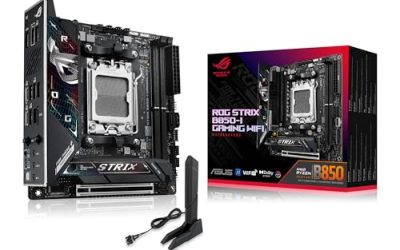
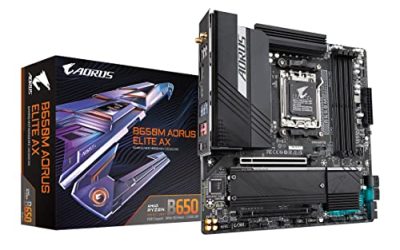
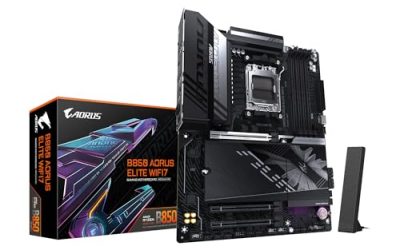
The AM5 socket has settled into a clear pecking order: X870E and X870 boards at the top, B850 as the mainstream sweet spot, and B650 holding the line for people who want a capable platform without paying for extras. For a gamer, the decision is less about raw speed, since the processor and graphics card do the heavy lifting, and more about which features you will use over the next four or five years. Wi-Fi generation, the number of M.2 slots, whether the primary graphics slot and a storage slot run PCIe 5.0, and the quality of the power delivery are the checkpoints that separate boards.
This guide is for builders pairing a Ryzen processor with a new motherboard for a gaming PC, and it compares seven AM5 options by their titles alone: power stage counts, memory support, M.2 slots, PCIe generation, wireless standard and LAN speed. As of 2026, every board here is a full-size ATX design with DDR5 memory, so the choice comes down to chipset tier and how many of its extras suit your plans. Anything not stated in a title is flagged as something to confirm on the listing.
Our Top Picks
 ASUS ROG Strix B650-A Gaming WiFi AMD B650ATX 3x M.2 WiFi6E (Pack of 1)13.4 x 10.8 x 2.9 inches4.25 poundsCheck on Amazon


Top 3 picks at a glance
Quick Picks
As an Amazon Associate we earn from qualifying purchases at no extra cost to you.


| Product | Best for | Key spec from the title |
|---|---|---|
| ASUS ROG Strix B850-A Gaming WiFi | Mainstream premium builds | B850, 14+2+2 power stages, 4X M.2, Wi-Fi 7 |
| ASUS TUF Gaming B850-PLUS WiFi | Durable mid-range | 14+2+1 80A stages, 3X M.2, Wi-Fi 7, 2.5Gb LAN |
| ASUS ROG Strix X870E-E Gaming WiFi | Enthusiast and overclockers | 18+2+2 power stages, 5X M.2, Wi-Fi 7 |
| ASUS ROG Strix B650-A Gaming WiFi | Value with a premium brand | B650, 12+2 power stages, 3x M.2, PCIe 4.0 |
| ASUS ROG Strix X870-A Gaming WiFi | High-end without the E tier | X870, 16+2+2 power stages, 4X M.2, Wi-Fi 7 |
| GIGABYTE B650 Eagle AX | Budget-minded AM5 entry | Triple M.2, Wi-Fi 6E, USB 3.2 Gen2x2 Type-C |
| GIGABYTE B850 AORUS Elite WIFI7 | Balanced mid-range | 14+2+2 power phase, 3X M.2, PCIe 5.0, Wi-Fi 7 |
How to Choose
Pick the chipset tier by your upgrade path
X870E sits at the top with the most connectivity and PCIe 5.0 support, X870 and B850 trim some extras, and B650 is the older mainstream tier that still supports current Ryzen processors. If you plan to keep a single graphics card and one or two drives, a B850 or B650 board is plenty. If you expect a stack of NVMe drives, capture cards and high-speed peripherals, a higher tier gives you more lanes and ports. Check the listing for the BIOS version on the shipping board when pairing with the newest processors.
Count M.2 slots and check PCIe generation
Games rarely need more than one fast NVMe drive today, but projects, capture and media storage fill slots quickly. Three M.2 slots suit most builders; four or five serve heavy storage users. Check which slots run at PCIe 5.0 and which at PCIe 4.0, since a PCIe 5.0 drive only pays off in specific workloads. Also confirm that using certain M.2 slots does not disable SATA ports, which some boards do through shared lanes.
Judge power delivery by use, not by headline numbers
Phase counts such as 14+2+2 or 18+2+2 describe the board’s power stages, and bigger numbers matter mostly for overclocking and high-core-count processors. A mid-range gaming processor runs happily on a modest design. Cooling on the voltage regulator heatsinks also counts. Where titles list per-stage current, such as an 80A figure, that tells you about stage capability, but the board’s overall design and heatsink coverage decide how well it holds up during long sessions.
Check networking, ports and where budgets cut corners
Wi-Fi 7 and 2.5Gb Ethernet are common on newer boards, while older or cheaper ones may offer Wi-Fi 6E and a basic gigabit controller. If you game on a wired connection, the LAN speed is more important than the Wi-Fi standard. Budget boards tend to cut corners on rear USB port counts, audio quality and BIOS flashback features. Confirm that the board has the front-panel USB-C header your case needs, and check the number of fan headers.
The 7 Best Options
ASUS ROG Strix B850-A Gaming WiFi
This B850 ATX board offers 14+2+2 power stages, DDR5 with AEMP support, 2.5G LAN, Wi-Fi 7 with a Q-Antenna, four M.2 slots and PCIe 5.0. It targets gamers who want premium features at the B850 tier instead of stepping into X870 territory. The ROG branding suggests a focus on cooling and layout, and the Q-Antenna mention points to a simple-install Wi-Fi setup for a desktop that sits behind a monitor.
- Strength: four M.2 slots and PCIe 5.0 support in a mainstream chipset tier.
- Strength: Wi-Fi 7 and 2.5G LAN cover modern networking.
- Trade-off: ROG-tier boards generally sit higher in the lineup than the TUF or Gigabyte alternatives.
Skip it if you want the lowest entry point into AM5 or do not need four M.2 slots. A single-drive gaming build rarely uses everything it offers.
ASUS TUF Gaming B850-PLUS WiFi
The TUF B850-PLUS carries 14+2+1 power stages at 80A, DDR5, PCIe 5.0, three M.2 slots, Wi-Fi 7 and 2.5Gb LAN, with DisplayPort and HDMI outputs. The title also mentions an AI-ready design. It suits builders who want durable construction and a clean feature list without extra frills, such as someone upgrading from an older platform who wants one fast drive, one spare slot and dependable networking.
- Strength: 80A power stages on a B850 platform per the title.
- Strength: Wi-Fi 7, 2.5Gb LAN and three M.2 slots round out a sensible set.
- Trade-off: fewer M.2 slots than the ROG B850 model.
Skip it if you want extra storage slots or flagship overclocking features. Anyone who needs five drives should look at the higher tiers.
ASUS ROG Strix X870E-E Gaming WiFi
This is the flagship of the group: an X870E board with 18+2+2 power stages, Dynamic OC Switcher, Core Flex, DDR5 AEMP, Wi-Fi 7, five M.2 slots and PCIe 5.0. It is for enthusiasts who overclock, run multiple drives and want the most headroom the socket offers. It is also the board to consider for a build meant to last through several processor upgrades, where extra ports and storage slots may eventually get used.
- Strength: 18+2+2 power stages and five M.2 slots at the top tier.
- Strength: overclocking features listed in the title, including Core Flex.
- Trade-off: it sits in the premium tier, which is more than most gaming builds need.
Skip it if you plan a mid-range processor and a single drive, because the extra capability is money spent on features you will not use.
ASUS ROG Strix B650-A Gaming WiFi
This B650 ATX board supports Ryzen 9000, 8000 and 7000 processors, with 12+2 power stages, DDR5, three M.2 slots and PCIe 4.0. It fits a builder who wants the ROG look and layout while staying on the older, lower-cost chipset. The LAN figure is cut off in the title, so check the listing for wired speed. Its three M.2 slots and 12+2 design make it a sensible platform for a single fast drive plus a second one for game storage.
- Strength: broad Ryzen generation support in the title.
- Strength: three M.2 slots and DDR5 for a capable, current platform.
- Trade-off: PCIe 4.0 rather than 5.0 in the headline spec.
Skip it if you want PCIe 5.0 storage or Wi-Fi 7. Buyers who want to keep cost down may also find a B850 option more future-ready for similar spend.
ASUS ROG Strix X870-A Gaming WiFi
The X870-A offers 16+2+2 power stages, Dynamic OC Switcher, Core Flex, DDR5 AEMP, Wi-Fi 7 and four M.2 slots with PCIe 5.0. It sits between the B850 boards and the X870E flagship, so it suits high-end gaming PCs that do not need every connectivity extra. Builders who stream, capture and keep a library of large game installs on separate drives will find the four storage slots handy.
- Strength: 16+2+2 power stages and overclocking features at the X870 tier.
- Strength: four M.2 slots and Wi-Fi 7 for strong storage and wireless options.
- Trade-off: a premium over B850 boards without a big visible gain for gaming alone.
Skip it if your processor is a mid-range chip and your goal is simply frame rates for the money.
GIGABYTE B650 Eagle AX
The Eagle AX is an AM5 ATX board with DDR5, three M.2 slots (one PCIe 5.0 and two PCIe 4.0), a USB 3.2 Gen2x2 Type-C port, Wi-Fi 6E and a Realtek gigabit LAN controller. It is the budget-friendly pick for a builder who wants an AM5 foundation and does not care about Wi-Fi 7. A wired gamer on a plain gigabit plan loses little here, and the saved budget can go toward a better graphics card or a faster NVMe drive.
- Strength: three M.2 slots, including one PCIe 5.0.
- Strength: fast Type-C port and Wi-Fi 6E included.
- Trade-off: Realtek gigabit LAN is more basic than the 2.5G ports on other boards here.
Skip it if you need 2.5G wired networking or want the newest wireless standard. Anyone planning a long-lived build should also weigh how much headroom the older tier leaves for future upgrades.
GIGABYTE B850 AORUS Elite WIFI7
This B850 ATX board supports Ryzen 9000, 8000 and 7000 processors, with DDR5, 14+2+2 power phases, three M.2 slots, PCIe 5.0, USB-C and Wi-Fi 7. It is a balanced mid-range option that competes with the ASUS B850 boards on features. Gigabyte pairs the AORUS name with a mainstream layout, so it works well for a first AM5 build where simplicity matters more than overclocking tools.
- Strength: 14+2+2 power phases and Wi-Fi 7 in the mid-range tier.
- Strength: PCIe 5.0 and three M.2 slots suit most gaming builds.
- Trade-off: the title does not state the LAN speed, so check the listing.
Skip it if you want ROG-style cooling extras or a stated 2.5G LAN in the title, or if you would rather buy a board whose wired speed is spelled out before checkout.
Which One Fits Your Situation
You want the best value mid-range build
ASUS TUF Gaming B850-PLUS WiFi and GIGABYTE B850 AORUS Elite WIFI7 both deliver Wi-Fi 7, PCIe 5.0 and three M.2 slots at the mainstream tier.
You overclock and use many drives
ASUS ROG Strix X870E-E is built for that, with five M.2 slots and 18+2+2 power stages. The X870-A is a step down that keeps most of the headline features.
You are saving as much as possible
GIGABYTE B650 Eagle AX gets you onto AM5 with three M.2 slots and Wi-Fi 6E, leaving more of the budget for the graphics card.
You want ROG styling on a lower tier
ASUS ROG Strix B650-A adds ROG layout to the B650 chipset, while the B850-A brings PCIe 5.0 and Wi-Fi 7 to the same family.
Common Mistakes
- Paying for a flagship chipset when the build uses one drive and a mid-range processor.
- Ignoring the BIOS version needed for the newest Ryzen processors.
- Assuming every M.2 slot runs at full speed without checking lane sharing.
- Choosing by phase count alone instead of heatsink coverage and overall design.
- Skipping the case check: front-panel USB-C headers and board size must match.
Related guides
- How To Check Motherboard Vrm Temperature In Hwinfo
- How To Clean Quest 3 Lenses And Facial Interface
- Prebuilt Gaming Desktops Under 1000 Dollars
Frequently Asked Questions
Is B850 enough for a gaming PC?
Yes for most builds. It offers modern features such as PCIe 5.0 and Wi-Fi 7 on many boards, and leaves the budget for a stronger graphics card.
Do these boards need a BIOS update for new Ryzen chips?
Some may, depending on the version on the shelf. Check the listing for BIOS flashback support and the manufacturer’s processor support page.
Does Wi-Fi 7 matter for gaming?
Only if your router and devices support it. A wired connection remains the steadier option for competitive play, so 2.5Gb LAN can be more useful.
How many M.2 slots are enough?
Two or three cover most gaming builds. Add more if you plan large game libraries across several drives or use capture and content tools.
Related guides
More from Amazon
Programs that pair well with the guide above. Offers and eligibility are set by Amazon and may change.
Free shipping on eligible items, Prime Video and more. Eligible new members can start with a free trial.
Start a Prime free trialAd-free music streaming. Eligible new subscribers can start with a free trial.
Try Music Unlimited freeA Prime membership for ages 18-24 with a trial period. Eligibility is set by Amazon.
See Prime for Young AdultsAudiobooks and podcasts to listen to on the go. Eligible new members can start with a free trial.
Try Audible freeAs an Amazon Associate we earn from qualifying purchases.