A small business does not buy a color laser printer the way a household buys an inkjet. The machine will sit in a corner, print contracts, invoices, proposals and the occasional brochure, and it needs to do it without clogged nozzles or a surprise trip for ink. The deciding questions are whether you need scanning and faxing or print only, how many pages per minute your team realistically waits for, and whether the machine can feed a stack of originals through a document feeder.
This guide is for owners and office managers shopping for a color laser in 2026, from a home office of one to a team of a dozen. Ten models from Brother, HP, Canon and Xerox are compared, split between print-only machines and all-in-one models with scan, copy and fax. Everything is judged from the details in the product titles, so verify toner costs, paper sizes and network needs against the maker’s page before ordering.
Our Top Picks
 Brother MFC-L8930CDW Business Color Laser All-in-One Printer withOne Size20.7 x 16.1 x 21.6 inches71.2 poundsCheck on Amazon
 Brother Color Laser Printer with Wireless Printing FastStandard15.7 x 15.7 x 9.4 inches24.7 poundsCheck on Amazon
 Brother MFC-L3720CDW Wireless Color Laser PrinterStandard16.1 x 17.5 x 15.8 inches44 PoundsCheck on Amazon
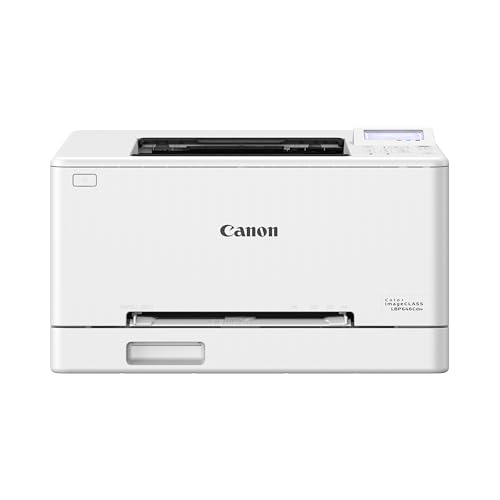 Canon Color imageCLASS LBP646Cdw Wireless Laser PrinterMedium16.5 x 16.8 x 10.5 inches27.6 poundsCheck on Amazon


Top 3 picks at a glance
Quick Picks
As an Amazon Associate we earn from qualifying purchases at no extra cost to you.


| Product | Best for | Key spec from the title |
|---|---|---|
| Brother MFC-L8930CDW | Busy offices needing security and low-cost printing | Business color laser AIO, duplex, advanced security |
| Brother wireless color laser (19 PPM) | Light-duty wireless printing | 19 PPM, duplex, 250-sheet tray |
| Brother MFC-L3720CDW | Small teams that still fax | Scan, copy, fax, auto duplex |
| HP Color LaserJet Pro 3201dw | Home office, print only | Wireless, duplex, mobile compatible |
| HP Color LaserJet Pro MFP 3301sdw | Compact all-in-one office | Wireless, all-in-one, duplex |
| Canon imageCLASS LBP646Cdw | Faster print-only desk | 26 PPM, duplex, print only |
| Xerox C240 | Compact print-only machine | 26 ppm, wireless, print only |
| HP Color LaserJet Pro 3204dw | Single-function duplex printing | Duplex, printer only, single function |
| Brother MFC-L3780CDW | Teams that copy and scan often | 31 ppm, single-pass duplex, dual-band Wi-Fi |
| Canon imageCLASS MF665Cdw | Document-feeder workflows | Auto document feeder, 3 year warranty |
How to Choose
Print-only versus all-in-one
If your work is mostly outgoing paper, a print-only laser keeps the cost and footprint down and has fewer parts to fail. If you scan receipts, copy IDs or still send faxes, an all-in-one saves a second machine. Check for an automatic document feeder in the title, since it is the difference between scanning a five-page contract in one pass and flipping each sheet on the glass.
Speed and monthly workload
Pages per minute figures run from 19 PPM on lighter models to 26 PPM and 31 ppm on faster ones. For one or two users printing a few dozen pages a day, 19 to 26 PPM is comfortable. A team printing reports and proposals benefits from 30 ppm or more. Duplex printing, which prints both sides automatically, saves paper and time, and every model here lists it.
Connectivity and paper handling
Wireless support is listed on most models, and dual-band Wi-Fi plus Gigabit Ethernet matters for offices that rely on a wired network. A 250-sheet tray is a good baseline for small offices, since refills are infrequent. Mobile compatibility lets staff print from phones and tablets, which is handy for a shared device in a front office. Business-grade models also list advanced security features that help when the machine sits on a company network.
Warranty, running costs and where budget models cut corners
A multi-year warranty, such as the three years listed on one Canon model, signals a business-oriented product. Entry models often ship with starter toner that runs out sooner, and lower-capacity tray and slower first-page times are common compromises. Look for the phrase low-cost printing, as in the Brother business model, and check cartridge yields on the maker’s page, since toner is the main long-term expense of any laser.
Think about the paper path as well. A single 250-sheet tray is plenty for letterhead, plain copy paper or both if you swap occasionally, but a busy office that prints on mixed stock, such as envelopes, labels and heavier cardstock, should check whether the maker lists a bypass slot or extra tray options. Duplex units also add a little to the footprint, so measure the shelf or desk before ordering, and leave room behind the machine for the output path and cables.
Finally, plan for the first year of consumables. Color lasers use four toner cartridges, and the starter set that ships in the box is often a lower-yield version. Budget for a full replacement set soon after setup so that a meeting-day print job never stalls on a low cyan cartridge. Business models that advertise low-cost printing generally use larger cartridges, which cost more upfront but spread the expense across more pages.
If your color printing is occasional, such as a monthly set of client reports, the lighter Brother 19 PPM model or an HP print-only unit is usually enough, and paying for a document feeder or fax you never use adds cost and clutter. If color pages are the core of what you sell, as with proposals, menus or signage, spend toward speed and a longer warranty instead. The right amount of printer is the one whose busiest week still fits comfortably inside its listed speed and tray size.
The 10 Best Options
Brother MFC-L8930CDW
This business color laser all-in-one prints, scans and copies with duplex, low-cost printing and advanced security features. It is aimed at small offices that want a more serious, network-friendly machine.
- Strength: advanced security features suit shared company networks.
- Strength: a low-cost printing focus helps with long-run expenses.
- Trade-off: it sits in the premium tier of this group.
Skip it if you only print a few pages a week at home.
Brother Wireless Color Laser (19 PPM)
This Brother color laser prints at 19 pages per minute with a duplex feature, wireless printing, mobile compatibility and a 250-sheet paper tray. It fits professionals with modest daily volumes.
- Strength: duplex and mobile printing on a single-function machine.
- Strength: 250-sheet tray means fewer refills.
- Trade-off: 19 PPM is the slowest speed in this group.
Skip it if your team prints large reports regularly.
Brother MFC-L3720CDW
The L3720CDW is a wireless color laser with printer, scanner, copier and fax functions, automatic duplex and a 250-sheet capacity. It suits small businesses that still need fax.
- Strength: a full four-function set in one body.
- Strength: auto duplex and a 250-sheet tray.
- Trade-off: the title lists no speed figure to compare.
Skip it if you need a high pages-per-minute rating.
HP Color LaserJet Pro 3201dw
This HP is a wireless, duplex color laser printer for home offices, with mobile compatibility and a print-only design. It is built for color documents without scan or copy.
- Strength: wireless and duplex in a print-only unit.
- Strength: mobile compatibility is listed.
- Trade-off: no scanning or copying.
Skip it if you want to scan receipts or copy documents.
HP Color LaserJet Pro MFP 3301sdw
The 3301sdw is a wireless all-in-one color printer with duplex support. It targets small offices that want print, scan and copy in a single unit.
- Strength: all-in-one design replaces multiple devices.
- Strength: wireless and duplex are both listed.
- Trade-off: the title offers few specifics on speed or capacity.
Skip it if you only need a print-only workflow.
Canon imageCLASS LBP646Cdw
The LBP646Cdw is a wireless color laser printer rated at 26 PPM with duplex, and it is print only. It is a quicker desk machine for shared print jobs.
- Strength: 26 PPM is mid-pack speed.
- Strength: duplex and wireless support.
- Trade-off: no scan, copy or fax.
Skip it if you need an all-in-one.
Xerox C240
The C240 is a compact wireless color laser, print only, rated at 26 ppm, with easy mobile setup. It is aimed at hybrid workers and small teams.
- Strength: compact footprint for tight spaces.
- Strength: 26 ppm matches the faster print-only options.
- Trade-off: it does not scan or copy.
Skip it if your desk needs a multifunction device.
HP Color LaserJet Pro 3204dw
This HP is a single-function, duplex color laser printer for home offices and color documents. It is a straightforward pick for printing only.
- Strength: duplex and single function keep it simple.
- Strength: color document focus for reports and proposals.
- Trade-off: no scanning or copying.
Skip it if you need a document feeder or fax.
Brother MFC-L3780CDW
The L3780CDW is a digital color all-in-one rated at 31 ppm with single-pass duplex copy and scan, dual-band Wi-Fi and Gigabit connectivity. It is the fastest speed in the group.
- Strength: 31 ppm helps busy teams.
- Strength: single-pass duplex scanning speeds up two-sided originals.
- Trade-off: it carries a higher tier than the print-only options.
Skip it if you only print a handful of pages daily.
Canon imageCLASS MF665Cdw
The MF665Cdw is a wireless all-in-one duplex laser with copier, scanner, fax and an automatic document feeder, backed by a three-year limited warranty. It is meant for document-heavy offices.
- Strength: automatic document feeder for multi-page originals.
- Strength: three-year limited warranty.
- Trade-off: the title gives no speed figure.
Skip it if you want a compact print-only machine.
Which One Fits Your Situation
You run a team that scans and copies daily
The Brother MFC-L3780CDW offers 31 ppm and single-pass duplex scanning. The Canon MF665Cdw adds a document feeder and a three-year warranty.
You work alone and only print
The HP Color LaserJet Pro 3201dw or 3204dw gives wireless duplex printing without extra features. The Xerox C240 is the choice if desk space is tight.
You still need fax and security
The Brother MFC-L8930CDW lists advanced security and low-cost printing, while the MFC-L3720CDW keeps fax at a lower tier.
You split time between a home desk and a shared office
The HP Color LaserJet Pro MFP 3301sdw combines wireless, duplex and all-in-one functions in one unit. It works well when the same machine must print client proposals, scan signed pages and copy ID documents without a trip to a copy shop.
Common Mistakes
- Buying an all-in-one when you only need a print-only machine, or the reverse.
- Overlooking toner yield and replacement cartridge cost.
- Ignoring the document feeder, then scanning multi-page files one sheet at a time.
- Choosing the slowest speed rating for a team that prints reports daily.
- Skipping network security features on a machine that joins the office network.
Related guides
- How To Check Motherboard Vrm Temperature In Hwinfo
- How To Clean Quest 3 Lenses And Facial Interface
- Vr Facial Interfaces For Glasses Wearers
Frequently Asked Questions
Is a color laser better than an inkjet for a small business?
For document-heavy work, usually yes. Laser toner does not dry out, and text stays sharp. Inkjets can be better for photos, but a laser handles stacks of invoices and contracts with far less maintenance.
What does single-pass duplex scanning mean?
It scans both sides of a page in one pass through the feeder, which is faster than flipping the sheet. It helps with two-sided contracts and forms.
Do I need Ethernet if the printer has Wi-Fi?
Wi-Fi works for most small offices, but a wired Gigabit connection is steadier for shared printing on a busy network.
How important is the warranty?
A longer warranty reduces risk for a machine you rely on daily. Check what it covers, especially for drums and fuser parts, and whether the maker offers advance replacement so the office is not left without a printer while a repair is processed.
Registering the product soon after setup keeps proof of purchase on file, and keeping the original box for the first few weeks makes any early return or exchange far simpler.
Related guides
More from Amazon
Programs that pair well with the guide above. Offers and eligibility are set by Amazon and may change.
Free shipping on eligible items, Prime Video and more. Eligible new members can start with a free trial.
Start a Prime free trialAd-free music streaming. Eligible new subscribers can start with a free trial.
Try Music Unlimited freeA Prime membership for ages 18-24 with a trial period. Eligibility is set by Amazon.
See Prime for Young AdultsAudiobooks and podcasts to listen to on the go. Eligible new members can start with a free trial.
Try Audible freeAs an Amazon Associate we earn from qualifying purchases.