Affordable and college are two words that pull a laptop purchase in opposite directions. A student machine has to survive four years of backpacks, lecture halls, library tables, and late-night essays, yet the person buying it is often juggling tuition, books, and housing. The practical answer is to stop chasing the highest spec and instead match the laptop to the coursework: a writing-heavy major lives happily on modest hardware, while anyone running statistics software or several research tabs benefits from extra memory.
This guide is for incoming freshmen, transfer students, and parents buying before the 2026 fall semester. The eight listings below split into three groups: full-size 15.6-inch laptops with 8GB to 16GB of RAM, compact 14-inch HP models with 4GB of RAM and generous cloud or external storage, and a small set of Windows 11 machines with Office included. Pay attention to how each title describes storage, since some totals combine fast internal flash with slower external drives or cloud space.
Our Top Picks
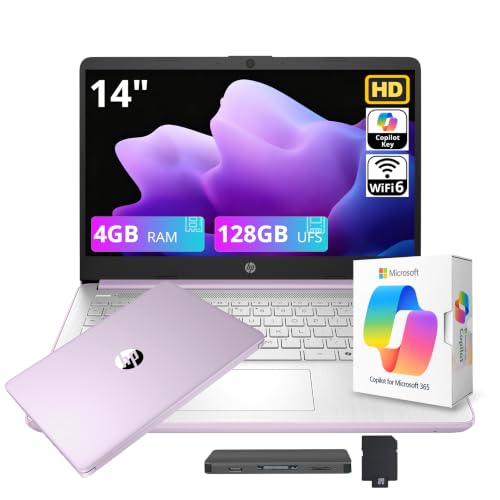
 HP 14" Laptop Computer for 2026 Student Business4GB RAM + 628GB Storage12.76 x 8.86 x 0.71 inches3.24 poundsCheck on Amazon


Top 3 picks at a glance
Quick Picks
As an Amazon Associate we earn from qualifying purchases at no extra cost to you.




| Product | Best for | Key spec from the title |
|---|---|---|
| DRKAKO 15.6-inch Student Laptop | Everyday classwork with room to grow | 12GB RAM, 256GB SSD, J4105 quad-core |
| 15.6-inch Pentium Laptop (8GB/256GB) | Entry-level study with a bigger screen | Windows 11 Pro, 8GB RAM, 256GB SSD, 6-hour battery |
| SAGAWHALE 15.6-inch Laptop | Multitasking with more memory | 16GB RAM, 256GB SSD, FHD IPS |
| 15.6-inch Pentium Laptop (16GB/512GB) | Students who store lots of files | 16GB RAM, 512GB SSD, Mini HDMI |
| HP 14-inch Student Laptop | A portable HP with Office | Intel 4-core CPU, 4GB DDR5, 628GB total storage |
| HP Stream 14-inch (128GB UFS) | Light, cloud-based note taking | N150, 4GB RAM, 128GB UFS, 1TB cloud |
| HP Everyday Student Laptop | Extra storage on a thin body | 628GB (500GB external HDD plus 128GB UFS) |
| HP Stream 14-inch (Docking Station) | Desk setup with large local storage | N150, 4GB RAM, 1.12TB total storage |
How to Choose
Memory and Processor for Four Years of Use
Students tend to keep a laptop for the full degree, so buy for the end of the program, not the first week. 8GB of RAM is a reasonable floor for browsers plus video calls, and 16GB gives comfortable headroom as web apps grow heavier. 4GB of memory works for note taking and document editing but strains with many tabs. For the processor, Celeron, Pentium, and N-series chips cover documents and streaming; they are not meant for video editing, large datasets, or engineering software, so check your department’s requirements first.
Storage Type and Real Capacity
A 256GB or 512GB SSD is faster and more useful than a larger but slower total made of mixed parts. Watch out for titles with odd totals such as 628GB or 1.12TB, which add an external hard drive or docking station to a smaller built-in drive of 128GB. The internal flash holds Windows and your apps, while the external part is only reachable when attached. Cloud storage offers, like 1TB with Office, are time-limited, so plan for how you will keep files after that period.
Screen Size, Battery, and Portability
A 15.6-inch full HD IPS panel suits research and split-screen reading but adds weight to a backpack. A 14-inch screen balances portability and workspace. Battery estimates of about six hours cover a typical class schedule if you charge between lectures. Check for fast charging or a slim adapter, and confirm a webcam and microphone are included for online classes and group projects.
Software, Warranty, and Where Budget Models Cut Corners
Office 365 inclusions are usually one-year trials, and many schools provide free Office licenses, so do not pay extra for a bundle you may not need. Windows 11 Pro is nice but unnecessary for most students. Budget models cut corners on keyboard feel, hinge strength, webcam quality, and port variety, so look for a stated USB-C or HDMI output if you plan to use a monitor. Seller warranties vary, so treat a clear support policy as part of the spec sheet.
The 8 Best Options
DRKAKO 15.6-inch Student Laptop
The DRKAKO lists a 15.6-inch FHD IPS display, 12GB of RAM, a 256GB SSD, a J4105 quad-core processor, a 180-degree lay-flat hinge, and Office 365 with an AI assistant. It suits a student who wants more memory than most budget machines offer.
- Strength: 12GB of RAM leaves room for many tabs and apps.
- Strength: an FHD IPS screen is comfortable for reading and writing.
- Trade-off: the J4105 is an older entry-class processor with limited speed.
It is a sensible pick for a liberal-arts or business major. The lay-flat hinge also helps when two classmates share a screen over a group project. Skip it if your program needs heavy software such as engineering or video tools.
15.6-inch Pentium Laptop (8GB/256GB)
This Windows 11 Pro laptop includes Office 365, 8GB of RAM, a 256GB SSD, an Intel Pentium processor, six hours of battery, and a Mini HDMI output. It suits a student who wants a straightforward machine with a larger screen and external display support.
- Strength: 8GB and a 256GB SSD cover everyday study well.
- Strength: a Mini HDMI port connects to a monitor or projector.
- Trade-off: six hours of battery will need a charger between long days.
Because the listing does not name a major brand, read the seller’s support terms carefully, since a laptop that fails in sophomore year is a bigger problem than a missing feature. Skip it if you want a brand-name warranty or a lighter 14-inch body.
SAGAWHALE 15.6-inch Laptop
The SAGAWHALE has 16GB of RAM, a 256GB SSD, a 15.6-inch FHD IPS display, and Windows 11 Pro, described as lightweight and aimed at business, student, and college use. It fits students who open many windows at once.
- Strength: 16GB of memory is the most generous tier among the budget picks.
- Strength: an IPS panel keeps text clear from side angles in a shared study space.
- Trade-off: the title does not name the processor.
In practice, that makes it a good fit for a student who lives in a browser, a word processor, and a video call at the same time. Skip it if you need a confirmed processor model before purchase.
15.6-inch Pentium Laptop (16GB/512GB)
This variant of the Pentium design lists 16GB of RAM and a 512GB SSD with Windows 11 Pro, Office 365, six hours of battery, and Mini HDMI. It suits a student who keeps large project files, photos, and software on the laptop.
- Strength: 512GB SSD gives plenty of local storage.
- Strength: 16GB of RAM aids multitasking.
- Trade-off: a Pentium-class chip limits raw speed despite the memory.
It is also the easiest of the group to keep for the full four years, because the storage will not feel cramped by senior thesis season. Skip it if you only keep documents and rely on cloud storage.
HP 14-inch Student Laptop
The HP 14-inch lists Windows 11 Pro, Office, Copilot AI, an Intel 4-core CPU, 4GB of DDR5 RAM, and 628GB of total storage, part of which is likely external. It suits students who value the HP name and a portable size.
- Strength: DDR5 memory and a quad-core chip in a compact body.
- Strength: Office and Copilot AI are listed.
- Trade-off: only 4GB of RAM limits multitasking.
Students who already own an HP printer or tablet may like the familiar software and support pages. Skip it if you plan to keep many browser tabs open.
HP Stream 14-inch (128GB UFS)
This HP Stream lists a 14-inch HD display, an Intel N150 processor, 4GB of RAM, 128GB of UFS storage, 1TB of cloud storage, and a year of Office 365 with AI Copilot. It fits a cloud-first student writing papers and joining video calls.
- Strength: a lightweight 14-inch design is easy to carry.
- Strength: the N150 is a newer entry-class chip.
- Trade-off: 128GB of local storage fills quickly.
A student who takes notes in a cloud app and submits assignments online will rarely notice the small drive. Skip it if you store large files locally or need more than 4GB of RAM.
HP Everyday Student Laptop
The HP Everyday lists 628GB of storage made up of a 500GB external hard drive plus 128GB of UFS, an Intel processor, one year of Office 365, Copilot AI, and a thin, light body with long battery life. It suits students who want to carry more files without cloud fees.
- Strength: the external drive adds a large amount of archive space.
- Strength: it lists a thin and light design.
- Trade-off: the 500GB drive is external, so it must be carried and plugged in.
Think of the drive as a backup shelf for finished semesters rather than a place to run programs. Skip it if you want one self-contained machine.
HP Stream 14-inch (Docking Station)
This HP Stream pairs an N150 processor, 4GB of RAM, and 128GB of UFS storage with a 1TB docking station for 1.12TB in total, plus a year of Office 365. It fits a desk-based student who docks at home and leaves the machine light on campus.
- Strength: 1TB of docked storage suits archives and media.
- Strength: the same light 14-inch frame as the other Stream.
- Trade-off: the docking drive stays at the desk.
It works best for students with a fixed desk in a dorm or apartment who want a lightweight machine for class and bulk storage at home. Skip it if you work mostly away from a desk.
Which One Fits Your Situation
You Run Many Tabs and Documents
Choose the SAGAWHALE 15.6-inch Laptop for 16GB of RAM, or the DRKAKO if 12GB is enough and you want a named processor.
You Store Big Project Files
The 15.6-inch Pentium Laptop (16GB/512GB) has the largest internal SSD of the group, which keeps files with you without extra drives.
You Carry the Laptop Across Campus
The HP Stream 14-inch (128GB UFS) is compact and pairs with cloud storage. Use cloud folders for coursework to offset the small drive.
You Want an HP and Extra Archive Space
The HP Everyday Student Laptop adds a 500GB external drive, which holds old coursework and media. The docking station Stream suits a fixed desk.
If you are torn between two models, choose the one with more RAM and an internal SSD over the one with a bigger storage total made of external parts. Memory and internal speed shape daily use far more than raw capacity.
Common Mistakes
- Reading a total such as 628GB as one fast internal drive when part of it is external.
- Choosing 4GB of RAM for a four-year degree.
- Paying extra for Office when the school already provides it.
- Ignoring the department’s software requirements before buying.
- Skipping a check for a webcam and microphone needed for online classes.
Related guides
- How To Check Motherboard Vrm Temperature In Hwinfo
- How To Clean Quest 3 Lenses And Facial Interface
- Vr Facial Interfaces For Glasses Wearers
Frequently Asked Questions
How much RAM does a college student need?
8GB is a safe floor for most majors, with 16GB giving extra headroom. 4GB works for light note taking but struggles with many tabs.
Is a Chromebook better than these laptops?
Chromebooks are simple and light, but some programs and courses require Windows software. Check your school’s requirements first, along with whether your campus labs already provide the software you would otherwise need to install yourself.
Do I need a docking station or external drive?
Only if you store many large files. Cloud storage and school accounts can cover most coursework instead.
Is Windows 11 Pro necessary?
Not for most students. Home edition covers coursework, though Pro adds features like encryption management that some programs use.
Related guides
More from Amazon
Programs that pair well with the guide above. Offers and eligibility are set by Amazon and may change.
Free shipping on eligible items, Prime Video and more. Eligible new members can start with a free trial.
Start a Prime free trialAd-free music streaming. Eligible new subscribers can start with a free trial.
Try Music Unlimited freeA Prime membership for ages 18-24 with a trial period. Eligibility is set by Amazon.
See Prime for Young AdultsAudiobooks and podcasts to listen to on the go. Eligible new members can start with a free trial.
Try Audible freeAs an Amazon Associate we earn from qualifying purchases.