The best SSD for a PS5 is a PCIe Gen4 x4 M.2 NVMe drive with a heatsink that fits Sony’s size limit, and the Samsung 990 Pro with heatsink, the WD_BLACK SN850X with heatsink and the Crucial T500 with heatsink are the models reviewers name most often. Buyers who want to spend less can look at the Lexar NM790 or the Crucial P310, while anyone who prefers a drive sold specifically for the console can consider WD’s licensed SN850P. Whichever you choose, the three rules are the same: Gen4 speed, an approved capacity, and a cooler that fits the slot.
As an Amazon Associate we earn from qualifying purchases at no extra cost to you.


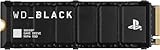
Our Top Picks


Top 3 picks at a glance
What Sony requires from an expansion drive
According to Sony’s published guidance as relayed by outlets such as PCBuildHelper, a PS5 M.2 drive must use PCIe Gen4 x4 with NVMe, deliver sequential reads of 5,500 MB/s or more, and fit within roughly 110 mm long, 25 mm wide and 11.25 mm tall including the heatsink. Supported capacities run from 250GB to 4TB. A heatsink is required, either built into the drive or fitted separately. Gen5 drives work only at Gen4 speed in the console, so they cost more with no benefit.
At a glance: PS5 SSD options compared
| Drive | Best for | Key stated specs | Limits |
|---|---|---|---|
| Samsung 990 Pro with heatsink | Best premium pick in several roundups | PCIe Gen4, reads up to about 7,450 MB/s per the maker | Premium tier; buy the heatsink version |
| WD_BLACK SN850X with heatsink | Balanced speed and DRAM cache | PCIe Gen4 NVMe, DRAM-backed; PCBuildHelper picks the 2TB heatsink version | Heatsink adds thickness; check clearance in the slot |
| WD_BLACK SN850P | Buyers who want a drive licensed for the console | Gen4, sold for PS5 by WD | Narrower capacity choices than the PC version |
| Crucial T500 with heatsink | Overall pick in one October 2026 roundup when the price is competitive | About 7,400 / 7,000 MB/s reads and writes, 1,200 TBW at 2TB as listed by that outlet | Confirm the heatsink dimensions on the model you select |
| Lexar NM790 | Value pick praised by TechRadar | Gen4 NVMe, no DRAM | One outlet flags a PS5-related caveat for DRAM-less drives |
| Crucial P310 (PS5 heatsink model) | Cheapest compliant 2TB in one roundup | Gen4 NVMe | Lower sustained speed than flagship drives |
| Corsair MP600 PRO LPX | Value pick from PCBuildHelper | Gen4 NVMe with low-profile heatsink | Older design; availability varies |
Samsung 990 Pro: the premium reference
TechRadar calls the 990 Pro the best high-end SSD for PS5, and other roundups rank it first for the same reasons: high Gen4 speed, a long reliability record and a version with an integrated heatsink. Samsung lists sequential reads up to about 7,450 MB/s. It is overkill for loading games because the console caps what it can use, so the 990 Pro is for buyers who also want to reuse the drive in a PC later.
WD_BLACK SN850X: the popular all-rounder
PCBuildHelper picks the 2TB SN850X with heatsink as a top choice for meeting Sony’s requirements while keeping a DRAM cache. TechSifted notes the heatsink version is thicker, so confirm that your console’s cover and slot allow it. WD also sells the SN850P, a licensed model designed for the console, if you would rather not match dimensions yourself.
Crucial T500: strong sustained performance
Asumetech’s October 2026 roundup names the T500 with heatsink as its overall pick, listing roughly 7,400 MB/s reads, 7,000 MB/s writes and 1,200 TBW at 2TB, with a heatsinked size of about 80 x 23.37 x 9.65 mm. That falls within Sony’s limit. The same outlet calls the 990 Pro an excellent premium alternative. As with any roundup, read the maker’s page to confirm which T500 variant carries the heatsink.
Value drives: Lexar NM790, Crucial P310 and Corsair MP600 PRO LPX
TechRadar rates the Lexar NM790 excellent value. Asumetech flags a console-specific caveat for DRAM-less drives that rely on host memory buffering, so treat it as a trade-off. PCBuildHelper names the Crucial P310 PS5 model the cheapest compliant 2TB it found and the Corsair MP600 PRO LPX as a good value option. These drives suit anyone whose main goal is more storage for a growing library.
Fit, heat and installation notes
- Heatsink: Either buy a drive with one or add a low-profile heatsink that keeps total height under 11.25 mm. Avoid tall tower coolers designed for desktop motherboards.
- Slot access: You remove the side cover and a metal cover plate, then use a screw at the correct length mark. The console includes guidance in its setup menu.
- Format: The PS5 formats the drive on first use and reports a read-speed test result.
- Games: PS5 titles can run from the M.2 drive. PS4 titles can also be stored there. You can also keep other content on the internal storage.
- Warranty: Check the drive maker’s terms before opening the console, and keep the console’s own warranty conditions in mind.
Capacity and tier advice
Budget tier
A 1TB drive with a compliant heatsink doubles the usable space for many players. The NM790 and P310 families sit here in most roundups.
Mid-range tier
A 2TB SN850X or T500 with heatsink is the sweet spot for large libraries, since modern games routinely occupy a large share of a terabyte.
Premium tier
The 990 Pro with heatsink at 2TB or 4TB is for buyers who want a drive that will move to a PC later and keep resale value.
Pick X if… decision table
| Pick this | If you… |
|---|---|
| Samsung 990 Pro with heatsink | Want the best-reviewed premium drive and plan to reuse it elsewhere |
| WD_BLACK SN850X with heatsink | Want a proven drive with a DRAM cache and wide availability |
| WD_BLACK SN850P | Prefer a drive sold and licensed for the console |
| Crucial T500 with heatsink | Want strong sustained speed and a heatsink that fits the limit |
| Lexar NM790 or Crucial P310 | Want the lowest cost per terabyte that still meets the spec |
Alternatives
- External USB storage: It stores PS4 games and moves PS5 games out of the way but cannot run PS5 titles directly.
- Gen5 drives: They work, but the console limits them to Gen4 speed, which wastes money.
- Waiting for a newer drive: If a model you want lacks a heatsink, buy a separate low-profile cooler rather than waiting.
What the installation involves
The process is similar for every compliant drive. First, back up saved data to cloud storage or a USB drive if you want extra safety. Power the console fully off and unplug it. Lay it flat, slide the side cover away, and remove the screw holding the slot cover plate. Pick the standoff position that matches the length of your drive, typically marked 30, 42, 60, 80 and 110 for the M.2 sizes, and move the screw to it. Insert the drive at an angle, press it flat and secure it with the screw, then refit the covers. When you power the console on, a setup screen prompts you to format the drive and runs a speed check. The console reports whether the drive meets the required read speed.
If you buy a drive without a heatsink, choose a low-profile model made for the console and compare its stated height with Sony’s limit. Avoid thick thermal pads and bulky designs, since a cover that does not close properly can trap heat and put pressure on the board.
How much capacity and endurance do you need
Capacity is the main decision for most buyers. A 1TB drive suits a player with a handful of large titles, while 2TB fits people who keep many games installed and avoid deleting and re-downloading. A 4TB drive makes sense if you also plan to use the drive in a PC later. Endurance, shown as terabytes written (TBW), matters little for typical console use since games are mostly read from the drive, but higher ratings, such as the 1,200 TBW cited for the Crucial T500 at 2TB, do reflect the maker’s confidence. Warranty length is another reasonable tie-breaker among drives of similar speed.
Read speed claims on the box are maximums under ideal conditions. Reviewers tend to find that load times in the console are similar across any compliant Gen4 drive, which is why value options like the NM790 and P310 make sense for many buyers.
Frequently Asked Questions
Do I need a heatsink for a PS5 SSD?
Yes, Sony’s requirements call for one. Many drives are sold in a version with a heatsink, and low-profile heatsinks are sold separately. Keep the combined height below 11.25 mm so the cover fits.
Will a Gen5 SSD make my PS5 faster?
No. The console supports Gen4 and cannot use the extra speed of Gen5 drives. Choose a Gen4 model that meets the 5,500 MB/s minimum read speed.
What capacity should I buy?
Sony supports 250GB to 4TB. Most players choose 1TB or 2TB, since modern game installs are large.
Can a DRAM-less drive work in a PS5?
Some outlets, including TechRadar, rate DRAM-less drives such as the Lexar NM790 highly. Asumetech notes a console-related caveat, so read the latest compatibility notes from the drive maker.
Can I move the drive to a PC later?
Yes. The M.2 drive is a standard NVMe device, so you can reformat it and use it in a desktop or laptop. Remove the console heatsink if your motherboard already has its own cover.
Is the installation difficult?
It requires a screwdriver and the console’s cover removal, which Sony documents. Take your time, ground yourself to avoid static and follow the instructions in the console’s manual.