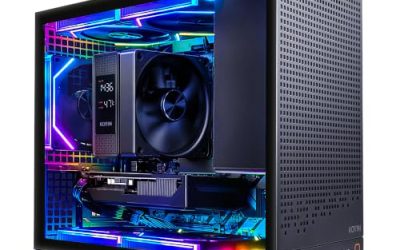
A budget of under 1000 dollars sounds generous until you notice that it buys two very different kinds of computer. One is a new gaming tower with a graphics card, an NVMe drive and a lit-up case. The other is a quieter machine that wins on memory capacity or a built-in screen: a renewed office small-form-factor box, or a 24-inch all-in-one that arrives with the display already attached. Which one deserves the money depends on what the computer must do every single day, not on which listing carries the longest spec line.
This 2026 guide sorts six listed desktops along that split. It is written for families choosing one shared home computer, students who want coursework and some gaming on the same box, and small offices that need a dependable workstation without shopping for a monitor as well. Everything below comes from the listing titles, so treat it as a shortlist and confirm the details on each product page before you commit.
Our Top Picks


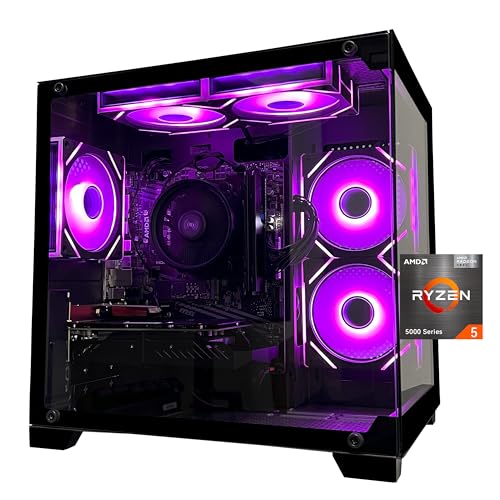

Top 3 picks at a glance
Quick Picks
As an Amazon Associate we earn from qualifying purchases at no extra cost to you.




| Product | Best for | Key spec taken from the title |
|---|---|---|
| ZYNEEX Ryzen 5 5500 tower | Gaming on a strict ceiling | GeForce RTX 3050 6GB, 16GB DDR4 3200MHz, 1TB NVMe SSD |
| SKYESEV Ryzen 5 5600 tower | Gaming plus heavy multitasking | Ryzen 5 5600, RTX 3050 6GB, 32GB DDR4 3200MHz, 1TB NVMe SSD |
| Lenovo IdeaCentre 24-inch all-in-one (8GB) | Simple family use with no extra monitor | 24-inch FHD IPS display, 8GB RAM, 512GB SSD, Wi-Fi 6 |
| Lenovo IdeaCentre 24-inch all-in-one (16GB) | Home office on a single desk footprint | 16GB RAM, 512GB PCIe SSD, Intel 8-core i3 up to 3.8GHz |
| Dell Optiplex 7050 SFF | Memory-heavy office work and dual screens | i7-7700, 32GB DDR4, 1TB SSD, dual monitor support |
| Dell Optiplex 7060 SFF | Newer-generation office processing | Intel 8th Gen i7-8700 (6 core), 32GB DDR4, 512GB NVMe M.2 SSD |
The 6 Best Options
ZYNEEX Ryzen 5 5500 Gaming Tower
This is the pick for anyone whose first question is whether the computer can run games at all. The listing shows an AMD Ryzen 5 5500, a GeForce RTX 3050 with 6GB of video memory, 16GB of DDR4 at 3200MHz, a 1TB NVMe SSD, ARGB air cooling and Wi-Fi, all inside a tower case. A tower matters under a tight ceiling because the graphics card, memory and drive can each be swapped later without replacing the whole machine, which stretches the useful life of the purchase well past the first year. The Wi-Fi mention also means a desk far from the router is not a problem, though a wired connection is still steadier for online matches. Buyers who have never opened a case before should note that a tower asks a little more of you at setup than a boxed all-in-one does.
- A dedicated graphics card, which neither the office boxes nor the all-in-ones below list
- 1TB of NVMe storage is roomy enough for a handful of large game installs
- The standard tower format leaves space for later upgrades to memory, storage and graphics
- 16GB of RAM is fine at first but is the earliest thing a heavy multitasker will outgrow
- Only 6GB of video memory, which will eventually limit texture settings in newer titles
Skip it if you need a monitor in the box, or a machine that sits silent beside a bed, because a tower with air cooling and case fans will make some noise under load. Against the next pick, the SKYESEV, it gives up a step in processor model and half the memory in exchange for what is probably a lower asking tier, so the decision comes down to whether you game while keeping a dozen browser tabs open.
SKYESEV Ryzen 5 5600 Gaming Tower
The SKYESEV listing reads like a stronger sibling of the previous tower. It names a Ryzen 5 5600, the same GeForce RTX 3050 6GB, 32GB of DDR4 at 3200MHz, a 1TB NVMe SSD, ARGB air cooling and Wi-Fi. The standout is the memory: 32GB is uncommon in a new tower aimed at a sub-1000-dollar shopper, and it suits someone who keeps a browser, a chat app, a music player and a game open together without watching a memory meter. For a household where one person games while another streams video in the next room, that spare capacity is the difference between a smooth evening and a stuttering one.
- 32GB of DDR4 gives real headroom for multitasking and for future, hungrier games
- Ryzen 5 5600 sits one model above the 5500 in the same processor family
- Discrete graphics and NVMe storage in a new-build tower that can still be opened and upgraded
- The graphics card matches the cheaper tower, so any gaming gain comes only from the processor
- Air cooling with ARGB fans is adequate for stock use but leaves little thermal room for aggressive tuning
Skip it if your workload is documents and video calls, because the memory and graphics budget would sit idle. Compared with the Lenovo all-in-ones that follow, it asks you to supply a monitor, keyboard and mouse, so total up what you already own before declaring it the cheaper route.
Lenovo IdeaCentre 24-Inch All-in-One, 8GB
Think of this one as the appliance of the group. The title lists a 24-inch FHD anti-glare IPS display, 8GB of RAM, a 512GB SSD, an Intel 4-core processor, Wi-Fi 6 and Bluetooth 5.2. Everything sits behind a single screen, which suits a kitchen counter, a spare-room desk or a dorm room where cable clutter is the real enemy and nobody plans to open the case. The listing also stresses its anti-glare finish, which helps in a bright room with a window behind the screen. It is a machine you plug in once and leave alone, and for plenty of buyers that is exactly the point.
- The display is included, so there is no separate monitor purchase to plan for
- An anti-glare IPS panel is friendlier to long reading sessions than a glossy screen
- Wi-Fi 6 and Bluetooth 5.2 cover wireless peripherals and modern routers without adapters
- 8GB of RAM is the lowest capacity in this roundup and can feel tight with many tabs and a video call
- All-in-one bodies rarely let you swap the processor or the screen later
Skip it if you play modern games or edit video, since the listing mentions no dedicated graphics. Next to the 16GB Lenovo below it is the entry tier of the same idea, so read the next review before deciding whether doubling the memory is worth the extra spend.
Lenovo IdeaCentre 24-Inch All-in-One, 16GB
This is the same screen-and-computer-in-one concept with a firmer memory floor. The listing mentions 16GB of RAM, a 512GB PCIe SSD, an Intel 8-core i3 processor that boosts up to 3.8GHz, a 24-inch FHD display and Wi-Fi 6. It is described as a business desktop, which fits payroll spreadsheets, video meetings, web apps and the other work that fills an ordinary office day. The Intel Core i3 branding sounds modest, yet the listing says eight cores, which is a generous count for the class and suits the way office software spreads small jobs across several threads. Pair it with a wireless keyboard and mouse and the desk stays almost cable-free.
- 16GB of RAM doubles the capacity of the other all-in-one and eases multitasking
- PCIe SSD storage keeps boot and application launch times short
- The one-box design suits small desks, reception counters and shared spaces
- No discrete graphics are listed, so gaming is limited to light titles
- A fixed 24-inch screen cannot be upgraded independently of the computer behind it
Skip it if you want to add a graphics card or a second internal drive down the road. Compared with the Dell office boxes below, it costs you upgrade flexibility but saves you the monitor, and that trade is really the whole story of the all-in-one category.
Dell Optiplex 7050 SFF
The Optiplex 7050 is for people who value capacity over novelty. The listing shows an Intel i7-7700 with four cores at 3.60GHz, 32GB of DDR4, a 1TB SSD, Wi-Fi, Bluetooth, HDMI, support for two monitors and Windows 11 Pro, in a small-form-factor chassis described as being in excellent condition. That pairing of memory and storage is unusually large for a desk-friendly business machine and covers accounting files, photo archives and big spreadsheets comfortably. The dual monitor support mentioned in the title is the feature office users tend to notice most, because a second screen saves constant window juggling. Because the description says excellent condition rather than new, buyers should treat the seller’s return policy as part of the product.
- 32GB of DDR4 and a 1TB SSD in a compact business-desktop footprint
- Dual monitor support suits a spreadsheet on one screen and a browser on the other
- The small-form-factor body takes very little desk or shelf space
- A 7th-generation processor is the oldest in the field, and Microsoft’s official Windows 11 support list favors newer chips, so confirm how the system is licensed
- The condition wording points to a used or renewed unit, so cosmetic wear is possible
Skip it for gaming or for any job that needs a graphics card. Against the 7060 that follows, the 7050 offers double the storage but an older chip generation with fewer cores, which makes the next review the natural cross-check.
Dell Optiplex 7060 SFF
The 7060 listing names an Intel 8th Gen i7-8700 with six cores, 32GB of DDR4, a 512GB NVMe M.2 SSD, built-in Wi-Fi and Bluetooth, and Windows. Six cores is the highest core count named in any office or all-in-one listing here, and an NVMe drive is a faster storage format than a basic SATA unit, so this model is the one that should feel quickest when several programs run at once. It is also the only Dell here that names its drive as NVMe M.2, which fits the idea of a newer-generation business desktop that stays responsive through a long workday. Buyers who keep large files can simply attach an external drive for the difference in storage.
- Six cores help when office apps, a browser and a video call all run together
- 32GB of DDR4 matches the 7050 for memory headroom
- NVMe M.2 storage is the quicker drive format
- 512GB is half the storage of the 7050, so an external or added drive may be needed
- The title lists no dedicated card, so games and heavy creative work are off the table
Skip it if you want a screen included or a gaming-capable graphics card. It closes the list as the most capable pure workstation, while the ZYNEEX at the top remains the better pick when play matters more than payroll.
Who Needs a Desktop in This Budget Instead of a Laptop
Households sharing one computer
A desktop does not travel, and in a shared home that is a feature rather than a flaw. It stays in a common room where parents can see the homework, the banking and the photo sorting happen, and nobody carries it off to a bedroom. Either Lenovo keeps the footprint small and the cabling to a single plug, while a tower leaves room for a larger monitor of your own choosing and a keyboard the whole family finds comfortable.
Small offices and home offices
Renewed small-form-factor Dells exist for this crowd. Plenty of memory, a real keyboard-and-mouse workflow and two display outputs matter more than a lit-up case, and a business chassis is built to run all day. Buying several identical units also makes support simpler when one needs replacing, because spare parts and settings carry over from machine to machine. Business chassis also tend to include sensible port layouts and quiet cooling, which a flashy gaming case often does not.
Players who refuse to pay for a screen and battery they never use
If the machine will live on a desk, a tower puts the money into silicon instead of a hinge, a battery and a built-in panel. That is the logic behind the two Ryzen towers: dedicated graphics and fast storage beat portability for someone who never leaves the house with the computer. The same budget in laptop form usually buys weaker graphics and less memory.
How to Choose
Processor generation and core count
Generation often matters more than the model name. For general use, look for a quad-core or better chip, and prefer 8th-generation Intel or Ryzen 5000-series parts over older silicon when the cost is similar. Six cores or more helps when many apps run at once, while four cores is the practical minimum for a main machine. Be cautious with chips that fall outside Microsoft’s published Windows 11 support list, because feature updates and licensing can become awkward over time. Ignore boost-clock marketing and compare generations and core counts instead. A listing that names the exact processor, as every pick above does, is easier to research than one that says only i7 or Ryzen 7. Business desktops tend to age gracefully because their chips are built for long daily use, while gaming towers lean on a modern graphics card to make up for processor limits.
Memory capacity and type
Treat 16GB as the comfortable floor for a main computer, and accept 8GB only for light browsing and documents. DDR4 is the normal type at this tier; DDR5 is rare and not worth chasing under a strict ceiling. For gaming towers look for 3200MHz, and check whether a free memory slot remains, since a single stick can run slower than a matched pair. Where a listing says 32GB, find out whether it is two sticks or four before planning an upgrade. A system with all slots filled may need every stick replaced to add capacity, which turns a small upgrade into a larger bill. Also remember that memory sold as part of a bundle may be a single-channel configuration that leaves some performance on the table.
Storage type and size
A 512GB SSD handles the operating system and everyday programs, but a few modern games can fill it quickly. An NVMe drive loads faster than a SATA drive, and 1TB is the sensible target if the machine will hold games, photo libraries or project folders. Avoid mechanical-only storage as a boot drive. Budget machines sometimes cut corners with slower, lower-endurance drives, so a named capacity and interface in the title is a good sign. Remember that Windows and updates consume a chunk of any drive, so a 512GB model leaves noticeably less than 512GB of free space once the system and common programs are installed.
Graphics: integrated or discrete
If the machine must game, a discrete card with at least 6GB of video memory is the practical entry point, and more is better for newer titles. For office tasks, integrated graphics cover spreadsheets, video calls and streaming video, so paying for a card that never works is wasteful. Ignore claims such as VR-ready on entry-level cards unless the listing also names the card and its memory. A card with 6GB of video memory will run today’s games at modest settings, but it leaves less headroom than a card with 8GB or 12GB, so buyers who plan to keep the machine for years should weigh that limit honestly.
Form factor, ports and display
Towers offer room, small-form-factor boxes save space, and all-in-ones remove the monitor purchase. Count the ports you actually need: HDMI or DisplayPort for screens, enough USB for a keyboard, mouse and backup drive, and a wireless standard such as Wi-Fi 6 if your router supports it. An anti-glare IPS panel is easier on the eyes for long sessions than a glossy one, and a full HD resolution is plenty at 24 inches. For a tower or small-form-factor box, also check how many display outputs exist and what type they are, because older monitors may need an adapter. A machine with only one video output cannot drive a dual-monitor desk without extra hardware.
Warranty, condition and where corners get cut
Renewed machines and unfamiliar tower brands cut corners in different places. Renewed units may carry cosmetic wear and a short seller warranty, while unfamiliar tower brands may use a generic power supply and a basic motherboard with few upgrade options. Ignore RGB lighting counts and invented model names. Read the warranty length, the return window, the condition grade and whether a power supply wattage is stated before you click buy. A short, vague warranty on a machine with a large parts list is the clearest warning sign in this price range.
Gaming Tower, Office Small Form Factor or All-in-One
Most shoppers at this ceiling are not choosing between two similar boxes. They are choosing between three different formats that happen to cost about the same, and the table below shows what each one gives up.
| Format | Strength | Weakness | Closest match here |
|---|---|---|---|
| Gaming tower | Dedicated graphics, upgradeable parts | Needs a separate monitor and peripherals | ZYNEEX, SKYESEV |
| Small form factor | High memory, compact, dual displays | Older chips, no game graphics listed | Dell 7050, Dell 7060 |
| All-in-one | Screen included, tidy desk | Fixed parts, limited graphics | Lenovo 8GB, Lenovo 16GB |
When the tower wins
Choose a tower when gaming, a later graphics upgrade or a long ownership horizon matters. A monitor is a one-time purchase, and a tower can outlive several of them, accepting new memory and drives as needs change. The drawbacks are bulk, extra cables and fan noise under load, so measure the desk space before ordering.
When an office box or all-in-one wins
Pick the small-form-factor Dell when memory and processor cores matter more than games and you already own a screen. Pick the all-in-one when desk space, cable count and simplicity matter most and nobody will open the case. Both formats lose the easy upgrade path that makes a tower flexible, so buy the memory you will need on day one rather than planning to add it later. Noise is the quiet tiebreaker: an all-in-one or office box generally runs calmer in a living space, while a gaming tower can become audible when the graphics card works hard.
Setup, Compatibility and Upgrade Tips
What to check before buying
Confirm what ships in the box: the operating system, power cable, Wi-Fi antenna and whether a keyboard and mouse are included. For towers, find the power supply wattage in the full listing, since titles often leave it out. For renewed units, read the seller’s return window and what the condition grade actually means. For any small-form-factor Dell, check which video outputs exist before pairing it with a monitor, because an adapter may be needed.
What to upgrade first
In an 8GB all-in-one or a modest tower, memory is the first upgrade if the model allows it. In a gaming tower, extra storage is the second most useful change, followed by the graphics card. Renewed office boxes benefit from a fresh SSD if the existing one is worn, and from a clean operating system install that clears out old business software and settings.
Common compatibility traps
Small-form-factor chassis often restrict the size and power draw of any graphics card you add, so do not assume a full-length card will fit. Slim power supplies limit wattage. DDR4 memory will not fit DDR5 slots, and mixing memory speeds can pull every stick down to the slowest speed. Older chips may not receive every Windows feature, and most all-in-ones accept no internal graphics upgrade at all.
Which One Fits Your Situation
A teenager who wants to play and finish homework
The SKYESEV Ryzen 5 5600 tower fits best. Its 32GB of memory handles browser tabs, a chat app and a game together, and the discrete card covers the play side. If the ceiling is tighter, the ZYNEEX is the nearest alternative, with half the memory and the same graphics card.
A bookkeeper working from a spare room
The Dell Optiplex 7060 is the match. Six cores, 32GB of memory and NVMe storage suit spreadsheets, accounting software and several browser windows spread across two monitors, and a business chassis is made for long workdays.
A family wanting one tidy machine for the kitchen
The Lenovo IdeaCentre 24-inch all-in-one with 16GB is the sensible choice. The screen is included, wireless connectivity is built in, and the memory is enough for video calls, recipes, homework and the family calendar without a tangle of cables.
A shopper who needs the biggest drive in the smallest footprint
The Dell Optiplex 7050 offers a 1TB SSD and 32GB of memory in a compact case, which suits photo libraries and document archives where graphics performance is secondary. Just confirm the Windows licensing, given the older processor generation.
Common Mistakes
- Buying an all-in-one for gaming and discovering afterward that the listing never mentioned a graphics card.
- Trusting memory capacity alone and ignoring processor generation on renewed machines, which can leave the system slower than the spec line suggests.
- Forgetting a monitor, keyboard and mouse when comparing a tower against an all-in-one, which makes the tower look cheaper than it is.
- Assuming any graphics card will fit inside a small-form-factor chassis with a slim power supply.
- Skipping the seller’s return window and warranty terms on a used or renewed unit, then finding cosmetic or battery-backed clock problems too late.
- Paying for RGB lighting and case styling instead of memory or storage, which are the specs that change daily use.
Related guides
- How To Clean Quest 3 Lenses And Facial Interface
- Vr Facial Interfaces For Glasses Wearers
- Micro Sd Cards For Samsung Galaxy Phones
Frequently Asked Questions
Can a desktop under 1000 dollars run modern games?
Yes, if it includes a discrete graphics card. The two Ryzen towers in this guide list an RTX 3050 with 6GB, which is an entry-level card suited to 1080p play at moderate settings. The office and all-in-one picks do not list dedicated graphics, so they are better for light titles only.
Is 8GB of RAM enough for a main computer?
It works for light browsing, documents and streaming, but it leaves little room for many tabs or video calls at once. Sixteen gigabytes is the more comfortable choice, and 32GB makes sense for multitasking or heavier office files.
Are renewed Dell Optiplex desktops a good idea?
They can be strong value for office work because they offer large memory and storage in a small body. Read the condition description, the warranty and the return terms, and confirm the operating system license before you rely on one as your only computer.
Do I need a separate monitor?
For the two towers and both Dell small-form-factor machines, yes, unless you already own one. The Lenovo all-in-one listings include a 24-inch display, so you can plug in a keyboard and mouse and begin work.
Should I choose NVMe or a regular SSD?
NVMe is the faster drive format and is listed on the two towers and the Dell 7060. For everyday office use the difference is modest, but for loading large games and moving big files it is noticeable.
Can I add a graphics card later?
In a tower, usually yes, as long as the power supply and case have room. In a small-form-factor Dell the card must be low-profile and the power supply is small, and in an all-in-one it is generally not possible at all.
Final Words
The best desktop under 1000 dollars is the one that matches your daily habits, not the one with the biggest numbers. Choose a tower when gaming and future upgrades matter, a renewed small-form-factor box when memory and processor cores matter, and an all-in-one when a single tidy unit matters most. Compare the listed memory, storage and graphics, read the warranty and return terms, and budget for any peripherals you still need before you place the order.