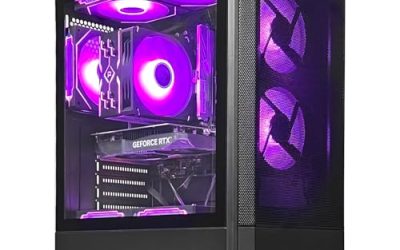
Streaming asks a computer to do two jobs that fight each other. The game wants every bit of graphics power and processor time it can get, while the broadcast software wants to capture the screen, encode the video, run a mic chain and push the result to the internet without a single hiccup. A gaming desktop that looks perfect for solo play can still stutter the moment a camera, a chat window and a capture program join the party. That is why a streaming-focused shortlist has to weigh memory, encoder-friendly graphics and cooling more heavily than the headline frame-rate number.
This guide is for beginners going live from a single machine, variety streamers who also record, and creators who edit highlights on the same tower. It reviews seven prebuilt desktops for 2026 using only what the listing titles state, from entry-level graphics cards up to the newest RTX 5060 Ti generation. Use it to narrow the field, then read each product page for the power supply, ports and warranty before ordering.
Our Top Picks


Top 3 picks at a glance
Quick Picks
As an Amazon Associate we earn from qualifying purchases at no extra cost to you.


| Product | Best for | Key spec taken from the title |
|---|---|---|
| KOTIN Ryzen 7 8700F, RTX 5060 Ti | Streaming and gaming with room to grow | RTX 5060 Ti 8G, 32GB DDR5, 1TB SSD, WiFi 7 |
| KOTIN Core i5-14400F, RTX 5060 Ti | Intel build with a 650W supply | i5-14400F, RTX 5060 Ti 8G, 16GB DDR4, 1TB NVMe SSD |
| YAWYORE Ryzen 7 5700X, RTX 5060 | Memory-first multitasking | Ryzen 7 5700X, RTX 5060, 32GB DDR4, 1TB M.2 NVMe SSD |
| AEXPXO Ryzen 7 5700X, RTX 5060 | Newer memory-type graphics on DDR4 | RTX 5060 8GB GDDR7, 16GB DDR4 3200MHz, 550W Bronze PSU |
| Olialia Ryzen 5 5500, RTX 3060 Ti | Value graphics with a roomy supply | RTX 3060 Ti, 16GB RAM, 512GB SSD, 600W power |
| WIWB Ryzen 7 4700LE, RTX 3050 | Entry-level first streaming rig | RTX 3050 8GB GDDR6, 16GB DDR4, 512GB NVMe SSD |
| STGAubron Core i7, RX 580 | Casual streaming and video editing | RX 580 8G, 16G RAM, 1T SSD, i7 up to 3.9GHz |
The 7 Best Options
KOTIN Ryzen 7 8700F with RTX 5060 Ti and 32GB DDR5
This listing is the most complete streaming package in the group on paper. The title shows a Ryzen 7 8700F, a GeForce RTX 5060 Ti with 8GB, 32GB of DDR5 memory, a 1TB SSD, WiFi 7, Windows 11 Home, DLSS 4 support and ARGB cooling, all in a prebuilt tower. For a creator the combination that stands out is the 32GB of fast memory next to a current-generation graphics card, because a stream with a game, a browser, chat and capture software open at once eats RAM quickly. DLSS 4 is an upscaling and frame-generation feature, which lets supported games run smoothly at higher settings and leaves more graphics headroom for the encoder working beside the game. The tower format also means memory and storage can be extended later, which suits a channel that expects to grow. A buyer who streams mainly competitive shooters will care about processor speed and cooling more than texture detail, and the Ryzen 7 with ARGB cooling covers both.
- 32GB of DDR5 leaves comfortable headroom for game, overlay software and browser sources together
- Current-generation RTX graphics bring a hardware video encoder and DLSS 4 upscaling support
- WiFi 7 is listed, which helps if running a network cable to the desk is not practical
- 8GB of video memory is the limiting spec for maximum-detail textures in newer titles
- A sparse title means the power supply wattage and case airflow need checking on the product page
Skip it if the budget is tight and you only plan to stream lighter games. Against the next pick, the Intel-based KOTIN, it offers double the memory and the newer DDR5 type, while the Intel build leans on a different processor family and a stated 650W supply.
KOTIN Core i5-14400F with RTX 5060 Ti
The second KOTIN is the Intel alternative. Its title lists a Core i5-14400F, the same RTX 5060 Ti 8G graphics card, 16GB of DDR4, a 1TB NVMe SSD, Wi-Fi, ARGB cooling, Windows 11 Home and a 650W power supply. It is the only listing in the group that states a 650W figure alongside a current graphics card, which is useful when you plan to add a capture card or extra drives later. The i5-14400F is a mainstream Intel desktop chip, and the F suffix means it ships without integrated graphics, so the RTX card does all the display work. That is fine for a dedicated streaming desk but worth remembering if you ever need to troubleshoot with the card removed. The 1TB NVMe drive is a sensible size for a first channel, because it can hold a library of games plus a few weeks of recorded sessions before an archive drive becomes necessary.
- The same RTX 5060 Ti class of graphics as the Ryzen KOTIN
- A stated 650W power supply gives some expansion headroom for add-in cards
- NVMe storage at 1TB covers the operating system, a few games and a recording folder
- 16GB of DDR4 is the minimum for streaming and fills quickly once overlays and a browser join the game
- DDR4 and an F-series processor with no integrated graphics mean the card must always be present
Skip it if you plan to run a game, editing software and a stream together, as the memory capacity will become the first bottleneck. Compared with the YAWYORE that follows, you gain a newer graphics tier and lose half the memory, so decide which resource your streams stress more.
YAWYORE Ryzen 7 5700X with RTX 5060
The YAWYORE listing is the memory-first choice. It names a Ryzen 7 5700X, a GeForce RTX 5060, 32GB of DDR4, a 1TB M.2 NVMe SSD, ARGB fans, WiFi and Bluetooth. Streaming rewards capacity more than speed, and this is a straightforward way in the group to reach 32GB alongside a current-generation graphics card. The title also lists WiFi and Bluetooth, so a wireless headset and controller work without extra dongles. The ARGB fans suggest some case airflow, which matters because streaming keeps the machine under load for hours rather than minutes. A buyer who plans to run Discord, a browser with a chat dock, a music player and the broadcast program together will notice the memory benefit first. The listing does not state the power supply wattage, so confirm it before adding drives or a capture card.
- 32GB of DDR4 is plenty for the game, browser, chat and capture software at once
- Ryzen 7 5700X sits in a processor class that handles software tasks alongside gaming
- M.2 NVMe storage and Bluetooth keep the setup responsive and wireless-friendly
- The RTX 5060 sits one step below the 5060 Ti found in the KOTIN builds
- DDR4 and an older socket limit how far the platform can be upgraded later
Skip it if future upgrade paths matter more to you than present memory. Next to the AEXPXO, it uses the same processor and graphics model, so the real difference is memory capacity and power supply details.
AEXPXO Ryzen 7 5700X with RTX 5060
The AEXPXO listing pairs the same Ryzen 7 5700X with an RTX 5060 8GB that the title says uses GDDR7 video memory. It lists 16GB of DDR4 at 3200MHz, a 1TB NVMe SSD, an ARGB cooler, WiFi and Bluetooth, and a 550W Bronze power supply. The explicit 550W Bronze wording is helpful because many budget listings hide this detail. For streaming, the split of labor is straightforward: the processor handles overlay and chat software while the card handles the game and the encoder. The 3200MHz wording at least tells you the memory kit is not running at a slower default speed. The cooler is described only as ARGB, so check the product page to learn whether it is air or liquid. A Bronze-tier supply is competent but not premium, which is common in prebuilts at this level.
- GDDR7 video memory is named on the card, a newer type than older mid-range cards used
- The listing is open about its 550W Bronze supply, which makes planning easier
- 1TB NVMe storage is generous for the category
- 16GB of DDR4 leaves less room for heavy multitasking than the YAWYORE
- A 550W supply gives limited headroom for adding power-hungry components later
Skip it if you want to expand the build with several drives or a more powerful card. Compared with the Olialia that comes next, you get a newer graphics generation but a smaller drive-to-supply margin, so choose by what you intend to add.
Olialia Ryzen 5 5500 with RTX 3060 Ti
Olialia leans on an older but still capable graphics card. The title lists an RTX 3060 Ti, a Ryzen 5 5500, 16GB of RAM, a 512GB SSD, RGB lighting, WiFi 6, a 600W power supply, Windows 11 and a panoramic tower case. The glass-front panoramic design suits creators who want the build visible behind them on camera. The RTX 3060 Ti belongs to an older generation than the 5060 family, yet it carries the NVIDIA hardware encoder that streamers rely on. With WiFi 6 and a stated 600W supply, the platform has more breathing room than a short title suggests. The lighting and glass panel are as much a content decision as a hardware one, because an attractive case behind the streamer becomes part of the channel look.
- RTX 3060 Ti graphics include a hardware encoder for offloading the stream
- 600W power supply is stated, giving reasonable room to grow
- Panoramic tower and RGB lighting suit a visible on-camera setup
- 512GB storage fills quickly once a few modern games and recorded clips are installed
- Ryzen 5 5500 is the entry processor in this group for multitasking
Skip it if you plan to record long sessions, since the drive is the smallest in the field. Against the WIWB below, it carries a stronger graphics card and a clearer power figure, while the WIWB trades both away for its price.
WIWB Ryzen 7 4700LE with RTX 3050 8GB
The WIWB listing is the entry-level rig. It names a GeForce RTX 3050 with 8GB of GDDR6, a Ryzen 7 4700LE, 16GB of DDR4, a 512GB NVMe SSD and WiFi 6 in a desktop tower marketed for gaming, streaming and content work. For a first channel that mostly plays lighter or esports-style games, this class of machine is where many beginners begin. The Ryzen 7 4700LE is an unusual part that appears mostly in prebuilts, so there is less public information about how it behaves than for common 5000-series processors. The mention of content work suggests the seller expects light editing, which is realistic for short clips rather than long timelines. The real strengths here are the dedicated 8GB card and the NVMe drive, which keep the basics from feeling slow.
- 8GB of video memory on an RTX 3050 is more than some entry cards list
- An RTX-branded card carries a hardware encoder for streaming
- NVMe storage and WiFi 6 keep the basics modern
- The RTX 3050 is the lowest-tier RTX card here and will limit settings in demanding games
- 512GB is tight for a game library plus recordings
Skip it if your target is demanding new releases at high settings while live. Compared with the STGAubron that follows, it offers a more modern graphics architecture, whereas the STGAubron offers more storage and an older card.
STGAubron Core i7 with RX 580 8G
The STGAubron listing is aimed at casual creators. It shows an Intel Core i7 running up to 3.9GHz, a Radeon RX 580 with 8G, 16G of RAM, a 1T SSD and an ARGB fan, with the seller pitching it for streaming, video editing, home and school. The RX 580 is an older graphics generation, so this machine suits light games and everyday tasks rather than demanding releases. The title says Core I7 without naming the generation, and up to 3.9GHz is a boost figure rather than a promise of sustained speed, so look for the exact model on the product page. The 8G of video memory remains useful for lighter titles, yet the card predates the dedicated features newer streamers rely on. For a family computer that occasionally goes live to share a game with friends, the 1TB drive and broad marketing are the real selling points.
- 1TB of SSD storage is the largest capacity in the budget tier
- 8G of video memory on the card is listed
- Marketed for streaming, editing, home and school use, so it can double as a family computer
- The RX 580 belongs to an older graphics generation and lacks the newer features of RTX cards
- Broad marketing for school and editing suggests a general-purpose build rather than a streaming specialist
Skip it if you want current-generation upscaling or an efficient hardware encoder. It closes the list as the budget entry, and if gaming quality matters even slightly more than storage, the Olialia or WIWB above is the better foundation.
Why a Streaming PC Needs More Than a Gaming PC
Two workloads, one machine
A game alone can saturate a graphics card. Add a capture program, an encoder, overlays, a music player and a chat window, and memory plus encoder capacity become the real constraints. A streaming desktop spends its budget differently than a pure gaming tower: more RAM, a fast SSD for local recordings and a graphics card whose hardware encoder takes load off the processor. Even a solid esports title can drop frames on stream if memory runs out and Windows begins swapping to disk, and that is the failure viewers notice first.
Why the graphics card generation matters
Modern RTX cards include a dedicated video encoder, so the stream can be compressed without heavily taxing the processor. Older cards often have less capable encoders, and a very weak card forces you to lower game settings to leave room for the stream. That is why the listings with RTX 5060 and 5060 Ti rank above the others for this use, and why the older Radeon card sits at the bottom of the list.
Why storage and cooling get overlooked
Recording a stream locally writes large files continuously, so a 512GB drive can fill in a handful of sessions, particularly when the footage is kept at a high bitrate for later editing. Long broadcasts also heat the case for hours, which makes airflow and a stated power supply matter more than they do for short play sessions.
How to Choose
Graphics card and video memory
Look for a card with a modern hardware encoder: GeForce RTX cards and recent Radeon RX cards both offer one, while older generations are weaker. For 1080p streaming, 8GB of video memory is a practical floor, and 12GB or more gives breathing room for higher textures and a capture overlay running on the same card. Ignore ARGB branding and focus on the exact card name in the title. Also check that the card name is stated in full, since a vague mention of RTX graphics can hide a much older model.
Processor cores and threads
Streaming software uses extra threads, so aim for at least six cores and twelve threads. Eight cores, such as the Ryzen 7 class, give more margin when a game, encoder and browser compete. An F-series Intel chip lacks integrated graphics, which only matters if the discrete card fails or is removed. Ignore peak clock speeds in the title and look instead at the core count and generation, because those decide how well the processor shares time between the game and the broadcast software.
RAM capacity and speed
Sixteen gigabytes is the minimum for streaming and fills quickly; 32GB is the comfortable target for a game plus overlays plus a browser. DDR5 offers more bandwidth than DDR4 and is the newer type, but capacity helps streams more than speed does. Check that the memory runs in a dual-channel pair, because a single stick halves the bandwidth available to the processor and the integrated tasks around it. Budget builds sometimes ship a single large module, so look for wording about two sticks.
SSD size and interface
Choose NVMe storage of at least 1TB if you record gameplay locally. A 512GB drive is workable only if you move recordings to an external disk after each session. Keep the game library and recording folder on separate drives when you can, to avoid write stalls during a live broadcast. Budget drives can slow down sharply once their fast cache fills, so a recording on a cheap drive may hitch late in a long session.
Power supply and cooling
For a mid-range card plus a modern processor, a quality 550W to 650W supply is a reasonable minimum, and listings that state wattage and efficiency tier deserve more trust. Streams last for hours, so look for multiple case fans or a liquid or tower air cooler, and leave free space around the case for airflow. Cheaper prebuilts sometimes cut corners with a generic supply, so a stated efficiency tier is a small but real sign of care.
Ports, networking and warranty
You will plug in a microphone, webcam, headset and perhaps a capture card, so count USB ports and check the front panel. A wired Ethernet connection is steadier than Wi-Fi for broadcasts, even when the listing advertises Wi-Fi 6 or WiFi 7. Read the warranty length and the seller’s return terms, since unfamiliar tower brands can cut corners on motherboards and power supplies. Ignore bundled extras such as a keyboard and mouse; they rarely influence streaming quality.
GPU Encoder or CPU Encoder for Your Stream
Every streamer picks between asking the graphics card or the processor to compress the video. The right answer depends on the hardware in the listing, and on how much processor time the game itself consumes. A fast shooter that already keeps the processor busy leaves little room for software encoding, while a slower strategy game leaves plenty.
| Approach | Strength | Weakness | Fits these picks |
|---|---|---|---|
| Hardware (GPU) encoder | Little processor load, easy to set up | Quality depends on the card generation | KOTIN, YAWYORE, AEXPXO, Olialia, WIWB |
| Software (CPU) encoder | Can offer fine quality when cores are spare | Competes with the game for processor time | Eight-core Ryzen 7 builds |
When the graphics encoder wins
For most single-PC streamers the hardware encoder is the simple answer. It lets the processor focus on the game and the broadcast software, and current RTX cards compress video efficiently. Beginners can switch it on in the streaming program and move on. Another benefit is predictability: the load on the graphics card stays steady, so the stream settings you pick on day one keep working on day one hundred.
When the processor encoder makes sense
Software encoding appeals to people with spare cores who want fine control over quality settings. It only works well when the processor has plenty of threads left after the game takes its share, which suggests the Ryzen 7 builds. On six-core parts, it often forces lower game settings. The extra processor heat also raises case temperatures, so cooling becomes part of the decision.
Setup, Compatibility and Upgrade Tips
What to check before buying
Confirm the exact graphics card, memory capacity, and power supply wattage in the full listing, because streaming titles often shorten them. Check whether the tower includes Wi-Fi hardware and what ports sit on the front panel, since cameras and microphones need USB. Make sure the case has room for a capture card if you plan to add a console. Look at the rear panel too: a second display for chat and stream controls needs a spare video output, and some budget cards offer only a few ports. Finally, confirm the Windows edition and that the license is attached to the machine.
What to upgrade first
On the 16GB listings, doubling the memory is the most effective upgrade for streaming. After that, add a second drive for recordings, then consider a cooling upgrade if the case runs warm during multi-hour broadcasts. A better microphone and a decent webcam improve a stream more than extra graphics power once the baseline is met, so budget some of the savings for those instead.
Common compatibility traps
DDR4 and DDR5 do not interchange, so memory bought for one will not fit the other. Small power supplies limit the cards you can add later, and some budget cases have restricted airflow. Capture cards need a free expansion slot or a spare USB port that supports the required speed. Also watch for tower cases with solid front panels, which can choke airflow when the graphics card and processor work together for hours.
Which One Fits Your Situation
A beginner who wants to go live this month
The WIWB Ryzen 7 4700LE with RTX 3050 is the gentle way in. It carries an RTX encoder at the lowest tier, enough for lighter games and a simple overlay. Plan to add memory and a second drive within a few months as the channel grows.
A variety streamer juggling a game, browser and chat
The YAWYORE Ryzen 7 5700X with 32GB suits the multitasking workload best, because capacity is what keeps overlays and browser sources smooth. The RTX 5060 is current enough that the hardware encoder and upscaling features are there when you need them, and the AEXPXO is the near-twin to compare if you prefer a stated power supply.
A creator who also edits highlights
The KOTIN Ryzen 7 8700F with RTX 5060 Ti and 32GB of DDR5 offers the strongest all-round balance for streaming, recording and editing on one tower. The DDR5 platform also leaves a sensible upgrade path once the channel outgrows its first setup, which the DDR4 builds cannot match.
A family sharing one machine for school and casual streaming
The STGAubron Core i7 listing with 1TB of storage is built for that mix of homework, video editing and light games, as long as expectations for new releases stay modest. The Olialia with its glass panel is the better pick if the case will appear on camera and the library is small.
Common Mistakes
- Buying for frame rate alone and ignoring memory, which is what the broadcast software and overlays actually consume once the game is running.
- Choosing a 512GB drive and then running out of space after a few recorded sessions, which forces constant cleanup between streams.
- Assuming Wi-Fi is enough for broadcasting when a wired connection is steadier for upload and avoids interference from neighbors and household devices.
- Ignoring the power supply wattage and efficiency tier on a listing that does not state it.
- Expecting a weak or older graphics card to stream and play a new game at high settings together.
- Forgetting to check front-panel ports for the webcam, microphone and capture card.
Related guides
- How To Clean Quest 3 Lenses And Facial Interface
- Vr Facial Interfaces For Glasses Wearers
- Micro Sd Cards For Samsung Galaxy Phones
Frequently Asked Questions
How much RAM do I need to stream and game on one PC?
Sixteen gigabytes is the working minimum, but 32GB is more comfortable once overlays, a browser and chat run beside the game. Capacity matters more than memory speed for this workload, since running out of memory forces the system to use the drive and causes visible stutter.
Does the graphics card matter more than the processor for streaming?
Both matter, but a modern graphics card with a hardware encoder moves the compression work off the processor. A mid-range processor with a capable card is usually a better streaming combination than the reverse, and the picks above follow that logic.
Is 8GB of video memory enough for streaming?
For 1080p play and streaming it is a practical floor. Demanding newer games at high textures may want more, which is where 12GB or 16GB cards pull ahead; if you stream mostly esports or indie games, 8GB is rarely the limit.
Do I need a wired connection?
It is strongly advised. Wi-Fi 6 or WiFi 7 helps, but a cable avoids dropped frames caused by interference or weak signal during a long broadcast.
Can I stream from an older card like the RX 580?
You can, especially for lighter games, but older cards have less efficient encoders and lack newer upscaling features. Expect to lower game settings to keep the stream stable.
Should I record locally while streaming?
Many creators do, since a local file keeps full quality for edits. That requires fast, roomy storage, so favor a 1TB NVMe drive or a second disk.
Final Words
A good streaming desktop balances the graphics card, memory capacity, storage and cooling instead of chasing one headline number. For most creators the sweet spot is a current RTX card with 32GB of RAM and a 1TB NVMe drive, and the listings above show how close you can get at different tiers. Check the power supply, the ports and the warranty on each product page, and choose the machine whose weakest spec still fits the way you actually broadcast. A balanced mid-range build you can upgrade will serve a growing channel better than a single expensive component surrounded by weak ones.