The best VR link cable for most Quest owners is the INIU 16ft Link Cable, because its listing pairs a long 16-foot run with USB 3.0 data speeds and charging while you play, and it names Quest 3, 3S, 2, Pro and Pico 4. A “link cable” is a long USB cable that connects a standalone headset to a gaming PC so the PC renders the game and the headset simply displays it. If your play space is small, the shorter VakiReyy 10FT cable is easier to manage, while the two Syntech cables suit people who want a USB-A to USB-C adapter in the box.
Our Top Picks


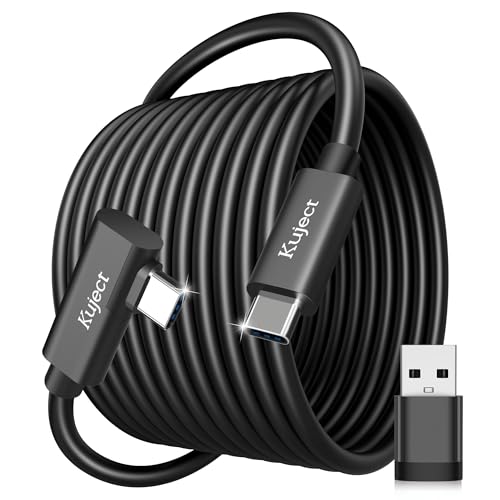
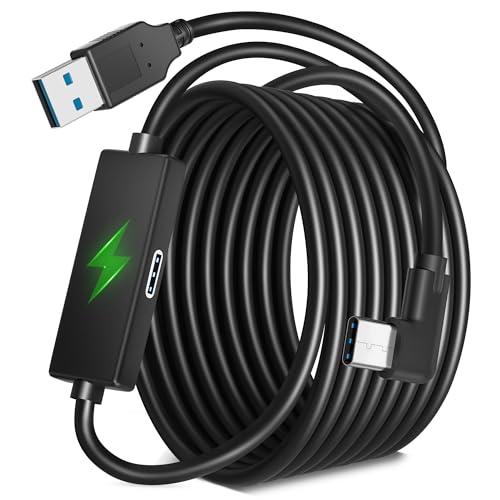
Top 3 picks at a glance
Quick List
- INIU 16ft Link Cable – best all-round pick for Quest 3, 3S, 2, Pro and Pico 4 owners who want charging while playing
- Syntech 16FT Cable with 2-in-1 Adapter – best for people whose PC has a mix of USB-A and USB-C ports
- Syntech 16FT Cable with USB 3.0 Adapter – best for a straightforward long run with an adapter included
- Kuject 16FT Link Cable with Charging – best for a USB-A to USB-C connection that also keeps the headset topped up
- Kuject 16FT Black Link Cable – best for a plain, dark, data-first cable that names Pico 4 and Quest Pro
- VakiReyy 10FT Link Cable – best for seated play or small rooms where 16 feet is more cable than you need
Which One Is Right for You?
| If you… | Choose |
|---|---|
| want one long cable that names Quest 3, 3S, 2, Pro and Pico 4 | INIU 16ft Link Cable |
| are unsure whether you will plug into USB-A or USB-C on your PC | Syntech 16FT Cable with 2-in-1 Adapter |
| play seated or in a small room and dislike cable slack on the floor | VakiReyy 10FT Link Cable |
| want a USB-A to USB-C cable that also charges the headset | Kuject 16FT Link Cable with Charging |
| prefer a simple long cable with an adapter included for other ports | Syntech 16FT Cable with USB 3.0 Adapter |
| want a black 16-foot cable listed for Quest 3S, 3, 2, Pro and Pico 4 | Kuject 16FT Black Link Cable |
All six are USB 3.0-class cables sold for the same job, so the choice mostly comes down to length, connector ends and whether the listing mentions charging. Measure the distance from your PC’s USB port to the middle of your play space first. Add roughly three feet for routing around a desk, and you will know whether 10 feet or 16 feet is the right fit. If you are still choosing between two cables, favor the one whose listing states a data rate in writing.
All 6 Picks in Detail
1. VakiReyy 10FT Link Cable – Best for Seated and Small-Room Play
As an Amazon Associate we earn from qualifying purchases at no extra cost to you.

The VakiReyy cable is the shortest in the group at 10 feet, and the listing describes high-speed USB 3.0 data transfer and charging, going from USB 3.0 to USB-C, for Oculus Quest 3 and Quest 2. Ten feet is about three meters, enough to reach from a tower under a desk to a seated player, or from a shelf PC to a small play area. Shorter runs have a practical advantage: fewer feet of cable means less to trip over and less weight pulling at the headset connector. If your PC and your play space are in the same corner of a room, this is the least fussy option.
- Length: 10 feet, per the listing name
- Data class: USB 3.0 high-speed transfer, per the listing
- Charging: listed as charging-capable; wattage not stated, confirm on listing
- Connectors: USB 3.0 to USB-C, per the listing
- Named devices: Oculus Quest 3 and Quest 2; Quest 3S is not named in the visible title
Pros:
- Less slack to manage in a small room
- Shorter cable is lighter at the headset end
- Charging and USB 3.0 data both listed
Cons:
- Ten feet can be too short for a PC placed far from the play area
- Fewer named headsets than the 16-foot options
Against the INIU cable, it sacrifices reach and named-device breadth for a tidier footprint in compact spaces.
2. INIU 16ft Link Cable – Best for Charging While You Play

This cable is the broadest match for the topic. The listing says it is a 16-foot link cable with charging, and it names Meta Quest 3 and 3S, Oculus Quest 2 and Pro, Pico 4 and PC VR. It also states USB 3.0 high-speed data and charging, which is the specification class Meta points to for wired PC play. A long cable that can also feed power is useful because a Quest battery drains quickly while it is decoding a PC stream, so a charging-capable link lets you play for a full evening without stopping to plug in a second cable. That convenience is the main reason it leads this list, since it covers the most headsets and the most use cases in one wire.
- Length: 16 feet, per the listing name
- Data class: USB 3.0 high-speed data, per the listing
- Charging: listed as “with charging”; wattage not stated, confirm on listing
- Named devices: Meta Quest 3 and 3S, Oculus Quest 2 and Pro, Pico 4
- Connector ends: USB-C at the headset; confirm the exact PC-side connector on the listing
Pros:
- Longest reach with the widest list of named headsets
- Charging support means the headset battery is not the limit on session length
- Works for both standing room-scale and seated setups because of the extra length
Cons:
- Sixteen feet of cable needs managing, or it will pool on the floor and get stepped on
- The PC-side connector type should be confirmed so it matches your port
Compared with the Kuject 16FT cable with charging, this one has a longer list of named headsets in its title, which makes compatibility easier to confirm at a glance.
3. Syntech 16FT Cable with 2-in-1 Adapter – Best for Mixed USB-A and USB-C Ports
The headline feature here is the included 2-in-1 USB-A/C adapter. Many desktop motherboards still have more USB-A ports on the back than USB-C ports, and some cases have a USB-C front connector that behaves differently from the rear ports. With an adapter in the box, you can move the cable between those ports while you work out which one gives the most stable connection. The listing also names Meta Quest 3S, 3 and 2, an 18W fast-charge figure and a 3.2Gbps sync rate, so it is a good fit for people who value flexibility over a short spec list.
- Length: 16 feet, per the listing name
- Adapter: 2-in-1 USB-A/C adapter included
- Charging: 18W fast charge, per the listing
- Data: 3.2Gbps sync, per the listing; Meta’s help page cites a 5Gbps minimum, so ask what the manufacturer’s figure means before you buy
- Named devices: Meta Quest 3S, 3 and 2
Pros:
- Adapter flexibility helps when port types are limited
- Fast-charging figure is stated in the listing
- Long enough for room-scale play
Cons:
- The quoted 3.2Gbps figure is lower than the 5Gbps class named on competing listings, so read the fine print
- An extra adapter adds a connection point that can loosen if a heavy cable tugs on it
Compared with the other Syntech cable, this model trades a simpler package for the dual-end adapter, which matters most if you are not sure which port you will use.
4. Syntech 16FT Cable with USB 3.0 Adapter – Best for a Simple Long Run

This second Syntech cable is described as a 16-foot USB-C VR cable with a USB 3.0 adapter for Quest 3, 3S and 2. The listing mentions fast data transfer, and the title is built around the adapter rather than a charging claim. That makes it the straightforward choice for a player who just wants a long wire to the PC and does not need to compare charging specs. It follows the same family design as the cable above, so the same advice applies about confirming the exact speed class on the product page before you commit.
- Length: 16 feet, per the listing name
- Adapter: USB 3.0 adapter included
- Named devices: Meta Quest 3, 3S and 2
- Data: described as fast data transfer; exact rate not stated in the visible title, confirm on listing
- Charging: not stated in the visible title, confirm on listing
Pros:
- Sixteen feet gives plenty of reach for most rooms
- Adapter in the box helps with PC-side port differences
- Clear Quest 3, 3S and 2 compatibility
Cons:
- Pico 4 and Quest Pro are not named in the visible title
- Charging details are less prominent than on competing listings
Next to the INIU cable, it names fewer headsets and puts less emphasis on charging, so pick it when the Syntech adapter style appeals to you.
5. Kuject 16FT Black Link Cable – Best for a Plain, Data-First Run

This is the earlier Kuject listing, and it reads like a pure data cable: 16 feet, USB 3.0, 5Gbps-class transfer, black, and named for Meta Quest 3S, 3, 2 and Pro, Pico 4 and Rift-era VR headset accessories. The title does not mention charging, so treat it as a data-first cable and plan to keep the headset charged another way if you play long sessions. For people who want a plain black wire that stays out of sight against dark flooring or trim, that focus is fine, and the lack of extra features keeps the listing simple to evaluate.
- Length: 16 feet, per the listing name
- Data class: USB 3.0 with a 5Gbps figure, per the listing
- Color: black
- Named devices: Meta Quest 3S, 3, 2 and Pro, Pico 4
- Charging: not stated in the visible title, confirm on listing
Pros:
- Stated 5Gbps data class
- Discreet black finish
- Long reach for room-scale play
Cons:
- Charging is not highlighted, so battery life may limit marathon sessions
- Same USB-A-style PC end considerations as its sibling
Compared with the Kuject cable with charging, this one gives up the power angle; choose it only if you already have a way to keep the headset charged.
6. Kuject 16FT Link Cable with Charging – Best for USB-A to USB-C Setups

Kuject describes this as a 16-foot link cable with charging for Meta Quest 3S, 3, 2 and Pro as well as Pico 4. The listing quotes USB 3.0 with 5Gbps-class data transfer, and the connector description refers to a USB-A to USB-C cable. Because the data rate is stated at 5Gbps, it lines up with the minimum that Meta’s own help page mentions for Link cables, which is a point in its favor if you want the spec in writing. The USB-A end also makes it a natural fit for the blue USB 3 ports on the back of most desktops.
- Length: 16 feet, per the listing name
- Data class: USB 3.0 with a 5Gbps figure, per the listing
- Connectors: USB-A to USB-C, per the listing
- Charging: listed as “with charging”; wattage not stated, confirm on listing
- Named devices: Meta Quest 3S, 3, 2 and Pro, plus Pico 4
Pros:
- Written 5Gbps figure matches the guidance Meta cites
- Charging support is part of the listing name
- Broad headset list
Cons:
- A USB-A end means you need a spare USB 3 port on the PC rather than USB-C
- No adapter is mentioned in the visible title
It is the closest match to the other Kuject cable, adding charging, and it is the pick when you want an explicit speed figure alongside power delivery.
Specs Compared
| Cable | Length | Data class (listing) | Charging (listing) | Adapter | Named headsets |
|---|---|---|---|---|---|
| INIU 16ft Link Cable | 16 ft | USB 3.0 | Yes; wattage: confirm on listing | Confirm on listing | Quest 3, 3S, 2, Pro; Pico 4 |
| Syntech 16FT with 2-in-1 Adapter | 16 ft | USB 3.0; 3.2Gbps sync quoted | 18W fast charge | 2-in-1 USB-A/C | Quest 3S, 3, 2 |
| Syntech 16FT with USB 3.0 Adapter | 16 ft | USB 3.0; rate: confirm on listing | Confirm on listing | USB 3.0 adapter | Quest 3, 3S, 2 |
| Kuject 16FT with Charging | 16 ft | USB 3.0; 5Gbps quoted | Yes; wattage: confirm on listing | Confirm on listing | Quest 3S, 3, 2, Pro; Pico 4 |
| Kuject 16FT Black | 16 ft | USB 3.0; 5Gbps quoted | Confirm on listing | Confirm on listing | Quest 3S, 3, 2, Pro; Pico 4 |
| VakiReyy 10FT | 10 ft | USB 3.0 | Yes; wattage: confirm on listing | Confirm on listing | Quest 3, 2 |
How We Chose These
This guide is built from research into listing details and maker documentation. We started with the six cables in the current catalog set and read each listing title and specification field for the length, data class, charging and named headsets. We then compared those statements against the cable guidance on Meta’s help pages, which calls for a USB-C 3.2-class cable rated at a minimum of 5Gbps and a USB 3.x port on the PC. Where a listing was silent on a detail, we say so and tell you to confirm it on the product page rather than guessing. Ordering favors clear compatibility statements, a written USB 3.0 data class, charging support and a length that fits common room layouts.
What to Look For
Data speed and the USB 3 requirement
Wired PC play depends on moving a compressed video stream from the PC to the headset and tracking data back, in real time. Meta’s help page for Link says to use a USB-C 3.2 cable that supports a minimum of 5Gbps and to plug it into a USB 3.x port on the PC. A cable that falls back to USB 2.0 speeds, which top out at 480Mbps, forces a lower bitrate and a softer picture. Many everyday phone-charging cables are USB 2.0 inside even though the plug looks identical, which is why VR-specific cables are advertised with a “USB 3.0” or “5Gbps” label. When a listing shows a lower figure, such as 3.2Gbps, read the description closely and ask the seller what it measures before you buy. Remember that the speed printed on a box is a ceiling for the cable, and the real result also depends on the port, the PC and the headset.
Length, weight and where the cable runs
Sixteen feet, about five meters, matches the length of Meta’s own official Link cable, and it is the common choice for room-scale play. A rule of thumb: measure the straight-line distance from the PC port to the center of your play area, then add three to four feet for the vertical run up to the headset and the route around furniture. If the total is under 10 feet, a 10-foot cable is easier to live with. If it is over 12 feet, go with 16. Longer passive USB 3 cables are harder to build well, because signal loss grows with distance, so many 16-foot cables use built-in signal boosting. That is another reason to favor listings that state a USB 3.0 data rate clearly instead of leaving it vague.
Connector ends and your PC’s ports
The headset end is USB-C on every cable here. The PC end varies. A USB-A end plugs into the blue USB 3 ports on the back of most desktops. A USB-C end suits newer motherboards and some laptops. An adapter, like those packaged with the Syntech cables, lets one cable serve both. Avoid hubs and front-panel ports that share bandwidth with other devices, and avoid long extension chains; plug directly into a motherboard port wherever possible. On a desktop, rear-panel ports connect straight to the board, while front-panel headers run through an internal cable that can add loss. If you are using a laptop, check that the port you pick supports data and not just charging.
Charging while you play
A standalone headset draws power while it decodes a stream from the PC. Without charging, a Quest can run down over a long session even though the PC is doing the rendering. Listings that mention charging, such as an 18W fast charge, suggest the cable can carry power as well as data. Treat wattage numbers as manufacturer claims and check them on the product page. Never keep using a damaged cable that feels hot at the connector; unplug it and replace it. Also avoid bending the connector sharply while it is plugged into the headset, since the port is the weakest part of the chain.
Worked example
Suppose your PC sits 8 feet from the middle of a 6-by-6-foot play space. The straight-line distance is 8 feet, plus 3 to 4 feet for the headset height and routing, so you need about 12 feet. A 10-foot cable would be tight and could pull at the connector when you turn, so choose a 16-foot cable and use a ceiling hook, a clip on your belt or a simple pulley to keep the slack off the floor. In a seated setup with the PC two feet away, the same math gives about 6 feet, and the 10-foot cable is already generous.
Questions
Do I need an official cable, or will a third-party cable work?
Meta’s setup page says you can use Air Link, the official Link cable or a similar high-quality USB 3 cable. A third-party cable that truly supports USB 3.0 at 5Gbps and has a well-made connector is the same class of cable, but quality varies, so read the listing details closely.
Is Air Link better than a cable?
Air Link streams over Wi-Fi and removes the wire, which is convenient, but it depends on a strong network and a capable router. A cable avoids wireless interference and can charge the headset, so many players keep one for demanding games or crowded home networks.
Why does my headset say the cable is too slow?
The most common reasons are a USB 2.0 cable, a USB 2.0 port or a port that shares bandwidth through a hub. Try a rear-panel USB 3 port on the motherboard, remove adapters if you can, and check that the cable is listed as USB 3.0 with a 5Gbps-class data rate.
Will a longer cable hurt picture quality?
It can if the cable is poorly built, since passive USB 3 signals weaken with distance. Well-made 16-foot cables use signal boosting or higher-grade conductors, so choose listings that clearly state a USB 3.0 data rate and keep the run as short as your room allows.
Can I use these cables with Pico 4 or other headsets?
Some listings name Pico 4 and Quest Pro as well as Quest 2 and 3, including the INIU cable and both Kuject cables. If your headset is not named in a listing, confirm on the product page that the cable works with it before you buy.
How should I store a 16-foot cable?
Loosely coil it in wide loops rather than wrapping it tightly around your hand, and avoid sharp bends near the connectors. Gentle storage extends the life of the wires inside and helps prevent the intermittent disconnects that tight kinks can cause.
Update History
- October 20, 2026 – Initial publication; product set drawn from current catalog listings.
- Check the product page for current specifications and availability before buying.
Sources
- Meta help and setup pages covering Meta Horizon Link, Air Link and Link cable requirements
- Retailer listing titles and specification fields for each cable