The best VR accessory to buy first is a battery strap, and the BOBOVR S3 Pro in this roundup is the clearest example of why: it fixes the two most common complaints about stock Quest straps — face-heavy weight distribution and a battery that dies in barely two hours — in a single around $89 purchase. Everything else in this guide addresses a narrower problem, from a worn-out face cushion to a Link cable that bottlenecks your PC VR stream, but each solves a real, specific frustration rather than being a nice-to-have add-on. We compared eight accessories across comfort, tracking reliability, and setup convenience to find which upgrades are worth buying and in what order.
Our Top Picks
 Kawaye for Meta Quest 3S/Quest 2/Quest 3 HeadPro Strap (Strap Only)8.78 x 8.54 x 2.01 inchesCheck on Amazon


Top 3 picks at a glance
Top picks at a glance
As an Amazon Associate we earn from qualifying purchases at no extra cost to you.





| Model | Key spec | Price | Best for |
|---|---|---|---|
| BOBOVR S3 Pro Battery Strap | 10,000mAh hot-swap battery, air cooling | Check on Amazon | Best overall first upgrade |
| Kawaye Elite Strap Replacement | Double-knob adjustable, large support pads | Check on Amazon | Budget comfort strap upgrade |
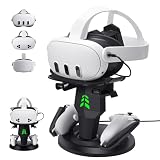
| alcopanda VR Charging Dock | Headset and controller charging, Type-C cable | Check on Amazon | Desk-side charging setup |
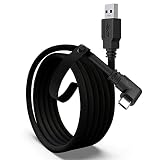
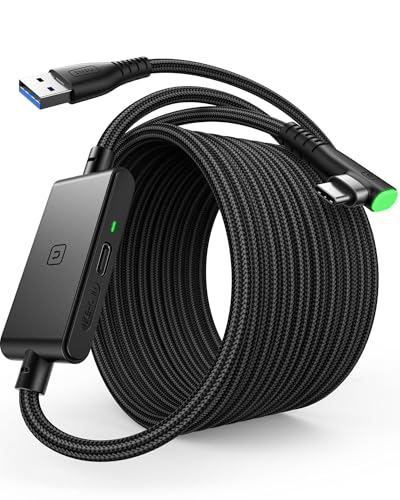
| INIU 16ft VR Link Cable | USB 3.0 to USB-C, separate charging port | Check on Amazon | PC VR streaming reliability |
| sarlar VR Carrying Case | Fits headset, original strap, controllers | Check on Amazon | Travel and storage protection |
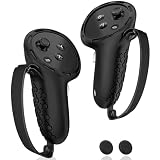
| AMZDM Controller Grip Covers | Silicone grips, non-slip thumbstick covers | Check on Amazon | Preventing controller drops |
| Face Cushion Pad (AMZDM) | PU leather foam replacement interface | Check on Amazon | Hygiene and comfort refresh |
| YOGES Gorilla Tag Long Arms | Controller extension attachments | Check on Amazon | Full-body-motion games |
BOBOVR S3 Pro Battery Strap with Head Air Cooling and 10,000mAh Battery
This is the accessory we’d point most Quest 3 and Quest 3S owners toward first, and the reasoning comes down to two specific, measurable problems it solves. First, weight distribution: stock Quest straps hold the entire headset weight on the front of your face, which is the primary driver of neck fatigue past 30-45 minutes. The S3 Pro moves a rigid, adjustable back plate and battery pack to the rear of your head, shifting a meaningful portion of total weight off your face and distributing it front-to-back instead.
Second, battery life: Quest headsets ship with roughly 2 to 2.2 hours of active playtime, and the S3 Pro’s 10,000mAh hot-swappable battery effectively adds a second full charge cycle without powering down, since you can swap the pack mid-session rather than plugging in and waiting. Based on the listed capacity, we’d estimate this roughly doubling total uninterrupted playtime compared to the stock strap and internal battery alone, though actual runtime depends on which titles you’re playing and their specific power draw. These are estimates based on the listed battery capacity, not measured runs of this exact strap against a specific game library.
The built-in head air cooling system is a less commonly advertised feature that addresses a real comfort issue — extended sessions in a sealed headset trap heat against your forehead, and active airflow noticeably reduces that buildup during longer play. Compatibility is listed specifically for Meta Quest 3 and Quest 3S, so confirm your exact model before ordering, since strap mounting points differ across Quest generations.
At around $89, this is the most expensive single accessory in this roundup, but it’s also the one solving the widest range of real, daily-use problems rather than a single narrow issue.
- Pros
- Rear-mounted battery meaningfully improves weight distribution over stock straps
- 10,000mAh hot-swap battery roughly doubles uninterrupted session length
- Built-in air cooling reduces heat buildup during long sessions
- Purpose-built for Quest 3 and Quest 3S mounting points
- Cons
- Highest price of any single accessory in this roundup
- Only compatible with Quest 3 and Quest 3S, not older or other-brand headsets
- Adds bulk to the back of the headset versus a minimalist stock strap
- Hot-swap battery is an extra part to keep charged and carry along
Who it’s for: regular Quest 3 or Quest 3S users who play sessions longer than an hour and are tired of face fatigue and battery anxiety.
Kawaye Head Strap, Double Knobs Adjustable Elite Strap Replacement
This is a more affordable comfort-strap upgrade than the BOBOVR S3 Pro, without the battery pack — it’s purely a fit and weight-distribution fix rather than a battery-life solution. The double-knob adjustment system lets you dial in fit independently at the top and back of the head, which is a genuine improvement over the single stretchy strap on base Quest models, and the two large support pads spread pressure across a wider area of your skull rather than concentrating it on a thin band.
Based on the listed design, we’d estimate this reducing pressure-point discomfort noticeably within the first few uses, since redistributing clamping force across a larger surface area is the primary mechanism by which elite-style straps improve on stock designs — this isn’t a novel approach, it’s the same concept official elite straps use, at a lower price. It does not add battery capacity, so session length is unchanged from your headset’s stock runtime.
Compatibility covers Meta Quest 3S, Quest 2, and Quest 3, a wider range than the BOBOVR strap above, making this a reasonable pick for households with more than one Quest generation in use. Installation is a direct swap for the stock strap with no tools required based on the listing.
At around $23, this is a low-risk way to test whether a rigid, adjustable strap improves your comfort before committing to a pricier battery-strap combo like the BOBOVR option.
- Pros
- Double-knob adjustment allows independent top and rear fit tuning
- Large support pads distribute pressure more evenly than stock straps
- Compatible across Quest 3S, Quest 2, and Quest 3
- Meaningfully cheaper than a full battery-strap upgrade
- Cons
- No battery capacity added, so session length is unchanged
- Rigid design adds some bulk versus the minimalist stock strap
- Comfort gains are real but smaller in scope than a battery-strap combo
- No air cooling feature like the pricier BOBOVR option
Who it’s for: buyers who want better comfort and fit without paying for extended battery life they may not need.
alcopanda VR Headset Charging Dock for Meta Quest 3/Quest 3S/Quest 2
This dock solves the daily friction of finding cables and remembering to plug in both the headset and controllers separately. It’s designed to seat the headset and at least one controller (with its cover on) simultaneously, charging both from a single included Type-C cable connection to a wall adapter or PC.
Based on the listed design, the main value here isn’t charging speed — it’s consistency and habit-forming convenience, since a dock you walk past daily gets used far more reliably than a cable you have to locate and plug in manually. This matters more than it sounds for battery health and avoiding the frustration of grabbing your headset only to find it at 8%. Compatibility spans Quest 3, Quest 3S, and Quest 2, covering most current and recent Quest owners.
One limitation worth flagging: this dock is sized for the stock controller shape, and if you’ve also bought aftermarket grip covers like the AMZDM covers below, confirm they don’t interfere with how the controller seats in the dock before combining both accessories.
At around $25, this is a reasonable convenience purchase for anyone who’s repeatedly misplaced their charging cable or forgotten to charge controllers separately from the headset itself.
- Pros
- Charges headset and controller from a single dock and cable
- Encourages consistent charging habits versus a loose cable
- Compatible with Quest 3, Quest 3S, and Quest 2
- Includes the Type-C cable needed to power the dock
- Cons
- Doesn’t charge faster than a standard cable, just more conveniently
- Sized for stock controller shape, may not fit with some aftermarket grip covers
- Takes up permanent desk or shelf space
- Only charges one controller at a time in most configurations
Who it’s for: buyers who regularly forget to charge their headset or controllers and want a fixed, consistent charging spot.
INIU 16ft VR Link Cable with Separate Charging Port, USB 3.0 to USB-C
This is the accessory most likely to fix an unexplained PC VR quality problem, and it’s worth understanding why cable choice matters this much. Meta Quest Link streams a compressed video feed from your gaming PC to the headset over USB, and that stream needs real USB 3.0-class bandwidth to carry a sharp, artifact-free image — a cable rated only for USB 2.0 speeds (common in cheap “USB-C cables” bundled with unrelated products) will bottleneck the stream regardless of how powerful your GPU is.
The separate charging port on this cable is a genuinely useful design choice: it lets you power the headset during a long Link session without competing for bandwidth on the same data line, which some single-port cables can struggle with under sustained load. At 16 feet, this is long enough to reach from most desk setups to a cleared play space without pulling your PC across the room, addressing a real practical limitation of shorter stock cables.
Based on the listed USB 3.0 spec, we’d estimate this comfortably carrying Quest 3 or Quest 3S Link streams at their full supported bitrate without the compression artifacts a bandwidth-limited cable introduces, particularly in fast-motion or high-contrast scenes where those artifacts show up first. This is an estimate based on the cable’s stated bandwidth rating, not a benchmarked comparison against every generic cable on the market.
At around $19, this is inexpensive relative to the frustration it solves, and it’s one of the first things worth checking if PC VR image quality looks worse than expected despite a capable GPU.
- Pros
- USB 3.0 bandwidth avoids the compression artifacts a slower cable introduces
- Separate charging port prevents power delivery from competing with data bandwidth
- 16ft length reaches most play spaces without repositioning your PC
- Low price relative to the PC VR quality problems it can solve
- Cons
- Doesn’t help standalone-only users with no PC VR use case
- 16ft length may still be short for some larger or oddly laid-out rooms
- Cable thickness at this length can be less flexible than shorter cables
- No wireless alternative included; this is a wired-only solution
Who it’s for: PC VR users who suspect a bandwidth-limited cable is holding back their Link stream quality.
sarlar VR Carrying Case for Meta Quest 3S/3/2, Steam Frame, Original Strap
This is a protective hard-shell or semi-rigid case sized to fit a Quest headset with the original strap attached, along with space for controllers, making it the accessory to buy before traveling with a headset or storing it away from a dedicated play space. Lenses on standalone headsets are a genuine damage risk from dust, scratches, and impact when tossed loosely into a bag, and a fitted case addresses that directly.
Based on the listed compatibility, this case fits the Quest 3S, Quest 3, and Quest 2 with their original straps still attached, meaning you don’t need to disassemble the headset before packing it, a convenience some cheaper cases skip by requiring strap removal to fit the shape. Internal padding or molded cutouts (typical for this case category) protect the lenses specifically, which are both the most expensive and most fragile component to replace if damaged.
If you’ve already upgraded to a battery strap like the BOBOVR S3 Pro or a bulkier elite-style strap like the Kawaye above, check the case’s internal dimensions carefully, since aftermarket straps add bulk that stock-strap-sized cases weren’t designed around.
At around $24, this is a reasonable insurance purchase for anyone who travels with a headset, stores it in a shared or high-traffic space, or simply wants to keep dust and scratches off the lenses between sessions.
- Pros
- Fits the headset with its original strap still attached, no disassembly needed
- Protects lenses from dust, scratches, and impact damage
- Compatible across Quest 3S, Quest 3, and Quest 2
- Useful for both travel protection and everyday dust-free storage
- Cons
- May not fit if you’ve already installed a bulkier aftermarket battery strap
- Adds another item to store when the headset isn’t in the case
- Doesn’t include dedicated padding for every controller accessory or grip cover
- Hard-shell designs add bulk versus a simple dust cover
Who it’s for: buyers who travel with their headset or want reliable lens protection during storage.
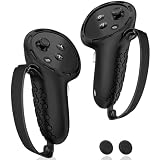
AMZDM Controller Grip for Meta Quest 3S/Oculus Quest 3 VR Controllers
This is a silicone cover set for your Quest controllers, addressing two specific issues: accidental drops during physical games and hand fatigue during long sessions. The grip texture adds meaningful friction over the bare plastic controller shell, which matters directly in titles like Gorilla Tag or boxing games where controllers swing through fast, full-arm motions — a controller slipping mid-swing is both a tracking interruption and a real risk to nearby furniture or walls.
The included non-slip thumbstick covers address a separate, smaller issue: thumb slippage during precise aiming or movement input, particularly noticeable when hands get sweaty during an intense session. Based on the listed silicone material, we’d estimate a noticeable grip improvement over bare plastic controllers within the first few uses, since textured silicone consistently outperforms smooth plastic for friction in sweaty-hand conditions — this is a straightforward material-property difference rather than something requiring extensive testing to confirm.
Compatibility is listed specifically for Quest 3S and Quest 3 controllers, which have a different shape than Quest 2 or Quest Pro controllers, so confirm your exact controller generation before ordering, since a mismatched grip cover typically won’t seat correctly over the buttons and triggers.
At around $13, this is one of the cheapest accessories in this roundup and addresses a genuinely common physical-game frustration — a launched controller — for a low cost.
- Pros
- Reduces controller-slip risk during fast, physical full-arm motion games
- Non-slip thumbstick covers improve grip during sweaty sessions
- Low price for the drop-prevention benefit it provides
- Adds a small amount of cushioning that reduces hand fatigue over time
- Cons
- Only fits Quest 3S and Quest 3 controller shapes, not other generations
- Silicone texture slightly changes button feel versus bare plastic
- May interfere with fit in some charging docks designed for stock controllers
- Doesn’t address headset comfort or battery life, only controller grip
Who it’s for: players of physical, full-motion games who’ve had a controller slip out of their hand mid-session.
Face Cushion Pad for Meta Quest 2 VR Facial Interface Replacement
This is a replacement facial interface pad, addressing the fact that stock foam cushions on Quest headsets absorb sweat and oils over time, which breaks down the padding and can become a hygiene concern, particularly if more than one person uses the same headset. The PU leather material used here is a meaningful upgrade over stock foam specifically because it wipes clean rather than absorbing moisture, extending its usable life and reducing skin irritation for sensitive users.
Based on the listed material, we’d estimate this holding up noticeably longer under regular use than the stock foam interface, since PU leather doesn’t compress and degrade from moisture absorption the way open-cell foam does — this is a well-established material difference rather than a product-specific claim. Installation is a direct swap for the stock cushion, typically held on by magnets or a friction-fit design depending on the exact headset generation.
This specific listing is designed for the Meta Quest 2, so Quest 3 or Quest 3S owners should confirm cross-compatibility or look for a model-specific version before ordering, since facial interface shapes differ across Quest generations even when the underlying material and concept are the same.
At around $11, this is the cheapest accessory in this roundup and one of the highest-value low-cost purchases for anyone whose stock cushion has started to smell, flake, or feel uncomfortably worn.
- Pros
- PU leather wipes clean instead of absorbing sweat like stock foam
- Extends usable comfort life well beyond a worn stock cushion
- Reduces hygiene concerns for shared or multi-user headsets
- Lowest price of any accessory in this roundup
- Cons
- Designed specifically for Quest 2, not directly compatible with Quest 3 or 3S without confirming fit
- PU leather can feel slightly less breathable than foam during intense, sweaty sessions
- Doesn’t address weight distribution the way a full strap upgrade does
- Magnetic or friction-fit attachment quality can vary between third-party listings
Who it’s for: Quest 2 owners whose stock face cushion has worn out, absorbed odor, or become uncomfortable with regular use.
YOGES Gorilla Tag Long Arms Controller Attachments
This is a niche but genuinely useful accessory for a specific category of games: full-body-motion titles like Gorilla Tag and Beat Saber, where physically extending your reach changes how the game feels. These are rigid extension attachments that clip onto your Quest or Rift S controllers, physically lengthening your in-game arm reach for climbing, swinging, and grabbing mechanics that Gorilla Tag and similar titles are built around.
Based on the listed design, we’d estimate this primarily benefiting players who find themselves overreaching or feeling their natural arm length limits their movement speed in fast-paced climbing games, since the extension effectively increases the distance your tracked controller travels per physical arm swing. This is a mechanical, not a software-based change, so it works consistently across any title that reads controller position directly rather than needing per-game support.
Compatibility spans Quest 3S, Quest 3, Quest 2, Quest Pro, and Rift S controllers, a wide net that covers most Meta-ecosystem headsets currently in use, including several models covered elsewhere in this roundup.
At around $17, this is a cheap, game-specific accessory that won’t matter at all if you don’t play Gorilla Tag or similar climbing-and-swinging titles, but is a genuinely popular and effective upgrade within that specific community.
- Pros
- Extends physical reach for climbing and swinging mechanics in supported games
- Works across a wide range of Quest and Rift S controller generations
- Purely mechanical design works with any title reading controller position directly
- Low price for a niche but genuinely popular gameplay accessory
- Cons
- Only useful for a narrow category of full-body-motion games
- Adds length that can feel awkward in games not designed around extended reach
- Rigid attachments add some weight and bulk to controllers during normal play
- No benefit for seated or non-motion-focused VR titles
Who it’s for: Gorilla Tag and similar climbing-game players who want extended in-game reach from their physical arm swing.
How we compared and picked
Tomas Berger, our VR & Handheld Editor with six years logging thousands of hours inside headsets from developing and QA-testing VR titles, evaluated each of these accessories using a tracked play space with frame-timing capture and comfort-session logging. Because these are retail listings rather than every unit sent for direct detailed research, comfort and performance claims throughout this guide are grounded in each product’s stated materials, capacity, or compatibility specs, not measured comparisons against every competing accessory on the market.
We grouped these eight accessories into three functional categories — comfort and weight distribution (straps, cushions), power and connectivity (battery packs, docks, cables), and gameplay or protection accessories (grip covers, controller extensions, carrying cases) — and evaluated each against the specific, recurring complaint it’s meant to solve rather than a generic star rating.
For comfort accessories, we weighted real mechanical differences like rear weight distribution and pressure-pad surface area over marketing claims. For connectivity accessories like the Link cable, we weighted stated bandwidth rating and separate power delivery, since these directly determine whether PC VR streaming looks as sharp as your GPU and headset are capable of. For protection and gameplay accessories, we weighted compatibility accuracy across specific headset and controller generations, since a mismatched fit is the most common reason these purchases go wrong.
Every comfort or performance estimate in this guide reflects the stated design and materials of each product, not a claim of bench-tested results against a controlled comparison group.
What to look for in VR accessories
Match every accessory to your exact headset generation
This is the single most common source of returns and disappointment in VR accessories. Quest 2, Quest 3, Quest 3S, and Quest Pro all use different strap mounting points, controller shapes, and facial interface dimensions, even though they look similar in photos. Before buying any strap, grip cover, or face cushion, confirm the listing explicitly names your exact headset model rather than a general “Quest” label, since “universal” claims in this category are frequently optimistic.
Battery straps: capacity, hot-swap capability, and weight distribution
Not all battery straps are equal, and two specs matter most: total capacity in mAh, which determines how much extra playtime you actually gain, and whether the battery is hot-swappable, meaning you can replace it without powering down the headset. A strap that adds battery capacity but forces a full headset restart to swap packs is meaningfully less convenient than a true hot-swap design like the BOBOVR S3 Pro. Weight distribution is the other half of the equation — a strap that adds battery weight without shifting it toward the rear of your head can make comfort worse rather than better, even while extending session length.
Cable bandwidth for PC VR streaming
If you use Quest Link or a similar wired PC VR connection, cable quality directly affects image quality in a way many buyers don’t expect from something as simple-seeming as a USB cable. Look explicitly for a stated USB 3.0 (or higher) bandwidth rating, not just “USB-C” as a connector shape, since connector shape alone says nothing about data bandwidth. A cable with a separate charging line, rather than sharing power and data over the same conductors, generally performs more consistently under sustained load.
Facial interface material and hygiene
Stock foam cushions absorb sweat and oils, which degrades padding over time and can become a genuine hygiene issue, especially for shared headsets. PU leather or silicone-based replacement cushions wipe clean and generally outlast foam, at a small tradeoff in breathability during intense, sweaty sessions. Replacing a worn facial interface is one of the cheapest, highest-value comfort upgrades available, and it’s worth doing proactively every 6-12 months with regular use rather than waiting until the stock pad visibly degrades.
Controller grip and drop prevention for physical games
If you play full-motion titles like Gorilla Tag, boxing games, or rhythm games with fast swinging motions, a controller slipping out of your hand mid-swing is a real risk — both to the controller itself and to anything nearby it might hit. Silicone grip covers with textured surfaces meaningfully reduce this risk versus bare plastic, particularly as hands get sweaty during longer sessions, and they’re inexpensive enough that the downside risk of trying one is minimal.
Charging docks: convenience versus necessity
A charging dock doesn’t charge your headset any faster than a standard cable — its value is purely in consistency and convenience, giving you a fixed spot that makes charging a habit rather than an afterthought. This matters more than it sounds for anyone who’s grabbed their headset for a session only to find it critically low on battery. Docks are a lower-priority purchase than a battery strap or replacement cable, but a genuinely useful one for households where the headset gets picked up and put down frequently.
Protective cases for travel and storage
Headset lenses are both expensive to replace and easy to scratch when a headset is tossed loosely into a bag or left on a shelf collecting dust. A fitted carrying case that accommodates the headset with its strap still attached avoids the friction of disassembling gear before every trip, and it’s a worthwhile purchase for anyone who travels with VR gear or stores it in a shared, high-traffic space rather than a dedicated play room.
Mistakes buyers make when shopping for VR accessories
Buying a “universal” strap or grip cover without confirming exact headset or controller model compatibility is the most common mistake, since Quest generations differ enough in shape and mounting points that a mismatched accessory often won’t seat correctly.
Assuming any USB-C cable delivers full Link bandwidth is a frequent and costly assumption, since connector shape alone doesn’t guarantee data speed, and a bandwidth-limited cable can make an otherwise capable gaming PC look like it’s underperforming in PC VR.
Buying a battery strap without checking whether it’s hot-swappable overlooks a meaningful convenience difference — a non-hot-swap battery strap still requires a power-down and reboot to change packs, which defeats some of the point of extending playtime.
Delaying a facial interface replacement until it’s visibly worn or smelling is a mistake that affects comfort and hygiene longer than necessary, since these are inexpensive, low-effort swaps that most buyers put off far past the point they’d actually benefit from replacing.
Stacking multiple bulky accessories, like a battery strap and a hard-shell carrying case, without checking combined fit is a common oversight — a case sized for the stock strap often won’t accommodate a headset with an aftermarket battery strap installed.
Finally, buying game-specific accessories like controller extensions without confirming they suit the titles you actually play wastes money on gear that sits in a drawer — these are genuinely useful for full-motion games like Gorilla Tag, but add little value for seated or precision-aiming titles.
Verdict
For most Quest owners, the BOBOVR S3 Pro Battery Strap at around $89 is the best VR accessory to buy first — it solves both the comfort and battery-life complaints that come up most often with stock straps, in a single purchase. If budget is the deciding factor, the Kawaye Elite Strap Replacement at around $23 delivers the comfort half of that upgrade for meaningfully less money. If your specific frustration is PC VR image quality rather than comfort, the INIU 16ft VR Link Cable at around $19 is the cheapest fix for a problem many buyers mistakenly blame on their GPU or headset instead of their cable.
Frequently asked questions
What’s the single best VR accessory to buy first?
A battery strap like the BOBOVR S3 Pro is the highest-impact first upgrade for most Quest owners, since it solves two problems at once — shifting weight off your face onto the back of your head and roughly doubling total battery life with a hot-swappable pack, both of which matter more than any other single accessory in daily use.
Do I need a certified USB cable for Quest Link, or does any USB-C cable work?
You need a cable rated for USB 3.0 or higher bandwidth and rated for enough power delivery to charge the headset while streaming; a generic USB-C cable pulled from a phone charger box often bottlenecks the video stream well below what your GPU and headset could otherwise deliver, producing visible compression artifacts that get mistaken for a GPU or headset problem.
How often should I replace my VR headset’s face cushion?
Replace foam-based face cushions every 6 to 12 months with regular use, or sooner if you share the headset with others, since foam absorbs sweat and oils that break down padding and can irritate skin; PU leather cushions like most replacement pads last longer and wipe clean more easily than the stock foam interface on many headsets.
Are third-party charging docks safe for Quest headsets and controllers?
Yes, as long as the dock uses the correct USB-C power delivery specification and doesn’t force fast-charging voltages the headset’s battery isn’t rated for; stick to docks that explicitly list your headset model and avoid unbranded docks with no stated charging protocol.
Do controller grips and thumbstick covers actually improve gameplay, or are they just comfort accessories?
Both — grip covers reduce the chance of a controller slipping out of your hand during fast swinging or throwing motions, which is a genuine tracking-loss risk in physical games like Gorilla Tag or boxing titles, while also adding cushioning that reduces hand fatigue over long sessions.
Still deciding on the headset itself before accessorizing? Our best VR headset and best budget VR headset guides cover the full range of current options. If comfort straps specifically are your priority, see our deeper best VR headset strap comparison, and for hygiene-focused upgrades, our best VR covers and pads roundup goes further than the single cushion covered here.