
The Steam Deck doesn’t ship with any case at all, which means the exposed screen and protruding thumbsticks are entirely unprotected the moment it leaves the box. A properly fitted case is less an accessory upgrade and more a basic protection requirement for anyone who actually carries the Deck outside the house. Our top pick for most owners is the JSAUX Carrying Case for Steam Deck/Steam Deck OLED, since it balances protection, size, and OLED-specific fit better than anything else in this lineup.
Our Top Picks
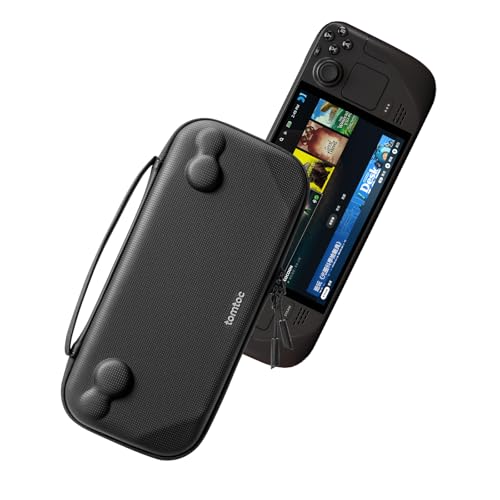 tomtoc Slim Carrying Case for Steam Deck/OLED160.57 cubic inches12.52 x 5.51 x 2.36 inches0.7 PoundsCheck on Amazon

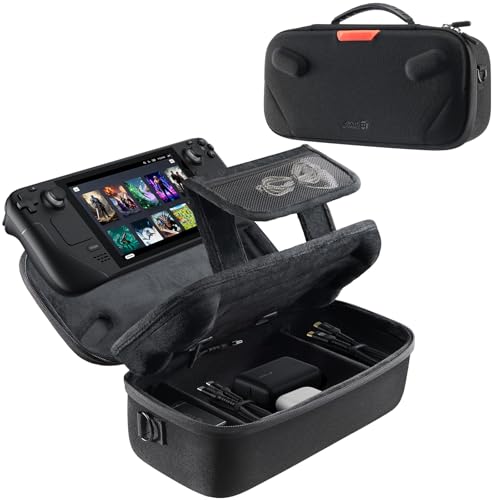


Top 3 picks at a glance

Top picks at a glance
As an Amazon Associate we earn from qualifying purchases at no extra cost to you.





| Model | Key spec | Price | Best for |
|---|---|---|---|
| JSAUX Case for Steam Deck/ROG Ally | Hard shell, dual-device fit | Check on Amazon | Owners wanting a case that also fits an ROG Ally |
| JSAUX Case for Steam Deck/OLED | Hard shell, OLED-specific fit | Check on Amazon | Best overall pick for most owners |
| MeloSync Carrying Case | Hard shell, protective | Check on Amazon | Lowest-cost hard shell option |
| Spigen Rugged Armor Pro | Hard shell, reinforced corners | Check on Amazon | Maximum impact protection |
| tomtoc Slim Carrying Case | Slim profile, soft protective | Check on Amazon | Minimal bulk for everyday carry |
| JSAUX Sling Bag | Crossbody, soft carry design | Check on Amazon | Hands-free daily commuting |
| UYIYE Carrying Case | Hard shell, cover-compatible fit | Check on Amazon | Fits with third-party cover attached |
| Skull & Co. EDC Case – Denim | Slim fabric case | Check on Amazon | Everyday-carry style and portability |
JSAUX Carrying Case for Steam Deck/ROG Ally
This hard shell design fits both the Steam Deck and the ROG Ally, a genuinely useful feature for buyers who own or plan to own both handhelds, or who simply want a case that would carry over to a future device switch. The hard shell construction protects against drops and crushing pressure in a backpack, a meaningful concern given the Deck’s exposed screen.
At around $25, this is one of the more affordable hard shell options on this list, and the dual-device compatibility adds practical flexibility without a price premium over similarly specced single-device cases elsewhere in this lineup.
- Pros
- Compatible with both Steam Deck and ROG Ally in one case design
- Hard shell construction protects against drops and crushing pressure
- Competitively priced relative to other hard shell options on this list
- Cons
- Shared dual-device design may not fit the Deck as precisely as a Deck-specific case
- Hard shell adds more bulk than the slim soft-case alternatives on this list
- Not explicitly listed as OLED-compatible, so verify fit for that model specifically
Who it’s for: buyers who own or plan to own both a Steam Deck and an ROG Ally.
JSAUX Carrying Case for Steam Deck/Steam Deck OLED
This is our top overall pick, specifically designed and listed for compatibility with both the original LCD Steam Deck and the newer OLED model, addressing the dimensional differences between the two that can cause fit issues with cases designed for only one generation. The hard shell construction delivers solid impact protection for backpack or bag carrying.
At around $32, it sits at a reasonable mid-range price point for the specific OLED compatibility confirmation, which matters given how easy it is to accidentally buy a case that doesn’t properly fit the newer model’s slightly different dimensions.
- Pros
- Explicitly compatible with both original LCD and newer OLED Steam Deck models
- Hard shell construction provides solid impact and crush protection
- Reasonable mid-range pricing for confirmed dual-generation compatibility
- Cons
- Hard shell adds more bulk than slim soft-case alternatives on this list
- Priced higher than the ROG Ally dual-compatible JSAUX case above
- Doesn’t include extra accessory storage compartments
Who it’s for: most Steam Deck owners, especially those with the OLED model wanting confirmed fit.
MeloSync Carrying Case Compatible with Steam Deck/Steam Deck OLED
This is the most affordable hard shell option on this entire list at around $21, offering protective hard shell construction and OLED compatibility at a price below the JSAUX options above. For budget-conscious buyers who still want genuine impact protection rather than a soft sleeve, this represents strong value.
As with any lesser-known brand, MeloSync carries less established market history than JSAUX or Spigen, though the core hard shell protective design follows the same general approach as the pricier alternatives on this list.
- Pros
- Most affordable hard shell option on this entire list
- Compatible with both original LCD and OLED Steam Deck models
- Genuine impact protection rather than a soft sleeve design
- Cons
- Less established brand recognition than JSAUX or Spigen
- Fewer accessory storage features than pricier alternatives
- Build quality consistency less documented than more established brands
Who it’s for: budget-conscious buyers wanting genuine hard shell protection at the lowest price on this list.
Spigen Rugged Armor Pro Hard Shell Case
Spigen has an established reputation in the broader phone and electronics case market, and this Rugged Armor Pro case brings that reinforced-corner protective design philosophy to Steam Deck and ROG Xbox Ally X compatibility. At around $37, it’s the priciest hard shell option on this list, reflecting the brand’s premium positioning and reinforced protective design.
For buyers who specifically want maximum impact protection and trust an established case manufacturer’s engineering over a less familiar brand, this represents the premium pick in the hard shell category on this page.
- Pros
- Established Spigen brand reputation in the broader case market
- Reinforced corner design for maximum impact protection
- Compatible with both Steam Deck and ROG Xbox Ally X
- Cons
- Priciest hard shell option on this entire list
- Reinforced design adds more bulk than slimmer alternatives
- Premium pricing may exceed what casual users need for basic protection
Who it’s for: buyers who prioritize an established brand’s engineering and want maximum impact protection.
tomtoc Slim Carrying Case for Steam Deck/OLED
This slim-profile case prioritizes minimal bulk over maximum impact protection, using a soft protective design compatible with both the original and OLED Steam Deck models. For users who mainly want scratch and light-impact protection while keeping the overall carrying profile as compact as possible, this represents a genuinely different approach from the hard shell options elsewhere on this list.
At around $30, it’s priced similarly to the hard shell options but trades impact resistance for portability, a reasonable tradeoff for users who carry the Deck in a bag alongside other items rather than tossing it loosely into a backpack where crushing risk is higher.
- Pros
- Slimmest profile among the protective cases on this list
- Compatible with both original LCD and OLED Steam Deck models
- Good option for carrying inside another bag alongside other items
- Cons
- Less impact protection than the hard shell options on this list
- Not ideal as the sole protection in a loosely packed backpack
- Similar price to hard shell alternatives despite less physical protection
Who it’s for: users prioritizing a slim profile who carry the Deck inside another bag for extra protection.
JSAUX Sling Bag for Steam Deck/ROG Xbox Ally X
This crossbody sling bag design trades a dedicated hard case for hands-free portability, useful specifically for commuting or travel scenarios where quick access and comfortable hands-free carrying matter more than maximum impact protection. It’s compatible with both the Steam Deck and ROG Xbox Ally X based on the listing.
At around $37, it’s priced at the top of this list alongside the Spigen case, reflecting the more complex bag construction versus a simple hard shell or slim sleeve. This is a genuinely different use case from the other options here — a carrying solution rather than a pure protective case.
- Pros
- Hands-free crossbody design for comfortable daily commuting
- Compatible with both Steam Deck and ROG Xbox Ally X
- Quick-access design better suited to frequent use during travel
- Cons
- Less rigid impact protection than a dedicated hard shell case
- Priciest option on this list alongside the Spigen hard shell case
- Bag-style design adds bulk beyond just the Deck’s own dimensions
Who it’s for: commuters or travelers wanting hands-free, quick-access carrying over maximum protection.
UYIYE Carrying Case for Steam Deck OLED & LCD, Fits with Cover
This case specifically accommodates the Deck with a third-party protective cover already attached, addressing a common fit problem where a case designed for the bare console doesn’t leave enough room once a separate cover or skin is applied. This is a useful niche feature for buyers who’ve already invested in a cover and don’t want to remove it every time the Deck goes into the case.
At around $29, it’s priced in the middle of this list, and the cover-compatible fit is the primary differentiator versus the otherwise similar hard shell designs from JSAUX and MeloSync.
- Pros
- Specifically designed to fit with a third-party cover already attached
- Compatible with both OLED and original LCD Steam Deck models
- Solves a common fit problem for buyers who already use a separate cover
- Cons
- Less established brand recognition than JSAUX or Spigen
- Cover-inclusive sizing means a bit more bulk than a bare-console-only case
- Less differentiated from competitors for buyers without an existing cover
Who it’s for: buyers who already use a separate protective cover on their Deck and want a case that fits over it.
Skull & Co. EDC Case: Slim Carrying Case for Steam Deck – Denim
This slim fabric case emphasizes everyday-carry style with a denim exterior design, differentiating itself aesthetically from the more utilitarian hard shell options elsewhere on this list. Like the tomtoc slim case, it prioritizes portability and a compact profile over maximum impact resistance.
At around $29, it’s priced comparably to the tomtoc slim option, and the choice between the two largely comes down to aesthetic preference and specific brand trust, since both represent a similar slim-case philosophy versus the hard shell alternatives on this page.
- Pros
- Distinctive denim aesthetic differentiates it from utilitarian hard shell cases
- Slim profile suits everyday carry and portability
- Reasonable pricing comparable to other slim-case alternatives on this list
- Cons
- Less impact protection than the hard shell options on this list
- Fabric exterior may show wear differently than hard shell alternatives over time
- Not ideal as sole protection in a loosely packed bag or backpack
Who it’s for: buyers who want a stylish, slim everyday-carry case over maximum impact protection.
How we compared and picked
Tomas Berger’s team evaluates carrying cases against the Steam Deck’s specific physical vulnerabilities — an exposed screen with no stock protection and thumbsticks that protrude enough to catch on other items in an unprotected bag. This guide organizes recommendations around two clear use-case categories: hard shell cases for maximum impact protection in backpacks or checked luggage, and slim or sling designs for buyers prioritizing portability and quick access over maximum crush resistance.
OLED compatibility is checked directly against each product’s specific listing, since the OLED model’s dimensions differ enough from the original LCD Deck that a case without confirmed dual-generation compatibility carries real fit risk. Brand reliability considerations weigh each manufacturer’s broader market reputation and documented product history, since case construction quality varies meaningfully between established brands like Spigen and JSAUX versus lesser-known alternatives.
What to look for in a Steam Deck carrying case
Match the case type to how you actually carry the Deck
A hard shell case makes the most sense for backpack carrying or checked luggage where crushing is a real risk, while a slim sleeve or sling bag suits users who carry the Deck inside another bag or want quick, frequent access. Choosing based on your actual carrying habits matters more than defaulting to whichever case looks most protective.
Confirm OLED compatibility explicitly, don’t assume it
The OLED Steam Deck’s dimensions differ enough from the original LCD model that a case without explicitly stated OLED compatibility carries genuine fit risk. Always check the specific listing rather than assuming any Steam Deck case fits both generations.
Consider whether you use a separate protective cover
If you already apply a skin, grip, or cover directly to your Deck, check whether a case is designed to accommodate that added bulk, since standard cases sized for a bare console can be a tight or impossible fit once a cover is applied.
Dual-device compatibility adds real flexibility
Several cases on this list are designed to fit both the Steam Deck and similarly sized handhelds like the ROG Ally, which is worth prioritizing if you own multiple handhelds or expect to switch devices in the future without needing a new case.
Accessory storage affects overall bulk and convenience
A case with a dedicated compartment for a charger, cables, or a spare microSD card avoids needing a separate accessory bag, but this convenience comes with added bulk compared to a slim, Deck-only case. Weigh this tradeoff based on how much you travel with additional accessories.
Established brands generally offer more consistent build quality
Case brands with a longer track record in the broader electronics accessory market, like Spigen and JSAUX, tend to show more consistent construction quality across units than newer or lesser-known brands, a consideration worth weighing against the price savings of a budget alternative.
Mistakes buyers make
Buying a case without checking OLED compatibility explicitly is one of the most common Steam Deck accessory mistakes, since the newer model’s dimensions differ enough from the original to cause real fit problems with a case not specifically listed as compatible with both.
Choosing a slim sleeve case as the sole protection for backpack or checked-luggage carrying underestimates the crushing risk in those specific scenarios, where a hard shell case provides meaningfully better protection.
Assuming a case will fit over an already-applied protective cover or skin without checking for cover-compatible sizing specifically can lead to a case that simply won’t close properly once the Deck is inside it.
Overpaying for a premium hard shell case when your actual use case is mostly slim, everyday carrying inside another bag means paying for impact protection that a slimmer, cheaper case would have served just as well for your specific habits.
Skipping accessory storage consideration, then needing a separate bag for chargers and cables anyway, undermines the convenience benefit that a well-chosen case with storage compartments was meant to provide.
Finally, choosing an unfamiliar budget brand purely on price without considering the more established alternatives’ documented construction consistency risks receiving a case with looser tolerances or weaker material quality than expected.
Verdict
For most Steam Deck owners, the JSAUX Carrying Case for Steam Deck/Steam Deck OLED remains the best overall pick, balancing protection, price, and confirmed compatibility across both hardware generations. Budget-focused buyers should consider the MeloSync Carrying Case for genuine hard shell protection at the lowest price on this list. Buyers wanting hands-free daily carrying should look at the JSAUX Sling Bag, while those prioritizing minimal bulk should choose between the tomtoc Slim Carrying Case and the Skull & Co. EDC Case based on aesthetic preference.
Frequently asked questions
Do I really need a case for my Steam Deck, or is the included one enough?
The Deck doesn’t ship with a case at all, so any protection is an aftermarket purchase, and given the exposed screen and protruding thumbsticks, tossing it into a bag unprotected risks scratches or stick damage that a properly fitted case specifically prevents.
Hard shell or soft sling case — which is better for Steam Deck?
It depends on how you carry it, since a hard shell case offers more impact protection for a backpack or checked bag where crushing is a real risk, while a soft sling case prioritizes quick access and comfort for regular day-to-day carrying rather than maximum impact protection.
Will a Steam Deck case fit the OLED model if it’s designed for the original LCD version?
Not necessarily, since the OLED model has slightly different dimensions than the original LCD Deck, so always check that a specific case explicitly lists OLED compatibility rather than assuming a case designed for the original model will fit properly.
Do these cases also fit other handhelds like the ROG Ally?
Some do, since several case manufacturers design a shared form factor that accommodates both the Steam Deck and similarly sized handhelds like the ROG Ally, though always check the specific listing for confirmed compatibility with your exact device.
Is extra storage for cables and accessories worth paying more for in a case?
Yes for most travelers, since a case with a dedicated compartment for a charger, cables, or a spare microSD card avoids needing a separate bag for accessories, though it does add bulk compared to a slim, Deck-only case.
Pair your new case with our picks for the best microSD cards for Steam Deck and best Steam Deck accessories more broadly. For battery expectations while traveling, our handheld gaming PC battery life guide covers what actually affects runtime away from an outlet.
Related guides
- Best Free MMOs on Steam: Subscription Limits, Pay-to-Win and Time Cost (2026)
- Best Free Horror Games on Steam: How to Pick One That Fits Your PC and Your Nerves (2026)
- Black Frame Insertion vs VRR: Which Smoothness Feature Should You Use?
- Best Webcams for Streaming: 11 Listings Compared by Resolution, Focus and Light (2026)








