
Our Top Picks

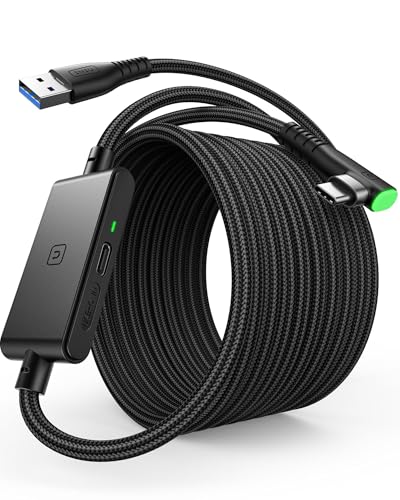


Top 3 picks at a glance
The Short Answer
For the vast majority of Meta Quest users, a 16-foot (5-meter) active USB cable is the absolute sweet spot. This length provides the ideal balance between physical freedom of movement and signal integrity. If you are primarily playing seated simulation games at your desk, a shorter 10-foot (3-meter) cable will suffice and keep your workspace looking tidy. However, for room-scale physical play where you are ducking, dodging, and stepping side-to-side, anything shorter than 16 feet will severely restrict your movement, yank on your headset strap, or pull your expensive gaming PC off your desk.
High-quality third-party cables in the 16-foot range typically cost between $15 and $30, making them a highly accessible upgrade for your home setup. When planning your layout, you must account for the physical distance from your computer port to the center of your play area, plus an additional 3 to 4 feet of vertical “slack” to allow the cable to drape naturally from your head to the floor without tension.
As an Amazon Associate we earn from qualifying purchases at no extra cost to you.


Standard Sizes
When shopping for a Meta Quest Link cable, you will generally encounter three standardized lengths. Choosing the right size ensures you have enough physical slack to move comfortably without creating a massive, tangled pile of heavy wire on your floor. Below is a breakdown of standard cable sizes, their exact physical measurements, and their recommended home applications.
| Nominal Length (Feet) | Length in Inches | Length in Centimeters | Ideal Room Setup & Use Case | Aesthetic & Cable Management Impact |
|---|---|---|---|---|
| 10 Feet | 120 in | 304.8 cm | Seated desk play, flight/racing simulators, stationary standing next to PC. | Minimalist; easy to coil and store in a desk drawer or small decorative basket. |
| 13 Feet | 156 in | 396.2 cm | Small bedrooms, compact offices with limited floor space. | Moderate clutter; requires a simple velcro strap to keep tidy on the floor. |
| 16 Feet | 192 in | 487.7 cm | Standard living rooms, dedicated gaming zones, active room-scale play. | High utility but high visual impact; benefits from ceiling pulleys or floor runners. |
| 20 Feet | 240 in | 609.6 cm | Large open rooms, basement play zones, ceiling-mounted pulley systems. | Significant visual clutter; requires dedicated storage hooks and active signal boosting. |
How to Measure Your Space
Before purchasing a cable, you should measure your physical room layout to ensure you buy a cord that fits your space and your movement style. Follow these steps to map out your room:
- Locate Your Anchor Point: Identify the exact USB-C or USB-A port on your PC or wall charger. This is your starting point. Note its height from the floor (e.g., a desktop tower sitting on a 30-inch-tall desk).
- Mark the Center of Your Play Boundary: Walk to the middle of your designated VR play zone (your “Guardian” boundary). This should be a clear space of at least 6.5 feet by 6.5 feet (2 meters by 2 meters) free of coffee tables, area rugs with curling edges, or low-hanging light fixtures.
- Measure the Diagonal Floor Distance: Use a physical tape measure to find the distance along the floor from your PC tower to the center of your play boundary.
- Calculate the Vertical Headroom (The Slack Factor): Since the cable plugs into the side of your headset, it must travel from your head (typically 5 to 6 feet high) down to the floor, and back up to your PC port. Add 4 feet to your floor measurement to account for this vertical drape. For example, if your floor distance is 10 feet, you need at least a 14-foot cable to stand comfortably in the center of your zone without the cord pulling taut.
- Verify Furniture Clearance: Path the cable’s trajectory. Ensure it does not drape over sharp furniture corners, heavy cabinet handles, or pet walkways where it can easily be caught or damaged.
By Room or Use Case
Your physical environment dictates the type of cable setup that will work best. As we look ahead to the home tech and interior design trends of 2026, keeping play spaces visually clean while maintaining high performance is a top priority for gamers and design-conscious homeowners alike.
The Compact Home Office (Seated & Standing Play)
If your VR setup is integrated into a small home office where you primarily sit in an ergonomic office chair, a 10-foot (3-meter) cable is your best option. A shorter cable keeps your desk free of heavy black cords, preserving a clean, professional aesthetic. Because you are seated, you do not need to worry about room-scale stepping. The cable simply drapes over your shoulder and plugs directly into your desktop or laptop. A 10-foot cable is highly manageable, lightweight (typically weighing around 6 to 8 ounces), and can be neatly coiled and tucked into a desk organizer when your workday begins.
The Dedicated Living Room Play Space (Room-Scale VR)
For active games that require stepping, ducking, and reaching, you need a 16-foot (5-meter) cable. In a shared living room, your PC or console is likely situated on a media console or a desk in the corner, while your clear play space is centered on a stylish area rug in the middle of the room. A 16-foot option, such as the Syntech 16FT Link Cable (priced around $16) or the AMVR 16FT Nylon Braided Cable (priced around $25), provides enough length to stretch across the room while leaving enough slack so you can move dynamically. From a design perspective, a premium nylon-braided cable in grey or black blends more naturally with home textiles than a harsh plastic PVC cable.
The Bedroom or Studio Apartment (Multi-purpose Space)
In smaller, multi-purpose rooms where a bed or sofa occupies most of the footprint, a 13-foot or 16-foot cable is ideal. In these spaces, managing cable clutter is crucial. When playing, the cable must navigate around bed frames, nightstands, and storage benches. To keep your bedroom looking organized, look for cables that come with integrated silicone straps, or invest in a small decorative storage basket placed near your PC tower where the cable can be coiled and hidden away when not in use.
Ceiling-Mounted Cable Management Systems
For dedicated VR enthusiasts who want to completely eliminate the tripping hazard of a floor cable, a ceiling-mounted pulley system is the ultimate luxury home upgrade. This setup suspends the cable overhead using retractable adhesive pulleys. Because the cable must travel up the wall, across the ceiling, and hang down to your head height, you will need a 16-foot or even a 20-foot cable to cover the vertical and horizontal distance. This keeps the floor completely clear of cords, protecting both your safety and your home’s design aesthetic.
Common Sizing Mistakes
- Ignoring the “Tug Factor”: Many buyers measure the exact distance from their PC to their play space in a straight line and buy a cable of that exact length. This results in a cable that is constantly taut, which damages the USB-C port on your Meta Quest and can pull your PC tower off your desk. Always add 3 to 4 feet of buffer length.
- Choosing a Heavy, Thick Cable: Extremely thick, heavily shielded cables are durable, but they add significant weight (sometimes over a pound) to the side of your head. This ruins the balance of your headset and causes neck fatigue. Opt for lightweight, flexible cables specifically designed for VR.
- Neglecting Power Delivery Over Distance: Standard passive USB cables lose signal strength and power delivery capabilities over long distances. If you buy a standard 16-foot cable, your headset battery may still drain during play. To counter this, look for active cables or smart designs with separate charging ports, such as the INIU 16ft VR Link Cable (priced around $21), which injects dedicated power (typically up to 18W) to keep your headset charged indefinitely while you play.
- Tripping Hazards and Floor Friction: A cable draped across a hardwood floor can slide around easily, whereas a cable on a high-pile shag rug can get snagged. Always route your cable away from high-traffic walkways to prevent family members or pets from tripping over your high-speed connection.
FAQ
Is a 10ft cable long enough for Meta Quest room-scale gaming?
Generally, no. A 10-foot (3-meter) cable is too short for safe room-scale gaming. Once you factor in the vertical drop from your head to the floor and the height of your PC port, a 10-foot cable only leaves you with about 4 to 5 feet of horizontal movement. This severely limits your physical play area and increases the risk of yanking on the cable or damaging your ports during sudden movements.
What is the maximum USB cable length for Meta Quest without losing signal?
The maximum reliable length for a standard, high-speed USB 3.0 data connection without signal degradation is 16 feet (5 meters). Beyond 16 feet, the high bandwidth required for VR (typically 1.5 to 2.5 Gbps) can suffer from packet loss, resulting in screen stuttering or disconnects. If you need a cable longer than 16 feet, you must purchase an “active” USB cable that features a built-in signal booster chip to maintain data integrity.
Do I need a cable with a separate charging port for long play sessions?
If you plan to play VR for more than 2 to 3 hours at a time, yes. Most standard motherboard USB ports only output 0.9A of power, which is not enough to keep the Meta Quest battery charged while gaming. Specialty cables like the INIU 16ft Link Cable or the AMVR Charging Link Cable feature a secondary port that allows you to plug in your original Quest wall charger, delivering up to 18W of power to keep your headset battery fully charged while you play.
How do I stop my long Meta Quest cable from tangling or dragging on the floor?
To prevent your long cable from tangling, use the “over-under” coiling method when storing it to avoid twisting the internal copper wires. During play, you can use a physical cable clip to secure the cord to the back of your headset strap, directing the weight down your spine rather than the side of your face. For a cleaner home aesthetic, consider using a retractable ceiling pulley system or laying down a slim, rubber cord protector strip across floor walkways.
Related guides
- Best Free MMOs on Steam: Subscription Limits, Pay-to-Win and Time Cost (2026)
- Best Free Horror Games on Steam: How to Pick One That Fits Your PC and Your Nerves (2026)
- Black Frame Insertion vs VRR: Which Smoothness Feature Should You Use?
- Best Webcams for Streaming: 11 Listings Compared by Resolution, Focus and Light (2026)








