
Setting up a dedicated home virtual reality space is one of the most exciting home technology upgrades you can make. You have cleared the floor space, optimized your PC hardware, and adjusted your headset. However, many users stumble at the final hurdle by treating their connection cable as an afterthought. They grab a spare smartphone charging wire or the cheapest cord online, only to experience constant disconnections, lag, and a dead headset battery in under an hour.
When researching what to look for in a quest link cable, it is easy to get lost in a sea of confusing technical jargon like “USB 3.2 Gen 1,” “active signal boosting,” and “packet loss.” A high-quality link cable must balance high-speed data transmission, consistent power delivery, physical flexibility, and lightweight construction. Understanding these factors ensures your virtual reality sessions remain immersive, comfortable, and uninterrupted.
As an Amazon Associate we earn from qualifying purchases at no extra cost to you.



Our Top Picks


Top 3 picks at a glance
Decide These 3 Things First
Before diving into individual product listings, you need to map out your specific physical environment and hardware setup. Addressing these three foundational decisions first will immediately narrow down your options:
- Your PC Port Selection: Look at the back of your computer. Do you have an available high-speed USB-C port directly on your motherboard or GPU, or are you limited to traditional USB-A ports? This determines whether you need a native USB-C to USB-C cable or a cable that includes a robust USB-A to USB-C adapter (such as the Syntech 16FT VR Link Cable with USB 3.0 to C Adapter, typically priced around $21).
- Your Movement Style and Play Space: If you primarily play seated simulator games (like flight or racing sims), a shorter, heavier cable is acceptable. However, if you utilize a full room-scale setup (typically requiring at least a 6.5 x 6.5-foot clear area), a highly flexible, 16-foot (5-meter) cable is mandatory to prevent you from ripping the cord out of your computer during sudden turns.
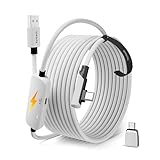
- Your Headset’s Power Consumption: Newer headsets like the Meta Quest 3 and Quest 3S consume significantly more power (drawing up to 18W to 27W under heavy loads) than older models. Standard motherboard USB ports often output only 4.5W (5V, 0.9A). You must decide if you want a basic data cable that lets the headset slowly discharge during play, or an active charging link cable (like the AMVR 16FT VR Charging Link Cable, retailing around $25) that features a separate power injection port to keep your headset at 100% battery indefinitely.
Cable Length and Weight (Size)
Physical dimensions are the most immediate factors affecting your comfort. When it comes to VR link cables, 16 feet (5 meters) is the industry-standard sweet spot. Anything shorter, such as a 10-foot (3-meter) cable, will severely restrict your physical movement, constantly tugging at your head and pulling you toward your PC tower.
However, as copper cables get longer, they also get heavier and suffer from signal degradation. A standard copper 16-foot link cable typically weighs between 220 and 280 grams. While this sounds negligible, that weight hangs directly from the left side of your head, which can cause neck fatigue during play sessions exceeding an hour. Look for cables with an outer diameter of 4.5mm to 5.5mm; anything thicker than 6mm will feel like a heavy hose dragging behind you, while anything thinner than 4mm may lack the internal shielding necessary to prevent electromagnetic interference from your PC fans and monitors.
Material and Flexibility
The outer jacket of the cable dictates how it behaves when you move. The two primary materials used are thermoplastic elastomer (TPE/PVC) and braided nylon.
Standard TPE/PVC jackets are smooth, rubbery, and highly cost-effective (found on cables like the entry-level Syntech Link Cable 16FT at around $16). They glide easily across carpet and hardwood floors without snagging. However, they are prone to retaining “coil memory.” If you store the cable wrapped tightly, it will resist straightening out, creating annoying loops that you can easily trip over during gameplay.
Premium braided nylon jackets (featured on options like the AMVR 16FT VR Charging Link Cable at around $25) offer far superior durability and flexibility. Nylon braiding resists kinking, twists easily without binding, and handles the friction of rubbing against furniture legs much better over time. The trade-off is that braided cables can sometimes catch on rough clothing fabrics or carpet fibers, though their kink-free nature generally makes them the preferred choice for active room-scale gamers.
Connector Construction and Angle
The point where the cable plugs into your headset is the most common point of failure. When looking at connector construction, there are two non-negotiable features you must look for:
First, the headset-side connector must feature a 90-degree (L-shaped) design. A straight USB-C connector sticks directly out from the side of your face, acting as a lever. If you accidentally swipe your hand near your face or drop the cable, a straight connector will bend, ruining either the cable or, worse, the internal USB-C port of your $500 headset. An L-shaped connector keeps the cable flush against the headset strap, routing the weight straight back along your temple.
Second, evaluate the connector housing and strain relief. High-quality cables use aluminum alloy housings rather than cheap, molded plastic. The rubber strain relief boot—the flexible collar where the wire meets the metal plug—should be at least 10mm to 15mm long to distribute bending forces evenly. A short, rigid collar will cause the internal copper wires to fray and snap after just a few months of active bending.
Power Delivery and Active Charging
Data transfer is only half the battle; power delivery is where most buyers get caught off guard. Standard USB 3.0 ports on most desktop computers output a maximum of 900mA at 5V (4.5 watts). The Meta Quest 2 consumes roughly 6W to 8W during PCVR play, while the Quest 3 can pull up to 15W or more depending on brightness, volume, and tracking settings. This means if you use a standard link cable, your headset battery will drain even while plugged into your PC, giving you a hard play-time limit of about 2 to 3 hours.
To solve this, look for dedicated “charging link cables” or “power injector cables.” These cables feature an integrated smart chip and a splitter near the PC end of the cable. You plug the main data line into your PC, and a separate USB-C power port on the cable connects directly to your headset’s original wall charger (typically 18W to 45W). This design injects dedicated power directly into the line, maintaining your headset’s battery charge at 100% for infinite playtime. Examples like the AMVR 16FT VR Charging Link Cable (around $21 to around $25) are engineered specifically for this purpose and are highly recommended for marathon gaming sessions.
Price Tiers and Value
Fortunately, you do not need to spend a fortune to get a high-quality connection. The market has matured significantly, dividing options into three clear price tiers:
- Budget ($15 to $20): In this tier, you will find standard 16-foot PVC or basic nylon-braided cables, such as the Syntech 16FT Link Cable (around $16). These are passive copper cables that support full 5 Gbps data transfer speeds but do not feature active power injection. They are excellent for casual players or those who play in shorter sessions.
- Mid-Range ($20 to $30): This is the sweet spot for most home users. For a few dollars more, you get active power injection capabilities, premium nylon braiding, and included USB-A to USB-C adapters. Products like the AMVR Charging Link Cable (around $21 to around $25) fall into this category, offering the best balance of long-term durability and infinite playtime.
- Premium ($79+): This tier is dominated by official fiber-optic cables. Fiber-optic lines are incredibly thin, highly flexible, and weigh up to 50% less than copper cables because they transmit data via light pulses rather than electrical current. However, they are highly fragile, cannot easily be repaired if stepped on, and do not support high-wattage power delivery to keep the headset charged indefinitely. For most home setups, a mid-range copper or hybrid cable offers much better practical value.
Cable Management and Longevity
Even the most durable cable will fail prematurely if it is constantly stepped on, run over by office chair wheels, or twisted into tight knots. When shopping, check if the manufacturer includes high-quality hook-and-loop (Velcro) straps. A strap should be used to anchor the cable securely to the side or back of your headset’s headstrap. This ensures that any sudden tugs pull against the rigid headstrap plastic rather than the delicate USB-C port itself.
Additionally, look for manufacturers that offer at least a 12-month warranty. Companies that stand behind their strain relief engineering and internal copper shielding will readily replace cables that fail due to regular bending fatigue. If you plan to mount your cable to your ceiling using a pulley system, ensure the cable jacket is rated for high torsional flexibility so it does not twist itself into knots while suspended overhead.
Spec Checklist
Use this quick-reference matrix to compare specifications across the different market tiers before making your final purchase. As we look ahead to the PCVR landscape of 2026, keeping these baseline technical requirements in mind will prevent you from buying outdated accessories.
| Specification | Budget Tier ($15 – $20) | Mid-Range Tier ($20 – $30) | Premium Tier ($79+) |
|---|---|---|---|
| Length | 10 to 16 feet (3 to 5 meters) | 16 feet (5 meters) | 16 feet (5 meters) |
| Data Transfer Rate | Up to 5 Gbps (USB 3.0/3.1 Gen 1) | Up to 5 Gbps (USB 3.0/3.1 Gen 1) | Up to 10 Gbps (Fiber Optic) |
| Power Delivery | Passive (4.5W – 10W max) | Active Power Injection (18W – 27W) | Passive (usually limited to 15W max) |
| Outer Material | Smooth PVC / TPE Jacket | Double-Braided Nylon | Ultra-thin TPU / Fiber-Optic Sheath |
| Headset Connector | 90-Degree USB-C (Plastic Mold) | 90-Degree USB-C (Aluminum Alloy) | 90-Degree USB-C (Premium Low-Profile) |
| Weight | 260g – 300g | 240g – 280g | Under 150g |
Red Flags
Avoid frustration and wasted money by steering clear of products that exhibit these common warning signs:
- “USB 2.0” Speeds (480 Mbps): Many cheap 16-foot cables are advertised as “VR Compatible” but only support USB 2.0 speeds. This will result in heavily compressed, pixelated visuals, severe input lag, or a flat-out refusal of the Oculus/Meta PC app to launch the Link environment. Always confirm the cable is rated for USB 3.0, USB 3.1, or USB 3.2 Gen 1 (supporting at least 5 Gbps bandwidth).
- Straight USB-C Headset Connectors: If a cable does not have a distinct 90-degree bend on the end meant for the headset, do not buy it. A straight connector will inevitably ruin your headset’s port or snap during active play.
- No Mention of Shielding: Standard copper wires without proper internal aluminum-foil shielding are highly susceptible to electromagnetic interference. This manifests as random audio crackling, brief screen blackouts, or sudden disconnections whenever your PC’s graphics card draws heavy power.
- Unusually Low Prices for Long Distances: If you see a 20-foot copper cable selling for $10 without an active signal repeater chip, avoid it. Copper cables longer than 16 feet naturally lose signal strength; without an active repeater chipset integrated into the line, you will experience constant packet loss and disconnections.
FAQ
Why is my Quest link cable lagging or showing a black screen?
This is usually caused by plugging the cable into a slow USB 2.0 port (typically colored black on your PC motherboard) instead of a high-speed USB 3.0/3.2 port (typically colored blue, red, or teal). It can also happen if your PC graphics card drivers are outdated, or if the cable is too long (over 16 feet) without an active signal booster to maintain data integrity over the distance.
Can I use a standard phone charger cable for Quest Link?
Generally, no. Most standard phone charging cables included in smartphone boxes are wired for USB 2.0 data speeds (480 Mbps) because they are designed primarily for power delivery, not high-bandwidth data streaming. While they may technically connect, your VR experience will be plagued by extreme video compression, massive latency, and frequent crashes.
Do I need a USB-C or USB-A port on my computer for a Link Cable?
Either port will work perfectly fine, provided the port itself supports USB 3.0 speeds or higher. If your PC only has USB-A ports, look for a cable that includes a high-quality, speed-rated USB-C to USB-A adapter. Ensure you plug it directly into your computer’s motherboard (on the back of the PC tower) rather than front-panel case ports, which often suffer from internal signal loss.
How do I keep my Meta Quest headset fully charged while playing PCVR?
To keep your headset completely charged during gameplay, you must use a dedicated power-injecting link cable (such as those from AMVR). These cables feature an extra input port that allows you to plug your original headset wall charger directly into the link cable line, bypassing your computer motherboard’s low power limits and supplying a full 18W to 27W directly to the headset.
Related guides
- Best Free MMOs on Steam: Subscription Limits, Pay-to-Win and Time Cost (2026)
- Best Free Horror Games on Steam: How to Pick One That Fits Your PC and Your Nerves (2026)
- Black Frame Insertion vs VRR: Which Smoothness Feature Should You Use?
- Best Webcams for Streaming: 11 Listings Compared by Resolution, Focus and Light (2026)








