
Integrating spatial computing into a modern home is no longer about setting up a dedicated computer cave in the basement. Today’s virtual reality headsets live on coffee tables, rest on charging docks in living room entertainment centers, and float between open-concept family rooms and compact home offices. When choosing between Meta’s hardware options, the real decision comes down to how a device blends into your daily environment, your decor, your living footprint, and your household budget.
The standard Quest 3 brings a slim optical engine and refined aesthetics designed to minimize bulk on your shelf and reduce facial pressure during long sessions. Meanwhile, the entry-level Quest 3S distills core spatial capabilities into a rugged, budget-conscious package that fits effortlessly into active, shared households. Deciding between the flagship model and the streamlined contender requires evaluating visual fidelity alongside physical footprint, storage needs, and long-term household durability.
As an Amazon Associate we earn from qualifying purchases at no extra cost to you.


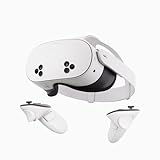
Our Top Picks


Top 3 picks at a glance
Quick Verdict
For dedicated home theaters, open-plan living rooms, and buyers who prioritize sleek hardware aesthetics, the flagship Quest 3 is the clear winner. Its pancake optics reduce the front visor profile by roughly 40 percent compared to older optical stacks, making it visually light on open shelving and exceptionally balanced on your face. The wide field of view and high-density 2064 x 2208 per-eye resolution turn movie streaming and productivity into true home-display replacements.
However, for multi-user households, playrooms, and budget-minded buyers, the Quest 3S offers unmatched value per square foot. Delivering the same processing hardware as its premium sibling, it runs identical software while leaving room in your decorating or home upgrade budget. If you want high-performance mixed reality without worrying about kids dropping expensive glass optics on hardwood floors, the 3S provides maximum utility for minimal investment.
Side by Side
Understanding how these two headsets compare physically and operationally helps clarify where each belongs in your home environment:
| Feature | Meta Quest 3 | Meta Quest 3S |
|---|---|---|
| Look & Profile | Slim 40% thinner visor; flush camera pill layout; premium matte finish | Thicker front housing; distinctive triangular camera clusters on front face |
| Display & Optics | Pancake lenses; 2064 x 2208 pixels per eye; ~110° horizontal field of view | Fresnel lenses; 1832 x 1920 pixels per eye; ~96° horizontal field of view |
| IPD Adjustment | Continuous mechanical dial (58mm – 70mm) for precise visual alignment | 3-position lens slider (58mm, 63mm, 68mm) preset notches |
| Weight & Balance | 515 grams; center of gravity kept close to face due to thin optics | 514 grams; slightly front-heavy profile due to deeper lens housing |
| Depth Sensor | Hardware time-of-flight depth sensor for automatic room mapping | Infrared sensor suite using algorithmic spatial mapping |
| Durability & Maintenance | Glass optics require microfiber care; wipeable facial interface compatible | Robust composite casing; forgiving lens surfaces; easy wipe-down plastic |
| Price Range | around $500 (128GB standard) to around $600 for higher capacity bundles | around $300 (128GB base) to around $350 for bundle options |
| Space Needed | 6.5 x 6.5 ft for roomscale boundary; stationary mode fits armchairs | 6.5 x 6.5 ft for roomscale boundary; physical action button speeds setup |
| Resale & Value | Holds premium resale value due to flagship pancake optics and 512GB option | Lower entry point with minimal depreciation loss over time |
| Best For | Design-conscious interiors, media enthusiasts, extended workspace use | Family rooms, kids’ play areas, casual gaming, budget-first buyers |
Where Quest 3 Wins
The primary advantage of the Quest 3 lies in its sophisticated optical stack. Utilizing pancake lenses, the depth of the front enclosure is dramatically reduced. From an interior design perspective, it sits neatly on a minimal wireless charging dock beside your living room television without looking like a bulky piece of industrial equipment. On your face, that reduced leverage minimizes neck strain during multi-hour spatial computing or virtual movie screenings.
Visual clarity is substantially higher on the premium tier. With 2064 x 2208 pixels per eye and an expansive 110-degree field of view, fine text in virtual desktop monitors remains sharp across the entire screen—not just in the center sweet spot. The inclusion of a dedicated hardware depth sensor allows the headset to instantly scan your furniture, floor space, and walls without manual drawing. If you frequently shift from standing in an open living room to sitting at a home office desk, this seamless environmental mapping saves time and preserves your decor boundaries.
Storage capacity options also lean heavily toward the main flagship line. Outfitting your home media library with high-resolution video files or expansive spatial software is effortless on high-capacity models such as the Meta Quest 3 512GB | Virtual Reality — VR Headset — Gorilla Tag Bundle at $599, ensuring you won’t need to constantly delete content to free up space.
Where Quest 3s Wins
The Quest 3S shines through sheer accessibility and durability. By adopting the time-tested Fresnel lens system from previous hardware generations, Meta cut production costs significantly while preserving the high-performance Qualcomm Snapdragon XR2 Gen 2 processor. This means all current mixed-reality applications, spatial games, and home workout apps run at identical frame rates and performance levels as the flagship device.
For active family spaces, the slightly deeper housing of the 3S is built tough. The front plastic casing withstands accidental bumps against nearby coffee tables or low ceilings better than exposed multi-camera glass arrays. The addition of a dedicated physical Action Button on the bottom of the visor allows users to instantly toggle between full immersion and color passthrough—a major practical upgrade when checking on pets, answering the doorbell, or grabbing a drink off the kitchen counter.
Entry pricing makes the 3S virtually unbeatable for practical home adoption. Options like the Meta Quest 3S 128GB | Virtual Reality — VR Headset — Gorilla Tag Bundle at around $350 give families complete access to next-generation mixed reality at nearly half the flagship cost. Value shoppers can stretch their household budget even further by opting for certified pre-owned units, such as the Meta Quest 3S 128GB | Virtual Reality — VR Headset (Renewed Premium) priced around $320, leaving extra funds for upgraded ergonomic headstraps or custom storage cases.
Cost Over 5 Years
Evaluating spatial hardware as an ongoing household utility requires projecting realistic 5-year ownership costs, including accessories, maintenance, electricity, and lifespan retention. As spatial computing becomes standard in home entertainment heading into 2026, both units remain highly capable platform investments.
For the standard Quest 3 (512GB tier):
- Initial Hardware Purchase: ~$600
- Comfort & Hygiene Upgrades (Ergonomic Strap & Silicone Interface): ~$90
- Display Charging Dock: ~$80
- Electricity (18W Fast Charger, 2 hrs daily usage): ~$15 over 5 years
- Estimated 5-Year Total Cost: ~$780 (or ~$160 per year)
For the Quest 3S (128GB tier):
- Initial Hardware Purchase: ~$350
- Comfort Upgrades (Padded Headstrap & Wipeable Covers): ~$60
- Storage Case / Stand: ~$35
- Electricity (18W Fast Charger, 2 hrs daily usage): ~$15 over 5 years
- Estimated 5-Year Total Cost: ~$460 (or ~$92 per year)
Choosing the Quest 3S yields roughly $324 in long-term savings across a five-year lifecycle, making it an exceptional secondary headset for multi-person households or budget-conscious smart homes.
Which One for Your Home
Small Apartment
In tight living arrangements or studio apartments where multi-functional furniture is a necessity, space efficiency rules supreme. The standard Quest 3 is ideal here because of its automatic depth-sensor mapping. It quickly identifies changing environments—like a fold-out desk or a shifted coffee table—without requiring you to clear out room boundaries every time. Furthermore, its ultra-sharp display lets you replace physically bulky multi-monitor desktop setups with virtual screens hanging over your dining table or kitchen island.
Family with Kids and Pets
High-traffic family rooms require resilient hardware. The Quest 3S is built for the chaos of shared living spaces. If a child drops the headset onto a hardwood floor or a dog bumps into a player during a active workout, the sturdy Fresnel housing and recessed lens design offer better peace of mind. Its lower replacement cost ensures that household accidents don’t turn into financial headaches, and the quick-toggle physical Action Button makes it easy for kids to quickly stay aware of their real-world surroundings.
Rental Property or Shared Living
When living with roommates or leasing a temporary space where you cannot mount hardware or modify lighting, flexibility is crucial. Both units feature full inside-out tracking requiring no external wall sensors, but the Quest 3S stands out as an easy-to-share amenity. It can be easily passed between housemates for evening gaming or casual movie nights without worrying about precise IPD mechanical wheel calibrations; users simply click the lens position to one of three standard notches and start playing.
Long-Term Home with Dedicated Media Room
If you own your home and have a dedicated home theater, office, or designated 6.5 x 6.5 ft open play grid, invest in the premium Quest 3. Its edge-to-edge optical clarity complements high-end audio setups and custom charging stations. When mounted on a custom credenza or floating wall shelf, its streamlined front profile looks like a contemporary piece of smart home technology rather than a toy, blending effortlessly into high-end residential interiors.
FAQ
How much open floor space do I need in my living room for spatial computing?
For full roomscale virtual reality movement, Meta recommends a clear floor area of at least 6.5 feet by 6.5 feet (2 meters by 2 meters) clear of furniture, rug edges, and low tables. However, both headsets offer Stationary Mode, which allows you to enjoy seated or standing experiences—such as watching movies or working at a desk—within an area as small as a standard armchair footprint.
Can I charge these headsets on a living room side table without cable clutter?
Yes. Both headsets support compact USB-C power delivery, utilizing standard 18W power adapters. To eliminate trailing cords on your side tables or credenzas, you can use sleek wireless drop-in charging docks or hide compact magnetic USB-C cables inside decorative storage boxes on your media console.
How do I safely clean and store the optical lenses in a dusty home environment?
Never use liquid glass cleaners, chemical wipes, or alcohol solutions on optical lenses. Dust glass surfaces with a clean dry microfiber cloth using gentle circular motions. To protect the optics from room dust and destructive direct sunlight (which can magnify onto internal display panels and permanently damage pixels), store the headset in a closed storage case or place a protective fabric lens cover over the lenses when placed on an open shelf.
Are both headsets compatible with third-party home aesthetic accessories?
Yes. While optical designs differ, both headsets share identical controller designs (Touch Plus controllers without tracking rings) and standardized strap attachment interfaces. You can easily outfit either model with third-party white, gray, or neutral-toned halo straps, silicone face pads, and fabric covers designed to coordinate with your home decor palette.
Related guides
- Best Free MMOs on Steam: Subscription Limits, Pay-to-Win and Time Cost (2026)
- Best Free Horror Games on Steam: How to Pick One That Fits Your PC and Your Nerves (2026)
- Black Frame Insertion vs VRR: Which Smoothness Feature Should You Use?
- Best Webcams for Streaming: 11 Listings Compared by Resolution, Focus and Light (2026)








