
Our Top Picks


The Short Answer
Whether the official Meta Quest Link Cable is worth its premium price tag depends on one primary condition: the quality and physical layout of your home Wi-Fi network. If you do not have a dedicated Wi-Fi 6 or 6E router wired directly via Ethernet to your PC in the same room as your play space, a physical Link cable is absolutely worth it to prevent stuttering and latency. However, you do not need to spend the premium $79 for the official fiber-optic version; highly reliable third-party copper cables will deliver the exact same visual performance for less than a third of the cost.
What You Actually Get
To understand the value proposition, we have to look at the physical and technical realities of what you are putting in your home. The official Meta Quest Link Cable is a 16-foot (5-meter) active fiber-optic cable. Because it uses fiber optics rather than traditional copper wire, it is exceptionally thin, highly flexible, and weighs just about 224 grams (7.9 ounces). It is designed to deliver up to 5 Gbps of data transfer speed while simultaneously carrying power to your headset.
As an Amazon Associate we earn from qualifying purchases at no extra cost to you.

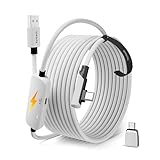
In a home environment, this cable represents a compromise between aesthetic minimalism and raw performance. A 16-foot cord trailing across your living room rug or home office hardwood floor is an undeniable tripping hazard and an eyesore when left uncoiled. However, from a technical standpoint, this physical connection bypasses the common pitfalls of residential wireless networks, such as wall interference, channel congestion from family members streaming 4K video, and local signal degradation.
When it comes to power delivery, there is a common misconception that plugging in a Link cable guarantees infinite battery life. Most standard computer motherboard USB-C ports output between 4.5W (5V/0.9A) and 15W (5V/3A). Because the Meta Quest 3 can draw between 18W and 27W under heavy gaming loads, even the official cable will only slow down the battery drain rather than charge the device. Instead of the standard 2-hour wireless battery life, a wired connection extends your playtime to roughly 4 to 6 hours depending on your motherboard’s specific power output.
Pros
- Uncompromised Visual Fidelity: A wired connection allows you to push your encoding bitrate up to 500 Mbps (and up to 960 Mbps via diagnostic tools), resulting in significantly fewer compression artifacts in dark or highly detailed scenes.
- Sub-40ms Latency: By eliminating the wireless transmission step, total motion-to-photon latency drops to a stable 30ms to 40ms, drastically reducing motion sickness for sensitive users.
- Extended Play Sessions: Continuous power delivery from your PC extends your headset’s battery life by an extra 2 to 4 hours compared to standalone wireless play.
- Zero Network Congestion Issues: You remain completely unaffected by other smart home devices, neighboring Wi-Fi networks, or thick drywall blocking your router’s line of sight.
- Lightweight physical profile: The official fiber-optic construction is noticeably lighter and less drag-heavy than cheap, thick rubber copper cables.
Cons
- High Price Tag: At $79, the official Meta Quest Link Cable is a tough pill to swallow when compared to highly capable third-party alternatives.
- Physical Tethering: Having a cord hanging from your head limits your physical freedom, making 360-degree physical rotations in room-scale games cumbersome.
- Wear and Tear on Ports: Constant tugging and pulling can damage both your PC’s USB-C port and the headset’s single USB-C port if the cable is not properly secured with a velcro strap.
- Home Storage Clutter: Coiling and storing a stiff 16-foot cable is another chore to manage if you prefer a clean, clutter-free living space.
Who Should Buy It
You should opt for a wired Link cable setup if you are a simulation enthusiast. If your primary VR activities involve sitting in a dedicated desk chair or cockpit setup playing Microsoft Flight Simulator, iRacing, or Assetto Corsa, the physical cable is a no-brainer. You do not need room-scale mobility, you are sitting close to your PC, and you require the absolute highest visual clarity to read tiny instrument dials and distant track markers.
It is also the correct choice for those who live in dense apartment complexes. In these environments, the 5GHz and 6GHz wireless bands are often saturated with dozens of competing signals from neighbors, making stable wireless VR streaming nearly impossible without frequent frame drops.
Who Should Skip It
You should skip the cable entirely if your favorite VR games are highly physical, room-scale experiences like Beat Saber, Superhot, or Gorilla Tag. The constant risk of stepping on the cord or ripping it out of the headset ruins the immersion. If you already have a modern Wi-Fi 6 or 6E router located in the same room as your play space, and that router is connected to your gaming PC via a Cat6 Ethernet cable, your wireless performance via Steam Link, Air Link, or Virtual Desktop will be incredibly close to a wired experience.
Looking ahead to 2026, as Wi-Fi 7 routers and advanced wireless casting protocols become standard fixtures in modern smart homes, the necessity of a physical data tether for casual room-scale gaming will continue to diminish.
Cheaper Alternatives
You do not need to spend $79 to get a high-quality wired PCVR experience. Third-party manufacturers have mastered the construction of durable, high-bandwidth USB 3.0 cables that offer the exact same 5 Gbps data transfer capabilities as the official cable, albeit using copper wiring instead of fiber optics. This makes them slightly heavier but vastly more affordable.
| Option | Cost | Trade-off |
|---|---|---|
| Official Meta Quest Link Cable | Check on Amazon | Premium price, but extremely lightweight, flexible fiber-optic build. |
| Syntech 16FT VR Link Cable with USB 3.0 to C Adapter | Check on Amazon | Slightly heavier than fiber optic; includes a useful adapter for older PC ports. Durable braided nylon jacket. |
| Syntech Link Cable 16FT, USB 3.0 to USB Cable | Check on Amazon | Budget-friendly copper construction; slightly stiffer to coil, but delivers identical data speeds. |
FAQ
Does the Link Cable keep the Meta Quest fully charged while playing?
No, the official Link Cable generally will not keep your Quest charged to 100% indefinitely during active play. Most PC motherboard USB ports output a maximum of 10W to 15W, whereas the Quest 3 requires up to 18W to 27W under load. As a result, your battery will still slowly drain, though it will take 4 to 6 hours to empty instead of the standard 2 hours on wireless.
Can I use a standard phone charging cable instead?
Generally, no. Most standard USB-C phone charging cables are only rated for USB 2.0 speeds (480 Mbps), which is not fast enough to handle the massive data stream required for PCVR. To use Quest Link successfully, you need a cable rated for USB 3.0 or higher, capable of at least 5 Gbps data transfer speeds.
Is the visual quality of a wired Link cable noticeability better than Air Link?
Yes, particularly in games with complex visual patterns like foliage, dirt tracks, or dark environments. Wired Link allows for a much higher bitrate (up to 500-900 Mbps), which eliminates the blocky compression artifacts and color banding that sometimes occur over wireless Air Link (which typically caps out at 150-200 Mbps).
Is Virtual Desktop better than using a physical Link Cable?
For convenience and physical freedom, yes. Virtual Desktop has highly optimized codecs (like AV1 and HEVC) that make wireless play feel incredibly native. However, if your home network is busy or your router is in another room, Virtual Desktop will suffer from latency spikes that a physical Link Cable completely avoids.
Related guides
- Best Free MMOs on Steam: Subscription Limits, Pay-to-Win and Time Cost (2026)
- Best Free Horror Games on Steam: How to Pick One That Fits Your PC and Your Nerves (2026)
- Black Frame Insertion vs VRR: Which Smoothness Feature Should You Use?
- Best Webcams for Streaming: 11 Listings Compared by Resolution, Focus and Light (2026)








