
Our Top Picks

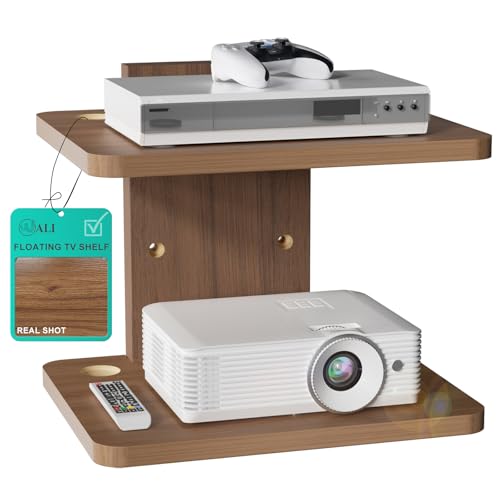


Top 3 picks at a glance

The Short Answer
If you are wondering how much weight a console shelf mount can hold, most models are rated between 10 and 30 pounds per tier when properly anchored into wall studs or solid masonry. A compact single-tier TV top shelf that sits on top of your television is at the low end, typically rated for 6 to 12 pounds, which is enough for a streaming stick, small router, or lightweight soundbar accessory. A standard wall-mounted floating glass shelf with brackets, like the popular single and double tier designs, is usually rated for 15 to 20 pounds per shelf when mounted into studs, and 8 to 12 pounds per shelf when using drywall anchors alone. The actual capacity depends less on the glass itself and more on three factors: what is behind your drywall, how many mounting points the bracket has, and how the weight is distributed across the shelf.
For most buyers, the practical rule is simple: mount into at least one stud for anything over 10 pounds, keep heavier items centered over the brackets, and assume drywall-only installations will hold about half the stud-mounted rating. If you plan to hold a game console such as a PlayStation 5 at 9.9 pounds, an Xbox Series X at 9.8 pounds, or an AV receiver at 18 to 25 pounds, you will need a stud-anchored shelf with a 20-pound or higher rating per tier. Lightweight gear like an Apple TV at 7.5 ounces, a Roku stick at 1.5 ounces, or a small cable box at 2 to 4 pounds will be safe on nearly any mount, even a TV-top platform.
As an Amazon Associate we earn from qualifying purchases at no extra cost to you.

Standard Sizes
Console shelf mounts are not one-size-fits-all. The term covers TV-top platforms that rest on your screen, single floating shelves for a DVD player or projector, and multi-tier vertical units for stacking components. Use the table below to match your gear and wall space to the right footprint. All dimensions are common retail sizes based on current best-selling models, with prices typically ranging from about $9 to $28 for these compact wall shelves as of 2026.
| Type | Width (in / cm) | Depth (in / cm) | Height / Spacing | Rated Capacity Per Tier | Best For |
|---|---|---|---|---|---|
| TV Top Shelf / Monitor Top Mount | 11.8 in / 30 cm | 4.7 in / 12 cm | Sits on TV, no wall clearance needed | 6 to 10 lbs / 2.7 to 4.5 kg | Apple TV, streaming sticks, small cameras, remote controls |
| Small Single-Tier Floating Glass Shelf | 12 in to 15 in / 30.5 to 38 cm | 8 in to 10 in / 20.3 to 25.4 cm | Single shelf, bracket height approx. 6 in / 15 cm | 15 to 17.6 lbs / 6.8 to 8 kg (studs) | Single DVD player, Blu-ray player, small projector, router |
| Standard Single-Tier Floating Glass Shelf | 15 in / 38 cm | 11 in to 12 in / 28 to 30.5 cm | Single shelf, bracket height approx. 7 in / 18 cm | 17.6 to 22 lbs / 8 to 10 kg (studs) | Game console, cable box, center channel speaker |
| 2-Tier Floating Wall Shelf | 15 in / 38 cm | 11 in to 12 in / 28 to 30.5 cm | Tier spacing 10 in to 14 in / 25.4 to 35.6 cm; total height 16 in to 22 in / 40.6 to 55.9 cm | 17.6 lbs / 8 kg per shelf, 35 lbs / 15.9 kg total | Stacked components: console + streaming box, DVD + soundbar |
| Large 2-Tier Floating Shelf (Wide) | 17.5 in to 20 in / 44.5 to 50.8 cm | 11.5 in to 12 in / 29.2 to 30.5 cm | Tier spacing 12 in to 15 in / 30.5 to 38 cm | 20 to 22 lbs / 9 to 10 kg per shelf | Larger receivers, projectors up to 12 lbs, gaming setup with ventilation space |
Glass thickness is another sizing detail that affects feel and capacity. Most models in this price range use 5mm tempered glass, which is 0.2 inches thick. More expensive wall-mounted wood or metal console shelves may use 0.5 to 0.75 inch thick boards but follow similar width and depth standards. If your device is deeper than the shelf, you need at least 75 percent of the device base supported. For example, a PlayStation 5 is about 10.2 inches deep, so it should sit on a shelf that is at least 11 inches deep to prevent overhang and tipping.
How to Measure Your Space
- Measure your device footprint first. Use a tape measure to get the width and depth of each device you want to mount, including any cables that stick out the back. Add 1 inch to the depth and 2 inches to the width for airflow and cable clearance. Most electronics need 2 to 4 inches of open space on the sides and top for ventilation; receivers and amplifiers need at least 4 inches above.
- Find your studs and mark the mounting height. Use a stud finder to locate studs where you want the shelf. Mark the center of each stud with painter’s tape. Hold a cardboard template cut to your shelf size against the wall at your desired height. Standard heights are 42 to 52 inches from the floor for a living room TV setup, and 48 to 60 inches for a projector shelf, but sit in your usual viewing position to confirm the screen is not blocked.
- Check wall clearance and cable path. Measure from the back of the shelf location to the nearest outlet. You will need a cable management channel or in-wall kit if the cord must run more than 36 inches. Measure the distance from the side wall or corner; leave at least 3 inches from a perpendicular wall so the tempered glass can slide into brackets during installation.
- Confirm depth and door swing. If the shelf is near a doorway, cabinet, or fireplace mantel, measure the shelf depth plus device overhang to ensure it will not block traffic or heat sources. Keep electronics at least 12 inches from electric fireplaces or heaters and at least 24 inches from wood-burning fireplaces.
- Weigh your gear on a bathroom scale. Do not guess. Place each device on a scale and add 2 to 3 pounds for cables and accessories. Compare that total to the manufacturer-rated capacity per tier, not the total system capacity. If one tier is rated for 17.6 pounds and you have two tiers, you cannot put 30 pounds on a single shelf.
- Test the mount with a dry run. Before drilling, place the devices on the cardboard template and have someone hold it at height while you check sightlines, remote sensor access, and whether the brackets will be visible below the TV. Take a photo from your sofa to spot alignment issues.
By Room or Use Case
Living Room TV Wall
This is the most common use case for console shelf mounts. A single-tier 15 x 11 inch shelf mounted 4 to 8 inches below a wall-mounted TV works well for a cable box at 3 to 5 pounds or a soundbar at 5 to 12 pounds. For a stacked gaming and streaming setup, choose a 2-tier 15 x 11 inch or 17.5 x 11.5 inch unit with 12 to 14 inches of vertical spacing between tiers. This spacing allows a 6-inch tall console to breathe and lets you reach ports without pulling the shelf off the wall. Keep total weight per shelf under 17.6 pounds, even if your console is lighter, because adding controllers, headsets, and discs quickly adds 3 to 5 pounds.
Bedroom or Small Apartment
In smaller rooms, a low-profile TV top shelf at 11.8 x 4.7 inches is ideal when you cannot drill into walls. It holds 6 to 10 pounds, which covers a Fire TV Stick, Apple TV, or a small white noise machine. If you need a wall shelf for a bedroom projector, use a single-tier floating shelf mounted at the back of the room. Most mini projectors weigh 2.5 to 7 pounds and need a shelf rated for at least 15 pounds to handle slight vibrations when you adjust focus. Position the shelf so the lens is 12 to 24 inches from the ceiling to avoid keystone distortion.
Home Office and Gaming Setup
For desks with monitors, a TV top shelf can hold a webcam at 0.2 to 0.5 pounds or a small LED light bar. A wall-mounted single-tier shelf at desk height, around 28 to 30 inches from the floor, keeps a router or modem off the desk and improves signal. Routers weigh only 1 to 2 pounds but benefit from being elevated and away from metal filing cabinets. If you mount a game console in an office, allow extra depth; the Xbox Series X needs a 12-inch deep shelf because it is 11.9 inches tall when placed vertically and requires clearance for exhaust.
Entryway or Utility Storage
Garages, laundry rooms, and entryways often use these shelves for small electronics beyond the TV. A 2-tier system can hold a security DVR at 3 to 6 pounds on the lower tier and a hard drive or network switch at 1 to 3 pounds on the upper tier. In these locations, consider dust and temperature. Avoid mounting above a washer or dryer where vibration can loosen anchors over time, and never exceed 10 pounds per shelf if you cannot hit studs in a utility wall with metal studs, which hold less than wood studs without specialty anchors.
Common Sizing Mistakes
1. Relying on drywall anchors for heavy gear. Plastic expansion anchors and toggle bolts are convenient, but manufacturers rate the same shelf much lower for drywall-only installs. A shelf rated for 17.6 pounds in studs may be rated for only 8 to 11 pounds in drywall. For game consoles, receivers, and anything with a hard drive, drive screws into at least one wood stud or use a proper masonry anchor for brick or concrete.
2. Buying a shelf that is too shallow. A 4.7-inch deep TV top platform looks tidy but cannot safely hold a device that is 8 to 10 inches deep. If more than 25 percent of the device base hangs off the front, the center of gravity shifts and the mount can tip, especially on a TV top model that relies on friction and adhesive. Match depth to device depth, not just width.
3. Ignoring heat and ventilation gaps. Stacking a console with only 2 inches of clearance above it traps heat and can cause thermal shutdown. Most consoles need 4 to 6 inches of open space above and at least 2 inches on each side. Wattage matters here too; a console drawing 150 to 220 watts and an AV receiver drawing 300 to 500 watts both produce significant heat that needs vertical space to dissipate.
4. Forgetting cable weight and pull. Heavy HDMI cables, power bricks, and bundled cords can add 1 to 3 pounds of downward pull if they hang freely off the back. This leverage pulls hardest on the front edge of the shelf. Use a short cable management clip to support the weight of the power brick on the wall, not on the shelf lip, and leave a 2-inch service loop behind the device.
5. Assuming both tiers can be maxed out at once. A 2-tier unit rated for 17.6 pounds per shelf has a total wall load of about 35 pounds. If the top shelf is at full capacity and the wall anchors are shared on a single vertical bracket, leverage doubles. Distribute weight evenly, place the heaviest item on the lower tier closest to the strongest stud, and keep the top tier lighter when possible.
FAQ
How do I know if my wall can hold the rated weight?
Check what is behind the drywall. Wood studs spaced 16 inches on center provide the strongest hold and will meet the full manufacturer rating, typically 15 to 22 pounds per tier for glass floating shelves. Metal studs, plaster over lath, and hollow drywall without studs reduce that rating by about 40 to 50 percent unless you use metal-stud anchors or snap toggles rated for 50 to 80 pounds in 1/2-inch drywall. For concrete or brick, use the included masonry anchors or 3/16-inch Tapcon screws and you will typically meet or exceed the stud rating. If you cannot locate a stud where you need the shelf, choose a wider shelf with three or four anchor points to spread the load, or move the shelf 2 to 3 inches to hit a stud.
Can a console shelf mount hold a soundbar?
It depends on the soundbar size and the shelf depth. A compact 2.0-channel soundbar at 20 to 24 inches wide and 4 to 7 pounds will fit on a standard 15 x 11 inch shelf or even a TV top mount if the bar is lightweight. A full 36 to 48 inch soundbar weighing 12 to 20 pounds needs a dedicated soundbar bracket or a solid wood console, not a glass floating shelf. Always check the soundbar depth; many are 3 to 5 inches deep, so an 11-inch deep shelf will hold them safely, but a 4.7-inch TV top shelf will not. Avoid placing a soundbar directly on tempered glass without silicone pads, as vibration can cause it to slowly walk to the edge.
What is the difference between a TV top shelf and a wall-mounted floating shelf?
A TV top shelf is a small platform, usually 11.8 x 4.7 inches, that uses adjustable arms to clamp or rest on top of a flat-screen TV. It requires no drilling, holds 6 to 10 pounds, installs in under a minute, and costs about $9 to $14. A wall-mounted floating shelf is screwed into the wall with brackets and tempered glass, comes in 12 to 20 inch widths and 8 to 12 inch depths, holds 15 to 22 pounds per tier, and costs about $18 to $28 for one or two tiers. Choose the TV top version for renters or ultra-light gear, and the wall-mounted version for consoles, receivers, and anything you want at a custom height.
Do I need to consider wattage or power draw when sizing a shelf?
Weight rating and electrical safety are separate, but power draw helps you plan spacing and cable management. Streaming sticks draw 5 to 15 watts, routers and modems draw 6 to 20 watts, game consoles draw 70 to 220 watts during play, and AV receivers draw 200 to 500 watts at peak. Higher wattage means more heat, so you need more vertical clearance and a shelf that is not enclosed. Do not run a power strip or uninterruptible power supply on the same small glass shelf as a console; those batteries weigh 7 to 25 pounds on their own and should sit on the floor or a low, sturdy console table. Keep power bricks off the glass and use a wall-mounted surge protector to reduce load on the shelf.
Related guides
- Best Free MMOs on Steam: Subscription Limits, Pay-to-Win and Time Cost (2026)
- Best Free Horror Games on Steam: How to Pick One That Fits Your PC and Your Nerves (2026)
- Black Frame Insertion vs VRR: Which Smoothness Feature Should You Use?
- Best Webcams for Streaming: 11 Listings Compared by Resolution, Focus and Light (2026)








