
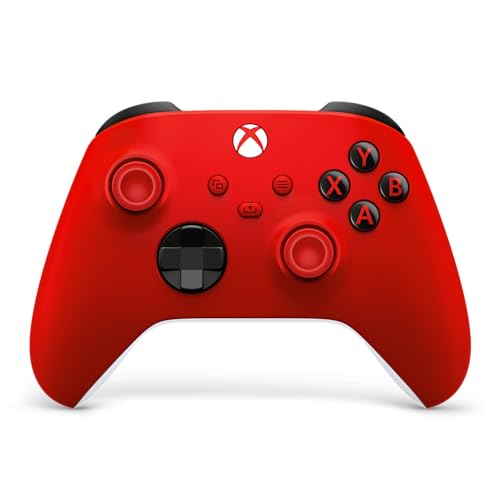
The standard Xbox Wireless Controller in Pulse Red is the best all-round choice for an Xbox Series X: it connects wirelessly to the console, pairs with PC and phones over Bluetooth, has a 3.5mm headset jack and a Share button, and costs the fewest compromises. Competitive players who want swappable parts should look at the Elite Series 2, and budget buyers who accept a cable can consider PowerA’s wired model. In this guide, “Series X controllers” means gamepads that work natively with the Xbox Series X|S console, not just PC-only look-alikes.
Our Top Picks
 Microsoft Xbox Core Wireless Controller 2-Pack Bundle6.02 x 4.01 x 2.4 inches1.64 poundsCheck on Amazon


Top 3 picks at a glance
Quick List
- Xbox Wireless Controller, Pulse Red – best overall for everyday console play
- Xbox Elite Series 2, Black – best for full customization with paddles and swappable parts
- Xbox Elite Series 2 Core, White – best for adjustable tension and profiles without the extras
- Xbox Core Wireless Controller 2-Pack, Carbon Black – best for couch co-op and spare-controller households
- GameSir G7 Pro – best for drift-resistant sticks and PC flexibility, wired on Xbox
- PowerA Wired Controller, Blue – best for a simple licensed wired pad with a long cable
Which One Is Right for You?
| If you… | Choose |
|---|---|
| want one reliable controller for console, PC and phone | Xbox Wireless Controller, Pulse Red |
| play shooters and want back paddles and trigger locks | Xbox Elite Series 2, Black |
| like the Elite feel but do not need extra components | Xbox Elite Series 2 Core, White |
| regularly play with a friend or sibling on the same couch | Xbox Core Wireless Controller 2-Pack |
| worry about stick drift and also play on PC | GameSir G7 Pro |
| prefer a plug-in controller with no batteries and a long cord | PowerA Wired Controller, Blue |
The decision comes down to how much you will customize and whether you tolerate a cable. If you have never wanted to remap a button or swap a thumbstick, the standard wireless pad is enough. If you already know which paddle layout you want, the Elite line is worth the step up. Wired models trade freedom for zero battery management. If you share the console, a second pad is usually the first thing worth buying, since it turns a solo setup into a multiplayer one without extra cost for features nobody asked for. Color matters little for performance, but a distinct color helps when two similar controllers sit on the same table.
All 6 Picks in Detail
1. Xbox Wireless Controller, Pulse Red – Best Overall for Everyday Console Play
As an Amazon Associate we earn from qualifying purchases at no extra cost to you.
This is the current standard Xbox controller in a red finish. The listing describes a modernized design with sculpted surfaces, a hybrid D-pad, and textured grips on the triggers, bumpers and back case. It connects over Xbox Wireless to the console and over Bluetooth to supported devices, and USB-C handles plug-and-play on console and PC. It suits nearly everyone who wants a dependable default. The shape will be familiar to anyone who has held an Xbox pad in the past decade, and that familiarity is part of its appeal: games, guides and accessories are built around this layout. Buttons can be remapped through the Xbox Accessories app, and you can plug a wired headset directly into the base for chat.
- Connectivity: Xbox Wireless, Bluetooth and USB-C
- D-pad: hybrid design
- Audio: 3.5mm headset jack for direct voice chat
- Extras: Share button for screenshots and recordings
- Weight: about 0.85 pounds per the listing field
Pros
- Works across console, PC and mobile
- Textured grips and hybrid D-pad suit many genres
Cons
- No back paddles or trigger locks
- Battery needs may include AA cells or a separate rechargeable pack; confirm what is in the box
Next to the Elite Series 2 Core, it gives up adjustable tension and profiles in exchange for a plainer, lighter body.
2. GameSir G7 Pro – Best for Drift-Resistant Sticks and PC Flexibility

The G7 Pro is a third-party controller built around TMR sticks, which GameSir describes as combining Hall Effect durability with traditional potentiometer precision. The listing says it is wired for Xbox, wireless 2.4G or wired on PC, and Bluetooth on Android, with a physical mode switch. This is a pick for players who value stick longevity and customization more than wireless play on the console. The Nexus app is the main differentiator: it adjusts stick response curves, gyro settings and button mapping, so players who like to tune dead zones will find more to adjust than on a stock pad. Because the Xbox connection is wired, the cable length and quality deserve a look on the listing.
- Sticks: Mag-Res TMR, advertised as drift-free
- Triggers: Hall Effect analog with micro-switch trigger stops
- Polling rate: 1000Hz on PC, wired or 2.4G
- Audio: 3.5mm jack
- Software: GameSir Nexus app for gyro, stick curves and button-to-mouse mapping
Pros
- Durable-stick technology and a wide range of settings
- Three platforms from one controller
Cons
- Wired on Xbox, so the cable limits seating positions
- Some GameSir variants are PC-only; confirm you are buying the Xbox-compatible edition
Against the PowerA pad it offers far more features, but it asks for a stronger commitment to configuration.
3. Xbox Elite Series 2, Black – Best for Full Customization

The Elite Series 2 is the enthusiast model. Its listing highlights adjustable-tension thumbsticks, three-step hair trigger locks, interchangeable components and up to three saved profiles. The box includes six thumbsticks, four paddles, two D-pads, a carrying case and a charging dock. It is for competitive players and anyone who wants the controller to fit their hands exactly. Swapping a taller thumbstick for a shorter one, or a faceted D-pad for the dished one, takes seconds and changes how the controller feels in fighting, platforming and shooting games. The included dock keeps it charged between sessions, and the case protects the parts when you travel.
- Thumbsticks: adjustable tension, six included
- Triggers: three-step hair trigger locks
- Components: four paddles and two D-pads included
- Profiles: save up to three and switch with a button
- Connectivity: Xbox Wireless, Bluetooth, USB-C
Pros
- Most flexible controller on this list
- Includes a case and charging dock
Cons
- Heavier and larger than the standard pad (listed near 1 pound)
- More features than casual players will use
Compared with the Core edition, it is the one to buy if you want the full kit in the box.
4. Xbox Elite Series 2 Core, White – Best for Adjustable Tension Without the Extras

The Core version keeps the Elite Series 2 controller design and strips out the extra parts. The listing describes a wrap-around rubberized grip, adjustable-tension thumbsticks, shorter hair trigger locks, three custom profiles and up to 40 hours of battery life. Additional components sold separately can be added later, so it suits players who want to start small. Because it lacks the swappable parts of the full kit, it is a good test: if you find yourself wishing for paddles after a month, you can add the component pack rather than buying a second controller. If you never miss them, you saved the money.
- Thumbsticks: adjustable tension
- Battery: up to 40 hours stated
- Profiles: up to three, with button remapping in the Xbox Accessories app
- Audio: 3.5mm stereo headset jack
- Colour: white; weight listed around 1.67 pounds
Pros
- Elite hardware at a more focused feature set
- Long stated battery life
Cons
- Paddles and swappable parts cost extra
- Weight and size may feel large to some hands
Choose it over the standard pad if adjustable tension matters, and over the full Elite if you do not need the paddles on day one.
5. Xbox Core Wireless Controller 2-Pack, Carbon Black – Best for Couch Co-Op

This bundle is two standard Xbox Core controllers in Carbon Black with the manufacturer’s warranty. The listing names Xbox Series X and S, Xbox One and Windows devices, with Bluetooth for phones and tablets, a Share button, a hybrid D-pad and textured grips. It suits households that regularly need a second pad and want matching ones. Pairing is the same as for any Xbox pad, and both controllers can be assigned to different profiles or players. The shared color is practical when two people play often, but add a sticker to tell them apart. Check the bundle contents on the page, as bundles can change.
- Pack: two controllers
- Connectivity: Xbox Wireless, Bluetooth, USB-C
- Audio: 3.5mm headset jack
- Features: Share button, button mapping
- Weight: 1.64 pounds per the listing field
Pros
- Two matching controllers in one purchase
- Works with PC, phone and tablet as well
Cons
- No premium features beyond the standard pad
- Two Carbon Black pads can be hard to tell apart, so consider decals or stickers
It is the pragmatic alternative to buying the Pulse Red pad twice in separate colors.
6. PowerA Wired Controller, Blue – Best for a Simple Licensed Wired Pad

PowerA’s wired controller is officially licensed for the Xbox Series X|S and works with Xbox One. It comes with a 10-foot USB-C cable, dual rumble motors and impulse triggers that give haptic feedback. It suits secondary rooms, kids, travelers and anyone who wants a controller with no batteries to charge or replace. Impulse triggers, as the listing describes them, use motors in the triggers to add tactile feedback in supported games. A lightweight body helps younger players and small hands. It is not an enthusiast pad, and that is the point: it does the basics with little to go wrong.
- Cable: 10 feet, USB-C
- Haptics: dual rumble motors and impulse triggers
- Licensing: officially licensed
- Weight: about 0.45 pounds
- Colour: blue
Pros
- No battery management
- Lightweight and easy to replace
Cons
- Wired only
- Few customization features compared with Xbox or GameSir options
It is the simplest option here and the natural second pad next to the standard wireless controller.
Specs Compared
| Product | Connection | Sticks / triggers | Battery or power | Extras | Weight (listing) |
|---|---|---|---|---|---|
| Xbox Wireless Controller, Pulse Red | Xbox Wireless, Bluetooth, USB-C | Textured grips, hybrid D-pad | Confirm on listing | Share button, 3.5mm jack | 0.85 lb |
| GameSir G7 Pro | Wired (Xbox), 2.4G/wired (PC), Bluetooth (Android) | TMR sticks; Hall Effect triggers | Wired on Xbox | 1000Hz PC polling, Nexus app | About 0.6 lb |
| Xbox Elite Series 2, Black | Xbox Wireless, Bluetooth, USB-C | Adjustable tension; trigger locks | Rechargeable, dock included | 6 sticks, 4 paddles, 2 D-pads, case | 1 lb |
| Xbox Elite Series 2 Core, White | Xbox Wireless, Bluetooth, USB-C | Adjustable tension; trigger locks | Up to 40 hours | 3 profiles, 3.5mm jack | 1.67 lb |
| Xbox Core Wireless 2-Pack | Xbox Wireless, Bluetooth, USB-C | Textured grips, hybrid D-pad | Confirm on listing | Two controllers, Share button | 1.64 lb |
| PowerA Wired Controller, Blue | Wired USB-C, 10 ft | Impulse triggers, dual rumble | Wired | Officially licensed | About 0.45 lb |
How We Chose These
We read each assigned listing for connection type, stated features, included parts and weight, then compared those claims with Microsoft’s public descriptions of the Xbox Wireless Controller and Elite line and GameSir’s own description of the G7 Pro. We sorted picks by how fully they support the Xbox Series X|S, how clearly the listing explains what is included, and how much flexibility they add. Where a listing left a value out, such as battery type, we say to confirm it. These are research-based choices; we have not used the controllers or measured input lag.
What to Look For
Wireless, Bluetooth or wired
Xbox controllers use Xbox Wireless to connect to the console, which gives a stable link without pairing hassles, and Bluetooth for PC, phones and tablets. A wired controller skips both and gives a steady signal with no battery. On the Series X, wired is typically a USB-C cable to the console, and a cable of 10 feet or more lets you sit across the room. If you stream or play on a TV across the room, wireless is easier.
Stick type and drift
Standard sticks use potentiometers, which can wear and register input when untouched, called drift. Hall Effect and TMR sticks use magnetic sensing, which wears less. GameSir’s G7 Pro uses TMR, and its listing calls the sticks drift-free. Those claims describe the design, not a guarantee; check the warranty length before relying on them. If you play shooters daily, stick longevity is a real factor.
Paddles, trigger stops and profiles
Back paddles let you press face buttons without lifting your thumb from the stick. The Elite Series 2 includes four paddles, while the Core edition sells them separately. Trigger locks shorten pull distance, which can speed up semi-automatic fire. Profiles let you save one layout for a shooter and another for a racing game, and switch them with a button. These matter most in competitive play.
Battery and weight
The standard Xbox pad can run on AA batteries or a rechargeable pack, and the Elite Series 2 uses an internal rechargeable battery. Stated life of up to 40 hours for the Core edition is a manufacturer figure that depends on use. Weight changes feel: the lightest pad here is under half a pound, while the Elite line is closer to a pound or more. Heavier controllers feel solid in long sessions but tire smaller hands faster.
Compatibility and licensing
Controllers sold for the Series X|S fall into three groups: first-party Xbox models, officially licensed accessories such as PowerA, and third-party designs like GameSir. First-party and licensed products are built to the console’s expectations and are the safest when you want plug-in-and-forget behavior. Third-party designs may add features, but check whether the Xbox mode is wired only and whether a firmware update or companion app is required. Also confirm that the listing’s exact variant is the Xbox-compatible one, since some product families include PC-only versions.
Ergonomics and grip
Hand size matters more than any feature. The standard Xbox pad suits most adults. Players with small hands may prefer a lighter controller, and players with large hands may prefer the larger rubberized grip of the Elite line. Textured surfaces on the triggers, bumpers and back help in long sessions, and the hybrid D-pad on the newer standard pad aims to improve accuracy in platformers and fighting games. If possible, hold a friend’s controller before buying an expensive one.
Updates and accessories
First-party Xbox controllers receive firmware updates through the console and the Xbox Accessories app, which can add fixes and remapping options over time. Third-party pads rely on their own apps, so check that the companion software is available for your platform before buying. Accessories such as charging docks, rechargeable packs and carrying cases are sold separately for the standard pad, which is worth remembering if you plan to play daily and want to stop buying batteries.
A worked example
Suppose you play two hours a night, mostly shooters, with a friend on weekends. You would want one Elite-class controller for yourself and a standard pad for the guest. If your budget allows only one purchase, the 2-Pack or the Pulse Red covers both of you, and you can add an Elite later. If you are mostly in racing and sports games, the standard pad is enough, because paddles do little there.
Questions
Do all of these work with the Xbox Series X?
The listings name the Series X|S, with the PowerA and GameSir models connected by cable. Always confirm the Xbox-compatible edition on the product page, since some third-party controllers are PC-only.
Can I use these controllers on PC?
Yes for the Xbox models, which connect through Bluetooth or USB-C, and for the GameSir G7 Pro, which supports wired and 2.4G on PC. The PowerA model is wired and listed for Xbox consoles; confirm PC support on its page.
Is the Elite Series 2 worth it over the standard controller?
It is worth it if you will use paddles, trigger locks and profiles. For casual play, the standard controller does most of the same jobs with less weight.
What is stick drift?
Stick drift is when a thumbstick registers movement without being touched. Magnetic sensors like Hall Effect and TMR are designed to resist it, though no design is immune.
Can I remap buttons?
Yes on the Xbox models through the Xbox Accessories app, and on the GameSir through its Nexus app. The PowerA listing does not mention remapping, so confirm that on its page.
Which is best for kids?
A standard wireless pad or the PowerA wired model suits kids because they are lighter and simpler. A wired pad also removes battery handling.
Update History
- October 14, 2026 – Initial publication; product set drawn from current catalog listings.
- Check the product page for current specifications and availability before buying.
Sources
- Manufacturer product and specification pages for Xbox and GameSir
- Retailer listing titles, bullet points and specification fields for each product
Related guides
- Best Speakers for Laptop: USB, 3.5mm and Clip-On Picks Compared (2026)
- Best Free MMOs on Steam: Subscription Limits, Pay-to-Win and Time Cost (2026)
- Best Free Horror Games on Steam: How to Pick One That Fits Your PC and Your Nerves (2026)
- Best Budget Webcam: Nine Low-Cost Picks and What They Give Up (2026)


