Swapping a key for a smart lock sounds simple until the practical questions pile up. Is your door drilled for a deadbolt, a knob or both? Do you want to unlock with a fingerprint, a code, a phone, a voice assistant or all of those? And what happens when the battery dies or the Wi-Fi drops? Those questions matter more than any marketing line, because a lock that fails to open at the wrong moment is worse than the key it replaced.
This guide is for homeowners, renters with landlord approval and busy families who want to stop hiding spare keys under a mat. It compares eight smart locks that span deadbolts, knobs and handle sets, with fingerprint, keypad and app control, using only what each listing states. Details such as battery life, security grade, weather rating and the number of user codes are quoted from titles rather than assumed. Buyers shopping in 2026 should also confirm which voice assistant, if any, the lock names, because compatibility varies from model to model.
Our Top Picks
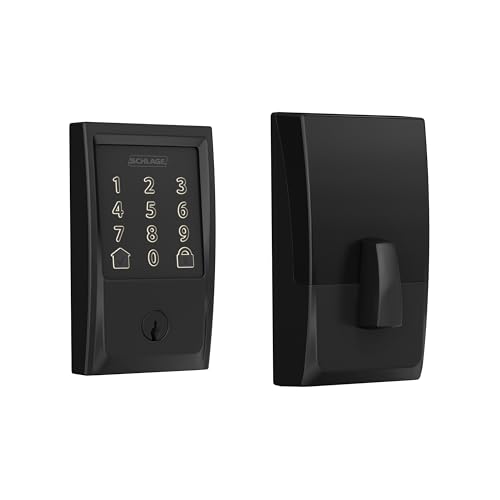 Schlage Encode Smart WiFi Deadbolt Lock with CenturyEncode0.9 x 3 x 5 inches3.4 poundsCheck on Amazon


Top 3 picks at a glance
Quick Picks
As an Amazon Associate we earn from qualifying purchases at no extra cost to you.




| Product | Best for | Key spec from title |
|---|---|---|
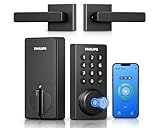
| Philips WiFi Keypad Deadbolt with Handle | Handle-set replacement with voice control | Built-in WiFi, voice and fingerprint unlock |
| eufy Security Smart Lock C220 | Fingerprint entry with long battery | Built-in Wi-Fi, up to 8-month battery |
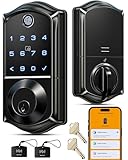
| Veise VE017 Fingerprint Lock | Multi-method entry for families | 8-in-1 keyless entry, auto lock, matte black |
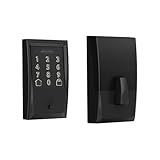
| Schlage Encode Smart WiFi Deadbolt | Established lock brand with voice support | Touchscreen keypad, Alexa, Google Home |
| Yamiry Fingerprint Knob | Knob doors needing fingerprint access | Fingerprint, deadbolt with app, remote passcodes |
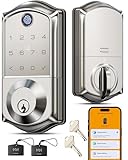
| Philips Wi-Fi Smart Deadbolt | Code, fingerprint or app unlock | Remote access, Alexa and Google voice unlock |
| Yamiry Keypad Smart Door Knob | Simple code entry on a knob door | Keypad, electronic code knob, easy install |
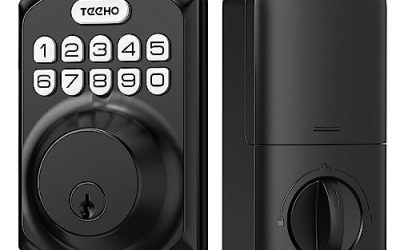
| TEEHO TE001 Keypad Deadbolt | Weather-exposed doors on a budget | ANSI Grade 3, 20 user codes, IP54 |
How to Choose
Match the lock style to your door
Deadbolt-style locks, like the Schlage Encode and the TEEHO, replace the bolt above the handle. Knob and handle-set locks, like the Yamiry and Philips handle models, replace the whole handle assembly. Measure the door thickness, bore hole and backset before ordering, and note whether you have one hole or two. Mismatched hardware is the most common reason for returns.
Choose how people will actually unlock it
Fingerprint access suits households with kids and guests who forget codes. A touchscreen or keypad suits short-term visitors who need a temporary passcode. App and voice control matter if you want remote unlock or integration with Alexa or Google Home, which the Schlage and Philips listings name. Pick two or three methods you will use, then ignore the rest of the feature count.
Check security grade, weather rating and battery
The TEEHO lists ANSI Grade 3 security and an IP54 waterproof rating, which are concrete figures a buyer can verify. The eufy states a battery life of up to 8 months. Low battery alerts, listed on the TEEHO, are a basic feature every smart lock should have. When a listing leaves out these details, treat the claims with caution and look elsewhere. A lock is a security product first and a gadget second, so published ratings carry more weight than a long list of app features, and a battery that lasts months is worth more than animated lighting.
Know where budget models cut corners
Low-cost smart locks often shorten battery life, use lighter materials, skip security certifications or limit how many user codes you can store. Wi-Fi-built-in units also depend on your router, so remote access disappears when the network does. Look for a physical key backup or a clearly described emergency power method before committing.
The 8 Best Options
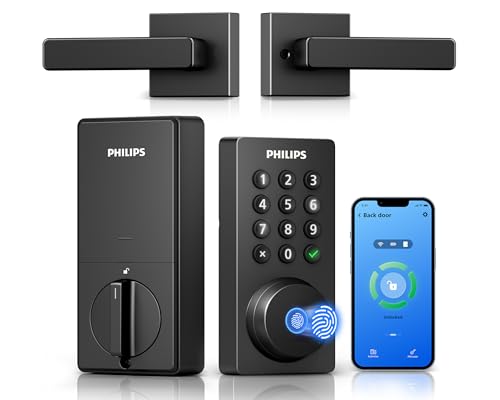
Philips WiFi Keypad Deadbolt with Handle
This handle-set lock combines a keypad, built-in WiFi and app remote control. The listing also names voice and fingerprint unlock and flexible codes, covering most entry preferences in one unit.
- Strength: Built-in WiFi removes the need for a separate hub.
- Strength: Fingerprint, voice and code unlock options in one device.
- Trade-off: Handle-set replacement is a bigger installation job than a deadbolt swap.
Skip it if you want to keep your existing handle and only change the bolt. Households that want one lock for family, dog walkers and guests will see the flexibility. Because it replaces the whole handle, it also lets you refresh a tired front door in one afternoon, instead of buying a lock and a handle separately.
eufy Security Smart Lock C220
A fingerprint-first lock for front doors, with built-in Wi-Fi, app remote control and a stated battery life of up to 8 months.
- Strength: Long stated battery life reduces maintenance.
- Strength: Fingerprint entry avoids codes and keys.
- Trade-off: Fingerprint-focused design may not suit guests who need a code.
Skip it if you rely on a keypad for visitors. It fits a family where everyone is comfortable enrolling a fingerprint and wants low upkeep. Parents of school-age kids who lose keys often are the clearest match, because a finger is never left in a coat pocket.
Veise VE017 Fingerprint Smart Door Lock
The title describes 8-in-1 keyless entry with smart user management, auto lock, an electronic touchscreen and app control, in matte black. It is the multi-method choice for busy households.
- Strength: Many entry methods in one lock.
- Strength: Auto lock and user management help manage family access.
- Trade-off: Many features mean more setup time.
Skip it if you prefer a simple keypad and nothing else. It suits a household with changing visitors, such as a rental room or a home office. User management is the standout idea, since it lets one owner decide who gets in, and how, without sharing a single master code.
Schlage Encode Smart WiFi Deadbolt
From a long-established lock brand, this deadbolt features a touchscreen keypad, app control, Alexa and Google Home compatibility and a Century trim in matte black.
- Strength: Named voice assistant support for Alexa and Google Home.
- Strength: A recognized lock brand adds familiarity.
- Trade-off: Keypad and app only, with no fingerprint listed.
Skip it if you want fingerprint unlock. It suits a buyer who wants a traditional deadbolt look with modern remote control. The Century trim named in the title also matters, since it determines how the lock sits against an existing door finish and covers older bore holes.
Yamiry Fingerprint Smart Door Knob
A knob-style lock with fingerprint reading, keyless entry, app control and remote passcode generation, aimed at interior or entry doors that use knobs.
- Strength: Fingerprint entry on a knob form factor.
- Strength: Passcodes can be generated remotely for visitors.
- Trade-off: A knob design may feel less sturdy than a deadbolt.
Skip it if your main door needs a separate deadbolt. It suits a side entrance, a mudroom door or a granny flat. Anyone who regularly lets contractors or cleaners in can send a passcode remotely and skip a key handoff.
Philips Wi-Fi Smart Deadbolt Lock
A deadbolt that unlocks by code, fingerprint or app, with remote access and Alexa and Google voice unlock noted in the title.
- Strength: Three unlock methods plus remote access.
- Strength: Voice assistant support for two major platforms.
- Trade-off: Deadbolt only, so your handle is a separate part.
Skip it if you want a complete handle set in one piece. It is a strong match for a household that already uses voice assistants. A common use is a front door where family members unlock with a fingerprint while guests get a temporary code from the app.
Yamiry Keypad Smart Door Knob Lock
A simpler keypad version with a handle, electronic code entry and easy installation, plus support for 20 user codes.
- Strength: Code entry is straightforward and keyless.
- Strength: Easy installation per the title.
- Trade-off: No fingerprint or voice features listed.
Skip it if you want remote app features at the center of the experience. It suits a landlord or small office that needs a code for each tenant. Being able to change a code between occupants is cheaper and quicker than rekeying cylinders every time someone moves out.
TEEHO TE001 Keyless Entry Deadbolt
A keypad deadbolt in matte black with ANSI Grade 3 security, 20 user codes, low battery alert and an IP54 waterproof rating.
- Strength: Concrete security and weather ratings in the title.
- Strength: Low battery alerts and 20 user codes.
- Trade-off: Keypad-only, so no fingerprint or voice features are listed.
Skip it if you want app-based remote control. It is a practical option for a covered porch, a garage entry or a shed door. Its published ratings give a buyer something specific to verify, which is more than many keypad locks offer.
Which One Fits Your Situation
You manage a rental room and need temporary codes
The Yamiry Keypad Smart Door Knob Lock or the TEEHO TE001 provide 20 user codes without extra features to configure. Issue one code per tenant or guest, delete it when the stay ends, and avoid reusing a single shared code for everyone, which defeats the point of a smart lock.
You want hands-free entry for a family with young kids
The eufy Security Smart Lock C220 pairs fingerprint entry with a long stated battery life.
You already use Alexa or Google Home
The Schlage Encode or the Philips Wi-Fi Smart Deadbolt both name voice assistant support.
You want one lock for every method
The Veise VE017 and the Philips WiFi Keypad Deadbolt with Handle gather multiple unlock methods in a single unit.
Common Mistakes
- Skipping a measurement of door thickness and bore size before ordering.
- Choosing the longest feature list instead of the two unlock methods you will use.
- Forgetting a physical key or emergency power plan.
- Mounting a keypad lock on an exposed door without checking a weather rating.
- Relying on Wi-Fi alone for access when the router may drop.
Related guides
- How To Check Motherboard Vrm Temperature In Hwinfo
- How To Clean Quest 3 Lenses And Facial Interface
- Vr Facial Interfaces For Glasses Wearers
Frequently Asked Questions
Are smart locks secure?
Security depends on the grade and construction. Look for certifications such as ANSI Grade 3, as on the TEEHO, rather than relying on feature counts. Strong strike plates and long screws in the door frame add real resistance no matter which lock you choose.
What happens if the battery dies?
Most locks give low battery warnings and offer a backup entry method. Read the listing for a backup key or emergency power note. Setting a calendar reminder to swap batteries before the stated life runs out is a simple habit that prevents a lockout.
Can I use a smart lock with Alexa or Google Home?
Some models name those assistants in the title, such as the Schlage and the Philips deadbolt. Others do not, so check before buying.
Is installation difficult?
Many replace an existing deadbolt with a screwdriver. Handle sets and knobs take longer, but listings like the Yamiry mention easy installation. Set aside an hour, keep the old lock until the new one works, and test the bolt with the door open before closing it.
Related guides
More from Amazon
Programs that pair well with the guide above. Offers and eligibility are set by Amazon and may change.
Free shipping on eligible items, Prime Video and more. Eligible new members can start with a free trial.
Start a Prime free trialAd-free music streaming. Eligible new subscribers can start with a free trial.
Try Music Unlimited freeA Prime membership for ages 18-24 with a trial period. Eligibility is set by Amazon.
See Prime for Young AdultsAudiobooks and podcasts to listen to on the go. Eligible new members can start with a free trial.
Try Audible freeAs an Amazon Associate we earn from qualifying purchases.